Read and write open-source flashcards and decks through split read/write MCP tools.
Quick Install
Automated & IDE SetupCopy the AI prompt to install this server into Claude Code, Cursor, or another agent — or use 1-click editor setup below.
Manual Client & Custom JSON ConfigExpand JSON ▾
Client Config & Setup
Remote HTTPChoose your client or environment
Target File:
💡 Paste the JSON block into your client's configuration file under mcpServers, then restart the application.
Documentation Overview
Nibomo
AI-powered open-source flashcards app for iOS, Android, and web.
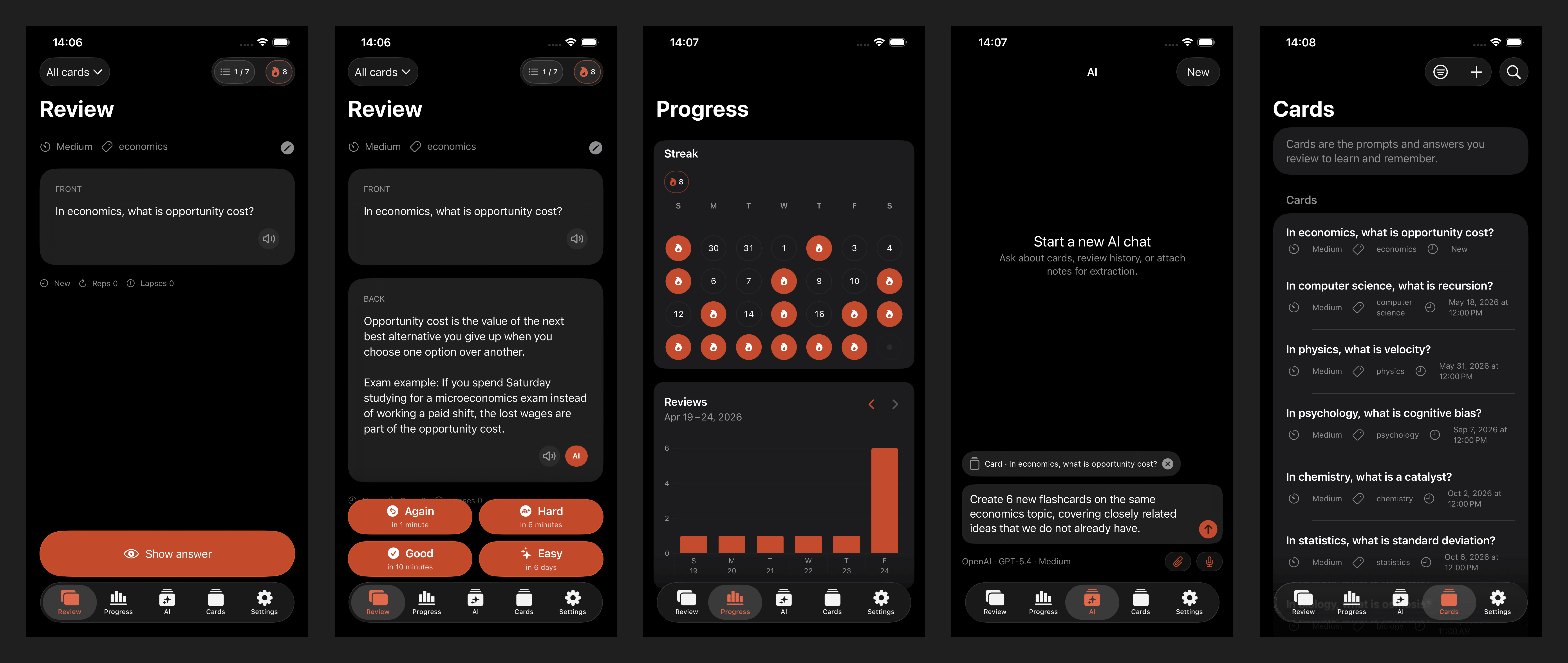
Nibomo (formerly Flashcards Open Source App) is an open-source AI-powered flashcards app built for serious daily study on iOS, Android, and the web. Use it to prepare for exams, learn vocabulary, memorize technical terms and facts, improve your material with AI, and review with spaced repetition. The project also includes an external agent API for terminal and AI-agent workflows.
Available on
- iOS
- Android
- Web
- MCP server: https://mcp.nibomo.com/mcp
- Agent API: https://api.flashcards-open-source-app.com/v1/
Card scheduling
Card scheduling uses FSRS-based spaced repetition. Detailed scheduling rules live in docs/fsrs-scheduling-logic.md.
MCP connector
The hosted MCP server is available at https://mcp.nibomo.com/mcp and publishes to MCP registries under com.nibomo/flashcards. It exposes eight tools, most of them workspace-scoped: list_workspaces, sql_query, sql_execute, get_guide, next_review_card, reveal_answer, submit_review, and the account-scoped get_usage_limits.
The dedicated review tools support one-question-at-a-time conversations and idempotent FSRS scheduling. See conversational reviews for the contract shared by MCP, the in-app chat, and the Agent API, and for voice-session examples. ChatGPT Voice currently does not invoke apps/MCP; these tools do not remove that external limitation.
Interactive clients authenticate with OAuth 2.1 authorization code + PKCE and Dynamic Client Registration. Headless clients can use an fca_ Bearer token.
The former address https://mcp.flashcards-open-source-app.com/mcp still serves the same server, so existing client configurations keep working. A client moved to https://mcp.nibomo.com/mcp authorizes once more; backend and web deployment owns why.
Docs
- iOS app
- Android app
- Web app
- Architecture
- Backend and web deployment
- Public site URLs (
PUBLIC_SITE_BASE_URL) - Release gates and monitoring
- Release all platforms and start the next development version
- Platform release procedures
- iOS local setup
- iOS CI/CD
- Android CI/CD
- Agent API
License
This project is licensed under the MIT License - see the LICENSE file for details.
Author
Related MCP Servers
Adoption & maintenance
Factual signals from GitHub, npm, and our automated checks — not a rating.
GitHub stars
69
Stargazers on the source repository.
Last commit
3d ago
Most recent push to the default branch.
Directory activity
1 views
Config copies, upvotes, and views on AllMCPs.
Reviews
No reviews yet — be the first to share how this listing worked for you.
Frequently Asked Questions about Flashcards Open Source App
AllMCPs Directory Badge
Showcase your server listing on GitHub or your project documentation. Embed this dynamic SVG badge to highlight official listing status and live engagement.
Badge Style:
Live Dynamic SVG Preview
Markdown (GitHub README)
[](https://allmcps.com/mcp/flashcards-open-source-app)HTML Embed
<a href="https://allmcps.com/mcp/flashcards-open-source-app"><img src="https://allmcps.com/api/badge/flashcards-open-source-app?style=directory" alt="Flashcards Open Source App on AllMCPs" /></a>