Figma to pixel-perfect code: deterministic HTML/React, then a render + pixel-diff verify loop.
Quick Install
Automated & IDE SetupCopy the AI prompt to install this server into Claude Code, Cursor, or another agent — or use 1-click editor setup below.
One-click editor setup isn’t available for this listing yet — we don’t have a confirmed install command, and we’d rather show nothing than point your editor at the wrong package or host. Follow the project’s own setup instructions, linked above.
Manual Client & Custom JSON ConfigExpand JSON ▾
No confirmed setup config for this listing yet. We only publish a config block when the install details come from the project itself — its README, its docs, or a verified owner. We haven’t found those for figma-mcp, and we’d rather show nothing than a guess you’d paste into your client. Follow the project’s own setup instructions for the current steps.
Documentation Overview
figma-mcp
Figma → code that is actually checked against the design.
Most Figma-to-code tools stop at the moment of generation: they hand you JSX and walk away. Nobody ever renders the output and compares it to the frame, so the result stalls at "90% there" and you spend the afternoon nudging padding by eye.
This MCP server closes that loop. It converts a frame to self-contained HTML deterministically (no LLM, no hallucinated layout), then renders your code in Chromium, pixel-diffs it against the Figma reference, measures every element's box, and tells the agent exactly what is missing or misplaced. The agent edits, calls verify again, and repeats until the diff is at the anti-aliasing floor.
| Figma reference | First pass — 5.18% off | Pixel diff | Converged — 0.00% |
|---|---|---|---|
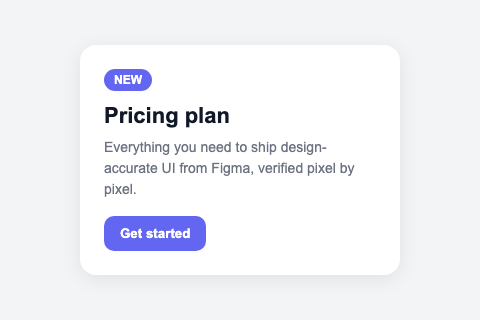 | 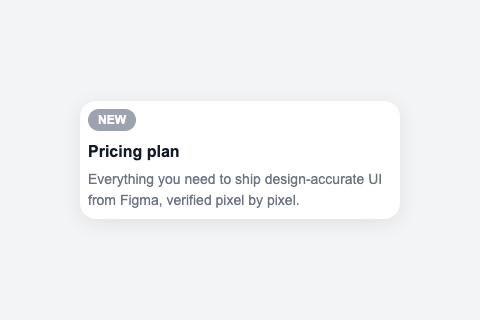 | 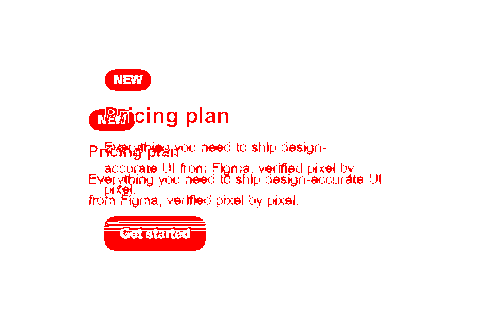 | 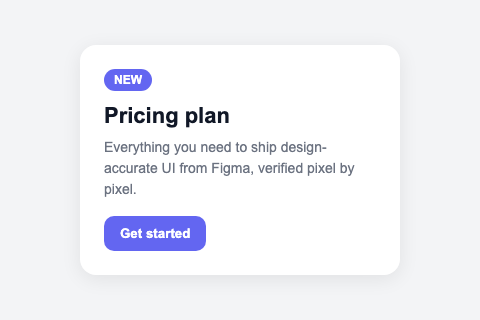 |
Those are real artifacts from npm run example, which runs the loop end to end
with no API key. The generate callback in that demo is a scripted stand-in
for an LLM, so it shows the loop mechanics honestly — the measuring is real, the
"model" is not.
Why the verify step matters
A Figma node tree tells you what the designer declared. It does not tell you what a browser will do with your CSS. Those diverge constantly — a flex gap that collapses, a font that falls back, an absolute child that escapes its parent. The only way to know is to render it and look.
figma_verify gives the agent three independent signals per pass:
- Pixel diff — the overall mismatch ratio plus the worst regions, so it knows how wrong and where.
- Element bounding-box IoU — every IR node is tagged
data-ir-id, measured in the live DOM, and matched against its Figma box. This is what turns "the bottom-left looks off" into "the CTA button is missing" or "the price label is 40px too low". - Paint order and clipping — Figma lists children back-to-front, so a node's
pre-order index is its paint order;
elementsFromPointover a sample grid gives the rendered order wherever two elements actually overlap. This catches the class of bug the other two signals are blind to by construction: elements present, in exactly the right box, stacked the wrong way round — or cut off by an ancestor'soverflowwhere the design lets them overhang. Neither moves a box, and on a tall frame neither moves the diff ratio much, but a decorative overlay drawn over a photo instead of under it is the first thing a person sees. Reported asWRONG STACKING/OVER-CLIPPED, and reported even when the pixel diff has converged.
Tools
| Tool | What it does | Network |
|---|---|---|
figma_convert | Fetch a frame → self-contained HTML + ir.json + assets as data URIs + reference.png. Optional react: true (component + the components/ it imports) and next: true (a runnable App Router project), plus a responsive variant. | Figma API (cached) |
figma_verify | Render HTML in Chromium, pixel-diff vs the reference, IoU-check every element, check paint order and clipping, return targeted fix instructions. | none |
figma_inspect | Print the IR as an indented outline (role, box, layout, text, tokens), filterable — read the structure without dumping raw Figma JSON into context. | none |
Responsive output depends on what the design actually declares
responsive: true reads Figma's sizing intent — FILL becomes flex/100%, HUG becomes
fit-content, FIXED keeps its px. That only exists where the designer used Auto Layout.
A frame with no Auto Layout on the root is a canvas: every child is position:absolute at a
coordinate on a 1440px artboard. There is nothing to relax, so making the root width:100% does not
reflow it — the children stay pinned at their canvas coordinates and the right-hand side disappears
under overflow:hidden. That reads exactly like a page breaking when you zoom.
For those frames the converter keeps the exact canvas and scales it to the viewport instead, so the
design stays intact at every width and zoom level (down to 0.5x, after which the page scrolls).
figma_convert tells you which strategy it used. If you want real reflow rather than proportional
scaling, add Auto Layout in Figma — that is the signal the converter needs.
Every tool returns file paths and numbers, never large blobs. A converted frame is often 100+ KB of HTML; pushing that through a tool result would burn the agent's context for nothing. The agent reads and edits the files directly.
Figma responses are cached per frame, so after the first figma_convert the
whole loop runs offline and free — including when you are rate-limited.
Quick start
You need a Figma personal access token: Figma → Settings → Security → Personal
access tokens, scope File content: read.
Add it to Claude Code:
Or for any MCP host that reads a JSON config:
Then, in the agent: copy a frame link out of Figma (right-click the frame → Copy link to selection) and say "convert this frame and verify it until it converges."
Check your setup
It checks Node, whether a token was found (and where, never its value), whether
Figma accepts it, and whether the Chromium figma_verify renders in is
installed, then prints READY or what to fix. Exit code 0 means all three tools
will work. If Chromium is missing (a skipped download, or CI), install it with
npx -y @mehmoodqureshi/figma-mcp --install-browser.
Windows
npx resolves to npx.cmd, which some MCP hosts cannot spawn directly. If the
server fails to start, point at the shim explicitly:
The loop, concretely
The refine loop runs through the calling agent, not through an LLM inside the
server. That means no ANTHROPIC_API_KEY, no second model billing, and the agent
keeps full context on what it already tried. A headless refine loop
(src/refine/) still exists for library use.
Watch the loop without an agent
The same pipeline has a one-page local web front end, split in two: a chat on the left, the generated app on the right. You send a frame link, it asks what to build — HTML, React or Next.js; exact or responsive — and then converts, renders and diffs in front of you. The right pane carries the running app, its source files, the verify numbers and the pixel diff.
It uses the same .figma-token and the same .figma-cache/, so a frame you have
already converted re-runs offline in about a second. Useful for checking a frame
converts cleanly before pointing an agent at it — and for showing someone what
"verified against the design" means rather than describing it. Details in
site/README.md.
Configuration
| Variable | Purpose |
|---|---|
FIGMA_TOKEN | Required. Also read from a .figma-token file in your project directory. FIGMA_API_KEY is accepted as an alias. |
FIGMA_MCP_CACHE_DIR | Where converted frames are cached. Defaults to .figma-cache/ in the directory the server is started from. |
ANTHROPIC_API_KEY / GEMINI_API_KEY | Optional, headless refine loop only. The MCP server never calls an LLM. |
FIGMA_MCP_SKIP_BROWSER_DOWNLOAD=1 | Skip the Chromium download on install. figma_convert and figma_inspect still work; figma_verify will not. |
See .env.example. Add .figma-cache/ to your project's
.gitignore — a cached frame with embedded assets is tens of megabytes.
What it does not do
Being straight about the edges, because they are Figma's, not bugs:
- Design tokens resolve to literals unless you are on Enterprise. The Figma
Variables REST API is Enterprise-only. Without it, colors and spacing come out
as exact values rather than
var(--color-surface). Everything else works. - Component prop bindings need Code Connect. Components are matched by name and reported, but the API does not expose which instance prop drove which value.
- The diff has a floor. Anti-aliasing and font hinting keep the ratio around
0.5–1.5% even on a perfect match.
thresholddefaults to 2% for that reason — chasing 0 is chasing rendering noise. - One frame at a time. No whole-file crawling, by design: it keeps token spend and Figma rate-limit pressure predictable.
Use it as a library
The verify loop is framework-agnostic and does not need the MCP layer:
Related MCP Servers
Reviews
No reviews yet — be the first to share how this listing worked for you.
Frequently Asked Questions about Figma MCP
AllMCPs Directory Badge
Showcase your server listing on GitHub or your project documentation. Embed this dynamic SVG badge to highlight official listing status and live engagement.
Badge Style:
Live Dynamic SVG Preview
Markdown (GitHub README)
[](https://allmcps.com/mcp/figma-mcp)HTML Embed
<a href="https://allmcps.com/mcp/figma-mcp"><img src="https://allmcps.com/api/badge/figma-mcp?style=directory" alt="Figma MCP on AllMCPs" /></a>