Fcp MCP Server
MCP server for Final Cut Pro XML. Lets Claude read, edit and generate real timelines: cut detection, markers, roles, transcript-based editing. Published on PyPI as fcp-mcp-server.
Install Fcp MCP Server
Pick your client, then add it in one click or paste the config.
No confirmed install command yet
We only publish a config when the install details come from the project itself — its README, its docs, or a verified owner. We haven’t found those for fcp-mcp-server, and we’d rather show nothing than a guess you’d paste into your client.
Open setup steps on GitHubOverview
Security & health
What it can reach and how reliably it runs — from our own checks, not the maintainer’s claims.
We have not completed a health check for this listing yet.
From the project README

fcp-mcp-server
Edit Final Cut Pro by talking to Claude, and watch the cut change.
Reads and writes FCPXML, no plugin, no patch


Python 3.10+ · Final Cut Pro for Mac 10.4 to 12.4 (compatibility)
claude mcp add fcpxml -e FCP_PROJECTS_DIR=~/Movies -- uvx fcp-mcp-server
Then File → Export XML… in Final Cut Pro, and ask Claude to work on the file.
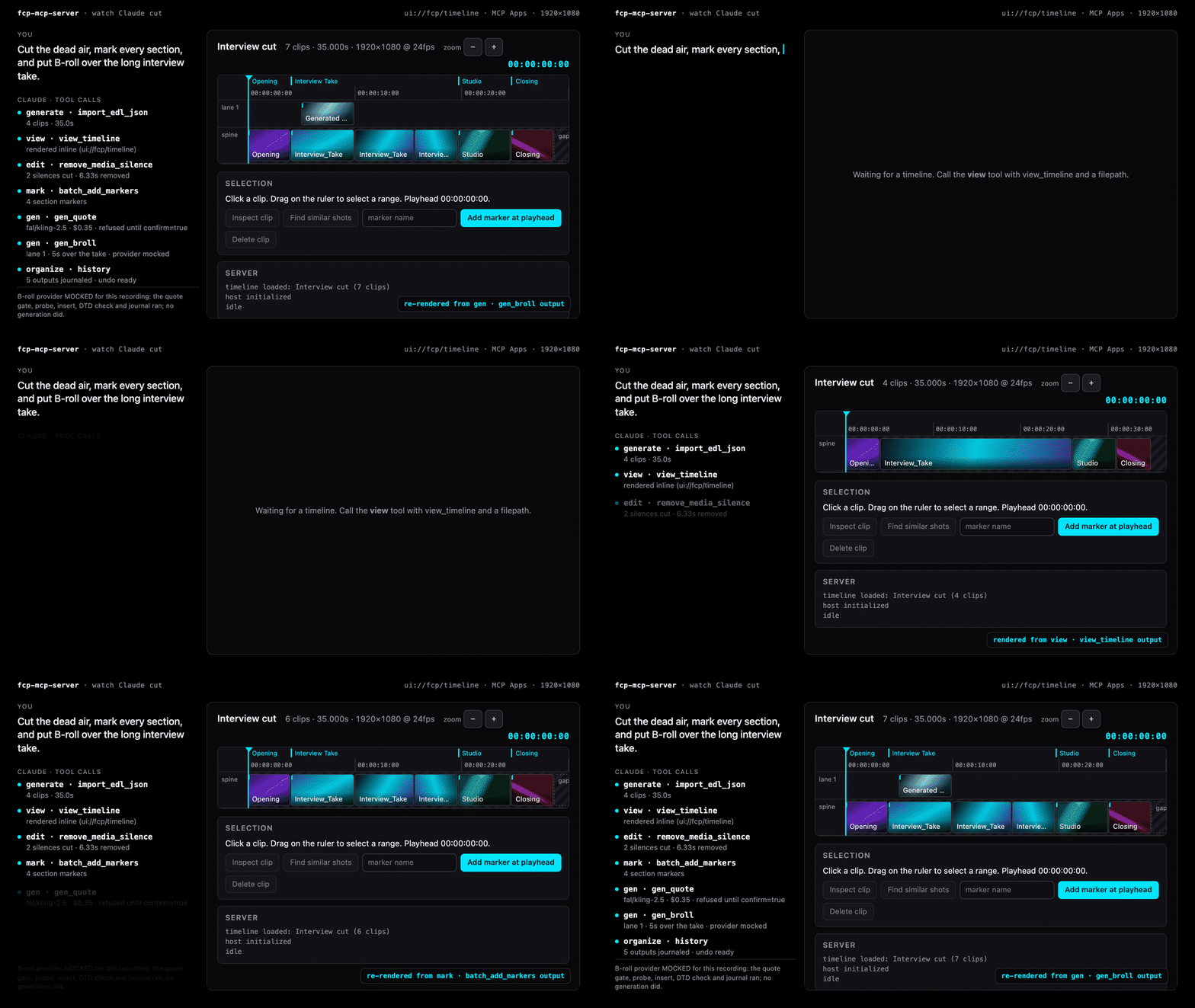
Staged close-up of the real app's results · unedited recording →
You: Cut the rest between sets, mark every lift, and put B-roll over the long set.
Claude, on four clips already imported with generate · import_edl_json:
view · view_timelinedraws the timeline inline (ui://fcp/timeline)edit · remove_media_silencecuts the rests out of the long squat setmark · batch_add_markersputs a marker on each liftgen · gen_quoteprices the B-roll under the per-call cap; nothing runs untilconfirm=truegen · gen_brolllays the clip on lane 1 over the long setorganize · historylists every journaled output, each one undoable
What is real: the timeline is the ui://fcp/timeline app as the server
serves it, drawing the real view_timeline results of the real calls above,
and every change is the app's own animation from one result to the next. What
is composed: the stage (only the view's ruler and lanes, drawn large on
black), the captions, the timing, the empty beat before the first call (the
app is handed the imported cut with its clips taken out, so they leave) and
the camera's push onto each edit. The
footage is the author's own gym session (its audio is a test tone, so the
rests are real silence), and the B-roll provider is mocked: the clip is named
"B-roll (mocked)" and carries a MOCK badge. The
unedited recording is the same
run (the same results, notes and thumbnails, checked by a test) with the app
inside a chat client. MP4,
poster, recorded with
demo/hero/build.py.
See it. view returns the timeline as exact rational-time JSON, and a
host with MCP Apps draws it inline: lanes, thumbnails, markers, transcript
words, a playhead, buttons that call the other tools.
Cut it. 15 grouped tools, 102 operations: trims, splits, silence removal, markers from transcripts and beats, rough cuts, keyframes and speed ramps, transcript edits, cross-NLE export, and a push into a running Final Cut Pro.
Trust it. Every write is journaled with its sha256 and can be undone.
deliver refuses an unreviewed cut, expected_sha256 refuses a file that
changed under the model, and generation is quote-then-confirm under a
per-call cap. 182 adversarial-input security tests, defusedxml everywhere,
sandboxed writes, no private APIs, and a disclosure channel.
Proof
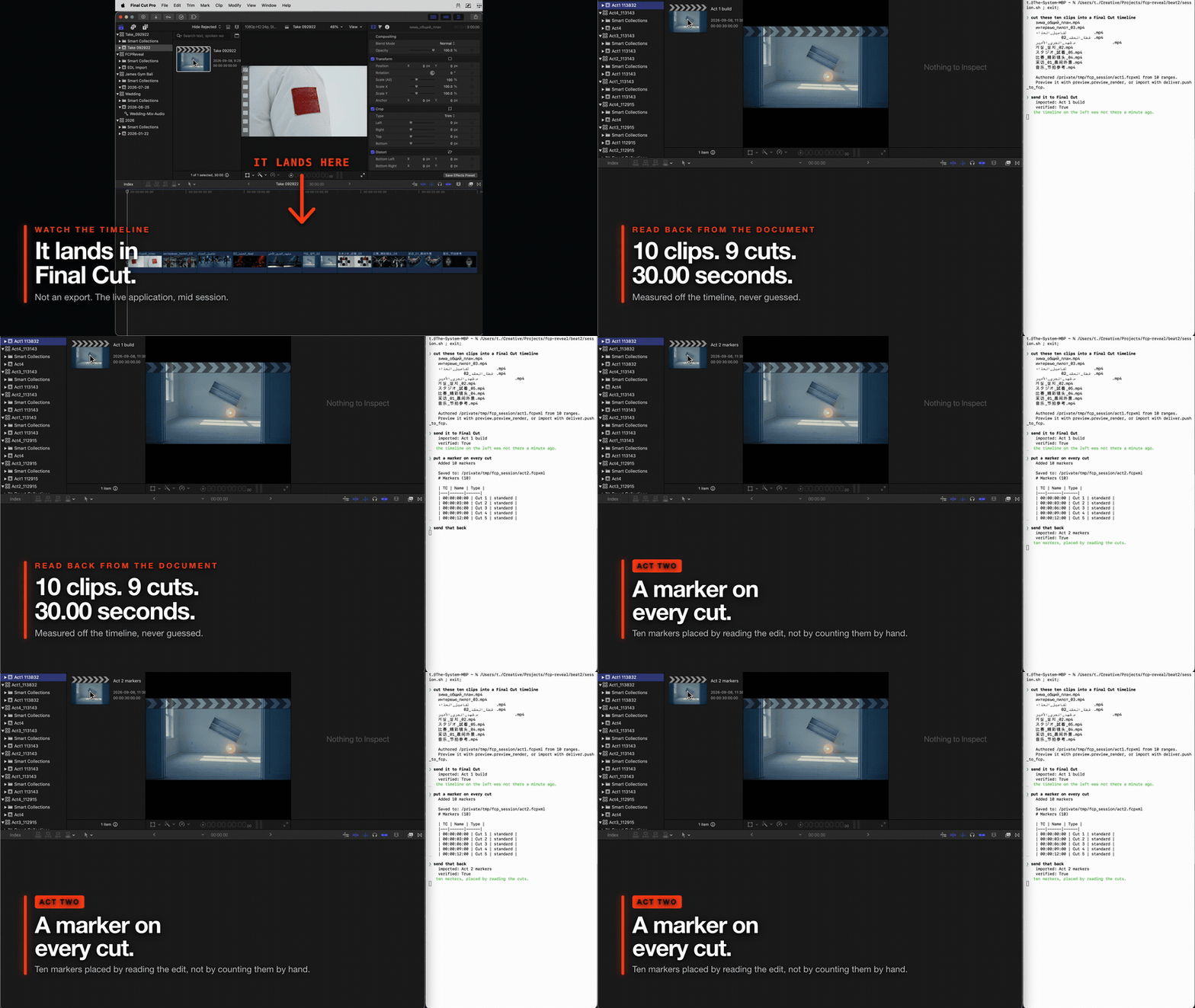
Real v0.25.0 output against a running copy of Final Cut Pro. A ten clip
timeline is read back off the document, a marker is placed on every cut, and
dialogue, music and effects roles are assigned across the clips. Final Cut is
open on the left the whole time and is never touched by hand. Screen recorded
from demo/session.sh, which calls the same handlers an MCP
client calls; each import is verified by polling Final Cut until the project
appears, so a delivered Apple event is never reported as a landed import.
The earlier terminal only demo is still at docs/assets/demo.gif.
Re-record it with vhs demo/demo.tape; the media is synthesised by ffmpeg at
run time, so there is no fixture to keep.
Keyframes and speed curves
Contributed by @travisoa in
#26: the inspect
and edit groups include five video/audio animation actions and three speed
curve actions, imported into Final Cut Pro 12.4 without warnings. See
keyframe usage for installation and animation, and
speed curves for holds, sampled ramps, ripple and reset.
Quick Start
Claude Code (fastest)
claude mcp add fcpxml -e FCP_PROJECTS_DIR=~/Movies -- uvx fcp-mcp-server
Or project-scoped — commit a .mcp.json so your whole team gets it:
{
  "mcpServers": {
    "fcpxml": {
      "command": "uvx",
      "args": ["fcp-mcp-server"],
      "env": { "FCP_PROJECTS_DIR": "/Users/you/Movies" }
    }
  }
}
With media intelligence (beat detection) and transcript editing (local Whisper):
claude mcp add fcpxml -e FCP_PROJECTS_DIR=~/Movies -- uvx --from "fcp-mcp-server[intelligence,transcribe]" fcp-mcp-server
Claude Desktop
Add to ~/Library/Application Support/Claude/claude_desktop_config.json:
{
  "mcpServers": {
    "fcpxml": {
      "command": "uvx",
      "args": ["fcp-mcp-server"],
      "env": { "FCP_PROJECTS_DIR": "/Users/you/Movies" }
    }
  }
}
Where the timeline draws
view returns a timeline an MCP Apps host draws inline (ui://fcp/timeline).
Every other client gets the same result as text: a summary line and the
exact JSON. preview returns images and an MP4 path everywhere. Checked
2026-11-12; a host listed by its vendor but not yet captured here says so.
| Host | What you get | Source |
|---|---|---|
| Claude Desktop | the timeline, inline | listed by the MCP Apps overview; not verified in Claude Desktop for this release (the capture steps are in scripts/capture-claude-desktop.md) |
| Claude on the web (claude.ai) | the timeline, inline | listed by the MCP Apps overview; not captured here |
| VS Code GitHub Copilot, Microsoft 365 Copilot, Goose, Postman, MCPJam, Archestra.AI | the timeline, inline | listed by the MCP Apps overview; not captured here |
ext-apps basic host (the reference host) | the timeline, inline, with Inspect and Find calling back into the server | run here on 2026-11-12 against 0.30.0 |
| Claude Code | text: the summary and the JSON; preview images | Claude's MCP Apps quickstart: "Claude Code calls the tool as text and doesn't render the UI" |
| ChatGPT | unconfirmed | not named on the MCP Apps overview |
| any other MCP client | text |
On mcp 1.x the tool carries _meta.ui and the resource is served, but the
SDK cannot advertise the extension in the handshake; a host that insists on
it needs mcp 2.x.
From source (contributors)
git clone https://github.com/DareDev256/fcp-mcp-server.git
cd fcp-mcp-server
pip install -e .
# then point your MCP client at: python /path/to/fcp-mcp-server/server.py
Use It
Export XML from Final Cut Pro (File → Export XML…), open your MCP client, and ask it to work with your timeline.
Why This Exists
After a decade directing music videos (Chief Keef, Migos, Masicka), I noticed the same editing bottlenecks on every project: counting cuts manually, extracting chapter markers one by one, hunting flash frames by scrubbing, building rough cuts clip by clip.
These are batch operations that don't need visual feedback. Export the XML, let Claude handle the tedium, import the result. That's the entire philosophy.
See It In Action
You:    "Run a health check on my wedding edit"

Claude: ✓ Analyzed WeddingFinal.fcpxml
        ├─ 247 clips · 42:18 total · 24fps · 1920×1080
        ├─ 3 flash frames detected (clips 44, 112, 198)
        ├─ 2 unintentional gaps at 12:04 and 31:47
        ├─ 14 duplicate source clips
        └─ Health score: 72/100

You:    "Fix the flash frames and gaps, then add chapter markers from
         this transcript"

Claude: ✓ Extended adjacent clips to cover 3 flash frames
        ✓ Filled 2 gaps by extending previous clips
        ✓ Added 18 chapter markers from transcript
        → Saved: WeddingFinal_modified.fcpxml
Import the modified XML back into Final Cut Pro. Every change is non-destructive — your original file is never touched.
What Claude Actually Sees
This is the magic trick. When you export XML from Final Cut Pro, your timeline becomes structured data that Claude can reason about:
Reviews
No reviews yet — be the first to share how it worked for you.
Frequently Asked Questions about Fcp MCP Server
Related MCP servers
Add a badge to your READMEShow it’s listed — live SVG, Markdown or HTML.
AllMCPs Directory Badge
Showcase your server listing on GitHub or your project documentation. Embed this dynamic SVG badge to highlight official listing status and live engagement.
[](https://allmcps.com/mcp/fcp-mcp-server)<a href="https://allmcps.com/mcp/fcp-mcp-server"><img src="https://allmcps.com/api/badge/fcp-mcp-server?style=directory" alt="Fcp MCP Server on AllMCPs" /></a>