Ffmpeg Skill
Local video editor for coding agents: 42 FFmpeg tools with a machine-readable contract and an MCP server, for Claude Code, Cursor and Codex. Cut, captions, reframe, loudness, platform exports. No cloud, no API keys.
Install Ffmpeg Skill
Pick your client, then add it in one click or paste the config.
No confirmed install command yet
We only publish a config when the install details come from the project itself — its README, its docs, or a verified owner. We haven’t found those for ffmpeg-skill, and we’d rather show nothing than a guess you’d paste into your client.
Open setup steps on GitHubOverview
Security & health
What it can reach and how reliably it runs — from our own checks, not the maintainer’s claims.
We have not completed a health check for this listing yet.
From the project README


Give your coding agent a video editor.
Claude Code, Cursor, Codex or any MCP client edits your footage with local FFmpeg, then checks its own output.
No cloud · No API keys · Python standard library
Quick start · Demos · Tools · MCP · npm





npx ffmpeg-skill
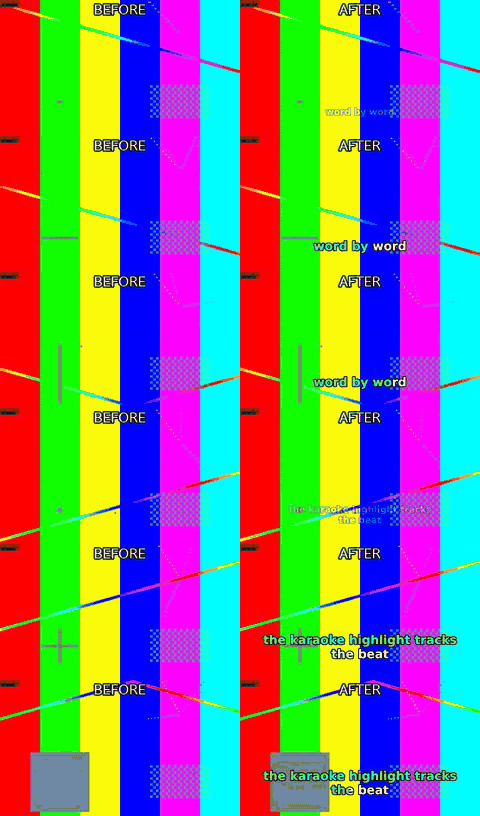 caption.py --animate pop --karaoke |  fit.py --aspect 9:16 --fit crop |
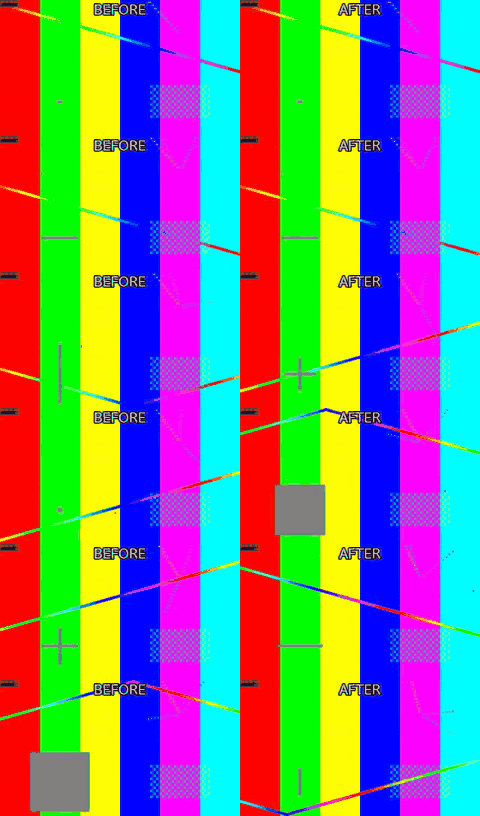 silence.py --threshold -35 |  loudness.py -I -14 --tp -1 |
Left half is the input, right half is what the command produced. All 66 before/after demos, with the exact command under each one → — all of it generated from synthetic footage by python3 demos/build.py, so you can rebuild every frame of it yourself.
ffmpeg-skill is an Agent Skill for Claude Code, Cursor, Codex and any agent that reads SKILL.md. It teaches the agent a fixed workflow (probe → edit losslessly where possible → check → verify) and ships 42 tools that do the actual work with ffmpeg / ffprobe: cut, join, silence removal, fit to duration and aspect, captions and karaoke, overlays and motion graphics, HDR → SDR and LUTs, audio clean-up and typed dynamics, sync with drift correction, multicam, loudness, delivery checks, whole-edit project rendering, batch folders. Every tool is also callable as an MCP tool (tools/list advertises a core 12 by default to keep client context small, with FFMPEG_SKILL_MCP_FULL=1 listing all 42; every tool is reachable by name through tools/call either way), and the whole set is described by a machine-readable contract.
If ffmpeg and python3 are on your PATH, it works: offline, on footage you would rather not upload.
SPEC (Self-Producing Execution Contract): each tool's
input_schema— the part of its contract and MCP tool definition that has to track the CLI flag-for-flag — is never hand-authored beside the code. It is derived, at run time, from the sameargparseparser that already defines the CLI, and CI fails the build if any of it drifts. → full explanation
Standalone, and in an ecosystem
Standalone, this is a local FFmpeg engine: probe → edit → verify, npx ffmpeg-skill and nothing else. No API key, no account, no other repo required. Everything above and below this section describes that standalone tool, and none of it changes if you never read the rest of this one.
In kajisho5's wider video-production ecosystem, this repo is the hands: it cuts, measures and exports files, and reports back in structured JSON. It does not decide what to cut, whether a deliverable is approvable, what makes a highlight interesting, or what a caption should say (the user's cue text is burned as written, never rewritten to fit) — those are a brain's job, sitting in front of this engine, not inside it.
| You want to... | Use |
|---|---|
| Cut / join / measure / export a file right now | this repo (ffmpeg-skill), standalone |
| Decide cut points, approve a deliverable, plan a whole edit | video-production-agent / AI-video-production-OS |
Build a typed editing graph across a workspace, without writing raw ffmpeg | video-editing-skill / audio-production-skill |
| Put Remotion motion graphics (animated captions, silence jump cuts, audio-peak motion) on a real recording | remotion-ffmpeg-skill: its compositions take their length, fps, frame, silences, scene cuts, audio peaks and beats from this repo's probe.py, silence.py and scenes.py. It verifies its render with check.py and look.py, composites a graphics layer with overlay.py (--place for its --sparse mode), and delivers through render.py --template |
Other repos in the ecosystem — media-analysis-skill, transcription-skill, subtitle-skill, thumbnail-skill, color-grading-skill, motion-graphics-skill, qc-skill — read this repo's contract --json, its tools' --json output and doctor, the same way any agent framework would; this repo does not call into any of them. The dependency runs one way.
Contents Standalone, and in an ecosystem · Why · Quick start · How it works · Design principles · Tools · Audio · Built for agents · FAQ · FFmpeg compatibility · Tested on real footage · Install · Requirements · Development · Docs
Why
An agent that "knows FFmpeg" still guesses: it assumes a frame rate, picks a codec the container cannot hold, re-encodes a file that only needed a stream copy, and reports "done" without opening the result. This skill takes the guessing out:
- Real files first. Every job starts with
probe.py; the agent decides from the measured duration, fps, resolution, colour and audio layout, not from the file name. - Structured tools, not shell strings. Each operation is a script with typed arguments. Nothing runs through a shell; no filter graph is accepted from the caller.
- A contract the agent can read.
contract --jsonstates, for every tool, what it takes, what it writes, which FFmpeg components it needs and how the result is verified. The MCP surface is derived from it. - Verification after execution. The result is probed, checked against the destination's spec and, when the picture changed, looked at as a contact sheet.
- Local first. No cloud, no API keys, no Python dependencies. Optional local transcription is used when a speech engine (Parakeet or a whisper) is installed, never required — by
caption.py --transcribeand, since 1.17, bysilence.py --filler --transcribe; both take a transcript you already have instead, and both refuse with the install lines rather than guessing. Both take--engineand--model;FFMPEG_SKILL_ASR_ENGINEandFFMPEG_SKILL_ASR_MODELset this machine's defaults (e.g.large-v3-turbowhere that whisper.cpp model is installed; without either, auto andbase). The engine runs on your machine and the audio is never uploaded; parakeet-mlx, faster-whisper and openai-whisper download their model weights the first time they run (parakeet-mlx's default from Hugging Face).
Paper
The design discipline behind this skill — per-operation verification for AI agents — is written up as a position paper. The paper scores ffmpeg-skill itself as only partially conformant with the discipline it defines.
Kajiyama, S. (2026). What Is Verification-Driven Coding? — A Discipline for Not Trusting Generation. Zenodo. https://doi.org/10.5281/zenodo.23720216
Quick start
# 1. install the skill for Claude Code (Cursor: --cursor, Codex: --codex, all three: --all)
npx ffmpeg-skill

# 2. check the machine: ffmpeg, ffprobe and every FFmpeg component the tools need
npx ffmpeg-skill doctor

# 3. (for agent frameworks) read the machine-readable contract
npx ffmpeg-skill contract --json | head -40
Already installed? re-run npx ffmpeg-skill to refresh ~/.claude/skills/ffmpeg-skill. Copies are not updated automatically.
Reviews
No reviews yet — be the first to share how it worked for you.
Frequently Asked Questions about Ffmpeg Skill
Related MCP servers
Add a badge to your READMEShow it’s listed — live SVG, Markdown or HTML.
AllMCPs Directory Badge
Showcase your server listing on GitHub or your project documentation. Embed this dynamic SVG badge to highlight official listing status and live engagement.
[](https://allmcps.com/mcp/ffmpeg-skill)<a href="https://allmcps.com/mcp/ffmpeg-skill"><img src="https://allmcps.com/api/badge/ffmpeg-skill?style=directory" alt="Ffmpeg Skill on AllMCPs" /></a>