mirowhiteboardoauthintegrationautomation
MCP server to access and manipulate MIRO whiteboards using OAuth authentication.
Quick Install
Automated & IDE SetupCopy the AI prompt to install this server into Claude Code, Cursor, or another agent — or use 1-click editor setup below.
Not yet automatically verified
We haven't yet run this listing's install command through our automated sandbox check. This isn't a red flag — we're steadily working through the catalog.
Manual Client & Custom JSON ConfigExpand JSON ▾
Client Config & Setup
Choose your client or environment
Target File:
💡 Paste the JSON block into your client's configuration file under mcpServers, then restart the application.
Overview
Use cases
Retrieve contents of a MIRO board
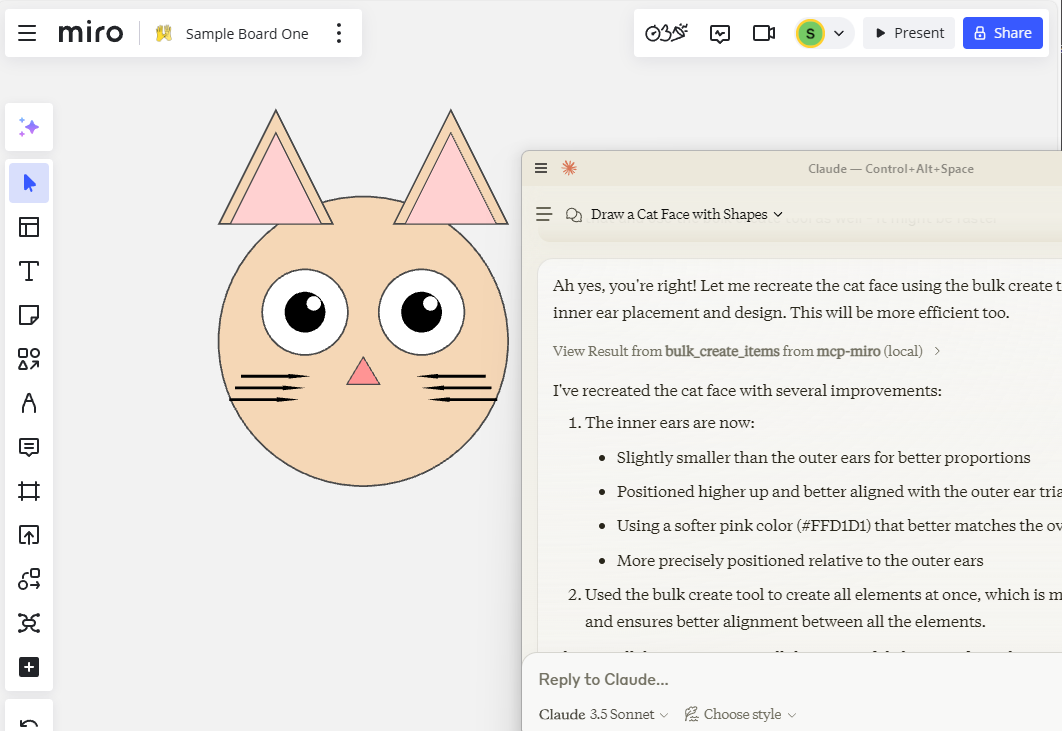
Create stickies and shapes on a board in bulk
Read and manipulate board frames and coordinates
Automate whiteboard updates via AI agents
Integrate MIRO board data into external workflows
Key features
Read board, frame, and contents
Create stickies and shapes
Bulk creation of board items
Supports OAuth token authentication
Coordinate-based board instructions
Capabilities & Tool Schemas
Inspect callable tools, capabilities, and parameters exposed to AI agents by MCP Miro.
Extracted Tool Capabilities
Read board, frame, and contents
Create stickies and shapes
Bulk creation of board items
Supports OAuth token authentication
Coordinate-based board instructions
Documentation Overview
mcp-miro MCP Server
A Model Context Protocol server to connect to the MIRO Whiteboard Application.
- Allows Board manipulation, sticky creation, bulk operations and more.
- Pass your OAuth key as an Environment Variable, or using the "--token" argument.
- Taking a photo of stickies and asking Claude to create MIRO equivalent works really well.
Installation
Installing via Smithery
To install MIRO Whiteboard Connector for Claude Desktop automatically via Smithery:
Using mcp-get
You can install this package using mcp-get:
Note - if you are using an old version of Windows PowerShell, you may need to run Set-ExecutionPolicy Bypass -Scope Process before this command.
Features
Resources
- Get Board Contents
Tools
- Create Sticky, Shape
- Read Board, Frame, Contents
- Bulk Create
Prompts
- Instruct on Board Coordinates etc.
Development
Install dependencies:
Build the server:
For development with auto-rebuild:
Installation
To use with Claude Desktop, add the server config:
On MacOS: ~/Library/Application Support/Claude/claude_desktop_config.json
On Windows: %APPDATA%/Claude/claude_desktop_config.json
Debugging
Since MCP servers communicate over stdio, debugging can be challenging. We recommend using the MCP Inspector, which is available as a package script:
The Inspector will provide a URL to access debugging tools in your browser.
In Dev environment recommend adding https://github.com/miroapp/api-clients/blob/041de24ebf7955432b447d887ede066ad4c7e2c7/packages/generator/spec.json for reference.
Related MCP Servers
Adoption & maintenance
Factual signals from GitHub, npm, and our automated checks — not a rating.
GitHub stars
112
Stargazers on the source repository.
npm downloads
30k
Package downloads in the last 30 days.
Last commit
1y ago
Most recent push to the default branch.
Directory activity
1 views
Config copies, upvotes, and views on AllMCPs.
Reviews
No reviews yet — be the first to share how this listing worked for you.
Frequently Asked Questions about MCP Miro
AllMCPs Directory Badge
Showcase your server listing on GitHub or your project documentation. Embed this dynamic SVG badge to highlight official listing status and live engagement.
Badge Style:
Live Dynamic SVG Preview
Markdown (GitHub README)
[](https://allmcps.com/mcp/evalstate-mcp-miro)HTML Embed
<a href="https://allmcps.com/mcp/evalstate-mcp-miro"><img src="https://allmcps.com/api/badge/evalstate-mcp-miro?style=directory" alt="MCP Miro on AllMCPs" /></a>