Erd Editor vs Three.js DevTools MCP
A side-by-side look at the Erd Editor and Three.js DevTools MCP MCP servers: transport, auth, tools, quality signals, and the config to install either one in Claude, Cursor, Windsurf or VS Code.
Verdict: choose Erd Editor for developer tools work as a local process; choose Three.js DevTools MCP for developer tools as a local process. You can also run both side by side in one mcpServers block.
Which MCP server should you choose?
 Choose Erd Editor when
- You need dedicated capabilities in the Developer Tools domain.
- You prefer a local stdio subprocess transport.
- Its auth model fits you: No auth required.
- You want tools like
erd_list_documents, erd_open_document, erd_save.
 Choose Three.js DevTools MCP when
- You need dedicated capabilities in the Developer Tools domain.
- You prefer a local stdio subprocess transport.
- You want tools like
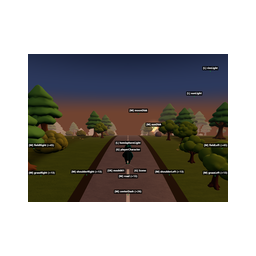
scene_tree, object_details, find_objects.
Feature & specification comparison
Rows where the two servers differ are marked.
| Spec | ||
|---|---|---|
| Category | Developer Tools | Developer Tools |
| Quality signal | 71/100 · Great | 67/100 · Great |
| Install command | Confirmed | Confirmed |
| Transport | Local subprocess (stdio) | Local subprocess (stdio) |
| Auth | No auth required | Not declared |
| Pricing | Free | Not declared |
| Required env vars | None listed | None listed |
| Verified owner | Community listing | Community listing |
| GitHub stars | 1,729 | 124 |
| Directory activity | 0 views 0 installs 0 upvotes | 0 views 0 installs 0 upvotes |
| Tools | 77 | 69 |
| Full listing | View Erd Editor | View Three.js DevTools MCP |
Tools & capabilities
Erd Editor tools 77
erd_list_documentsLists ERD documents with path, open, active, dirty and readonly. With an editor serving the working directory (the VS Code extension, the Obsidian plugin or the JetBrains IDE plugin) it lists that editor's, every open project's in a JetBrains IDE; otherwise the ERD files under the working directory.erd_open_documentOpens a document for editing, in the ERD editor of the editor that serves it, if one does (the VS Code extension, the Obsidian plugin or the JetBrains IDE plugin). With create it makes the file first if missing; a name with no extension gets .erd.json.erd_saveSaves a document an editor holds to disk. VS Code keeps edits unsaved until this is called; Obsidian and JetBrains IDEs save them as they save the user’s edits, and this writes them at once. On disk, with no editor, edits are written at once and this does nothing.erd_undoReverts the last edit this agent made to the document, never the user’s edits. Calls that made no undo entry are skipped and named.erd_redoApplies again the edit erd_undo last reverted.erd_readReads a document as a snapshot, as DDL, as its raw JSON or, with the scripts format, its before and after scripts alone. The sql format of the whole document includes the document's before and after scripts. The sql format with tableIds, tableNames or groupNames gives the DDL of just those tables, the way to read a large schema; a read too large for one answer is refused with how to narrow it. For ids and details prefer erd_list and erd_get. Change a document only through the erd_ tools, never by writing its file.erd_listLists a document: its settings and counts, then a page of tables, each with its id, position and size on the ERD canvas (the width approximate, the height exact), with their indexes and relationships (each relationship once, with one of its tables) and, for a table in a table group or with a logical name, its groupId or logicalName; after the tables come the table groups, the memos, then the rows of the domain, term and word dictionaries, each with its name and what it gives a physical name or column. A small schema fits in one page. On a larger one, nextOffset and note say how to go on: query finds tables by a word, namesOnly lists every table name in a call or a few. Columns, comments, memo text, the tables of a group and every field of a dictionary row come from erd_get; the foreign keys a table holds, from erd_read sql with tableNames.erd_getGives the entities named, in full: tables with their columns and size, relationships with their columns, indexes with their columns, memos with their text, table groups with their tables, and words, terms and domains with every field. Ids and names that name nothing live are listed in missing; ids one answer has no room for are listed in notReturned, to ask for again.erd_list_checksLists what the word, term and domain dictionaries find, as the Checks sheet of the editor's Dictionary tab does, and changes nothing. Errors: a name two rows of one dictionary share, a link to a domain the document does not list, a forbidden word in a logical name or a term's name. Warnings: a word no dictionary lists, a synonym used for a standard word, each in a logical name or a term's name, a physical name other than the one the term of its logical name gives, a column type other than its domain's. Each check names its target (a table, a column with its table, or a word, term or domain row) with its names, the field read, the text found and, where the dictionaries have them, the suggestions to use instead, and counts gives each code's total. The words, terms and domains come first in sheet order, then each table and its columns in document order. With no dictionary row nothing is checked. A long list comes a page at a time: pass nextOffset, or list again from offset 0 after fixing some, since a fixed check leaves the list.erd_add_tableAdds an empty table at a free spot and returns its id in createdIds. Name it with erd_change_table_name.erd_remove_tableRemoves a table with its columns, indexes and every relationship that touches it.erd_change_table_nameRenames a table. The name is then its own: nameDerived goes off, so a later logical name leaves a name that is not empty as it is.- +65 more on the listing page
Three.js DevTools MCP tools 69
scene_tree[INSPECT] Read-only. Scene hierarchy. Compact text tree by default (~2KB); compact=false for full JSON with positions/geometry.object_details[INSPECT] Read-only. Detailed info about one object by name, uuid, or dot path.find_objects[INSPECT] Read-only. Search objects by type, material, visibility, name pattern, or custom property.raycast[INSPECT] Read-only. Cast a ray from the camera through screen coordinates and return hit objects.click_inspect[INSPECT] Read-only. Click-to-inspect: the cursor becomes a crosshair — tell the user to click an object in the 3D view. Returns that object.scene_diff[INSPECT] Read-only. Compare scene state over time: first call saves a snapshot, next call lists added/removed/modified objects.layer_details[INSPECT] Read-only. Camera layer mask and objects with non-default layers.set_object_transform[LIVE PREVIEW] Changes the scene in the browser only — NOT saved to source code, lost on reload. Recorded in pending_changes (→ code edits) and undoable with revert_changes. Set position, rotation, scale, or visibility of an object.set_layers[LIVE PREVIEW] Changes the scene in the browser only — NOT saved to source code, lost on reload. Recorded in pending_changes (→ code edits) and undoable with revert_changes. Set layers on an object or the camera.material_list[INSPECT] Read-only. All materials in the scene with type, color, transparency.material_details[INSPECT] Read-only. Full material properties: colors, PBR/physical params, maps, uniforms, defines, NodeMaterial (TSL) slots.shader_list[INSPECT] Read-only. Compiled shader programs with their materials (WebGL).- +57 more on the listing page
Ready-to-paste client configs
Paste either block (or both) into your client config, e.g. claude_desktop_config.json or ~/.cursor/mcp.json. We only show a config when the install command is confirmed.
Erd Editor
{
  "mcpServers": {
    "erd-editor": {
      "command": "npx",
      "args": [
        "-y",
        "@dineug/erd-editor-mcp"
      ]
    }
  }
}
Three.js DevTools MCP
{
  "mcpServers": {
    "three-js-devtools-mcp": {
      "command": "npx",
      "args": [
        "-y",
        "threejs-devtools-mcp"
      ]
    }
  }
}
Frequently asked questions
Erd Editor is categorized under Developer Tools and uses a local stdio subprocess. Three.js DevTools MCP belongs to Developer Tools and uses a local stdio subprocess. Pick Erd Editor for developer tools work and Three.js DevTools MCP for developer tools.
Copy the mcpServers block from the config section on this page into your client's config (for example claude_desktop_config.json or ~/.cursor/mcp.json), then fully restart the client.
Erd Editor is listed as free. Auth: no auth required. Three.js DevTools MCP has no declared pricing — check the project's own site. If a server needs environment variables such as API keys, define them under the env key in your client's MCP config.
Yes. MCP clients support multiple servers: add erd-editor and three-js-devtools-mcp as separate keys in the same mcpServers object, and your assistant will call tools from either one.
On AllMCPs, Erd Editor has a quality signal of 71/100 (Great) with 0 views, 0 installs and 1,729 GitHub stars. Three.js DevTools MCP has 67/100 (Great) with 0 views, 0 installs and 124 GitHub stars.