Alcove README
The full upstream README, mirrored here for reference. Install config, tool schemas, adoption signals, and an original overview live on the Alcove listing page.
Your AI agent doesn't know your project. Alcove fixes that.
English · 한국어 · 日本語 · 简体中文 · Español · हिन्दी · Português · Deutsch · Français · Русский







Alcove is an HTTP API server that gives AI coding agents on-demand access to your private project docs — BM25 + vector hybrid search for precision retrieval, tree-sitter code indexing so agents understand your codebase structure, and policy enforcement for doc consistency. No context bloat, no leaking docs into public repos, no per-project config for every agent.
Demo
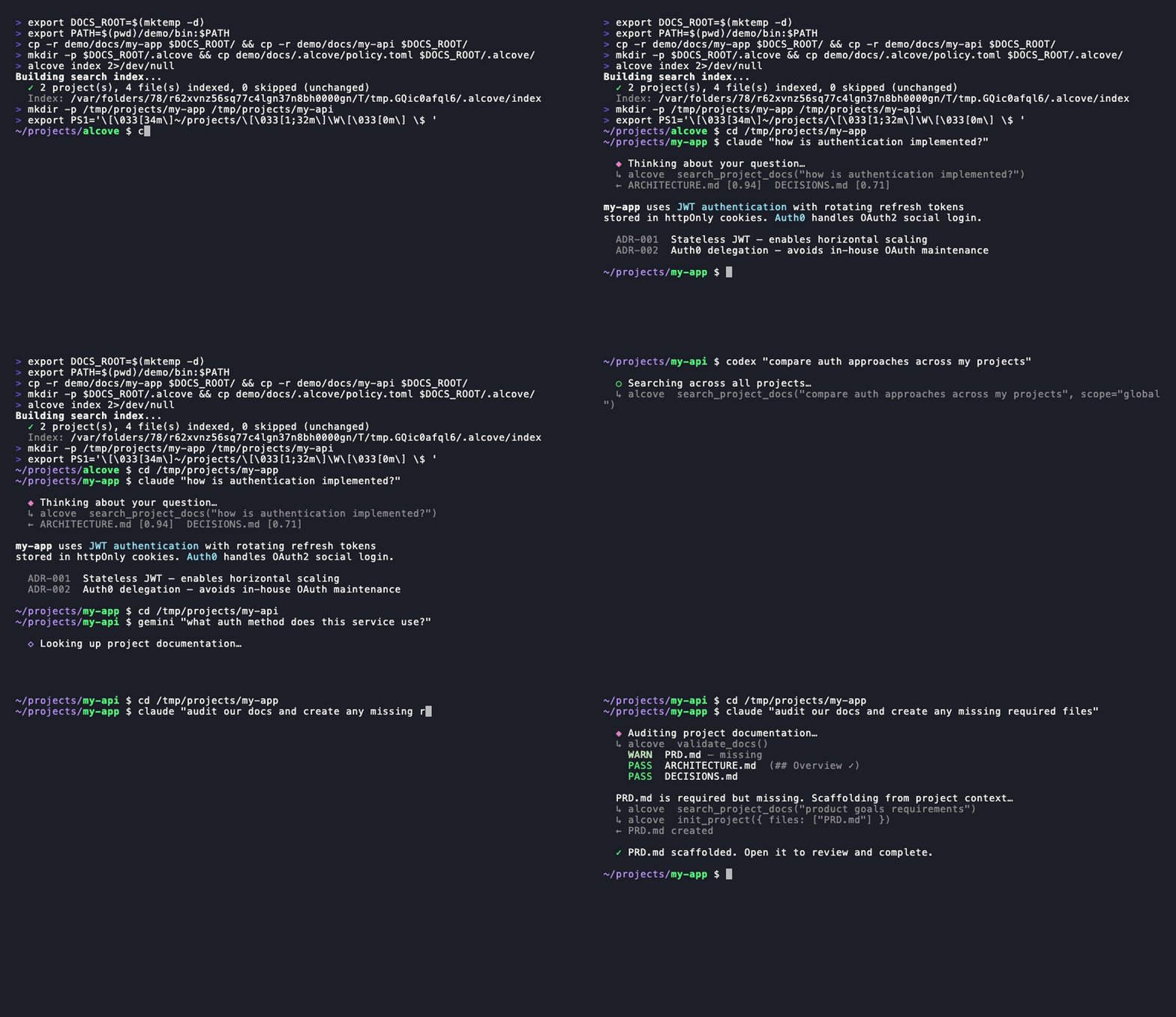
Claude, Codex — search · switch projects · global search · validate & generate. One setup.
CLI demo
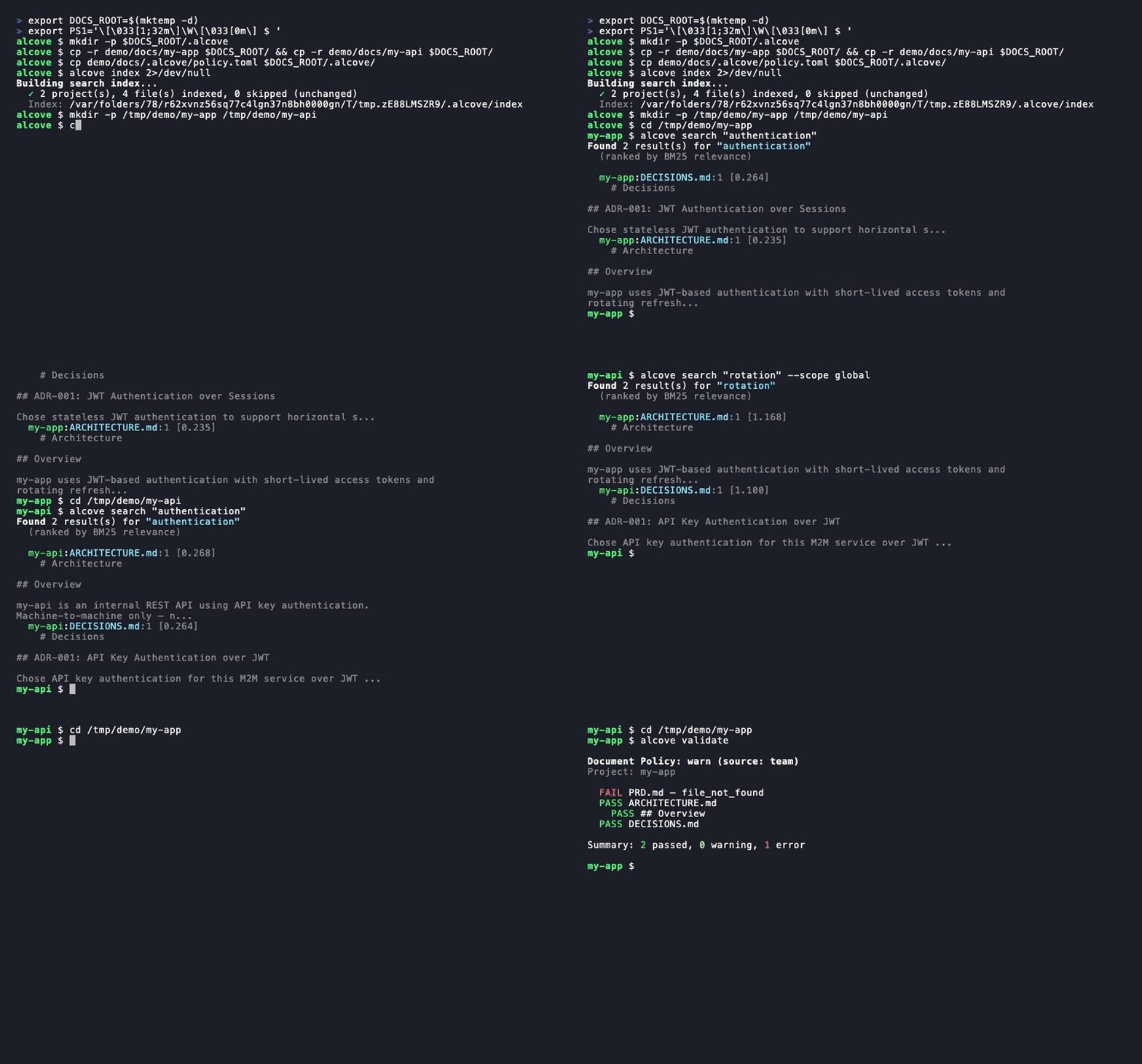
alcove search· project switch ·--scope global·alcove validate
The problem
Your AI agent starts every session from zero.
It doesn't know your architecture. It ignores constraints from decisions you already made. It asks you to explain the same things every session.
The context window is the bottleneck. Every token costs money and attention. Loading 10 architecture docs into context wastes 50K+ tokens on every run — and Anthropic's own docs warn that bloated config files make agents ignore your actual instructions.
So you have three bad options:
Stuff everything into agent config — every file loads into context on every run. 10 docs = context bloat = slower, more expensive, less accurate responses.
Copy-paste into every chat — works once, doesn't scale past one session.
Don't bother — your agent invents requirements you already documented, ignores constraints from decisions you already made, and you re-explain the same architecture every Monday morning.
Now multiply it across 5 projects and 3 agents. Every time you switch, you lose context.
How Alcove solves this
Alcove doesn't inject your docs. Agents search for what they need, when they need it.
Switch agents anytime. Switch projects anytime. The document layer stays standardized.
Why Alcove
Alcove gives your agents a memory that survives between sessions.
Agents don't load your docs into context. They search for what they need, when they need it. Architecture docs, design decisions, runbooks, constraints — all in one place, searchable, never in your public repo.
Agent config is for agent behavior. Alcove is for project knowledge.
| Without a doc layer | With Alcove |
|---|---|
| Docs in agent config bloat context on every run | Hybrid search (BM25 + RAG) — agents pull only what they need, ranked by relevance |
| Agent only sees text docs, not code structure | Tree-sitter code indexing — agents understand modules, functions, and types across 12 languages |
| Internal docs scattered across Notion, Google Docs, local files | One doc-repo, structured by project |
| Each AI agent configured separately for doc access | One setup, all agents share the same access |
| Switching projects means re-explaining context | CWD auto-detection, instant project switch |
| Agent search returns random matching lines | Ranked results — best matches first, one result per file |
| "Search all my notes about OAuth" — impossible | Global search across every project in one query |
| Sensitive docs sitting in project repos | Private docs on your machine, never in public repos |
| Doc structure differs per project and team member | policy.toml enforces standards across all projects |
| No way to check if docs are complete | validate catches missing files, empty templates, missing sections |
| Stale docs with broken links or WIP markers go unnoticed | lint detects broken links, orphans, and stale markers automatically |
| Notes from Obsidian or other tools stay siloed | promote brings any note into your doc-repo with one command |
Quick start
Required: Run
alcove setuponce after installation to configure your docs root and enable full functionality. Plugins start the API server automatically, but Alcove cannot search or index documents untilsetuphas been run.Using Obsidian? See the Ecosystem section for the docs structure and vault configuration.
Claude Code
Auto-installs the binary and starts the API server on next session start.
Updates with claude plugin update alcove@epicsagas.
Codex CLI
Auto-installs the skill and starts the API server. Available immediately — no further steps needed.
Updates with codex plugin update alcove@epicsagas.
macOS (Apple Silicon only)
No Homebrew? Use the installer script:
Linux (x86_64)
Windows (x86_64 / ARM64)
Pre-built Windows binaries are not currently published. Build from source:
Antigravity (Gemini CLI)
Auto-installs the plugin (API server, skill, hooks) and starts it on next session start.
Via Rust toolchain
Note:
cargo binstalldownloads a pre-built binary with hybrid search (vector + BM25) included. When building from source,--features full-macosor--features full-crossis required for hybrid search support. Without features, only BM25 (keyword) search is available.
First-time setup (required)
After installing via any method above, run:
setup walks you through everything interactively:
- Where your docs live
- Which document categories to track
- Preferred diagram format
- Embedding model for hybrid search
- Background server — eliminate cold-start on every session (macOS login item)
- Which AI agents to configure (skill files — Claude Code and Codex are handled by their plugin systems)
Re-run alcove setup anytime to change settings. It remembers your previous choices.
Optional dependencies
| Tool | Purpose | Install |
|---|---|---|
pdftotext (poppler) | Full PDF text extraction — required for PDF search | macOS: brew install poppler · Debian/Ubuntu: apt install poppler-utils · Fedora: dnf install poppler-utils · Windows: poppler for Windows |
Without pdftotext, Alcove falls back to a built-in PDF parser which may fail on some files. Run alcove doctor to check your setup.
Troubleshooting
Agent can't find Alcove tools
Run alcove setup again — it reconfigures the API server for all configured agents. Then start a new agent session (changes take effect on next session start).
Search returns no results
The index may not be built yet. Run alcove index to build it, then try again.
403 Unauthorized from background server
ALCOVE_TOKEN is not set in your shell. Run alcove token to print it, then add export ALCOVE_TOKEN="..." to your shell profile and reload.
alcove doctor reports issues
Follow the suggestions printed by doctor — it checks binary location, API server status, index state, and optional dependencies like pdftotext.
Usage
CLI Search
Search through your documents directly from the terminal. By default, it searches across all projects (global scope).
Coding Agents (HTTP API)
AI coding agents use Alcove through a local HTTP API. The URL and auth token are resolved once per session with alcove api env:
Agents can verify connectivity with the verify or rag status argument — it checks the daemon, resolves the URL, and calls /health automatically. You don't usually need to call these yourself; the agent will invoke them when you ask questions about your project.
| Endpoint | Method | Description |
|---|---|---|
/health | GET | Health check — verify the API server is running |
/search?q=... | GET | Search documentation (query parameter) |
/v1/search | POST | Search with JSON body (supports scope, limit, mode) |
/projects | GET | List all projects in the doc-repo |
/projects | POST | Initialize a new project from templates |
/projects/{name}/docs | GET | List docs for a project with sizes and classification |
/projects/{name}/audit | GET | Audit doc health (missing, outdated, misplaced) |
/projects/{name}/validate | GET | Validate docs against policy.toml |
/projects/{name}/config | PUT | Update project settings in alcove.toml |
/docs/{path} | GET | Read a specific doc file (query: project, offset, limit) |
/index | POST | Update search index (incremental, all projects) |
/projects/{name}/index | POST | Update search index (single project) |
/changes | GET | Check changed files since last index (query: auto_rebuild) |
/lint | GET | Lint docs — broken links, orphans, stale markers (query: project) |
/vaults | GET | List all knowledge base vaults |
/vaults/search?q=... | GET | Search vaults (query: vault, limit) |
/vaults/backup | POST | Git snapshot of vault state |
/promote | POST | Import a file into the doc-repo |
/index-code | POST | Index source code via tree-sitter |
/mcp | POST | JSON-RPC proxy for all 16 MCP tools (legacy) |
Note: MCP is still available — see
registry/mcp.jsonfor manual MCP setup if you prefer stdio-based access.
Example API calls:
Example agent interaction:
User: "/alcove How do I add a new API endpoint?" Agent: (calls
POST /v1/searchwithquery="add api endpoint") Agent: (reads the most relevant doc viaGET /docs/{path}?project=...) Agent: "According toARCHITECTURE.md, you need to..."
How it works
Your docs are organized in a separate directory (DOCS_ROOT), one folder per project. Alcove manages docs there and serves them to any AI agent over HTTP on port 58301.
API Endpoints
| Endpoint | Method | What it does |
|---|---|---|
/health | GET | Health check — verify the API server is running |
/search?q=... | GET | Search documentation (query parameter) |
/v1/search | POST | Search with JSON body (scope, limit, mode) |
/projects | GET | List all projects |
/projects | POST | Initialize a new project |
/projects/{name}/docs | GET | List docs for a project |
/projects/{name}/audit | GET | Audit doc health |
/projects/{name}/validate | GET | Validate docs against policy |
/projects/{name}/config | PUT | Update project settings |
/docs/{path} | GET | Read a doc file |
/rebuild | POST | Rebuild search index |
/changes | GET | Check changed files |
/lint | GET | Lint docs |
/vaults | GET | List vaults |
/vaults/search?q=... | GET | Search vaults |
/vaults/backup | POST | Backup vault |
/promote | POST | Import file into doc-repo |
/index-code | POST | Index code structure |
/mcp | POST | JSON-RPC proxy (legacy MCP) |
Note: MCP is still available for manual setup — see
registry/mcp.jsonfor stdio-based access.
CLI
Code Indexing
Parse source files with tree-sitter and generate CODE_INDEX.md — a module-level markdown summary of your codebase that integrates with the Tantivy search pipeline.
Supported languages:
| Language | Feature flag | File extensions |
|---|---|---|
| Rust | lang-rust | .rs |
| Python | lang-python | .py, .pyi |
| TypeScript | lang-typescript | .ts, .tsx |
| JavaScript | lang-javascript | .js, .jsx, .mjs |
| Go | lang-go | .go |
| Java | lang-java | .java |
| Kotlin | lang-kotlin | .kt, .kts |
| C | lang-c | .c, .h |
| C++ | lang-cpp | .cpp, .cc, .cxx, .hpp, .hxx, .h |
| Swift | lang-swift | .swift |
| Ruby | lang-ruby | .rb |
| C# | lang-csharp | .cs |
All 12 parsers are enabled in official binaries (lang-all feature). When no --language flag is given, all recognized extensions are indexed automatically — safe for monorepos.
The --language flag accepts both canonical names and common aliases: ts → TypeScript, cpp → C++, csharp → C#, py → Python, js → JavaScript, kt → Kotlin, rb → Ruby.
Lint
Lint checks four things:
| Check | What it catches |
|---|---|
broken-link | [[wikilinks]] and [text](https://github.com/epicsagas/alcove/blob/HEAD/path) pointing to missing files |
orphan | Files that no other document links to |
stale-marker | WIP / TODO / FIXME / DRAFT / DEPRECATED markers |
stale-date | Year mentions that are 2+ years old (e.g. "as of 2022") |
Promote
Files with no matching project land in inbox/ for manual review.
Benchmark
Measure and track search quality with built-in IR metrics and regression detection.
Isolated corpus mode (--corpus) uses a self-contained test dataset (19 synthetic documents, 25 queries) for fast, reproducible CI benchmarks — no real docs needed, completes in under 60 seconds.
| Metric | What it measures |
|---|---|
| Precision@K | Fraction of top-K results that are relevant |
| Recall@K | Fraction of relevant docs found in top-K |
| NDCG@K | Ranking quality with position discounting |
| MAP@K | Mean average precision across queries |
| MRR | Reciprocal rank of first relevant result |
| Chunk accuracy | Whether retrieved chunks fall within correct sections |
Regression thresholds: precision >5%, latency >20%, throughput >15%. Warnings at half the threshold.
Background Server
Running a persistent background server eliminates cold-start latency on every new agent session. alcove setup enables this by default (macOS login item).
When the background server is running, the stdio process acts as a thin proxy — forwarding requests to the warm server instead of loading the search engine each session. On startup, the stdio process checks GET /health and enters proxy mode automatically.
Note: MCP is still available for users who prefer stdio-based access. See
registry/mcp.jsonfor manual MCP configuration.
Search
Alcove automatically picks the best search strategy. When the search index exists, it uses BM25 ranked search (powered by tantivy) for relevance-scored results. When it doesn't, it falls back to grep. You never have to think about it.
Hybrid Search (RAG)
Alcove supports Hybrid Search which combines BM25 with Vector Similarity Search (powered by fastembed).
During alcove setup, you can choose an embedding model and download it immediately. You can also manage models manually:
Choosing a model
| Model | Disk | Dim | Context | Languages | Best for | Peak RAM |
|---|---|---|---|---|---|---|
ArcticEmbedXS (default) | 90 MB | 384 | 512 | Multilingual | Best default — size/quality | ~400 MB |
ArcticEmbedXSQ | 90 MB | 384 | 512 | Multilingual | Quantized, smaller download | ~400 MB |
MultilingualE5Small | 470 MB | 384 | 512 | 100+ langs | Best Korean/CJK support | ~1.2 GB |
BGEM3 | 600 MB | 1024 | 8192 | 100+ langs | Premium — Dense+Sparse+ColBERT | ~2 GB |
ArcticEmbedMLong | 430 MB | 768 | 8192 | Multilingual | Long documents | ~1.5 GB |
JinaEmbeddingsV2BaseCode | 550 MB | 768 | 8192 | Code+English | Code-optimized | ~1.5 GB |
The default model is ArcticEmbedXS (90 MB, multilingual). It offers the best balance of size and quality for most projects.
Embedding models are provided by fastembed-rs (ONNX Runtime) and run entirely locally. To use a different model, set it in config.toml:
For the full list of 40+ supported models with dimensions, context length, and language coverage, see EMBEDDING_MODELS.md.
Once a model is downloaded and ready, Alcove will automatically use Hybrid Search for both CLI search and agent-based MCP tools. This is particularly effective for multilingual projects and complex semantic queries.
The index builds automatically in the background when the API server starts, and rebuilds when it detects file changes. No cron jobs, no manual steps.
How it works for agents: agents just call search_project_docs with a query. Alcove handles the rest — ranking, deduplication (one result per file), cross-project search, and fallback. The agent never needs to choose a search mode.
Index lifecycle
Understanding when to run alcove index vs alcove rebuild:
| Command | What it does | When to use |
|---|---|---|
alcove index | Incremental update — only processes new/changed files | Default: run after adding or editing docs |
alcove rebuild | Full rebuild — drops and recreates all index data | After changing embedding models, or after index corruption |
First-time setup:
Switching models:
Memory during rebuild:
Peak RAM varies by model — see the "Peak RAM" column in the table above. Larger models (BGEM3, ArcticEmbedMLong) can use 1.5–2 GB during rebuild. After rebuild completes, steady-state drops to ~50–200 MB depending on your [memory] config. You can reduce steady-state further with lower max_hnsw_cache and shorter model_unload_secs.
Global search
Every architecture decision, every runbook, every project note — searchable across all your projects at once.
Agents can do the same with scope: "global" in search_project_docs. One query, every project.
Project detection
By default, Alcove detects the current project from your terminal's working directory (CWD). You can override this with the MCP_PROJECT_NAME environment variable:
This is useful when your CWD doesn't match a project name in your docs repo.
Document policy
Define team-wide documentation standards with policy.toml in your docs repo:
Policy files are resolved with priority: project (<project>/.alcove/policy.toml) > team (DOCS_ROOT/.alcove/policy.toml) > built-in default (from your config.toml core files). This ensures consistent doc quality across all your projects while allowing per-project overrides.
Document classification
Alcove classifies docs into tiers:
| Classification | Where it lives | Examples |
|---|---|---|
| doc-repo-required | Alcove (private) | PRD, Architecture, Decisions, Conventions |
| doc-repo-supplementary | Alcove (private) | Deployment, Onboarding, Testing, Runbook |
| reference | Alcove reports/ folder | Audit reports, benchmarks, analysis |
| project-repo | Your GitHub repo (public) | README, CHANGELOG, CONTRIBUTING, SECURITY, CODE_OF_CONDUCT, LICENSE, QUICKSTART |
The audit tool scans both your doc-repo and local project directory, then suggests actions — like generating a public README from your private PRD, or pulling misplaced reports back into Alcove.
Configuration
Config lives at ~/.config/alcove/config.toml:
All of this is set interactively via alcove setup. You can also edit the file directly.
Memory usage note: During initial indexing or a full rebuild, Alcove loads the embedding model (~235–500 MB) and holds all document vectors in RAM while constructing the HNSW graph — peak usage scales with corpus size and is unavoidable for that operation. The [memory] settings above control steady-state RAM after indexing is complete.
File lists are fully customizable — add any filename to any category, or move files between categories to match your team's workflow:
Supported agents
| Agent | Access | Skill |
|---|---|---|
| Claude Code | ~/.claude.json | ~/.claude/skills/alcove/ |
| Cursor | ~/.cursor/mcp.json | ~/.cursor/skills/alcove/ |
| Claude Desktop | platform config | — |
| Cline (VS Code) | VS Code globalStorage | ~/.cline/skills/alcove/ |
| OpenCode | ~/.config/opencode/opencode.json | ~/.opencode/skills/alcove/ |
| Codex CLI | ~/.codex/config.toml | ~/.codex/skills/alcove/ |
| Copilot CLI | ~/.copilot/mcp-config.json | ~/.copilot/skills/alcove/ |
| Antigravity | agy plugins install | — |
Supported languages
The CLI automatically detects your system locale. You can also override it with the ALCOVE_LANG environment variable.
| Language | Code |
|---|---|
| English | en |
| 한국어 | ko |
| 简体中文 | zh-CN |
| 日本語 | ja |
| Español | es |
| हिन्दी | hi |
| Português (Brasil) | pt-BR |
| Deutsch | de |
| Français | fr |
| Русский | ru |
Updating
| Method | Command |
|---|---|
| Homebrew | brew upgrade alcove |
| curl installer | Re-run the install script above |
| cargo binstall | cargo binstall alcove@latest |
| cargo install | cargo install alcove@latest --features full-macos |
| Claude Code Plugin | claude plugin update epicsagas/alcove |
Uninstall
Knowledge Base Vaults
Beyond project documentation, Alcove supports independent knowledge base vaults for research notes, reference materials, and curated knowledge that LLMs can search.
Vaults are completely isolated from project docs — separate indexes, separate caches, separate search. Your coding agent's project doc search is never affected by vault activity.
| Feature | Project docs | Vaults |
|---|---|---|
| Purpose | Per-project documentation | General knowledge base |
| Storage | ~/.alcove/docs/ | ~/.alcove/vaults/ |
| Index | Shared project index | Independent per-vault index |
| Cache | PROJECT_READER_CACHE | VAULT_READER_CACHE |
| Search | search_project_docs | search_vault |
| Symlink | No | Yes (link external dirs) |
Vault Configuration
By default, vaults are stored in ~/.alcove/vaults/. You can change this in your config.toml:
Refer to the Configuration section for more details on config.toml.
Ecosystem
obsidian-forge
Alcove pairs naturally with obsidian-forge, an Obsidian vault generator and automation daemon. For the best integration, your alcove docs_root should point to the obsidian-forge project archives.
1. Set Documents Root Point your primary docs to the obsidian-forge project directory (directly or via symlink):
2. Link Knowledge Areas as Vaults
Link the other three obsidian-forge categories as independent alcove vaults. This creates symlinks in ~/.alcove/vaults/:
Now your agents have structured access:
search_project_docs: Searches archived project knowledge (PRDs, etc.)search_vault: Searches your broader knowledge areas and research notes.
You can verify the physical storage mapping by checking the symlinks in ~/.alcove/vaults/.
FAQ
Why not just use ripgrep as an MCP tool?
Ripgrep returns entire files. If your agent searches for "auth" and hits 5 files averaging 200 lines each, that's ~10K tokens injected into context — most of it irrelevant. Alcove chunks documents, ranks the chunks, and returns only the most relevant passages. It also provides semantic search (vector embeddings) that ripgrep cannot — a query like "how is the deployment pipeline structured" won't match any keyword in your DEPLOYMENT.md, but Alcove's vector search will find it.
Does this replace CLAUDE.md / AGENTS.md?
No — they serve different purposes. Agent config files (CLAUDE.md, AGENTS.md) define behavioral rules: commit style, language preferences, safety constraints. Alcove manages institutional knowledge: architecture decisions, progress tracking, coding conventions, code structure. Agent config is for how the agent should act. Alcove is for what the agent should know.
Why Rust?
Single binary, no runtime dependency. Tantivy is best-in-class BM25. fastembed (ONNX Runtime) gives us local vector embeddings without Python. One cargo install or curl — no Docker, no Node.js, no virtualenv.
What about context windows getting bigger?
Bigger windows don't solve the relevance problem. Even a 200K-token window filled with irrelevant docs degrades agent output quality — Anthropic's own documentation warns that bloated config files cause agents to ignore actual instructions. The goal isn't more context, it's the right context at the right time.
Roadmap
- Multi-user remote access — team doc sharing over LAN/VPN (bearer token auth, rate limiting already implemented). Requires: write API, concurrent index coordination, project lifecycle management.
Contributing
Bug reports, feature requests, and pull requests are welcome. Please open an issue on GitHub to start a discussion.
Acknowledgments
The temporal validity model (valid_until / last_verified with query-time expiry exclusion) was informed by the lifecycle schema of Data Olympus by @ajdelaguila (discussion in #37).
License
Apache-2.0