developer-toolsprivate-docssearchcode-indexing
Search private project docs and indexed code with BM25 and vector hybrid retrieval for AI coding agents.
Quick Install
Automated & IDE SetupCopy the AI prompt to install this server into Claude Code, Cursor, or another agent — or use 1-click editor setup below.
One-click editor setup isn’t available for this listing yet — we don’t have a confirmed install command, and we’d rather show nothing than point your editor at the wrong package or host. Follow the project’s own setup instructions, linked above.
Manual Client & Custom JSON ConfigExpand JSON ▾
No confirmed setup config for this listing yet. We only publish a config block when the install details come from the project itself — its README, its docs, or a verified owner. We haven’t found those for epicsagas/alcove, and we’d rather show nothing than a guess you’d paste into your client. Follow the project’s own setup instructions for the current steps.
Overview
Use cases
Search architecture and design decision documents
Retrieve relevant project context during coding sessions
Index code structure for agent-assisted development
Switch between projects without per-agent configuration
Validate project documentation consistency
Key features
BM25 and vector hybrid search
Tree-sitter code indexing
Private project document storage
Project switching and global search
Policy enforcement for document consistency
HTTP API server and CLI access
Capabilities & Tool Schemas
Inspect callable tools, capabilities, and parameters exposed to AI agents by Alcove.
Extracted Tool Capabilities
BM25 and vector hybrid search
Tree-sitter code indexing
Private project document storage
Project switching and global search
Policy enforcement for document consistency
HTTP API server and CLI access
Documentation Overview
Your AI agent doesn't know your project. Alcove fixes that.
English · 한국어 · 日本語 · 简体中文 · Español · हिन्दी · Português · Deutsch · Français · Русский







Alcove is an HTTP API server that gives AI coding agents on-demand access to your private project docs — BM25 + vector hybrid search for precision retrieval, tree-sitter code indexing so agents understand your codebase structure, and policy enforcement for doc consistency. No context bloat, no leaking docs into public repos, no per-project config for every agent.
Demo
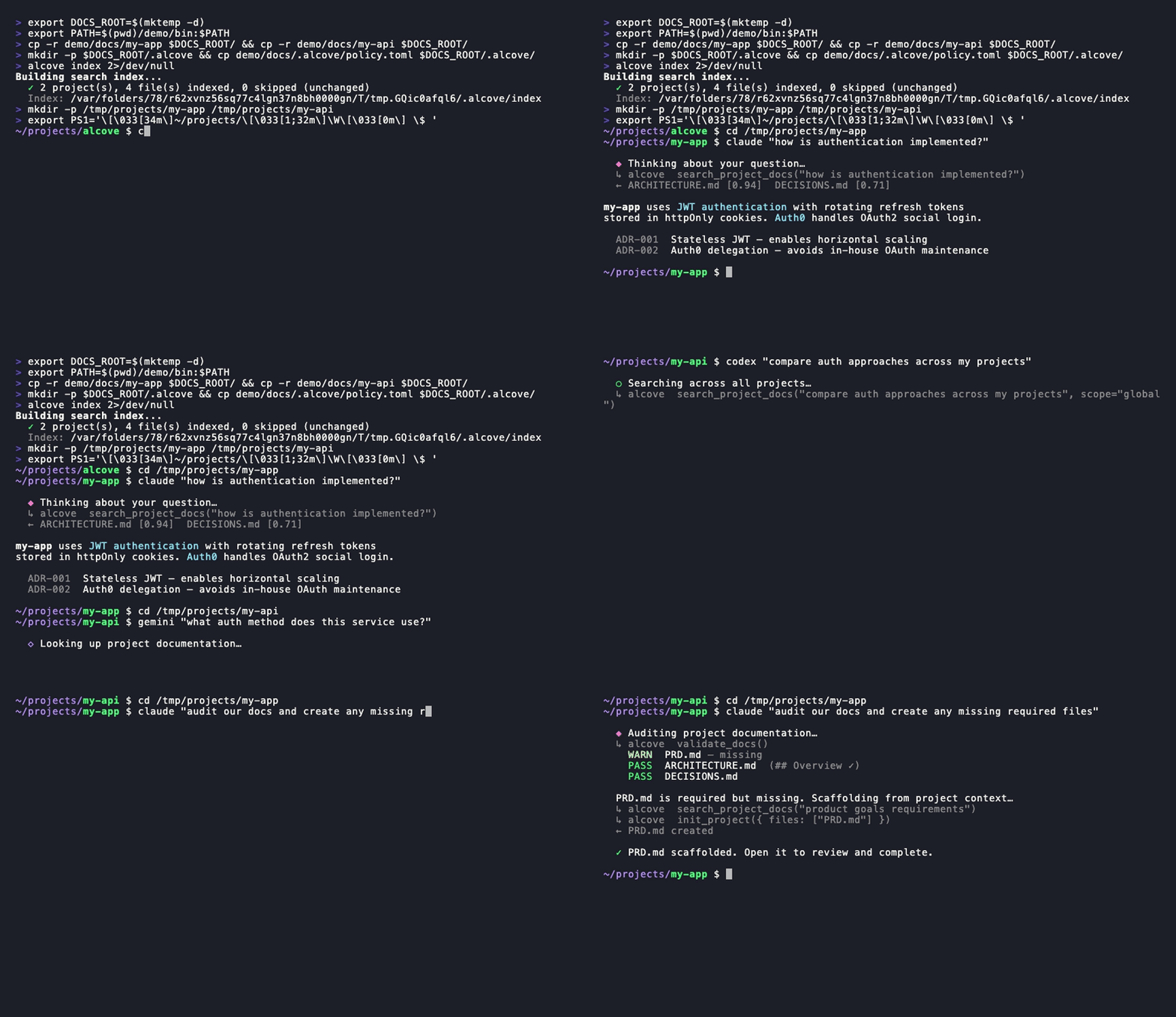
Claude, Codex — search · switch projects · global search · validate & generate. One setup.
CLI demo
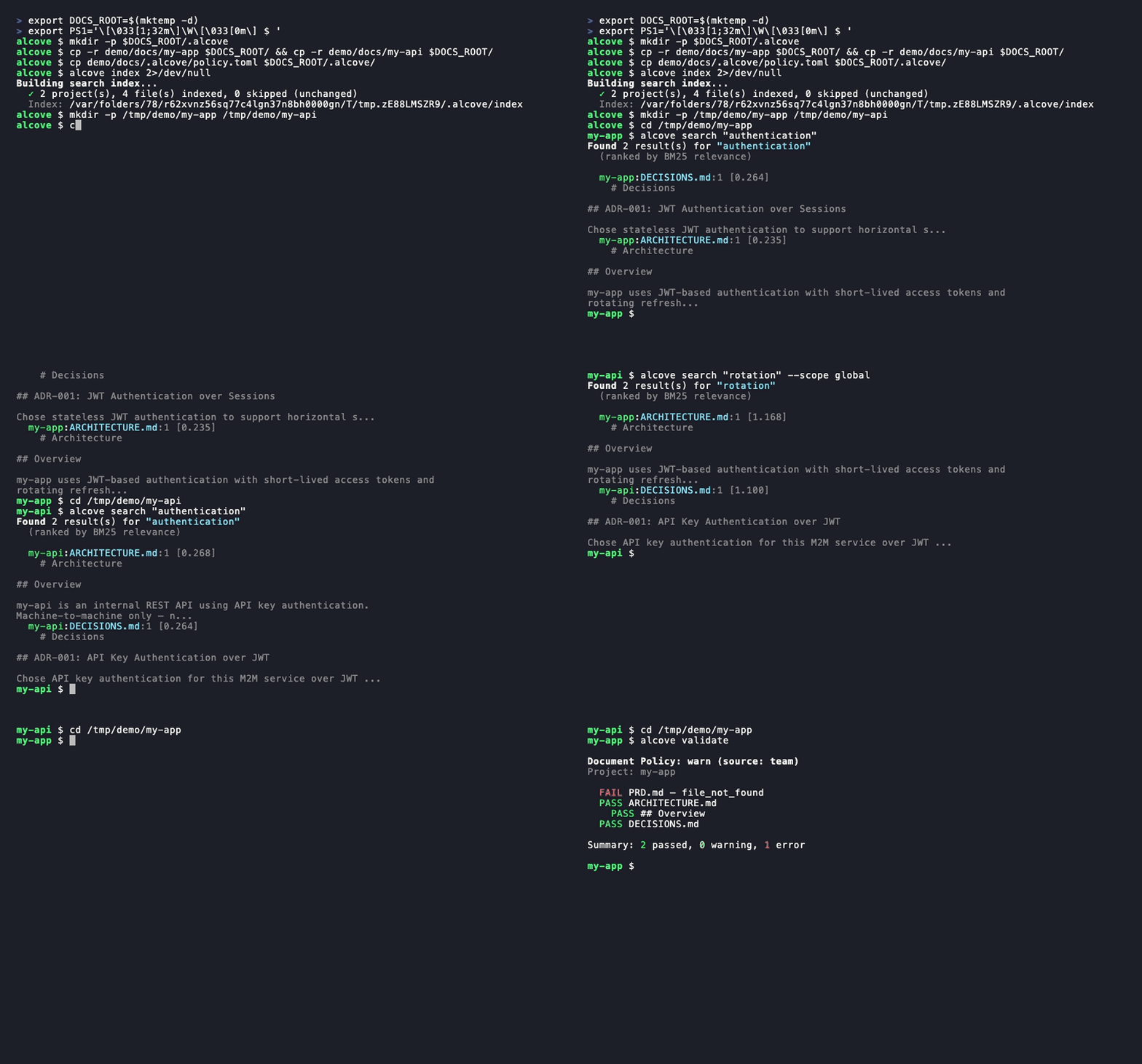
alcove search· project switch ·--scope global·alcove validate
The problem
Your AI agent starts every session from zero.
It doesn't know your architecture. It ignores constraints from decisions you already made. It asks you to explain the same things every session.
The context window is the bottleneck. Every token costs money and attention. Loading 10 architecture docs into context wastes 50K+ tokens on every run — and Anthropic's own docs warn that bloated config files make agents ignore your actual instructions.
So you have three bad options:
Stuff everything into agent config — every file loads into context on every run. 10 docs = context bloat = slower, more expensive, less accurate responses.
Copy-paste into every chat — works once, doesn't scale past one session.
Don't bother — your agent invents requirements you already documented, ignores constraints from decisions you already made, and you re-explain the same architecture every Monday morning.
Now multiply it across 5 projects and 3 agents. Every time you switch, you lose context.
How Alcove solves this
Alcove doesn't inject your docs. Agents search for what they need, when they need it.
Switch agents anytime. Switch projects anytime. The document layer stays standardized.
Why Alcove
Alcove gives your agents a memory that survives between sessions.
Agents don't load your docs into context. They search for what they need, when they need it. Architecture docs, design decisions, runbooks, constraints — all in one place, searchable, never in your public repo.
Agent config is for agent behavior. Alcove is for project knowledge.
| Without a doc layer | With Alcove |
|---|---|
| Docs in agent config bloat context on every run | Hybrid search (BM25 + RAG) — agents pull only what they need, ranked by relevance |
| Agent only sees text docs, not code structure | Tree-sitter code indexing — agents understand modules, functions, and types across 12 languages |
| Internal docs scattered across Notion, Google Docs, local files | One doc-repo, structured by project |
| Each AI agent configured separately for doc access | One setup, all agents share the same access |
| Switching projects means re-explaining context | CWD auto-detection, instant project switch |
| Agent search returns random matching lines | Ranked results — best matches first, one result per file |
| "Search all my notes about OAuth" — impossible | Global search across every project in one query |
| Sensitive docs sitting in project repos | Private docs on your machine, never in public repos |
| Doc structure differs per project and team member | policy.toml enforces standards across all projects |
| No way to check if docs are complete | validate catches missing files, empty templates, missing sections |
| Stale docs with broken links or WIP markers go unnoticed | lint detects broken links, orphans, and stale markers automatically |
| Notes from Obsidian or other tools stay siloed | promote brings any note into your doc-repo with one command |
Quick start
Required: Run
alcove setuponce after installation to configure your docs root and enable full functionality. Plugins start the API server automatically, but Alcove cannot search or index documents untilsetuphas been run.Using Obsidian? See the Ecosystem section for the docs structure and vault configuration.
Claude Code
Auto-installs the binary and starts the API server on next session start.
Updates with claude plugin update alcove@epicsagas.
Codex CLI
Auto-installs the skill and starts the API server. Available immediately — no further steps needed.
Updates with codex plugin update alcove@epicsagas.
macOS (Apple Silicon only)
No Homebrew? Use the installer script:
Linux (x86_64)
Windows (x86_64 / ARM64)
Pre-built Windows binaries are not currently published. Build from source:
Antigravity (Gemini CLI)
Auto-installs the plugin (API server, skill, hooks) and starts it on next session start.
Via Rust toolchain
Note:
cargo binstalldownloads a pre-built binary with hybrid search (vector + BM25) included. When building from source,--features full-macosor--features full-crossis required for hybrid search support. Without features, only BM25 (keyword) search is available.
First-time setup (required)
After installing via any method above, run:
setup walks you through everything interactively:
- Where your docs live
- Which document categories to track
- Preferred diagram format
- Embedding model for hybrid search
- Background server — eliminate cold-start on every session (macOS login item)
- Which AI agents to configure (skill files — Claude Code and Codex are handled by their plugin systems)
Re-run alcove setup anytime to change settings. It remembers your previous choices.
Optional dependencies
Related MCP Servers
Adoption & maintenance
Factual signals from GitHub, npm, and our automated checks — not a rating.
GitHub stars
15
Stargazers on the source repository.
Last commit
2mo ago
Most recent push to the default branch.
Directory activity
1 views
Config copies, upvotes, and views on AllMCPs.
Reviews
No reviews yet — be the first to share how this listing worked for you.
Frequently Asked Questions about Alcove
AllMCPs Directory Badge
Showcase your server listing on GitHub or your project documentation. Embed this dynamic SVG badge to highlight official listing status and live engagement.
Badge Style:
Live Dynamic SVG Preview
Markdown (GitHub README)
[](https://allmcps.com/mcp/epicsagas-alcove)HTML Embed
<a href="https://allmcps.com/mcp/epicsagas-alcove"><img src="https://allmcps.com/api/badge/epicsagas-alcove?style=directory" alt="Alcove on AllMCPs" /></a>Technical Specs & Signals
CategoryKnowledge & Memory
PricingFree
45Quality signal: Fair · 45/100How this signal is calculated ▾
Server availabilityNot measured
Not scored for repo-hosted servers — we can't reach the running server, only its GitHub page. Hosted MCP endpoints are health-checked live.
Verified ownership10/20
Documentation & tools19/30
Adoption & activity5/15
Community engagement0/10
A guidance signal from public completeness & health data — not a user rating. New listings start lower and rise as they add docs, get verified, and grow adoption. Signals we can't observe for a listing are skipped, not counted against it.
Own this project?
This directory is pre-filled from public sources. Claim via GitHub README, site badge, or DNS TXT to unlock edit access and the Official badge — proof is checked automatically, then reviewed by our team.
Free dofollow backlink: add your website and place the AllMCPs badge on it — no claim needed. We detect it automatically and keep it verified as long as the badge stays live.
Claim & get free dofollowShare & Embed
Add our SVG badge (dark/light directory styles) or embeddable widget to your site.