Embedded / IoT Mentor — a Claude Skill



A skill for Claude that acts as an experienced embedded-systems mentor: it picks the microcontroller, board, and toolchain for your project, estimates what it will cost and how long it will take, and hands you a build plan that stops at a working breadboard instead of a production line you didn't ask for.
Most embedded advice fails in one of two directions — a parts list with no plan, or a production roadmap for someone who hasn't blinked an LED yet. This skill asks what you've actually built before, then answers at that level.
Try it
| Where | One click |
|---|---|
| Your browser | iotmentor.dev — a web app by the same author, built on the same principles but with its own code. Nothing to install |
| Claude | Download embedded-iot-mentor.skill and open it |
| VS Code (Copilot Chat) | Copy vscode-copilot/'s prompt in — nothing to install |
| Your own code |  then call the REST API — routes then call the REST API — routes |
| Any other AI chat | Copy universal-prompt.md into the first message — no install, works in ChatGPT, Gemini, Copilot, and others |
Prefer a page over a chat? docs/index.html is a static overview with the
same "Try it" links and demo — live at
mh-mansouri.github.io/embedded-iot-mentor,
or open the file locally, no server needed.
Everything below is the longer way round: build it yourself, change it, or read why it answers the way it does.
Demo
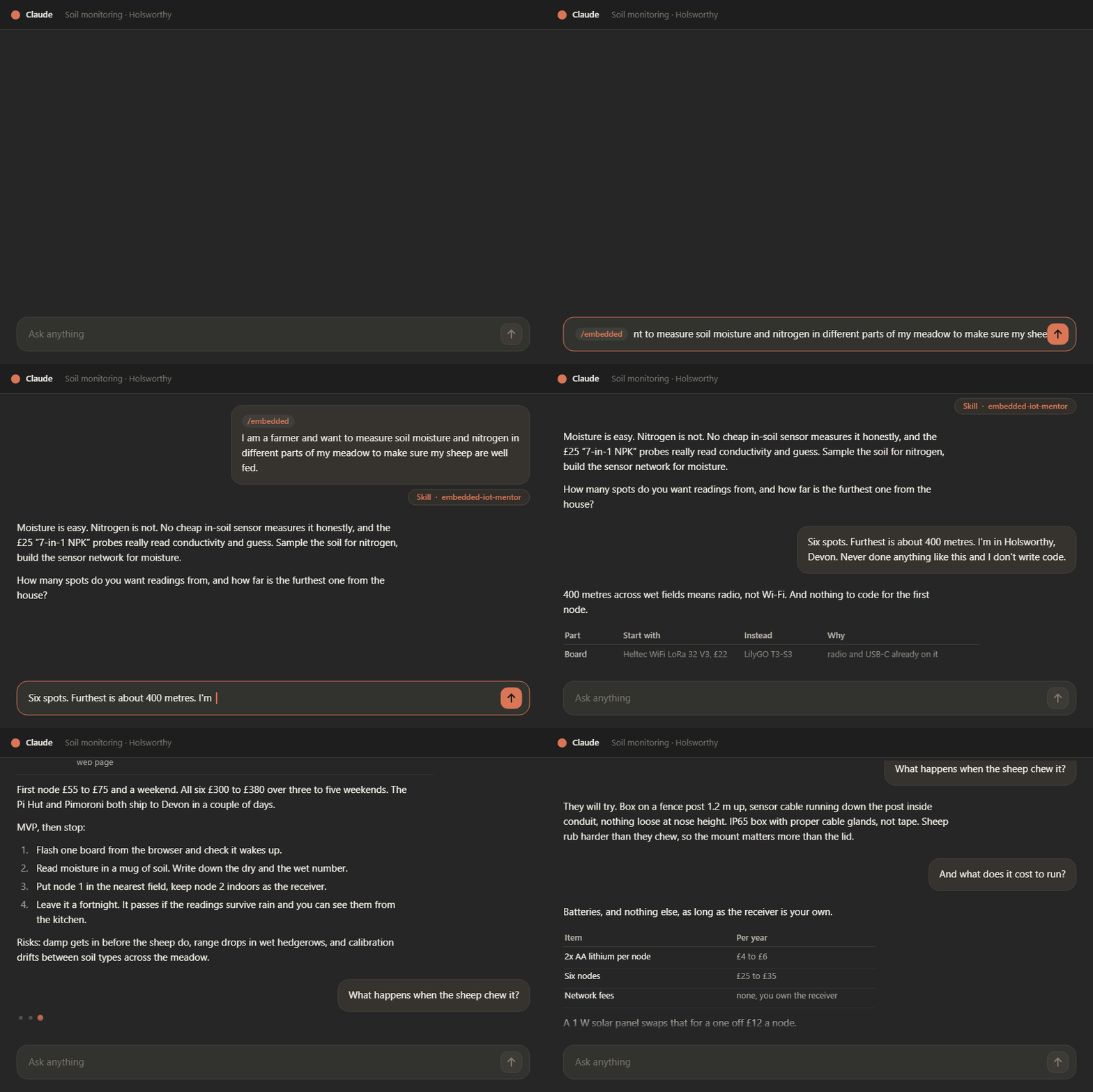
A sheep farmer in Devon, with no coding experience, requests six sensing points, and the furthest sensing point is around 400 m away from the house. All of those are below the minimum cost for such a project. Worth watching for what the skill doesn't suggest: It opens by refusing half the request - no cheap probe measures soil nitrogen honestly - then lets three constraints do the choosing. The 400 meters away from home picks radio over Wi-Fi, "I don't write code" picks ready-made firmware over a toolchain, and a wet meadow picks the enclosure. The board is the last thing decided, not the first. The full transcript is Scenario D.
What it does
- Picks a platform — ESP32, Pico, STM32, nRF52 — and says plainly why that one, plus one or two alternatives and when each would win instead.
- Separates the hardware path from the firmware path, so you know what to buy and what to install without conflating them.
- Checks whether you need to write firmware at all. If ESPHome, Meshtastic or Tasmota already does the job, that's the answer — writing code is a cost, not a deliverable.
- Takes the reading all the way to a person — Home Assistant, a page the device serves itself, a hosted dashboard, or just an alert. "On my phone" in the kitchen and "on my phone" from work are two different builds, and it says so before you pick one.
- Estimates time and cost as ranges, and flags what actually drives them — including what the thing costs to run, once it's six nodes eating batteries in a field.
- Says what a sensor really measures. Cheap "NPK" probes read conductivity and guess; you get told that before you buy six of them, not after.
- Plans to MVP and stops there. Engineering prototype, pre-production, and production phases exist, but you only get them when you ask.
- Names the risks — power budget, part availability, no debug path, certification, the learning curve on whatever it just recommended.
- Rejects its own suggestions against a fixed bar: no maintained library, single-supplier part, a package you can't solder, no serial console — it drops the candidate and picks again.
Why it exists
The failure modes it's built to catch:
- A beginner pointed at an STM32 with an ST-Link because a forum said it was "more professional" — three evenings lost to toolchain setup before the first LED.
- A battery project designed around a dev board whose regulator idles at 20 mA, so the "two month" runtime is really four days. The board was never the problem; nobody costed the sleep current.
- A first PCB ordered with 0402 passives and a QFN, hand-assembled with a soldering iron, and dead on arrival with no test points to find out why.
- Six sensors deployed in a field in indoor boxes, sealed with tape instead of cable glands, condensing on their own PCBs by the second week.
Install
Option A — one file. Download embedded-iot-mentor.skill from the
latest release (or
straight from the repository), then in claude.ai:
-
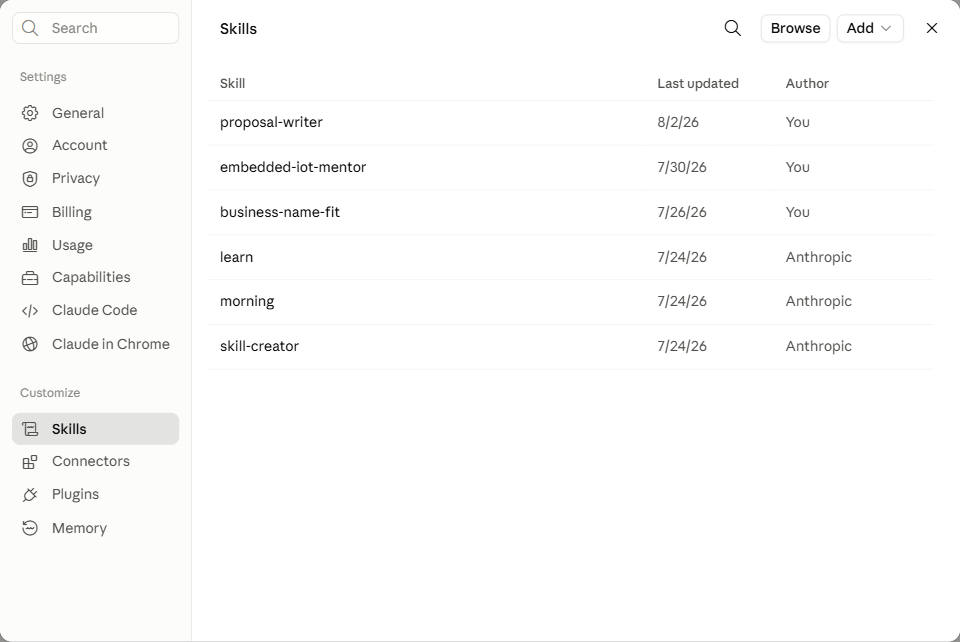
Click your name in the bottom-left corner, choose Settings, then open the Skills page under Customize:
-
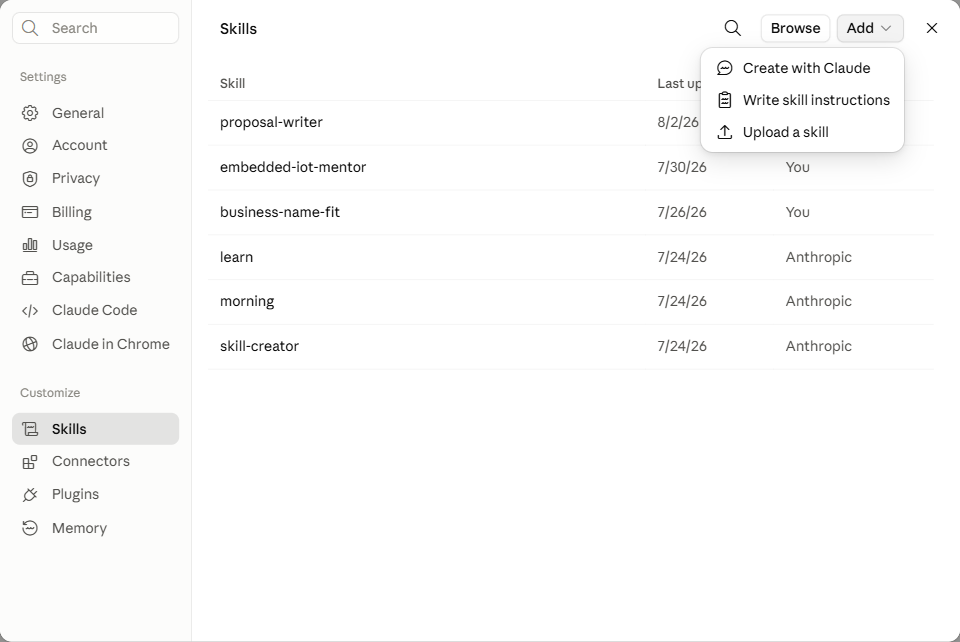
Click Add, then Upload a skill:
-
Drag the downloaded
embedded-iot-mentor.skillfile onto the upload box (or click it to browse):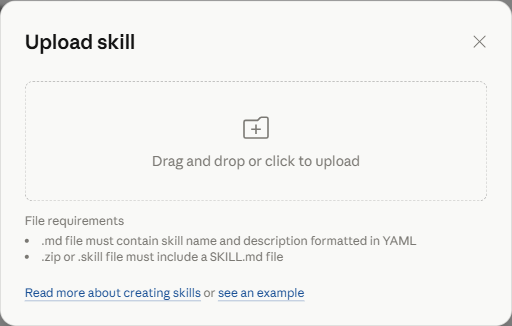
(Skill saving must be enabled for your account or organization.)
Option B — Claude Code. Unpack it into your skills directory:
python package_skill.py --install                                     # for your user
python package_skill.py --install --skills-dir <repo>/.claude/skills  # for one project
Or install a bundle you already have, with no copy of this repo:
python package_skill.py --install-from embedded-iot-mentor.skill
Or by hand — a .skill is just a zip:
mkdir -p ~/.claude/skills && unzip embedded-iot-mentor.skill -d ~/.claude/skills/
# Windows: Expand-Archive refuses any extension but .zip, so rename a copy first
New-Item -ItemType Directory -Force "$HOME\.claude\skills" | Out-Null
Copy-Item embedded-iot-mentor.skill "$env:TEMP\embedded-iot-mentor.zip"
Expand-Archive "$env:TEMP\embedded-iot-mentor.zip" -DestinationPath "$HOME\.claude\skills" -Force
Claude Code picks it up on the next session — /skills lists it, and Claude also loads it on
its own when a conversation matches the description.
Use it
Just describe the project. For example:
I want to log soil moisture in a greenhouse and see it on my phone. I've done a couple of Arduino sketches. Budget maybe €100, and I'd like it running in a month.
or
Which board for a battery sensor that has to last a year on a coin cell? I've shipped firmware before, so don't dumb it down.
or
I have an ESP32 and a BME280 sitting in a drawer. What's worth building with them?
or, the one in the demo above:
I am a farmer and want to measure soil moisture and nitrogen in different parts of my meadow to make sure my sheep are well fed.
It will ask a couple of short questions if the goal, experience level, power source, environment, or timeline are still unclear — then answer in tables rather than essays. A whole project plan is meant to fit on one screen; if you want the reasoning behind a pick, ask for it.
Elsewhere: VS Code and the REST API
The mentor is judgement written down, not a Claude feature, so it ports. Every port keeps the behaviour that matters — MVP first, hardware and firmware kept apart, ready-made firmware ahead of code to be written, the reject bar, and the hand-off on safety-critical, vehicle, and privacy questions.
| Route | What you do | Worth it when |
|---|---|---|
vscode-copilot/ | Copy one file to .github/copilot-instructions.md, or paste it into Copilot Chat | Always start here in VS Code — nothing to install |
api/ | Deploy the REST API — one click on Render — and call it from your own code | The caller is a script or a service, not a person in a chat window |
What the two carry differs. The Copilot port is judgement only — no reference files, no scripts, so a real battery runtime or a BOM total is still the skill's job. The REST API reads both straight out of the skill folder, so it can never fall behind a change made here.
Good to know
- Prices and stock go stale. Estimates are ranges, not quotes. Check LCSC, Digi-Key, or your local supplier before ordering.
- It cannot verify part availability in your country, and that is the most common reason a good plan stalls.
- It stops at MVP by design. Ask explicitly for the later phases.
- Not for safety-critical work. It will help you to a prototype for medical, automotive, or safety systems, then tell you plainly where hobbyist advice ends.
Layout
The skill itself lives in embedded-iot-mentor/. Everything at the repository root is
packaging and project metadata that the skill never reads.
| Path | What it is |
|---|---|
embedded-iot-mentor/SKILL.md | The instructions Claude follows. Most changes go here. |
embedded-iot-mentor/references/ | Detail read on a trigger: MCU selection, connectivity, where the data is seen, cost estimation, PCB checklist, power/battery, field deployment, OTA, EMC, safety boundary, learning resources. |
embedded-iot-mentor/scripts/ | Small deterministic helpers, run only when a concrete number is asked for. |
embedded-iot-mentor/examples/ | Worked scenarios showing the shape a reply should take when a request doesn't fit the standard mould. |
embedded-iot-mentor.skill | Generated. A zip of the folder above — don't edit by hand. |
package_skill.py | Builds, verifies, and installs the bundle. |
embedded-iot-mentor-demo.gif | The recording shown at the top. Not bundled — the packer only takes the skill folder. |
universal-prompt.md | The same mentor as a copy-paste prompt, for any AI chat that isn't Claude. |
assets/install-steps/ | Screenshots for the Claude Skill upload walkthrough in Install, above. |
docs/index.html | Static landing page for GitHub Pages — the "Try it" links and the demo, no chat needed. |
create_skill_demo_gif.py | Generates a mock-up demo GIF (assets/skill-demo-mockup.gif) from a scripted scenario, for when a real recording isn't available. |
scripts/check_links.py | Checks that every README, landing-page, CONTRIBUTING.md, and distribution link still resolves. Run by check-links.yml on push, PR, and weekly. |
vscode-copilot/ | The Copilot port — the paste-in prompt and example queries. |
api/ | The REST API — reads the reference library from the skill folder and shells out to its scripts. |
api/instructions.md | The mentor's rules condensed to a self-contained prompt, for POST /chat and GET /instructions. Mirror a behaviour change here if you make one in SKILL.md. |
render.yaml | Blueprint behind the one-click deploy of the API. Has to sit at the root for Render to find it. |
.github/DISTRIBUTION.md | Where the project is listed and how to list it — the steps that need a login rather than a workflow. |
Keeping the skill in its own folder matters: the spec requires a skill's name to match its
folder name, so building it straight from the repository root would break the moment someone
downloaded the repo as a ZIP and got embedded-iot-mentor-main/.
Build
python package_skill.py          # -> ./embedded-iot-mentor.skill
python package_skill.py --check  # validate source + bundle, build nothing
A .skill file is a zip archive holding the skill folder — the format is defined by the
Agent Skills specification. The packer bundles
everything under embedded-iot-mentor/, so a new reference file is picked up automatically
with no build-script edit. Text files are stored with LF and zip timestamps are pinned, so
the bundle is byte-identical whoever builds it.
--check is the gate, and CI runs it on every push and pull request. It fails when:
- the frontmatter breaks a spec constraint (
namepattern/length, folder match,descriptionlength); SKILL.mdpoints at areferences/…orscripts/…file that doesn't exist;- the committed
.skilldoesn't match the source folder.
That last one matters because the bundle is committed: edit the skill, forget to rebuild, and the download would ship a different version than the source folder.
Scripts
python embedded-iot-mentor/scripts/cost_estimator.py 1 4.50 "ESP32 DevKit" 10 0.12 "10k resistor"
python embedded-iot-mentor/scripts/footprint_hint.py 0603
python embedded-iot-mentor/scripts/sleep_budget.py --capacity 2000 --active-ma 80 \
    --active-ms 250 --sleep-ua 15 --interval-s 600
sleep_budget.py takes duty-cycle inputs rather than an average current, because the
average is the number nobody knows up front. Same firmware, same battery, sleep current
changed from 15 µA to a dev board's 8 mA regulator: 3.8 years becomes 8.3 days.
More skills like this
- Project Planning & Journaling — scopes a project before any code is written, then keeps a living, resumable documentation journal with a weekly routine review.
- Business Name Fit — picks or checks a business/brand name that's authentic to your origin and lands well in the markets you're selling into.
Contributing
Improvements are welcome — especially hands-on knowledge about parts, suppliers, and what actually goes wrong on a bench. See CONTRIBUTING.md.
License
Released under the MIT License — free to use, share, and build on.