English | 简体中文 | Русский | Español
 EasyEDA Copilot
MCP-based engineering automation for native EasyEDA Pro and JLCEDA documents.
EasyEDA Copilot connects MCP-capable AI agents to real schematic and PCB data. It supports schematic generation and reorganization, component resolution, constraint-driven PCB placement, checkpoint-backed routing transactions, structured design inspection, recovery, and native EasyEDA DRC.



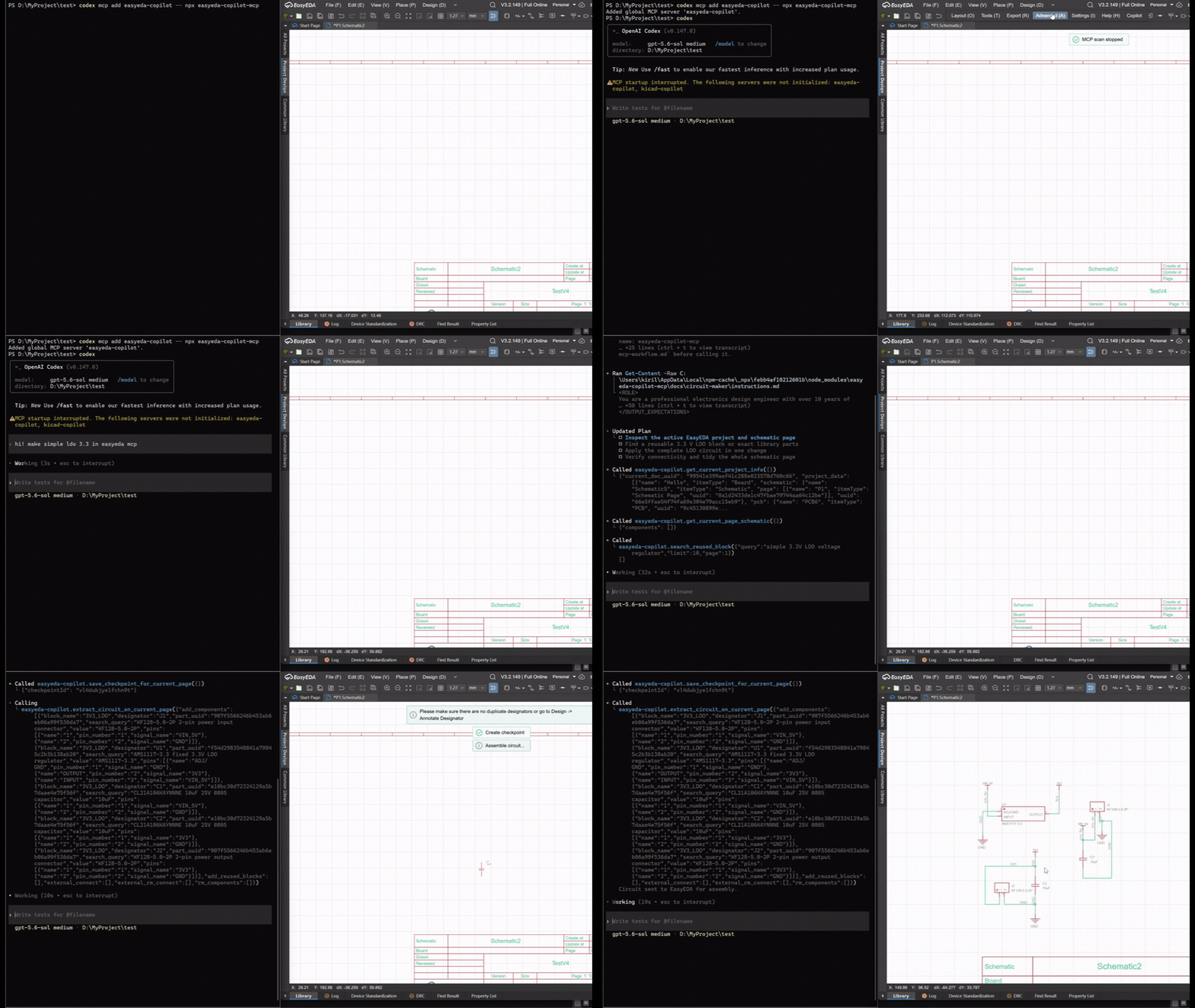
Creating and assembling an LDO schematic from a text specification.
Featured demonstration: BGA2869 2 GHz RF amplifier
A complete RF design workflow inside EasyEDA Pro: schematic organization, pin-level signal-path constraints, compact component placement, PCB routing, ground planes, and via stitching.
The RF ports are positioned on opposite board edges, the amplifier chain is kept ordered, and the bias network is placed close to the MMIC. The resulting components, tracks, vias, and copper zones remain editable as native EasyEDA objects.
More demonstrations
These examples cover larger controller boards and existing-document workflows. Every result remains editable as a normal EasyEDA project rather than being exported as a rendered mockup.
ESP32-C3 controller
A complete ESP32-C3 controller with power conversion, USB, CAN, RS-485, protected field I/O, external connectors, and antenna placement constraints.
The workflow demonstrates multi-page schematic generation, functional placement, board-edge and antenna constraints, power and signal routing, copper planes, via stitching, inspection, and DRC-driven repair.
MIMXRT1011 controller
A dense four-layer microcontroller design demonstrating placement and routing around a high-pin-count MCU, multiple interfaces, decoupling groups, board-edge connectors, mounting holes, and mechanical access constraints.
Schematic beautification
EasyEDA Copilot reads an existing schematic, identifies functional groups, saves a document checkpoint, and reassembles the page into named blocks while retaining its electrical connectivity and component identities.
More editable examples are available on OSHWLab.
Quick start
Requirements
- EasyEDA Pro Desktop;
- Node.js >=20.19;
- an MCP-capable client such as Codex or Claude Code.
1. Install the EasyEDA extension
Download the latest .eext package from GitHub Releases.
In EasyEDA Pro:
- Open
Settings -> Extensions -> Extensions Manager. - Select
Import Extensions. - Choose the downloaded
.eextfile. - Enable
External Interactions.

2. Add the MCP server
Codex:
codex mcp add easyeda-copilot -- npx -y easyeda-copilot-mcp
Claude Code:
claude mcp add easyeda-copilot -- npx -y easyeda-copilot-mcp
For generic MCP configuration and local builds, see the MCP package documentation.
To use the standalone skill instead of MCP client configuration, build it from this repository. Skill archives are not published in Releases:
npm ci
npm run build:skill
cd skill/scripts/runtime
npm install --omit=dev
Then install the generated skill/ directory as described in the skill installation guide.
3. Open a project
- Start the MCP client with EasyEDA Copilot enabled.
- Open EasyEDA Pro and the target schematic or PCB document.
- Ask the agent to inspect the currently opened EasyEDA project and begin the design workflow.
The extension discovers the local MCP bridge automatically. Copilot -> MCP pauses or resumes the connection.
Capabilities
| Area | Capabilities |
|---|---|
| Schematics | Inspect the current page, create and complete circuits, reorganize existing schematics into functional blocks, and annotate designators across multiple pages |
| Components | Resolve EasyEDA components by manufacturer MPN or part UUID |
| PCB placement | Generate board geometry and constraint-driven placement using functional blocks, modules, pin proximity, ordered signal paths, edge placement, keepouts, mounting holes, thermal pads, and preserved objects |
| PCB routing | Define net classes, signal and power nets, copper planes, differential pairs, matched groups, fanout, impedance intent, selective rerouting, and via stitching |
| Inspection | Render layer-aware PCB previews, highlight nets and components, and inspect routed length, track widths, layers, vias, pads, polygons, nearby components, and unrouted connections |
| Verification | Read current DRC rules, run native EasyEDA DRC, inspect violations, and choose whether to keep, repair, or restore an applied result |
| Project control | Inspect project trees, create and open projects or documents, synchronize editors, and select between multiple connected EasyEDA instances |
| Long operations | Monitor, continue, reapply prepared results, or cancel long PCB placement and routing operations |
Checkpoints, transactions, and recovery
EasyEDA Copilot uses full-document checkpoints and explicit application boundaries to protect existing engineering work. Changes are previewed, applied to native EasyEDA documents, inspected, and then kept, repaired, or restored.
| Workflow | Protection and recovery behavior |
|---|---|
| Source-based schematic assembly | Saves a full document checkpoint before modification and restores it automatically if assembly fails |
| Schematic beautification | Saves a checkpoint before page replacement and restores it automatically if replacement fails |
| Multi-page annotation | Saves a checkpoint for every affected page and rolls modified pages back if the annotation transaction fails |
| PCB placement | Produces mechanical and final previews, preserves existing board work, and saves a checkpoint before assembly |
| PCB routing | Applies DRC rules, selected copper replacement, new tracks, vias, zones, synchronization, and native DRC inside one checkpoint-backed transaction |
| Routing application failure | Restores the pre-routing checkpoint automatically |
| Manual recovery | Lists, saves, and restores checkpoints explicitly for the current EasyEDA document |
Checkpoints contain the complete EasyEDA document source, not only a list of agent actions. Existing tracks, vias, and copper zones are preserved by default and treated as fixed routing obstacles. Copper is replaced only when a routing program explicitly selects the affected nets and object types through clearRouting(...).
A successfully applied partial routing result remains available for inspection and focused repair. An application exception restores the pre-routing checkpoint. Recovery protects the document from failed mutations; electrical and manufacturability review remains part of the normal engineering workflow.
Schematic workflow
The schematic integration works with structured EasyEDA component, pin, net, and page data.
- Inspect the current project and schematic page.
- Resolve exact components.
- Save a document checkpoint.
- Create a circuit, complete an existing fragment, replace selected components, or reorganize the page into named functional blocks.
- Apply the result to the native EasyEDA document.
- Save and inspect the result, then keep, revise, or restore it.
Schematic beautification covers the complete current page and preserves component identities through destructive reassembly. Multi-page annotation supports two modes: preserve repairs only duplicate or unnumbered designators, while resequence recalculates trailing numbers in page and position order. Multi-part components are renamed together.
PCB workflow
PCB placement, routing, inspection, and DRC are provided through the MCP interface.
- Synchronize the schematic with its linked PCB document.
- Inspect schematic groups and complete connectivity to identify provisional functional blocks and local passive ownership.
- Inspect the current board outline, footprints, placement, copper layers, and DRC rules.
- Describe mechanical, functional, and electrical intent in the placement DSL.
- Review the mechanical preview and the final placement preview.
- Assemble the approved placement in the opened EasyEDA PCB document.
- Define stack, routing rules, net classes, planes, special nets, fanout, and via stitching in the routing DSL.
- Apply the routing program as one checkpoint-backed transaction.
- Inspect critical nets, remaining connections, copper, and native DRC results.
- Keep the result, apply a focused repair, or restore the previous checkpoint.
Existing placement can be retained with preserve(...). Placement assembly preserves existing copper and unrelated board objects. Existing routing is preserved unless the routing DSL explicitly calls clearRouting(...) for a selected scope.
Long placement and routing operations return an operation ID. The MCP client can wait for completion, cancel the work, or retry application of an already prepared result without running the operation again.
Detailed placement and routing references:
- PCB placement instructions
- PCB placement DSL
- Mechanical validation
- PCB routing instructions
- PCB routing DSL
- Verification and recovery
PCB comparison gallery: EasyEDA Copilot and Quilter
Earlier side-by-side examples show the PCB results produced for the same RP2040, PICO Duck, and ESPower designs.
RP2040 board


PICO Duck compact board


ESPower board


Compatibility
| EasyEDA Pro version | Status |
|---|---|
| Desktop V3.2.149 | Verified |
| Desktop V2.2.47 | Verified |
| Desktop V2.2.45 | Verified |
PCB assembly, routing integration, inspection, and native DRC are verified primarily against EasyEDA Pro Desktop V3.2.149.
MCP and the legacy built-in interface
MCP is the primary and actively developed EasyEDA Copilot interface. The original built-in interface remains available for its integrated chat and SPICE workflow.
| Capability | MCP | Built-in interface |
|---|---|---|
| Generate and modify schematics | Yes | Yes, legacy workflow |
| Component resolution | Yes | Yes |
| Checkpoints and automatic recovery | Yes | Limited |
| Project and document management | Yes | No |
| PCB placement, preview, and assembly | Yes | No |
| PCB routing, inspection, layers, and DRC | Yes | No |
| Multiple connected EasyEDA instances | Yes | No |
| Integrated chat and SPICE UI | No | Yes |
| Development priority | Primary | Limited maintenance |
New workflows and bug reports should use MCP unless the issue is specific to the legacy interface.
Show the legacy built-in interface
The original interface provides an integrated chat workflow for schematic generation, circuit completion, component selection, and SPICE simulation. These demonstrations use the legacy interface; MCP remains the recommended integration for new agent workflows.
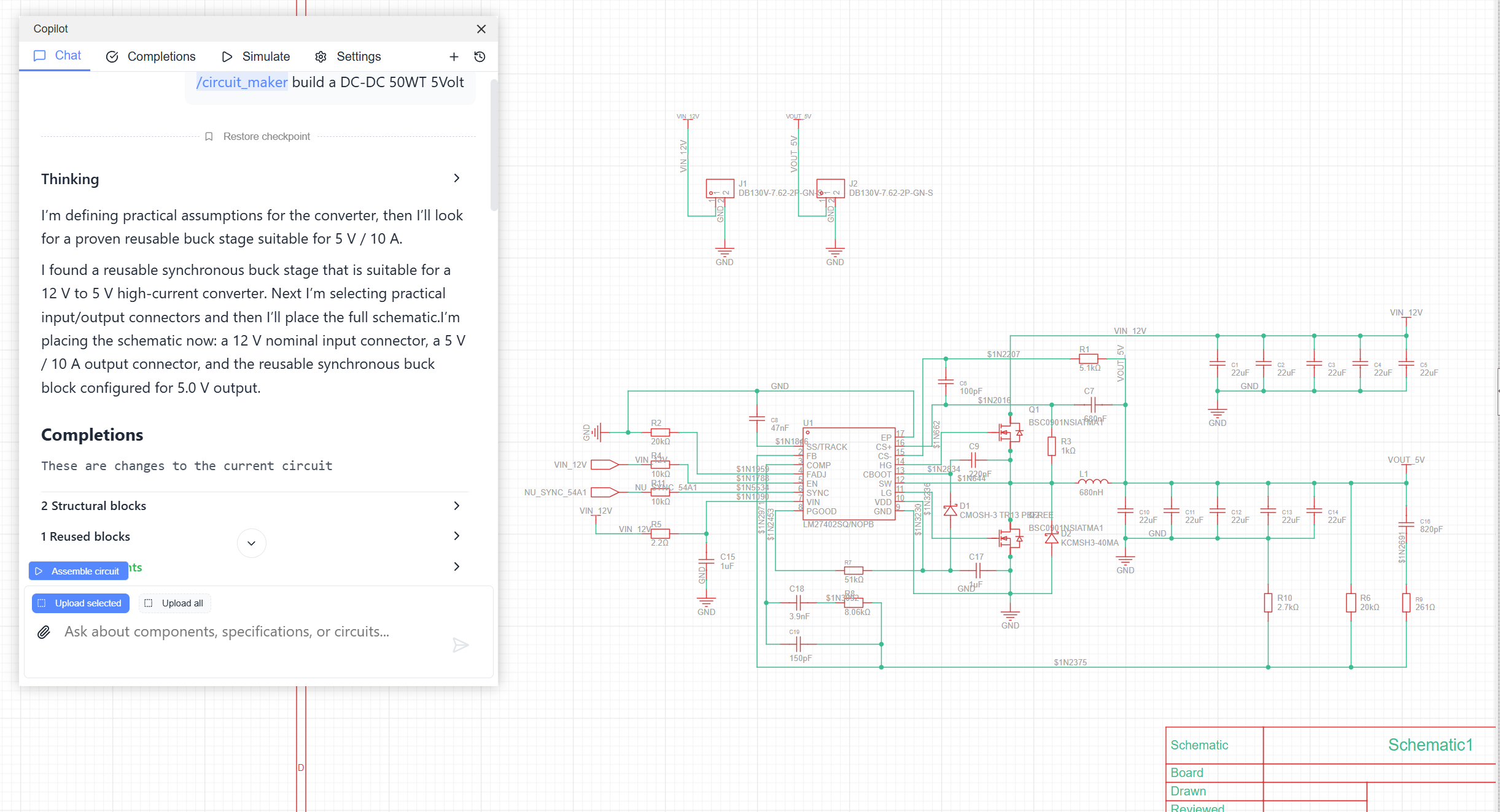
Circuit completion
Read an existing schematic fragment, add the missing components, and complete its electrical connections.
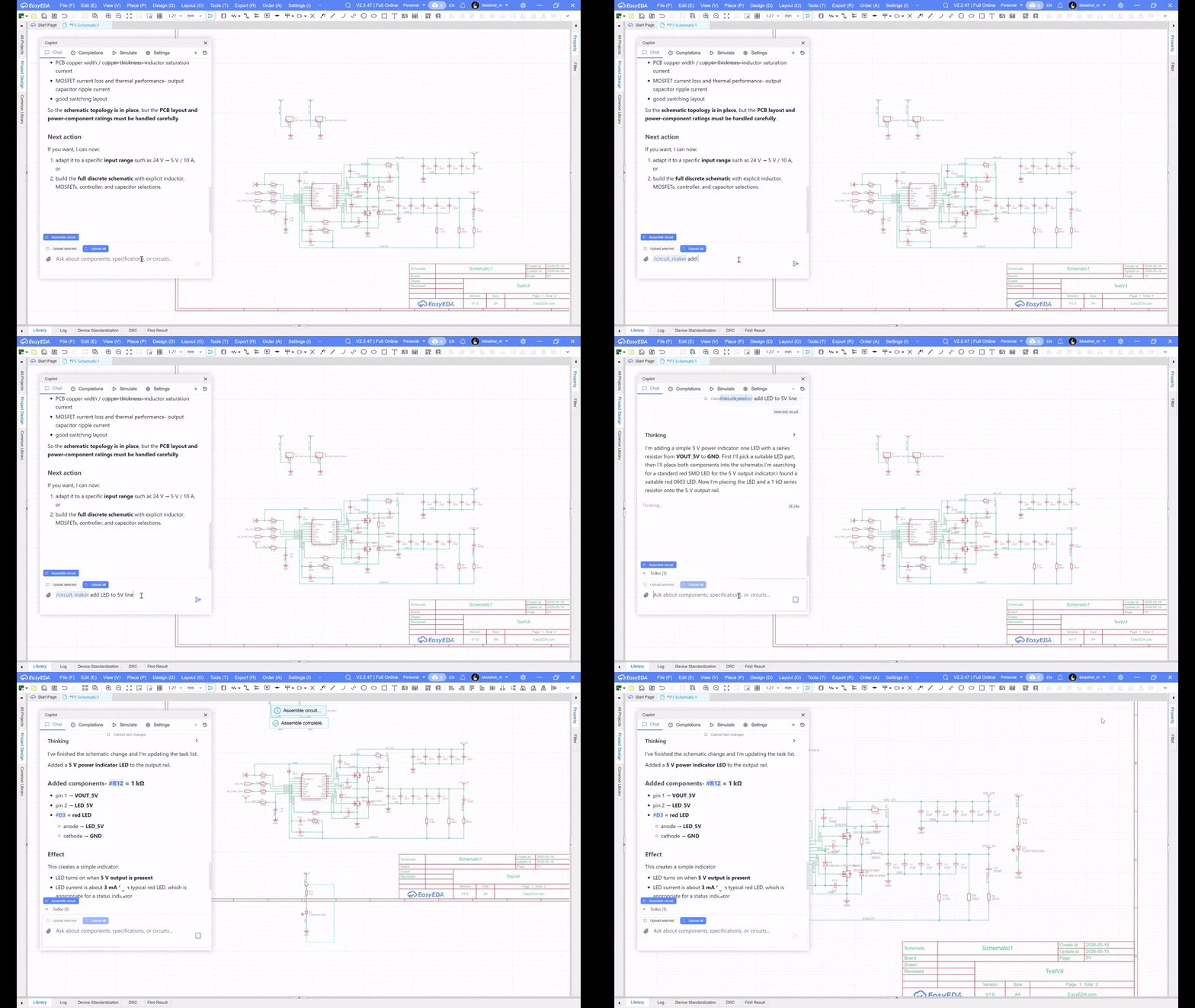
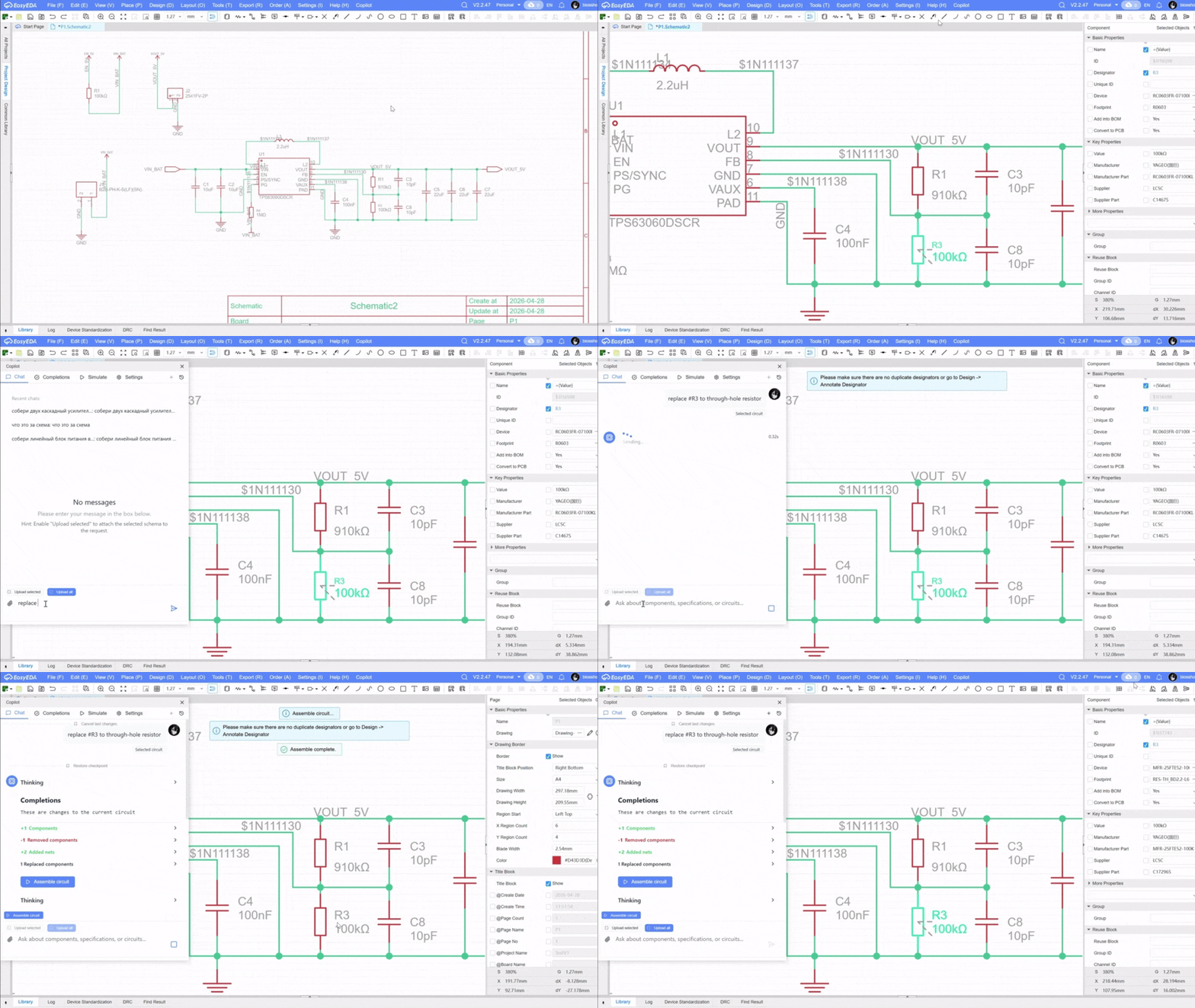
Component selection
Search the LCSC catalog from engineering requirements and compare candidate parts without leaving the design workflow.


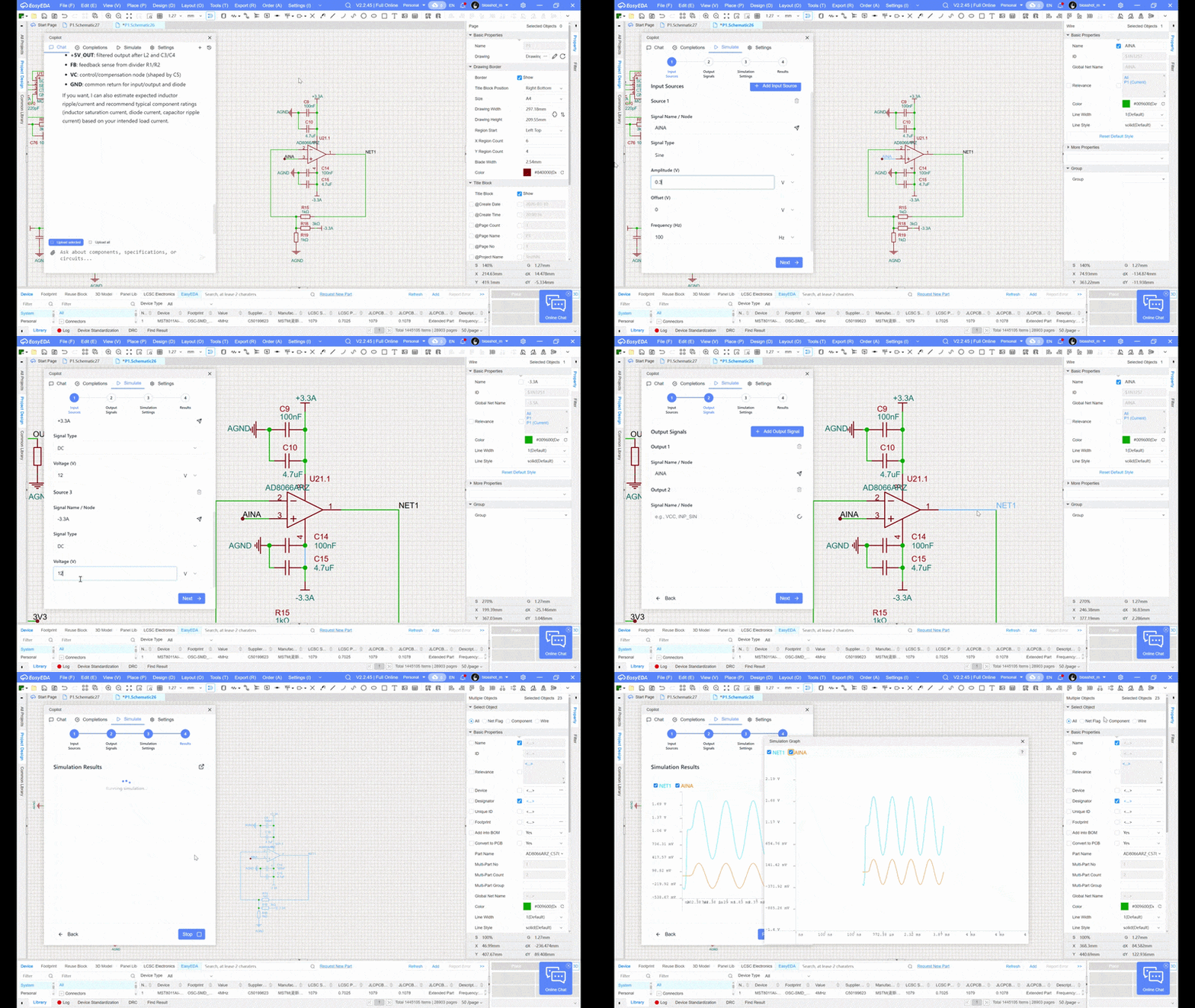
SPICE simulation
Run a SPICE simulation from the built-in interface and inspect the selected component models together with the resulting plots.
Architecture and data processing
Codex / Claude Code / another MCP client
                    |
                    | stdio
                    v
          easyeda-copilot-mcp
                    |
                    | WebSocket on 127.0.0.1:8787
                    v
        EasyEDA Copilot extension
                    |
                    v
          Open EasyEDA document
The EasyEDA extension, MCP bridge, document application logic, checkpoint system, inspection tools, and PCB routing package are open source. The MCP bridge communicates with the EasyEDA extension locally through 127.0.0.1.
The standalone eda-copilot-backend npm library resolves components through public EasyEDA APIs and generates schematic and PCB placement plans locally. Plans are applied, checkpointed, inspected, and DRC-checked through the EasyEDA extension. The legacy built-in chat uses its own service configuration. PCB routing is based on the open-source eda-copilot-router package.
Documentation
- MCP package and client configuration
- Complete MCP workflow
- Schematic workflow
- Schematic circuit modifications
- Project and page management
- Settings and permissions
- Attaching circuits to an AI agent
- Assembling circuits from an AI agent
Development
Extension sources, UI, resources and build configuration live in extension/; mcp/ and shared/ are sibling workspaces. Root build and development commands remain the entry point. The .eext output is written to build/dist/. See extension development.
Build the extension and MCP package from source:
git clone https://github.com/biosshot/easyeda-copilot.git
cd easyeda-copilot
npm ci
npm run build
npm run check --workspace=mcp
Published backend/router packages are installed by default. For joint development, dependency switching, and platform limits, see local development. Building the extension requires Node ^20.19.0 or >=22.12.0.
The standalone PCB routing package is developed in biosshot/eda-copilot-router.
Support
If EasyEDA Copilot saves you engineering time, you can support its continued development through Tribute. Contributions help maintain the extension, MCP integration, routing tools, documentation, and new design workflows.
Community
Questions, bug reports, design examples, and contributions are welcome through GitHub Issues and Discord.
License
EasyEDA Copilot is distributed under the MIT License.