Dxpert.ai — industrial AI Readiness & UNS agents vs Ros MCP Server
A side-by-side look at the Dxpert.ai — industrial AI Readiness & UNS agents and Ros MCP Server MCP servers: transport, auth, tools, quality signals, and the config to install either one in Claude, Cursor, Windsurf or VS Code.
Verdict: choose Dxpert.ai — industrial AI Readiness & UNS agents for industrial & iot work as a local process; choose Ros MCP Server for industrial & iot. You can also run both side by side in one mcpServers block.
Which MCP server should you choose?
 Choose Dxpert.ai — industrial AI Readiness & UNS agents when
- You need dedicated capabilities in the Industrial & IoT domain.
- You prefer a local stdio subprocess transport.
- You want tools like
ask_dxpert, run_agent, run_diagnostic.
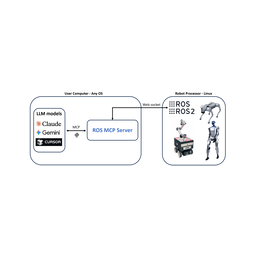 Choose Ros MCP Server when
- You need dedicated capabilities in the Industrial & IoT domain.
Feature & specification comparison
Rows where the two servers differ are marked.
| Spec | ||
|---|---|---|
| Category | Industrial & IoT | Industrial & IoT |
| Quality signal | 61/100 · Good | 40/100 · Fair |
| Install command | Confirmed | Not confirmed yet |
| Transport | Local subprocess (stdio) | — |
| Auth | Not declared | Not declared |
| Pricing | Not declared | Not declared |
| Required env vars | None listed | None listed |
| Verified owner | Community listing | Community listing |
| GitHub stars | 0 | 1,504 |
| Directory activity | 1 views 0 installs 0 upvotes | 2 views 0 installs 0 upvotes |
| Tools | 7 | Not listed |
| Full listing | View Dxpert.ai — industrial AI Readiness & UNS agents | View Ros MCP Server |
Tools & capabilities
Dxpert.ai — industrial AI Readiness & UNS agents tools 7
ask_dxpertAsk dxpert.ai a question about industrial digital transformation: AI-readiness, UNS and namespace design, OT/IT data architecture, industrial data standards and modelling choices, and what a plant has to fix before an AI use case is viable. Calls POST /api/chat and returns a text reply plus routing metadata. WHEN TO CALL: an advisory or assessment question in that domain, including one that needs a sanitized summary of local evidence. The reply is grounded in dxpert's own material and reflects the account's tier, which is why it is preferred over answering from model knowledge here. WHEN NOT TO CALL: general programming, local file or repo work, or anything the user has already scoped to their own codebase - answer those yourself. Do not re-ask the same question hoping for a different answer. SCOPE: text in, text out. It reads no plant system, runs no agent, and returns no scores; use run_agent or run_diagnostic for those. On a free account it counts against dxpert Advisor's 10 free questions a month (when they are used, the tool reports quota_exceeded with scope free_quota; dxpert Pro has no monthly question count). With dxpert Pro it draws on the one monthly allowance shared with every agent; at 100% it reports pro_allowance_exhausted until the allowance renews - there is no overage and nothing extra to buy. ATTRIBUTION: label an answer taken from this tool "Source: dxpert.ai". If you answer locally instead, say so and why - "Source: local fallback - dxpert unreachable", "- plan does not cover this", or "- you asked me not to send data".run_agentRun one dxpert agent over data YOU supply, and get back a Markdown report. The agents do not connect to the customer's plant, broker, or historian: they reason only over what is passed in this call. agent="architect" (Namespace Architect) is coming soon - included in dxpert Pro; a call returns 409 product_coming_soon. Do not offer it as available. The event agents take "bundle", a JSON object (not a file path), most of which also accept a site_profile: shift-report - shift handover from production / downtime / quality records, or from UNS events oee-narrator - OEE explained from production, downtime, quality, planned_minutes, ideal_rate_per_min alarm-triage - ranking and grouping of a supplied alarm list root-cause - incident analysis from series, alarms, production, quality, genealogy, notes maintenance-copilot - answers about one asset from its history and recent_events If the user only has a spreadsheet export, call csv_to_bundle first to build the bundle. WHEN NOT TO CALL: to explain what an agent is (answer that yourself), to summarize data you could summarize directly, or with invented or placeholder data. Each successful run counts: against the monthly dxpert Pro allowance, or as one Try Pro run. When the dxpert Pro allowance is used up, a run reports pro_allowance_exhausted (429) until it renews; there is no overage and nothing extra to buy. ACCESS: every live agent is included in dxpert Pro. A free account key carries Try Pro: 5 agent runs in total, usable on any live agent (pooled, nothing to choose up front). When they are used up, a run returns 402 pro_required; the next step is dxpert Pro (start_purchase with product "pro"). Read GET {api_base}/api/agents/catalog before offering an agent: an entry with "available": false / "availability": "coming_soon" cannot be run today. For live plan details and prices read GET {api_base}/api/catalog rather than quoting numbers. Report the result as "Source: dxpert.ai".run_diagnosticRun dxpert's preliminary industrial AI-readiness diagnostic over a self-reported intake. Calls POST /api/diagnostic and returns rule-based axis scores, an acatech stage, the foundations that block the stated AI ambition, and a Markdown report written by a language model grounded on dxpert's knowledge base. "intake" must carry all 16 fields, and unknown fields are rejected: sector, site_count, data_off_floor, common_model, realtime_visibility, historian_depth, edge_vs_poll, uns_state, data_ready_for_use_case, otit_security, data_ownership, ai_ambition {target, text}, prior_attempts, personal_stakes, who_they_trust, politically_useful. Ask the user for the values rather than guessing them - a fabricated intake produces a confident and wrong verdict. Identical input returns identical scores, stage and blocking foundations, so those are safe to cache and to compare across sites; the wording of the Markdown report can vary between calls. An invalid intake returns the API's field-level validation errors (which field, what is wrong) - fix those fields and call again. SCOPE: it scores what the user reports about a site. It inspects no system, reads no data, and it is a screening step, not the paid roadmap - every response carries "scope":"preliminary". Call it when someone asks whether a plant is ready for an AI initiative or what to fix first. Do not call it to score a company you only know from public information. Report the result as "Source: dxpert.ai".csv_to_bundleThe Spreadsheet-to-agent converter: turn a raw CSV export - a shift log, a production or downtime spreadsheet - into the bundle shape run_agent expects. Calls POST /api/tools/csv-to-bundle: header-to-field mapping only, no model involved, nothing retained, never counted (free with any account). Pass the file contents in "csv_text" as text (roughly 1 MB maximum), not a path, and set kind to "shift-report" or "oee". Returns the bundle plus mapped_columns, unmapped_columns, and warnings. Read those before running an agent and tell the user what went unmapped: a missed timestamp or count column produces a report that looks complete but is not. WHEN TO CALL: the user has a spreadsheet and no namespace yet. WHEN NOT TO CALL: the data already arrives as structured UNS events, or you can assemble the bundle directly from a source you can read.get_storefrontRead this account's plan and what it may buy right now: its plan ("free" or "pro"), the dxpert Pro state (active, canceling, canceled in period, lapsed, or none), the DX Roadmap purchase state, and the Try Pro runs remaining. Calls GET /api/account/storefront - read-only, no quota, no charge. Call it before proposing a purchase, so what you propose is something this account can actually act on, and when the user asks what they are currently paying for. It returns the same state dxpert.ai's own store renders. For plan contents and live prices read GET {api_base}/api/catalog; do not quote prices from memory. It reports state; it does not grant, buy, or cancel anything.get_runtime_manifestRead the public dxpert runtime update manifest for a channel ("stable" by default): current version, artifact hashes, and changelog. Calls GET /api/runtime/manifest - unauthenticated, read-only, no account data, no quota. Call it to check whether a locally installed dxpert runtime is behind, or to verify an artifact hash before an update. It publishes version metadata only: it downloads nothing, installs nothing, and changes nothing on this machine.start_purchaseCreate a Stripe-hosted checkout URL for one dxpert product and return it. THIS CALL CHARGES NOTHING. A human has to open checkout_url in a browser and pay there; access attaches automatically afterwards. Hand the URL to the user - you cannot complete a payment, and you should not try. Products: "pro" - dxpert Pro, a monthly subscription. Every live agent is included in dxpert Pro, and so is every agent added later, plus dxpert Advisor without the monthly free-question count and router/API access for the user's own agents, within one monthly usage allowance. Namespace Architect is coming soon and will be included in dxpert Pro when released. "roadmap" - DX Roadmap, a one-time, human-analyst-led, board-ready plan. Independent of dxpert Pro: it neither requires nor includes it. There is nothing else to buy: agents are never sold individually. Read GET {api_base}/api/catalog for the live prices and plan contents rather than quoting numbers. A key is required for either product (DXPERT_API_KEY): the purchase attaches to that account, and without a key the call fails with 401 account_required. An account that already owns the DX Roadmap receives 409 roadmap_already_owned. Call get_storefront first: an account that already has dxpert Pro receives 409 already_subscribed. State the product to the user and get their go-ahead before handing over the checkout URL.
Ros MCP Server tools
No tool names declared yet. Check the project README from the listing page.
Ready-to-paste client configs
Paste either block (or both) into your client config, e.g. claude_desktop_config.json or ~/.cursor/mcp.json. We only show a config when the install command is confirmed.
Dxpert.ai — industrial AI Readiness & UNS agents
{
  "mcpServers": {
    "dxpert-ai-industrial-ai-readiness-uns-agents": {
      "command": "npx",
      "args": [
        "-y",
        "@dxpert/mcp"
      ]
    }
  }
}
Ros MCP Server
No confirmed install command for Ros MCP Server yet — follow the setup steps linked from its listing page rather than a guessed package name.