Tracepass MCP Server vs Ros MCP Server
A side-by-side look at the Tracepass MCP Server and Ros MCP Server MCP servers: transport, auth, tools, quality signals, and the config to install either one in Claude, Cursor, Windsurf or VS Code.
Verdict: choose Tracepass MCP Server for industrial & iot work as a local process; choose Ros MCP Server for industrial & iot. You can also run both side by side in one mcpServers block.
Which MCP server should you choose?
 Choose Tracepass MCP Server when
- You need dedicated capabilities in the Industrial & IoT domain.
- You prefer a local stdio subprocess transport.
- Its auth model fits you: API key required.
- You have the keys it needs:
TRACEPASS_API_KEY, TRACEPASS_BASE_URL. - You want tools like
tracepass_products, tracepass_passports, tracepass_passport_fields.
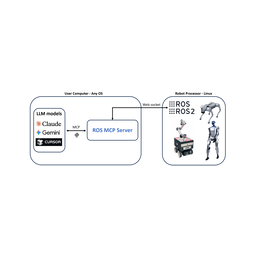 Choose Ros MCP Server when
- You need dedicated capabilities in the Industrial & IoT domain.
Feature & specification comparison
Rows where the two servers differ are marked.
| Spec | ||
|---|---|---|
| Category | Industrial & IoT | Industrial & IoT |
| Quality signal | 64/100 · Good | 40/100 · Fair |
| Install command | Confirmed | Not confirmed yet |
| Transport | Local subprocess (stdio) | — |
| Auth | API key required | Not declared |
| Pricing | Not declared | Not declared |
| Required env vars | TRACEPASS_API_KEYTRACEPASS_BASE_URL | None listed |
| Verified owner | Community listing | Community listing |
| GitHub stars | 1 | 1,503 |
| Directory activity | 3 views 0 installs 0 upvotes | 1 views 0 installs 0 upvotes |
| Tools | 6 | Not listed |
| Full listing | View Tracepass MCP Server | View Ros MCP Server |
Tools & capabilities
Tracepass MCP Server tools 6
tracepass_productsManage the TracePass product catalogue. A product is the catalogue layer — one product can have many passports (one per serialised unit). Products are not billable on their own. Actions (pass via `action`, with `args`): - list — args: { page?, limit? (≤100), category?, status?, search? }. Read-only. - get — args: { id }. Read-only. - create — args: { name, model, category, description? }. `category` is one of: battery, textile, electronics, construction, steel, detergents, paints-coatings, packaging, furniture, tyres, jewelry, toys, fmcg. - update — args: { id, name?, model?, description? }; pass at least one field to change. - create_batch — args: { products: [ { name, model, category, description? }, … ] }, up to 100. Partial-success: the response carries a per-item status, so some items can be created while others error. The whole batch consumes N writes upfront; if that would exceed the daily cap NOTHING is created (429). - archive — args: { id }. Soft-archive a product. Blocked with 409 while any non-archived passport still references it — archive those passports first. This is reversible and is NOT deletion.tracepass_passportsManage Digital Product Passports — create, read, and run lifecycle actions. IMPORTANT: `create` consumes a DPP slot on the account's plan and IS BILLABLE. Creating a passport beyond the included quota incurs a per-passport overage charge; if over quota the tool returns a 402-style message — only re-run with args.confirmOverage=true after the user explicitly agrees to the charge. `archive` is IRREVERSIBLE (the public QR permanently 404s); prefer `suspend` when a change might be undone. Actions (pass via `action`, with `args`): - list — args: { page?, limit? (≤100), productId?, status?, search? }. status ∈ draft|in_review|approved|published|suspended|expired|archived. Read-only. - get — args: { id, format? (summary|full), lang? }. Read-only. - get_by_serial — args: { serial, format?, lang?, gtin? }. Read-only. Addresses the passport by your own serial. A serial is unique only WITHIN a GTIN — if the same serial exists under two GTINs in your account the call returns 409 ambiguous_serial; pass `gtin` (or use the by-id action) to resolve exactly. - compliance — args: { id }. Read-only. Returns a three-tier compliance verdict (compliant | compliant_with_warnings | incomplete) with regulation-cited findings — use to gap-check a passport against the rules for its category, fix the cited fields/parties, then re-check. - registry_readiness — args: { id }. Read-only. Returns { ready, findings[] } — whether the passport would pass the EU DPP Registry's FORMAL submission gate (mandatory fields present, correct formatting, a resolvable public link, item-level granularity via a serial number, and a well-formed commodity code where the category carries one). This is the registry's mechanical pre-submission check, NOT the substantive compliance verdict; a passport can be registry-ready yet not substantively compliant. Battery passports only. - create — args: { productId, gtin, serialNumber, confirmOverage? }. BILLABLE. - suspend — args: { id }. Reversible — public QR shows 'suspended'. - suspend_by_serial — args: { serial, gtin? }. Same as suspend, addressed by your serial. 409 ambiguous_serial if the serial isn't unique in your account — pass `gtin`. - archive — args: { id }. IRREVERSIBLE — confirm with the user first. - archive_by_serial — args: { serial, gtin? }. IRREVERSIBLE, addressed by your serial — confirm first. 409 ambiguous_serial if the serial isn't unique — pass `gtin`. - get_qr — args: { id, format? (svg|png) }. Read-only. - get_qr_by_serial — args: { serial, format? (svg|png), gtin? }. Read-only. Same as get_qr, addressed by your own serial. A serial is unique only WITHIN a GTIN — if the same serial exists under two GTINs in your account the call returns 409 ambiguous_serial; pass `gtin` (or use get_qr by id) to resolve exactly.tracepass_passport_fieldsUpdate field values on a Digital Product Passport. Every change is recorded in the passport's audit trail, tagged as an API-key update. Actions (pass via `action`, with `args`): - update — args: { id, fieldKey, value }. `value` type matches the field's dataType (string, number, boolean, array, object). - update_by_serial — args: { serial, fieldKey, value, gtin? }. Same as update, addressed by your own serial. A serial is unique only WITHIN a GTIN — if it isn't unique in your account the call returns 409 ambiguous_serial; pass `gtin` (or use update by id) to resolve exactly.tracepass_passport_partiesManage the economic-operator parties on a passport — manufacturer, importer, authorisedRepresentative, distributor, recycler, producerResponsibilityOrg. Each party carries a legal name and ideally a validated 13-digit GS1 GLN. Actions (pass via `action`, with `args`): - set — args: { id, role, legalName, gln?, country?, legacyOperatorId? }. Sets or updates one role. - remove — args: { id, role }. Clears one role.tracepass_epcisGS1 EPCIS 2.0 supply-chain events. `export` is included on Starter plans and up; `capture`, `capture_job`, and `query` require the paid EPCIS add-on (those actions return a 403-style message without it). Actions (pass via `action`, with `args`): - export — args: { id }. Export a passport's events as an EPCIS 2.0 JSON-LD document. Read-only. - export_by_serial — args: { serial, gtin? }. Same as export, addressed by your own serial. A serial is unique only WITHIN a GTIN — if it isn't unique in your account the call returns 409 ambiguous_serial; pass `gtin` (or use export by id). Read-only. - capture — args: { events }. `events` is an EPCISDocument, a single event, or an array of events (JSON-LD). Returns a 202 with a captureJobId. - capture_job — args: { jobId }. Poll an async capture job. Read-only. - query — args: { params? }. `params` is a key/value map of standard EPCIS query parameters (EQ_bizStep, GE_eventTime, MATCH_epc, …). Read-only.tracepass_templatesDiscover the regulatory field schema for each DPP category — what a COMPLIANT passport must contain, per the governing EU regulation. Read-only reference data. Use this to advise on requirements before creating products/passports, and to gap-check a draft against the rules. Actions (pass via `action`, with `args`): - list — args: {}. Lists all 13 categories with their field count, required-field count, and governing regulation (name + number + effective/mandatory dates). - get — args: { category }. Full field schema for one category: every field's key, label, dataType, whether it is REQUIRED, its access level (public/restricted/authority), enum options, validation bounds, and — where known — the regulation article/annex that mandates it. `category` is one of: battery, textile, electronics, construction, steel, detergents, paints-coatings, packaging, furniture, tyres, jewelry, toys, fmcg. BATTERY — required-ness is per-category, so `required` alone is the wrong answer. Resolve it in this order: 1. SCOPE FIRST. Only EV, LMT and industrial_gt_2kwh batteries owe a passport at all (Art. 77(1), Reg (EU) 2023/1542). For portable, SLI or industrial_lte_2kwh, NO field is required — do not list mandatory fields for them; say the battery is out of scope. 2. Then `requiredBy[batteryCategory]` where the field carries that map (required | conditional | notApplicable). 3. Then fall back to `required`. The map is keyed ONLY by the three in-scope categories, so skipping step 1 falls through to `required` and invents an obligation the Regulation does not impose. Note also that EV and LMT report state-of-health through MUTUALLY EXCLUSIVE field sets — an EV battery must leave the remaining-capacity cluster empty and an LMT battery must leave stateOfCertifiedEnergy empty, so no single battery ever fills every field.
Ros MCP Server tools
No tool names declared yet. Check the project README from the listing page.
Ready-to-paste client configs
Paste either block (or both) into your client config, e.g. claude_desktop_config.json or ~/.cursor/mcp.json. We only show a config when the install command is confirmed.
Tracepass MCP Server
{
  "mcpServers": {
    "malinoto-tracepass-mcp-server": {
      "command": "npx",
      "args": [
        "-y",
        "tracepass-mcp-server"
      ],
      "env": {
        "TRACEPASS_API_KEY": "YOUR_TRACEPASS_API_KEY_HERE",
        "TRACEPASS_BASE_URL": "YOUR_TRACEPASS_BASE_URL_HERE"
      }
    }
  }
}
Ros MCP Server
No confirmed install command for Ros MCP Server yet — follow the setup steps linked from its listing page rather than a guessed package name.