pixel-artanimationasepritedrawingsprites
Python MCP server providing comprehensive pixel art and animation tools via Aseprite API.
Quick Install
Automated & IDE SetupCopy the AI prompt to install this server into Claude Code, Cursor, or another agent — or use 1-click editor setup below.
One-click editor setup isn’t available for this listing yet — we don’t have a confirmed install command, and we’d rather show nothing than point your editor at the wrong package or host. Follow the project’s own setup instructions, linked above.
Manual Client & Custom JSON ConfigExpand JSON ▾
No confirmed setup config for this listing yet. We only publish a config block when the install details come from the project itself — its README, its docs, or a verified owner. We haven’t found those for diivi/aseprite-mcp, and we’d rather show nothing than a guess you’d paste into your client. Follow the project’s own setup instructions for the current steps.
Overview
Use cases
Create and animate pixel art sprites programmatically
Manipulate layers, frames, and groups in pixel art projects
Draw shapes, lines, text, and apply gradients or fills
Export sprite sheets, GIFs, and individual frames
Analyze and validate animation consistency and color usage
Key features
Create and manage sprites with layers, frames, and groups
Draw pixels, lines, shapes, polygons, and text with font support
Apply effects like outlines, dithering, and color adjustments
Animate with frame control, tweening, onion skinning, and tags
Export in multiple formats including PNG, GIF, and sprite sheets
Raw Lua scripting escape hatch for advanced custom operations
Capabilities & Tool Schemas (80)
Inspect callable tools, capabilities, and parameters exposed to AI agents by Aseprite MCP.
create_canvasCreate a new sprite with the given dimensions
add_layerAdd a new layer, optionally inside a named group
add_groupAdd a new (optionally nested) group layer
add_frameAppend a new frame
set_frameSet the active frame
set_frame_durationSet one frame's duration in ms
Documentation Overview
Aseprite MCP Tools
A Python MCP server that gives AI assistants full control over Aseprite for creating pixel art and animated sprites.
104 tools across 17 categories — canvas, drawing, layers, animation, palettes, effects, slices, tilemaps, exports, visual-feedback/analysis tools, and a raw Lua escape hatch. The tool set is designed so an LLM has everything it needs to produce good pixel art, not just primitives: shading ramps with hue shifting, ordered dithering, outlines, retro palette presets with quantization, onion-skin renders, and frame diffing for animation work.
Example: a swordsman, drawn and animated by Claude
 |  |
| Task 1 — "Draw me a pixel art of a swordsman." 32×32 still, exported at 10×. | Task 2 — "…a sword slash attack sequence, from windup to follow-through." 4-frame animation, exported with export_tag. |
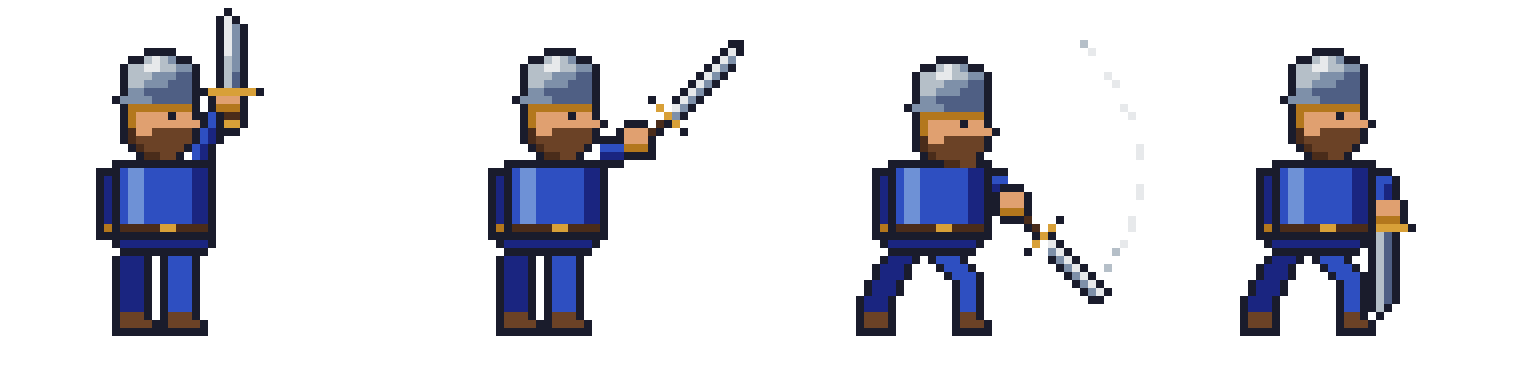 | |
The same slash as a spritesheet (export_spritesheet): windup → extension → swing → follow-through. | |
Both were created end-to-end by Claude Fable 5 through this server's MCP tools — drawing, checking its own work with scaled export_frame previews and render_onion_skin, then exporting. The tasks recreate the benchmark from Draw Me a Swordsman by Lj Miranda, whose findings inspired this server's expanded toolset.
Tool Categories
| Category | Tools | Description |
|---|---|---|
| Canvas | 6 | Create sprites, manage layers/frames, set the active state |
| Drawing | 14 | Pixels, lines, rectangles, circles, ellipses, polygons, paths, fills, gradients |
| Text | 3 | Draw and measure text with bitmap sprite-sheet or TrueType fonts |
| Layers | 7 | Delete, rename, duplicate, reorder, blend modes, merge, flatten |
| Selection & Regions | 4 | Move, copy, and erase rectangular regions or colors |
| Effects | 5 | Outlines, color replacement, HSL adjustment, ordered dithering |
| Animation | 24 | Frames, cels, tags, tweening with easing, propagation |
| Palette | 8 | Get/set palettes, retro presets, color ramps, quantization, color modes |
| Transform | 4 | Flip, rotate, resize, crop |
| Slices | 5 | Named regions, 9-patch centers, pivot points |
| Tilemap | 5 | Tilemap layers, tileset editing, tile placement |
| Export & Import | 7 | PNG, GIF, sprite sheets, per-layer/per-tag export, image import |
| Inspection | 3 | Read pixels and sprite metadata |
| Analysis & Visual Feedback | 3 | Onion-skin renders, frame diffing, color statistics |
| Quality | 4 | Validate and sanitize animation consistency |
| Scene | 1 | Copy layers between sprite files |
| Preview & Guide | 3 | Local HTTP preview server, workflow guide |
| Scripting | 1 | Raw Lua escape hatch for anything not covered above |
Canvas
| Tool | Description |
|---|---|
create_canvas | Create a new sprite with the given dimensions |
add_layer | Add a new layer, optionally inside a named group |
add_group | Add a new (optionally nested) group layer |
add_frame | Append a new frame |
set_frame | Set the active frame |
set_frame_duration | Set one frame's duration in ms |
set_layer | Set the active layer (optionally creating it) |
Drawing
All _at variants target a specific layer/frame and can create the cel on demand. Coordinates are sprite-global.
| Tool | Description |
|---|---|
draw_pixels | Plot individual pixels with per-pixel colors |
draw_pixels_at | Plot pixels on a specific layer/frame |
draw_line / draw_line_at | Lines with thickness |
draw_rectangle / draw_rectangle_at | Outlined or filled rectangles |
draw_circle / draw_circle_at | Outlined or filled circles |
draw_ellipse_at | Outlined or filled ellipses with separate x/y radii |
draw_polygon | Outlined or filled polygons from a point list |
draw_path | Polyline through a point list with thickness |
fill_area / fill_area_at | Paint-bucket flood fill |
apply_gradient_rect | Smooth linear gradient fill in a rectangle |
Text
Aseprite's Lua API has no text drawing, so glyphs are rasterised on the server and composited into the sprite. Two font backends are supported: bitmap sprite-sheet fonts (the right choice for pixel art — glyphs are already pixels and size scales them by whole numbers) and TrueType .ttf/.otf files, rendered without antialiasing unless you ask for it.
Fonts are discovered in ~/.aseprite-mcp/fonts: a bitmap font is a directory containing font.json plus its sheet PNGs; a TrueType font is just the font file. Installed system fonts are listed too. font also accepts a direct path.
| Tool | Description |
|---|---|
list_text_fonts | List the bitmap and TrueType fonts available to draw_text |
measure_text | Width, height, advance and baseline extents — size a panel or centre a label without redrawing to find out |
draw_text | Draw text with anchors, faux bold, outline, drop shadow and letter spacing |
Call measure_text first when the layout depends on the text: it returns the same metrics draw_text will use, so a label can be centred or a plate sized in one pass.
Anchors are topleft/top/topright, left/center/right, bottomleft/bottom/bottomright, plus baselineleft/baseline/baselineright for pinning several labels to one baseline. Outline and shadow grow the stamp but never move the glyphs.
font.json
Each sheet carries its own ascent, so sheets with different cell sizes still share a baseline — that is how a compact ASCII sheet and a taller accented sheet combine into one run. origin shifts the cell grid when the sheet has a margin, ink_rule: "dark" reads sheets that use an opaque white background to delimit variable-width glyph boxes, and advance: "box" takes the advance from the box rather than the ink. overrides replaces individual glyphs with hand-drawn rows, which is useful when a sheet ships a glyph that is off-centre or too tall to sit on the line.
Layers
| Tool | Description |
|---|---|
delete_layer | Delete a layer by name |
rename_layer | Rename a layer |
duplicate_layer | Duplicate a layer with all cels, opacity, and blend mode, optionally into a group |
reorder_layer | Move a layer to a position in the stack |
set_layer_blend_mode | Set blend mode (multiply, screen, overlay, ... 19 modes) |
merge_layer_down | Merge a layer into the one below it |
flatten_sprite | Flatten all layers into one |
Selection & Regions
| Tool | Description |
|---|---|
move_region | Cut a rectangle of pixels and paste it elsewhere |
copy_region | Copy a rectangle to another position, layer, or frame |
erase_region | Make a rectangle transparent |
erase_color | Magic-eraser: make all pixels of a color transparent (with tolerance) |
Effects
The pixel-art toolbox: clean outlines, palette-respecting blends, and shading variants.
| Tool | Description |
|---|---|
outline_cel | Add a 1px outline around all opaque pixels |
replace_color | Replace one color with another (with tolerance), preserving alpha |
adjust_hsl | Shift hue/saturation/lightness of a cel — palette swaps, night scenes, shadows |
apply_dither_gradient | Two-color gradient using Bayer 4×4 ordered dithering |
apply_dither_pattern | Uniform dithered mix of two colors at a given density |
Animation
Related MCP Servers
Adoption & maintenance
Factual signals from GitHub, npm, and our automated checks — not a rating.
GitHub stars
519
Stargazers on the source repository.
Last commit
1mo ago
Most recent push to the default branch.
Tools exposed
80
Callable tools this server registers over MCP.
Directory activity
1 views
Config copies, upvotes, and views on AllMCPs.
Reviews
No reviews yet — be the first to share how this listing worked for you.
Frequently Asked Questions about Aseprite MCP
AllMCPs Directory Badge
Showcase your server listing on GitHub or your project documentation. Embed this dynamic SVG badge to highlight official listing status and live engagement.
Badge Style:
Live Dynamic SVG Preview
Markdown (GitHub README)
[](https://allmcps.com/mcp/diivi-aseprite-mcp)HTML Embed
<a href="https://allmcps.com/mcp/diivi-aseprite-mcp"><img src="https://allmcps.com/api/badge/diivi-aseprite-mcp?style=directory" alt="Aseprite MCP on AllMCPs" /></a>Technical Specs & Signals
CategoryArt & Culture
PricingFree
11/11 checks healthy over the last 34d
51Quality signal: Good · 51/100How this signal is calculated ▾
Server availabilityNot measured
Not scored for repo-hosted servers — we can't reach the running server, only its GitHub page. Hosted MCP endpoints are health-checked live.
Verified ownership10/20
Documentation & tools20/30
Adoption & activity8/15
Community engagement0/10
A guidance signal from public completeness & health data — not a user rating. New listings start lower and rise as they add docs, get verified, and grow adoption. Signals we can't observe for a listing are skipped, not counted against it.
Own this project?
This directory is pre-filled from public sources. Claim via GitHub README, site badge, or DNS TXT to unlock edit access and the Official badge — proof is checked automatically, then reviewed by our team.
Free dofollow backlink: add your website and place the AllMCPs badge on it — no claim needed. We detect it automatically and keep it verified as long as the badge stays live.
Claim & get free dofollowShare & Embed
Add our SVG badge (dark/light directory styles) or embeddable widget to your site.