Extract a website’s design tokens (colors, type, spacing, shadows) as DESIGN.md, W3C, or CSS.
Quick Install
Automated & IDE SetupCopy the AI prompt to install this server into Claude Code, Cursor, or another agent — or use 1-click editor setup below.
Not yet automatically verified
We haven't yet run this listing's install command through our automated sandbox check. This isn't a red flag — we're steadily working through the catalog.
Manual Client & Custom JSON ConfigExpand JSON ▾
Client Config & Setup
Choose your client or environment
Target File:
💡 Paste the JSON block into your client's configuration file under mcpServers, then restart the application.
Documentation Overview
DesignScan
URL → design tokens → DESIGN.md. Point it at any website and get a
spec-compliant DESIGN.md file
(YAML tokens + prose) that AI coding agents can read to match that site's look.
Preview
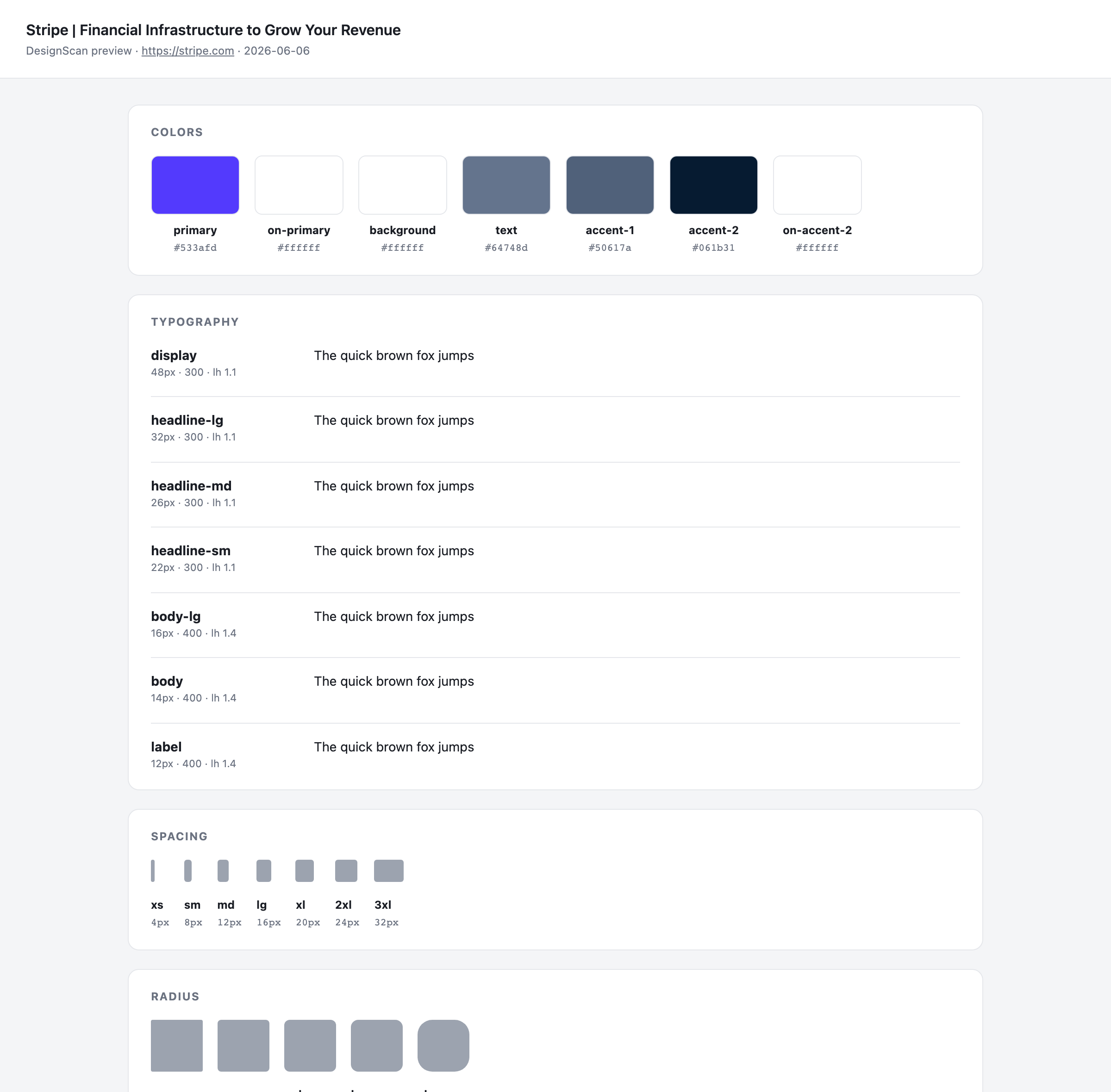
Every run can also emit a self-contained HTML proof sheet (--preview) that
renders the extracted tokens — color roles, type specimens, spacing/radius
scales, components — so you can eyeball the result before trusting it:
Notes for your coding agent
A DESIGN.md is always consumed by an AI coding agent (Cursor, Claude Code, …).
So rather than run our own LLM to resolve semantic intent, every file ends with a
Notes for your coding agent section: deterministic, per-extraction
instructions computed from the actual tokens — heading hierarchy vs. a muted
text color, sub-AA body contrast, brand-font fallback, the primary-button
contract, shape/spacing rhythm. The reasoning stays on our side (no API key); the
application happens for free inside the agent you already use.
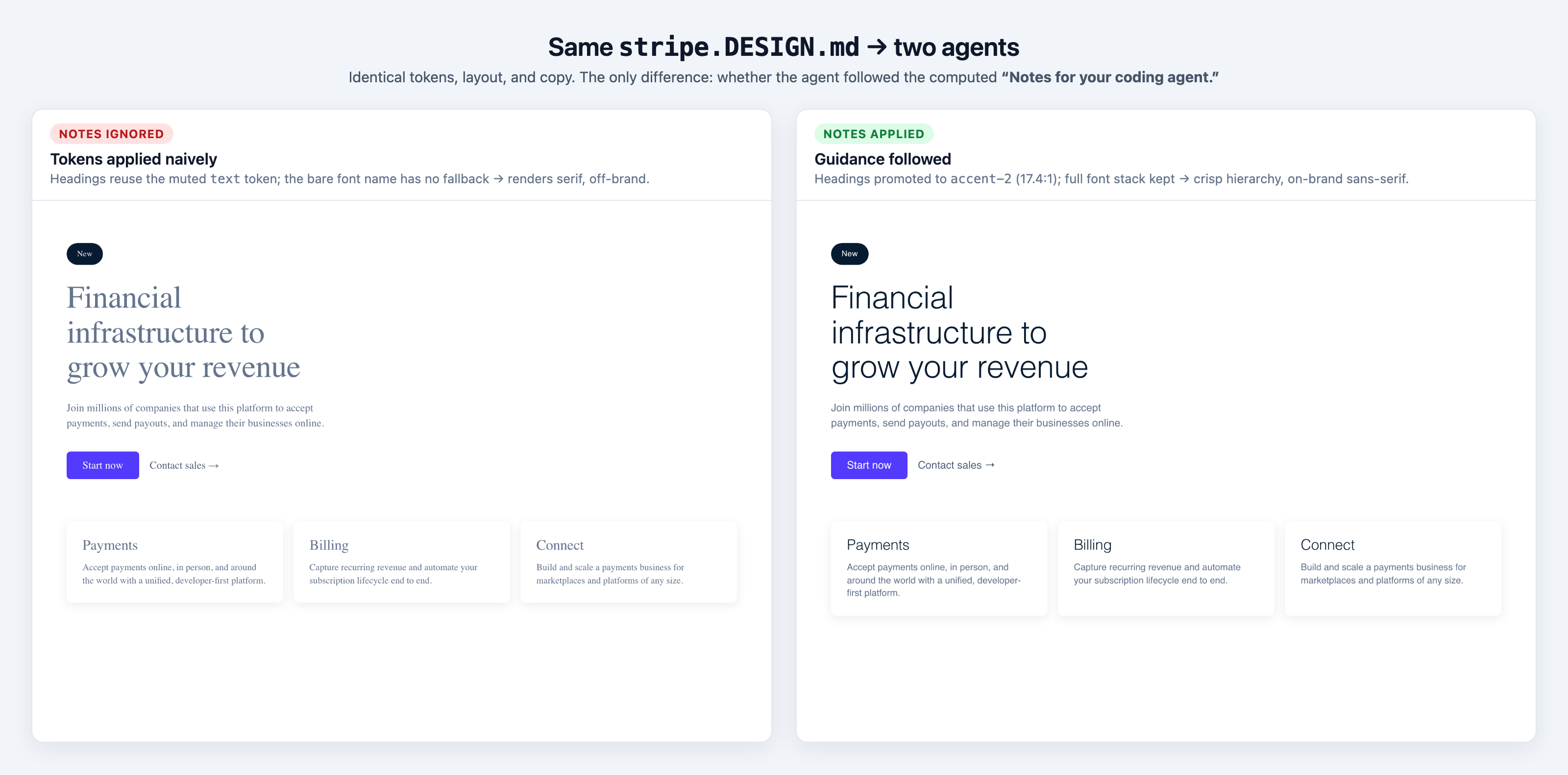
It measurably changes the output. Below: the same stripe.DESIGN.md cloned by an
agent that ignored the notes (left) vs one that followed them (right) —
identical tokens, layout, and copy:
Brand corpus
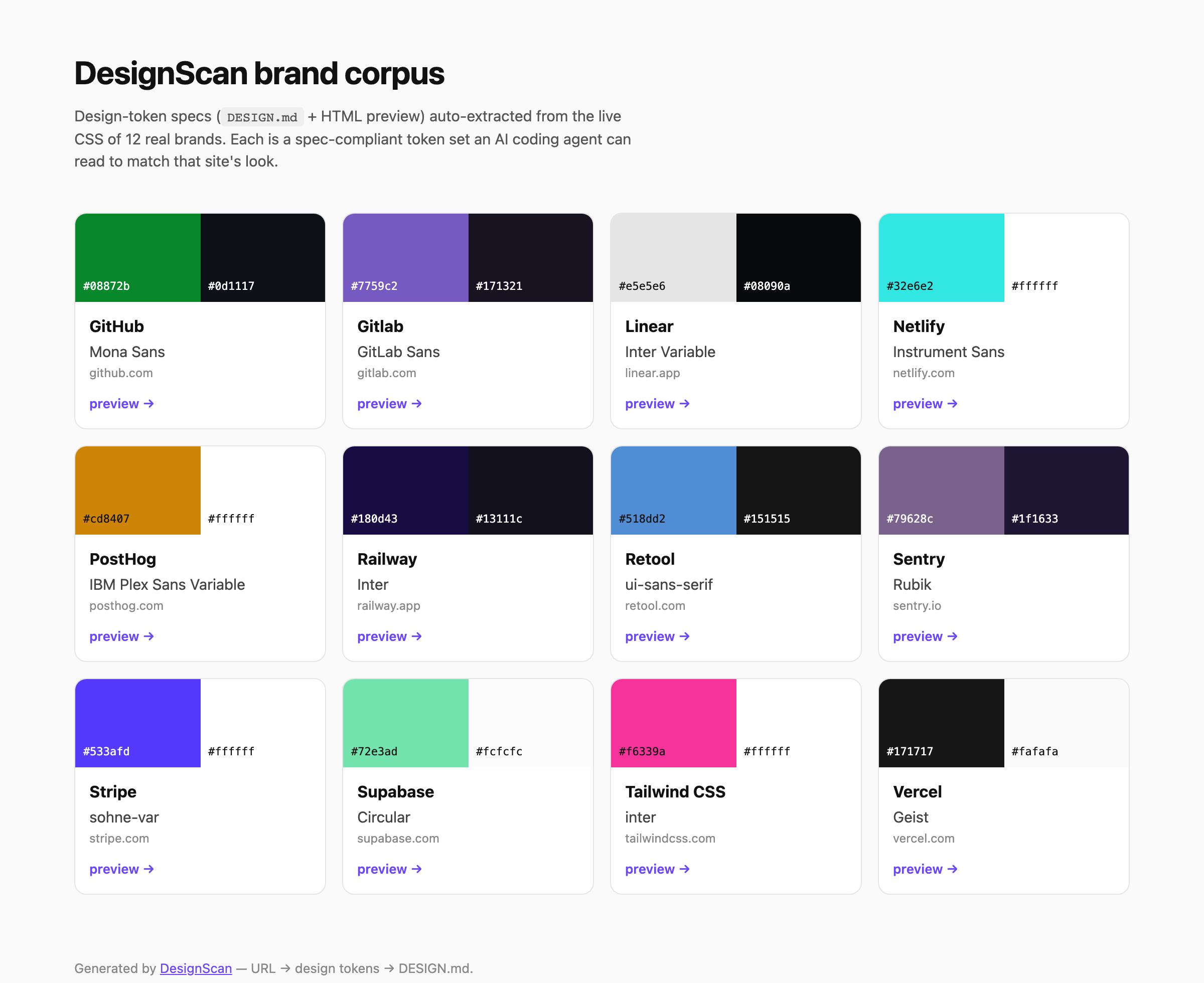
A growing, curated library of real-brand specs lives in examples/ —
each one a DESIGN.md, an HTML preview, and the raw token JSON, indexed in
examples/README.md (visual gallery: index.html).
Rebuild it from the committed JSON with pnpm seed rebuild (no network), or add
brands with pnpm seed add <url> — degenerate / bot-challenged pages are skipped
automatically so the corpus only holds trustworthy specs.
Monorepo layout
| Path | What |
|---|---|
packages/extractor | The extraction + generation engine (Playwright → tokens → DESIGN.md). |
packages/designscan | The short npm name — a thin CLI shim over the engine (npx designscan <url>). |
examples/ | The brand corpus — DESIGN.md + HTML preview + token JSON per brand, with a gallery index. |
Install (as a CLI / library)
The engine ships as the publishable @designscan/extractor
package — a designscan CLI and a typed library — with
designscan as its short npx alias.
Quick start (from this repo)
This is a pnpm workspace (corepack enable to get pnpm).
Scripts (root)
| Script | Does |
|---|---|
pnpm extract <url> [--format json|md|w3c|css] [--theme light|dark|both] [--preview] [--strict] [--timeout ms] [--out f] | Extract tokens in your format: profile JSON, DESIGN.md (--md shorthand), W3C Design Tokens, or CSS custom properties (--theme both = light + dark in one file; --preview = HTML proof sheet beside it; --strict = non-zero exit on a degenerate result) |
pnpm seed rebuild / pnpm seed add <url…> | Build the brand corpus under examples/ (md + preview + gallery; add extracts live) |
pnpm build | Compile the publishable package (tsc → dist) |
pnpm typecheck | Type-check all packages |
pnpm test | Run the test suite (vitest) |
pnpm check | Biome — format + lint (use pnpm format to auto-fix) |
pnpm lint:designmd | Validate examples/*.DESIGN.md against the official spec |
All of these run on every push/PR via GitHub Actions.
The engine is consumable as a library through its public API
(packages/extractor/src/index.ts).
Status
- Step 1 — Extraction engine (Playwright → clean token profile)
- Step 2 — Generator (token profile → spec-valid
DESIGN.md, lint-clean) - Step 3 — HTML preview (
--preview→ self-contained token proof sheet, light/dark toggle) - [~] Step 4 — agent guidance. Each
DESIGN.mdnow ships a Notes for your coding agent section: deterministic, per-extraction instructions (contrast, heading hierarchy, font fallback) so the consuming agent applies the tokens with intent — no LLM on our side. (Optional LLM-refined prose still future.) - [~] Step 5 — brand-seed library (
pnpm seed, curated corpus + gallery) done;npx … add/ checkout next
See packages/extractor/README.md for the full
roadmap and engine details.
Related MCP Servers
Reviews
No reviews yet — be the first to share how this listing worked for you.
Frequently Asked Questions about DesignScan
AllMCPs Directory Badge
Showcase your server listing on GitHub or your project documentation. Embed this dynamic SVG badge to highlight official listing status and live engagement.
Badge Style:
Live Dynamic SVG Preview
Markdown (GitHub README)
[](https://allmcps.com/mcp/designscan)HTML Embed
<a href="https://allmcps.com/mcp/designscan"><img src="https://allmcps.com/api/badge/designscan?style=directory" alt="DesignScan on AllMCPs" /></a>Technical Specs & Signals
CategoryDeveloper Tools
36Quality signal: Fair · 36/100How this signal is calculated ▾
Server availabilityNot measured
Not scored for repo-hosted servers — we can't reach the running server, only its GitHub page. Hosted MCP endpoints are health-checked live.
Verified ownership10/20
Documentation & tools16/30
Adoption & activity1/15
Community engagement0/10
A guidance signal from public completeness & health data — not a user rating. New listings start lower and rise as they add docs, get verified, and grow adoption. Signals we can't observe for a listing are skipped, not counted against it.
Own this project?
This directory is pre-filled from public sources. Claim via GitHub README, site badge, or DNS TXT to unlock edit access and the Official badge — proof is checked automatically, then reviewed by our team.
Free dofollow backlink: add your website and place the AllMCPs badge on it — no claim needed. We detect it automatically and keep it verified as long as the badge stays live.
Claim & get free dofollowShare & Embed
Add our SVG badge (dark/light directory styles) or embeddable widget to your site.