DBeast PostgreSQL MCP README
The full upstream README, mirrored here for reference. Install config, tool schemas, adoption signals, and an original overview live on the DBeast PostgreSQL MCP listing page.

A PostgreSQL MCP server that gives AI assistants expert DBA capabilities.




Quick Start · Demo · Tools · Safety · Configuration · Docs
DBeast connects AI assistants such as Claude, Cursor, Windsurf, and VS Code Copilot to PostgreSQL through the Model Context Protocol. Instead of exposing one broad execute_sql escape hatch, DBeast provides 21 focused tools for schema discovery, safe query execution, impact analysis, performance review, security checks, maintenance reporting, replication monitoring, and data quality inspection.
Demo
Watch Claude use DBeast MCP tools to audit a PostgreSQL database, identify security and maintenance risks, and preview cleanup impact without executing destructive SQL.
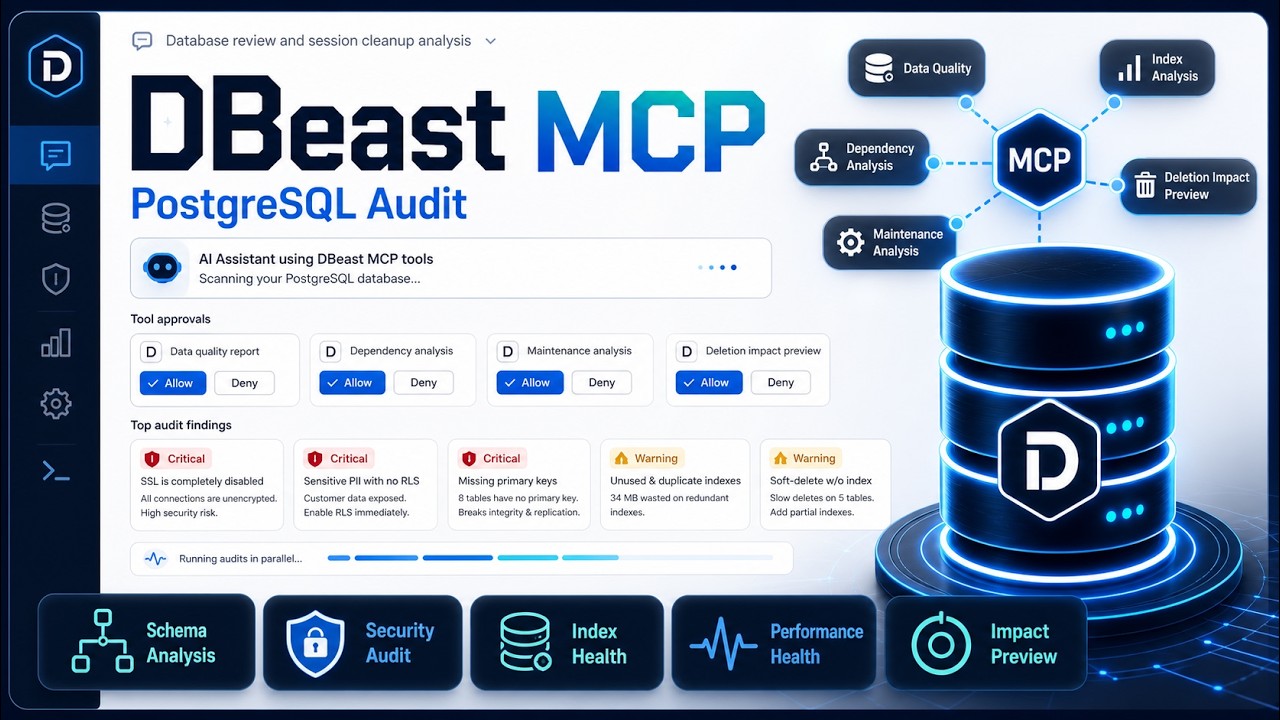
How It Works
DBeast runs as a local stdio MCP server. Your IDE or desktop assistant starts it as a subprocess and passes database credentials through environment variables. The assistant calls DBeast tools, DBeast queries PostgreSQL, and structured results come back to the assistant. No HTTP service or extra infrastructure is required.
Quick Start
1. Install
For development:
Optional: copy .env.example to .env and set your database credentials.
2. Verify
Or run the source entry point directly:
3. Configure Your MCP Client
Minimal Cursor or Windsurf config:
Common config locations:
| Client | Config location |
|---|---|
| Cursor | .mcp.json in project root, or ~/.cursor/.mcp.json globally |
| VS Code | .vscode/settings.json or user settings with key mcp.servers |
| Claude Desktop on macOS | ~/Library/Application Support/Claude/claude_desktop_config.json |
| Claude Desktop on Windows | %APPDATA%\Claude\claude_desktop_config.json |
| Windsurf | .mcp.json |
See SETUP.md for full client examples, Docker, RDS, Supabase, Neon, SSH tunnels, AWS Secrets Manager, and troubleshooting.
4. Ask Simple or Complex Questions
Once connected, your assistant can answer quick lookup questions and also run multi-step database investigations.
Simple examples:
More complex examples:
Tools
DBeast exposes 21 MCP tools across 10 categories.
Connection
| Tool | Description |
|---|---|
connect | Connect to PostgreSQL, check current status, or discover local databases |
disconnect | Close the current database connection |
health_check | Verify connectivity, pool health, PostgreSQL version, and extensions |
Schema Discovery
| Tool | Description |
|---|---|
get_schema | List schemas, tables, columns, indexes, relationships, and optional Mermaid ERDs |
dependency_analysis | Map object dependencies before renaming, dropping, or changing database objects |
Data Access
| Tool | Description |
|---|---|
execute_query | Run read-only SELECT queries with automatic row-limit injection |
Query Analysis
| Tool | Description |
|---|---|
analyze_query | Parse and inspect query structure, warnings, and optimization hints |
query_optimizer | Recommend indexes and rewrites for a given query |
analyze_impact | Preview write-query impact, risk level, affected rows, and rollback context without executing |
Database Health
| Tool | Description |
|---|---|
database_health | Review cache hit rates, connections, transaction age, table health, and overall health signals |
query_performance | Report slow or expensive queries from PostgreSQL statistics |
Security
| Tool | Description |
|---|---|
security_audit | Inspect roles, privileges, superuser accounts, and public schema exposure |
sensitive_data_scan | Detect likely PII or secrets by column names and schema patterns |
Maintenance
| Tool | Description |
|---|---|
maintenance_analysis | Review vacuum status, dead tuples, analyze timestamps, and index health |
partition_analysis | Inspect partition health, row distribution, and missing partition risks |
Data Quality
| Tool | Description |
|---|---|
data_quality_report | Analyze null rates, cardinality, value distributions, and outliers |
duplicate_detection | Find duplicate rows across selected key columns |
Server Config
| Tool | Description |
|---|---|
configuration_review | Review PostgreSQL configuration and tuning opportunities |
replication_status | Inspect replication lag, WAL sender/receiver state, and replication slots |
Audit
| Tool | Description |
|---|---|
get_audit_logs | Retrieve logged MCP tool calls for a given date |
list_audit_files | List available audit log files |
Recommended Workflow
Start by discovering schemas:
Run safe read queries:
Preview risky writes:
Check health and maintenance:
Most analysis tools accept a schema parameter:
Supported Databases
| Provider | Connection method |
|---|---|
| Local PostgreSQL | DATABASE_URL or individual DB_* variables |
| Docker PostgreSQL | Explicit variables or connect(discover=true) |
| AWS RDS / Aurora | Direct URL, SSH tunnel, or AWS Secrets Manager |
| Supabase | Pooler connection string from Dashboard settings |
| Neon | Connection string from Console connection details |
| Railway / Render / Fly.io | Provider connection string |
| Any PostgreSQL host | Standard PostgreSQL URL |
Configuration
Choose one connection method.
You can also connect at runtime:
Key settings:
| Variable | Default | Description |
|---|---|---|
DBEAST_DEFAULT_ROW_LIMIT | 100 | Max rows returned by execute_query |
DBEAST_QUERY_TIMEOUT | 300 | Query execution timeout in seconds |
DBEAST_COMMAND_TIMEOUT | 300 | SQL command timeout in seconds |
DBEAST_SSL_VERIFY | true | Set false for SSH tunnels where certificates do not match localhost |
DBEAST_SCHEMA_CACHE_TTL | 60 | Schema cache TTL in seconds, 0 disables caching |
DBEAST_AUDIT_ENABLED | true | Log MCP tool calls |
DBEAST_AUDIT_DIR | logs/mcp_audit | Audit log directory |
See SETUP.md for the complete configuration reference.
Safety Model
| Query type | What DBeast does |
|---|---|
SELECT | Executes with automatic row limits |
INSERT / UPDATE / DELETE | Never executed; returns an impact preview |
DROP / TRUNCATE | Never executed; reports affected objects and risk |
Formatted and JSON responses use a consistent wrapper:
Audit Logging
DBeast logs MCP tool calls for accountability and debugging.
Audit files are stored as daily markdown files and include timestamps, tool names, durations, masked parameters, truncated responses, and errors.
Development
Start the optional local PostgreSQL test database:
Legacy Compose:
Documentation
- SETUP.md - Full client setup, connection scenarios, configuration, and troubleshooting
- CONTRIBUTING.md - Development setup, tests, style, commits, and PR process
- CODE_OF_CONDUCT.md - Community guidelines
License
MIT