AllMCPs
BrowseBestCategoriesStackCompareToolsGuidesBlog
Log in Submit MCP

Stay in the loop

Get new MCP servers and top picks in your inbox.

AllMCPs

The open directory for discovering and installing Model Context Protocol servers.

AllMCPs on GitHub (opens in a new tab)
Launched onTiny Startupstinystartups.com
Explore
  • Browse servers
  • Best MCP servers
  • Categories
  • MCP clients
  • Agent prompts
  • Stack Builder
  • Compare servers
  • Random discovery New
  • Submit a server
  • Pricing & Boost Boost
Learn
  • Guides hub
  • What is MCP?
  • Install guide
  • Build an MCP server
  • Deploy an MCP server
  • Security guide
  • Troubleshooting
  • MCP for SEO & AEO
  • Protocol versioning
  • Blog & updates
Tools
  • All developer tools
  • Config generator
  • Config validator
  • Config auditor
  • MCP playground
  • Token calculator
  • OpenAPI β†’ MCP
  • Badge generator
For agents
  • REST API docs
  • Trust & traffic Live
  • Remote MCP server SSE β†— (opens in a new tab)
  • llms.txt β†— (opens in a new tab)
  • Catalog JSON β†— (opens in a new tab)
Company
  • About
  • Advertise Sponsor
  • Contact
  • GitHub β†— (opens in a new tab)
  • Terms
  • Privacy
AllMCPs VerifiedAllMCPs VerifiedFeatured on Nick LaunchesFeatured on Nick LaunchesLaunch Llama NewsletterLaunch Llama NewsletterVerified DR - allmcps.comVerified DR - allmcps.comFeatured on SaaSGrowFeatured on SaaSGrowFeatured on Twelve ToolsFeatured on Twelve ToolsFeatured on Saaspa.geFeatured on Saaspa.geFeatured on Findly.toolsFeatured on Findly.toolsFeatured on Startup FameFeatured on Startup FameFeatured on LaunchKiwiFeatured on LaunchKiwiFeatured on ScrollLaunchFeatured on ScrollLaunchFeatured on DailyPingsFeatured on DailyPingsFazier badgeFazier badgeFeatured on NewTool.siteFeatured on NewTool.siteFeatured on saasfame.comFeatured on saasfame.comDR Checker - Domain RatingDR Checker - Domain RatingListed on Turbo0Listed on Turbo0Launched on LaunchBoard - Product Launch PlatformLaunched on LaunchBoard - Product Launch PlatformList on SimilarlabsList on Similarlabshttps://codetrendy.comhttps://codetrendy.comListed on DevTool.ioFeatured on BuildlistFeatured on BuildlistLaunched on Tiny StartupsFeatured on ShowMeBestAIFeatured on ShowMeBestAIFind us on LaunchZoneFind us on LaunchZoneAllMCPs VerifiedAllMCPs VerifiedFeatured on Nick LaunchesFeatured on Nick LaunchesLaunch Llama NewsletterLaunch Llama NewsletterVerified DR - allmcps.comVerified DR - allmcps.comFeatured on SaaSGrowFeatured on SaaSGrowFeatured on Twelve ToolsFeatured on Twelve ToolsFeatured on Saaspa.geFeatured on Saaspa.geFeatured on Findly.toolsFeatured on Findly.toolsFeatured on Startup FameFeatured on Startup FameFeatured on LaunchKiwiFeatured on LaunchKiwiFeatured on ScrollLaunchFeatured on ScrollLaunchFeatured on DailyPingsFeatured on DailyPingsFazier badgeFazier badgeFeatured on NewTool.siteFeatured on NewTool.siteFeatured on saasfame.comFeatured on saasfame.comDR Checker - Domain RatingDR Checker - Domain RatingListed on Turbo0Listed on Turbo0Launched on LaunchBoard - Product Launch PlatformLaunched on LaunchBoard - Product Launch PlatformList on SimilarlabsList on Similarlabshttps://codetrendy.comhttps://codetrendy.comListed on DevTool.ioFeatured on BuildlistFeatured on BuildlistLaunched on Tiny StartupsFeatured on ShowMeBestAIFeatured on ShowMeBestAIFind us on LaunchZoneFind us on LaunchZone
Β© 2026 Jackalope Digital LLC. All rights reserved.
  1. Home
  2. πŸ—„οΈ Databases
  3. DBeast PostgreSQL MCP
D
Health: Not checked yetWe have not completed a health check for this listing yet.No health check has run yet.

DBeast PostgreSQL MCP

User RatingsBe the first to rate and review this MCP server! Enrichment pendingWe haven’t run our AI enrichment pass on this listing yet, so the overview, use cases, and FAQ below may be sparse or missing. We work through the catalog over time β€” check back soon.
View Repository

PostgreSQL MCP server for schema, query, health, security, and performance analysis.

Quick Install

Automated & IDE Setup

Copy the AI prompt to install this server into Claude Code, Cursor, or another agent β€” or use 1-click editor setup below.

Add to CursorAdd to VS Code
Manual Client & Custom JSON ConfigExpand JSON β–Ύ

Client Config & Setup

Choose your client or environment
Target File:~/Library/Application Support/Claude/claude_desktop_config.json
claude_desktop_config.json
{
  "mcpServers": {
    "dbeast-postgresql-mcp": {
      "command": "npx",
      "args": [
        "-y",
        "dbeast-postgresql-mcp"
      ]
    }
  }
}

πŸ’‘ Paste the JSON block into your client's configuration file under mcpServers, then restart the application.

Install Directory Badge Claim listing AlternativesπŸ—„οΈ More in Databases

Documentation Overview

DBeast

A PostgreSQL MCP server that gives AI assistants expert DBA capabilities.

Python 3.11+ PostgreSQL 12+ MCP Compatible License: MIT

Quick Start Β· Demo Β· Tools Β· Safety Β· Configuration Β· Docs


DBeast connects AI assistants such as Claude, Cursor, Windsurf, and VS Code Copilot to PostgreSQL through the Model Context Protocol. Instead of exposing one broad execute_sql escape hatch, DBeast provides 21 focused tools for schema discovery, safe query execution, impact analysis, performance review, security checks, maintenance reporting, replication monitoring, and data quality inspection.


Demo

Watch Claude use DBeast MCP tools to audit a PostgreSQL database, identify security and maintenance risks, and preview cleanup impact without executing destructive SQL.
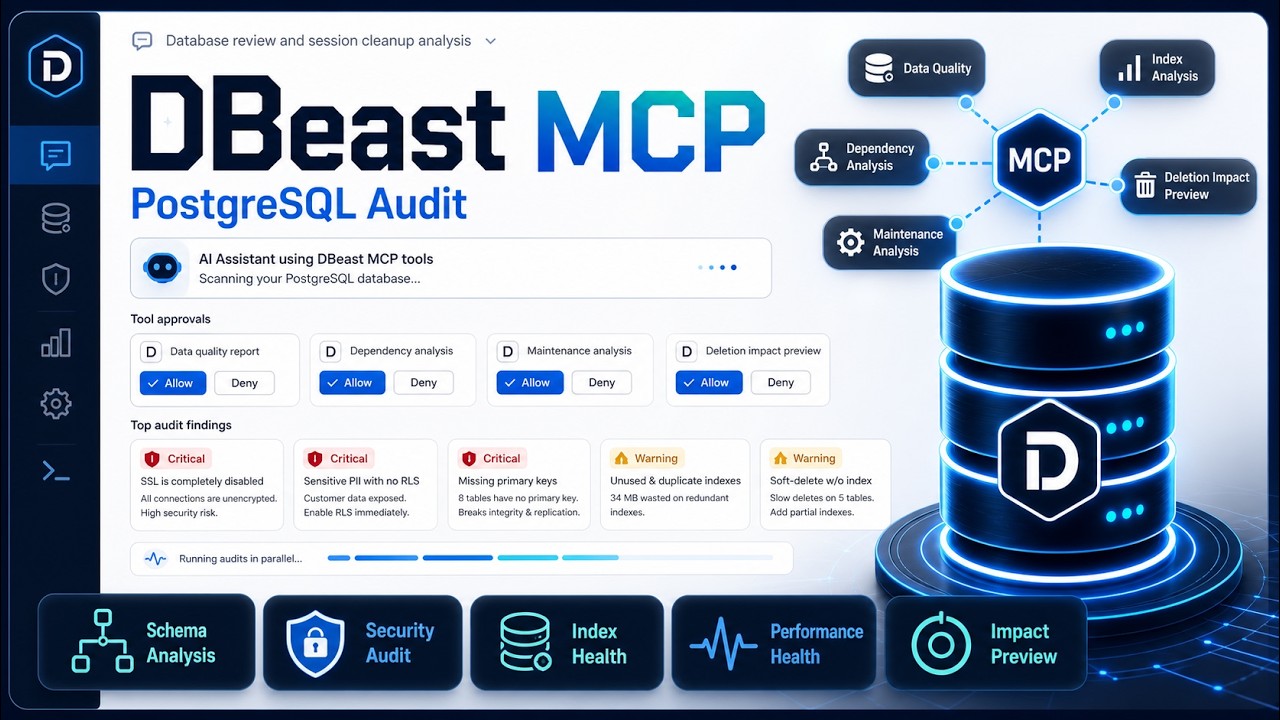
DBeast MCP demo: Claude audits a PostgreSQL database

Watch the demo on YouTube


How It Works

text
AI assistant  --MCP stdio-->  DBeast server  --asyncpg-->  PostgreSQL
Claude/Cursor                  Python local                 Local, RDS,
Windsurf/VS Code               subprocess                   Supabase, Neon

DBeast runs as a local stdio MCP server. Your IDE or desktop assistant starts it as a subprocess and passes database credentials through environment variables. The assistant calls DBeast tools, DBeast queries PostgreSQL, and structured results come back to the assistant. No HTTP service or extra infrastructure is required.


Quick Start

1. Install

bash
git clone https://github.com/snss10/DBeast.git
cd DBeast
pip install -e .

For development:

Terminal
pip install -e ".[dev]"

Optional: copy .env.example to .env and set your database credentials.

2. Verify

bash
dbeast

Or run the source entry point directly:

bash
python src/server.py

3. Configure Your MCP Client

Minimal Cursor or Windsurf config:

config.json
{
  "mcpServers": {
    "dbeast": {
      "type": "stdio",
      "command": "python",
      "args": ["/absolute/path/to/DBeast/src/server.py"],
      "env": {
        "DATABASE_URL": "postgresql://user:password@localhost:5432/mydb"
      }
    }
  }
}

Common config locations:

ClientConfig location
Cursor.mcp.json in project root, or ~/.cursor/.mcp.json globally
VS Code.vscode/settings.json or user settings with key mcp.servers
Claude Desktop on macOS~/Library/Application Support/Claude/claude_desktop_config.json
Claude Desktop on Windows%APPDATA%\Claude\claude_desktop_config.json
Windsurf.mcp.json

See SETUP.md for full client examples, Docker, RDS, Supabase, Neon, SSH tunnels, AWS Secrets Manager, and troubleshooting.

4. Ask Simple or Complex Questions

Once connected, your assistant can answer quick lookup questions and also run multi-step database investigations.

Simple examples:

text
Show me the schema for the orders table.
Which queries are slowest right now?
Run a security audit on the public schema.
Generate a Mermaid ERD for the sales schema.

More complex examples:

text
Before I archive old sessions, estimate how many rows would be affected, identify related tables, and tell me the rollback risk.
Investigate why the dashboard query is slow, explain the execution plan, and suggest safe indexes.
Review the public schema for maintenance issues, security risks, and data quality problems, then summarize the top priorities.
Compare table growth, dead tuples, and index health across all schemas and recommend what to vacuum or reindex first.

Tools

DBeast exposes 21 MCP tools across 10 categories.

Connection

ToolDescription
connectConnect to PostgreSQL, check current status, or discover local databases
disconnectClose the current database connection
health_checkVerify connectivity, pool health, PostgreSQL version, and extensions

Schema Discovery

ToolDescription
get_schemaList schemas, tables, columns, indexes, relationships, and optional Mermaid ERDs
dependency_analysisMap object dependencies before renaming, dropping, or changing database objects

Data Access

ToolDescription
execute_queryRun read-only SELECT queries with automatic row-limit injection

Query Analysis

ToolDescription
analyze_queryParse and inspect query structure, warnings, and optimization hints
query_optimizerRecommend indexes and rewrites for a given query
analyze_impactPreview write-query impact, risk level, affected rows, and rollback context without executing

Database Health

ToolDescription
database_healthReview cache hit rates, connections, transaction age, table health, and overall health signals
query_performanceReport slow or expensive queries from PostgreSQL statistics

Security

ToolDescription
security_auditInspect roles, privileges, superuser accounts, and public schema exposure
sensitive_data_scanDetect likely PII or secrets by column names and schema patterns

Maintenance

ToolDescription
maintenance_analysisReview vacuum status, dead tuples, analyze timestamps, and index health
partition_analysisInspect partition health, row distribution, and missing partition risks

Data Quality

ToolDescription
data_quality_reportAnalyze null rates, cardinality, value distributions, and outliers
duplicate_detectionFind duplicate rows across selected key columns

Server Config

ToolDescription
configuration_reviewReview PostgreSQL configuration and tuning opportunities
replication_statusInspect replication lag, WAL sender/receiver state, and replication slots

Audit

ToolDescription
get_audit_logsRetrieve logged MCP tool calls for a given date
list_audit_filesList available audit log files

Recommended Workflow

Start by discovering schemas:

text
get_schema()
get_schema(schema='public')

Run safe read queries:

Dockerfile
execute_query(query='SELECT * FROM orders ORDER BY created_at DESC')

Preview risky writes:

Dockerfile
analyze_impact(query='DELETE FROM sessions WHERE last_active < now() - interval ''30 days''')

Check health and maintenance:

text
database_health()
maintenance_analysis(schema='public')
query_performance()

Most analysis tools accept a schema parameter:

text
maintenance_analysis(schema='public')  -> analyze one schema
maintenance_analysis(schema='all')     -> analyze every schema
get_schema(format='mermaid')           -> generate an ERD diagram

Supported Databases

ProviderConnection method
Local PostgreSQLDATABASE_URL or individual DB_* variables
Docker PostgreSQLExplicit variables or connect(discover=true)
AWS RDS / AuroraDirect URL, SSH tunnel, or AWS Secrets Manager
SupabasePooler connection string from Dashboard settings
NeonConnection string from Console connection details
Railway / Render / Fly.ioProvider connection string
Any PostgreSQL hostStandard PostgreSQL URL

Configuration

Choose one connection method.

env
# Full URL
DATABASE_URL=postgresql://user:pass@host:5432/db

# Or individual variables
DB_HOST=localhost
DB_PORT=5432
DB_USER=postgres
DB_PASSWORD=secret
DB_NAME=mydb
DB_SSLMODE=prefer

# Or AWS Secrets Manager
AWS_SECRET_NAME=my-rds-secret
AWS_REGION=us-west-2

You can also connect at runtime:

text
connect(url='postgresql://user:pass@host:5432/db')
connect(host='localhost', user='postgres', password='secret', database='mydb')
connect(aws_secret_name='my-secret', aws_region='us-west-2')

Key settings:

VariableDefaultDescription
DBEAST_DEFAULT_ROW_LIMIT100Max rows returned by execute_query
DBEAST_QUERY_TIMEOUT300Query execution timeout in seconds
DBEAST_COMMAND_TIMEOUT300SQL command timeout in seconds
DBEAST_SSL_VERIFYtrueSet false for SSH tunnels where certificates do not match localhost
DBEAST_SCHEMA_CACHE_TTL60Schema cache TTL in seconds, 0 disables caching
DBEAST_AUDIT_ENABLEDtrueLog MCP tool calls
DBEAST_AUDIT_DIRlogs/mcp_auditAudit log directory

See SETUP.md for the complete configuration reference.


Safety Model

Query typeWhat DBeast does
SELECTExecutes with automatic row limits
INSERT / UPDATE / DELETENever executed; returns an impact preview
DROP / TRUNCATENever executed; reports affected objects and risk

Formatted and JSON responses use a consistent wrapper:

config.json
{
  "success": true,
  "data": { "...": "..." },
  "meta": {
    "connected": true,
    "source": "tool"
  }
}

Audit Logging

DBeast logs MCP tool calls for accountability and debugging.

env
DBEAST_AUDIT_ENABLED=true
DBEAST_AUDIT_DIR=logs/mcp_audit

Audit files are stored as daily markdown files and include timestamps, tool names, durations, masked parameters, truncated responses, and errors.


Read the full README β†’View source on GitHub β†’

Related MCP Servers

View all in Databases View all alternatives
  • Apple Health logoApple Health

    Query and analyze Apple Health CSV exports using DuckDB.

    πŸ—„οΈ Databases0 views
    Compare vs Apple Health β†’
  • Genai Toolbox logoGenai Toolbox

    Open source MCP server specializing in easy, fast, and secure tools for Databases.

    πŸ—„οΈ Databases5 views
    Compare vs Genai Toolbox β†’
  • Dryrun logoDryrun

    PostgreSQL schema intelligence from a committed snapshot. No connection, no credentials.

    πŸ—„οΈ Databases0 views
    Compare vs Dryrun β†’
  • Mysql MCP Server logoMysql MCP Server

    MySQL database integration with configurable access controls, schema inspection, and comprehensive security guidelines

    πŸ—„οΈ Databases3 views
    Compare vs Mysql MCP Server β†’

Reviews

No reviews yet β€” be the first to share how this listing worked for you.

Frequently Asked Questions about DBeast PostgreSQL MCP

Add the following block to your claude_desktop_config.json under mcpServers: "mcpServers": { "dbeast-postgresql-mcp": { "command": "npx", "args": ["-y", "DBeast PostgreSQL MCP"] } }

AllMCPs Directory Badge

Full Badge Customizer

Showcase your server listing on GitHub or your project documentation. Embed this dynamic SVG badge to highlight official listing status and live engagement.

Badge Style:
Live Dynamic SVG PreviewDBeast PostgreSQL MCP AllMCPs Directory Badge

Markdown (GitHub README)
[![AllMCPs](https://allmcps.com/api/badge/dbeast-postgresql-mcp?style=directory)](https://allmcps.com/mcp/dbeast-postgresql-mcp)
HTML Embed
<a href="https://allmcps.com/mcp/dbeast-postgresql-mcp"><img src="https://allmcps.com/api/badge/dbeast-postgresql-mcp?style=directory" alt="DBeast PostgreSQL MCP on AllMCPs" /></a>

Technical Specs & Signals

CategoryπŸ—„οΈDatabases
More technical detailsExpand β–Ύ
TransportSTDIO
RuntimeNode.js
Last updatedSep 7, 2026
Views0
Unique ViewsTotal visits recorded for this listing page on AllMCPs.
Installs0
Installs & Copy ActionsTotal times users copied install commands or configuration snippets for this server.
27Quality signal: Emerging Β· 27/100How this signal is calculated β–Ύ
Server availabilityNot measured

Not scored for repo-hosted servers β€” we can't reach the running server, only its GitHub page. Hosted MCP endpoints are health-checked live.

Verified ownership8/20
Documentation & tools11/30
Adoption & activity1/15
Community engagement0/10

A guidance signal from public completeness & health data β€” not a user rating. New listings start lower and rise as they add docs, get verified, and grow adoption. Signals we can't observe for a listing are skipped, not counted against it.

β˜… FeaturedAllMCPs Server logo

AllMCPs Server

The official MCP server for AllMCPs.com - submit and manage tools directly from your AI. The open directory for MCP servers. Connect Claude, Cursor, Windsurf, and AI agents to databases, tools, files, and APIs. Explore 10,000+ servers. AllMCPs is the premier, open directory for discovering, evaluating, and installing Model Context Protocol (MCP) servers to equip AI agents and LLMs with real-world superpowers.

Explore Server β†’

Own this project?

This directory is pre-filled from public sources. Claim via GitHub README, site badge, or DNS TXT to unlock edit access and the Official badge and attach your website β€” proof is checked automatically, then reviewed by our team.

Free dofollow backlink: add your website and place the AllMCPs badge on it β€” no claim needed. We detect it automatically and keep it verified as long as the badge stays live.

Claim & get free dofollow

Share & Embed

Add our SVG badge (dark/light directory styles) or embeddable widget to your site.

Explore more

More in πŸ—„οΈ Databases β†’Best MCP servers for Databases β†’Alternatives to DBeast PostgreSQL MCP β†’Install in Claude DesktopInstall in CursorInstall in VS Code