AllMCPs
BrowseBestCategoriesStackCompareToolsGuidesBlog
Log in Submit MCP

Stay in the loop

Get new MCP servers and top picks in your inbox.

AllMCPs

The open directory for discovering and installing Model Context Protocol servers.

AllMCPs on GitHub (opens in a new tab)
Launched onTiny Startupstinystartups.com
Explore
  • Browse servers
  • Best MCP servers
  • Categories
  • MCP clients
  • Agent prompts
  • Stack Builder
  • Compare servers
  • Random discovery New
  • Submit a server
  • Pricing & Boost Boost
Learn
  • Guides hub
  • What is MCP?
  • Install guide
  • Build an MCP server
  • Deploy an MCP server
  • Security guide
  • Troubleshooting
  • MCP for SEO & AEO
  • Protocol versioning
  • Transports: stdio vs HTTP
  • State of MCP (stats)
  • Blog & updates
Tools
  • All developer tools
  • Config generator
  • Config validator
  • Config auditor
  • MCP playground
  • Token calculator
  • OpenAPI → MCP
  • Badge generator
For agents
  • REST API docs
  • Trust & traffic Live
  • Remote MCP server SSE ↗ (opens in a new tab)
  • llms.txt ↗ (opens in a new tab)
  • Catalog JSON ↗ (opens in a new tab)
Company
  • About
  • Advertise Sponsor
  • Contact
  • GitHub ↗ (opens in a new tab)
  • Terms
  • Privacy
AllMCPs VerifiedAllMCPs VerifiedFeatured on Nick LaunchesFeatured on Nick LaunchesLaunch Llama NewsletterLaunch Llama NewsletterVerified DR - allmcps.comVerified DR - allmcps.comFeatured on SaaSGrowFeatured on SaaSGrowFeatured on Twelve ToolsFeatured on Twelve ToolsFeatured on Saaspa.geFeatured on Saaspa.geFeatured on Findly.toolsFeatured on Findly.toolsFeatured on Startup FameFeatured on Startup FameFeatured on LaunchKiwiFeatured on LaunchKiwiFeatured on ScrollLaunchFeatured on ScrollLaunchFeatured on DailyPingsFeatured on DailyPingsFazier badgeFazier badgeFeatured on NewTool.siteFeatured on NewTool.siteFeatured on saasfame.comFeatured on saasfame.comDR Checker - Domain RatingDR Checker - Domain RatingListed on Turbo0Listed on Turbo0Launched on LaunchBoard - Product Launch PlatformLaunched on LaunchBoard - Product Launch PlatformList on SimilarlabsList on Similarlabshttps://codetrendy.comhttps://codetrendy.comListed on DevTool.ioFeatured on BuildlistFeatured on BuildlistLaunched on Tiny StartupsFeatured on ShowMeBestAIFeatured on ShowMeBestAIFind us on LaunchZoneFind us on LaunchZoneAllMCPs VerifiedAllMCPs VerifiedFeatured on Nick LaunchesFeatured on Nick LaunchesLaunch Llama NewsletterLaunch Llama NewsletterVerified DR - allmcps.comVerified DR - allmcps.comFeatured on SaaSGrowFeatured on SaaSGrowFeatured on Twelve ToolsFeatured on Twelve ToolsFeatured on Saaspa.geFeatured on Saaspa.geFeatured on Findly.toolsFeatured on Findly.toolsFeatured on Startup FameFeatured on Startup FameFeatured on LaunchKiwiFeatured on LaunchKiwiFeatured on ScrollLaunchFeatured on ScrollLaunchFeatured on DailyPingsFeatured on DailyPingsFazier badgeFazier badgeFeatured on NewTool.siteFeatured on NewTool.siteFeatured on saasfame.comFeatured on saasfame.comDR Checker - Domain RatingDR Checker - Domain RatingListed on Turbo0Listed on Turbo0Launched on LaunchBoard - Product Launch PlatformLaunched on LaunchBoard - Product Launch PlatformList on SimilarlabsList on Similarlabshttps://codetrendy.comhttps://codetrendy.comListed on DevTool.ioFeatured on BuildlistFeatured on BuildlistLaunched on Tiny StartupsFeatured on ShowMeBestAIFeatured on ShowMeBestAIFind us on LaunchZoneFind us on LaunchZone
© 2026 Jackalope Digital LLC. All rights reserved.
  1. Home
  2. 🧮 Data Science Tools
  3. Data Profiler
Data Profiler logo
Health: ActiveRecent health check succeeded.Last checked 9/22/2026, 9:17:36 PM

Data Profiler

User RatingsBe the first to rate and review this MCP server! Enrichment pendingWe haven’t run our AI enrichment pass on this listing yet, so the overview, use cases, and FAQ below may be sparse or missing. We work through the catalog over time — check back soon.
View Repository1 GitHub StarsTotal stargazers on GitHub for the source repository (1 stars).Visit Website

Profile local CSV, Parquet, JSON and Excel files into a compact data-quality summary.

Quick Install

Automated & IDE Setup

Copy the AI prompt to install this server into Claude Code, Cursor, or another agent — or use 1-click editor setup below.

Add to CursorAdd to VS Code
Not yet automatically verified

We haven't yet run this listing's install command through our automated sandbox check. This isn't a red flag — we're steadily working through the catalog.

Manual Client & Custom JSON ConfigExpand JSON ▾

Client Config & Setup

Choose your client or environment
Target File:~/Library/Application Support/Claude/claude_desktop_config.json
claude_desktop_config.json
{
  "mcpServers": {
    "data-profiler": {
      "command": "uvx",
      "args": [
        "mcp-data-profiler"
      ]
    }
  }
}

💡 Paste the JSON block into your client's configuration file under mcpServers, then restart the application.

Install Directory Badge Claim listing Alternatives🧮 More in Data Science Tools

Documentation Overview

mcp-data-profiler

Let an AI agent understand a dataset without reading it.

An MCP server that turns a CSV, Parquet, JSON, or Excel file into a compact structured profile — types, ranges, missing values, and likely data-quality problems — instead of raw rows.


CI Python PyPI License: MIT MCP Registry


Overview

To let an AI agent reason about a data file, you normally paste rows into the conversation. That is expensive, truncates on anything large, and still leaves the model guessing at column types and null rates.

This server answers the question directly. One tool call returns a structured summary that is orders of magnitude smaller than the data and says more about it:

DatasetRaw fileProfileReductionTime
Google Play Store (2.3M rows × 24 cols)645 MB13 KB49,205×1.9 s
SNCF punctuality (10,687 rows × 26 cols)2 MB13 KB189×0.2 s
Orders sample (5,000 rows × 6 cols)241 KB2.3 KB104×0.1 s

The 645 MB file cannot go into a context window at any price. It is fully characterised here in under two seconds.

Demo

python demo.py generates a deliberately messy dataset, profiles it, and reports what came back:

A terminal running python demo.py: a 237 KB, 5,000-row CSV is reduced to a 2 KB profile in a
tenth of a second, with six data-quality findings listed across four columns

The same profiler seen from an MCP client — one question, one profile_dataset call, and the file is characterised without a single row entering the conversation:
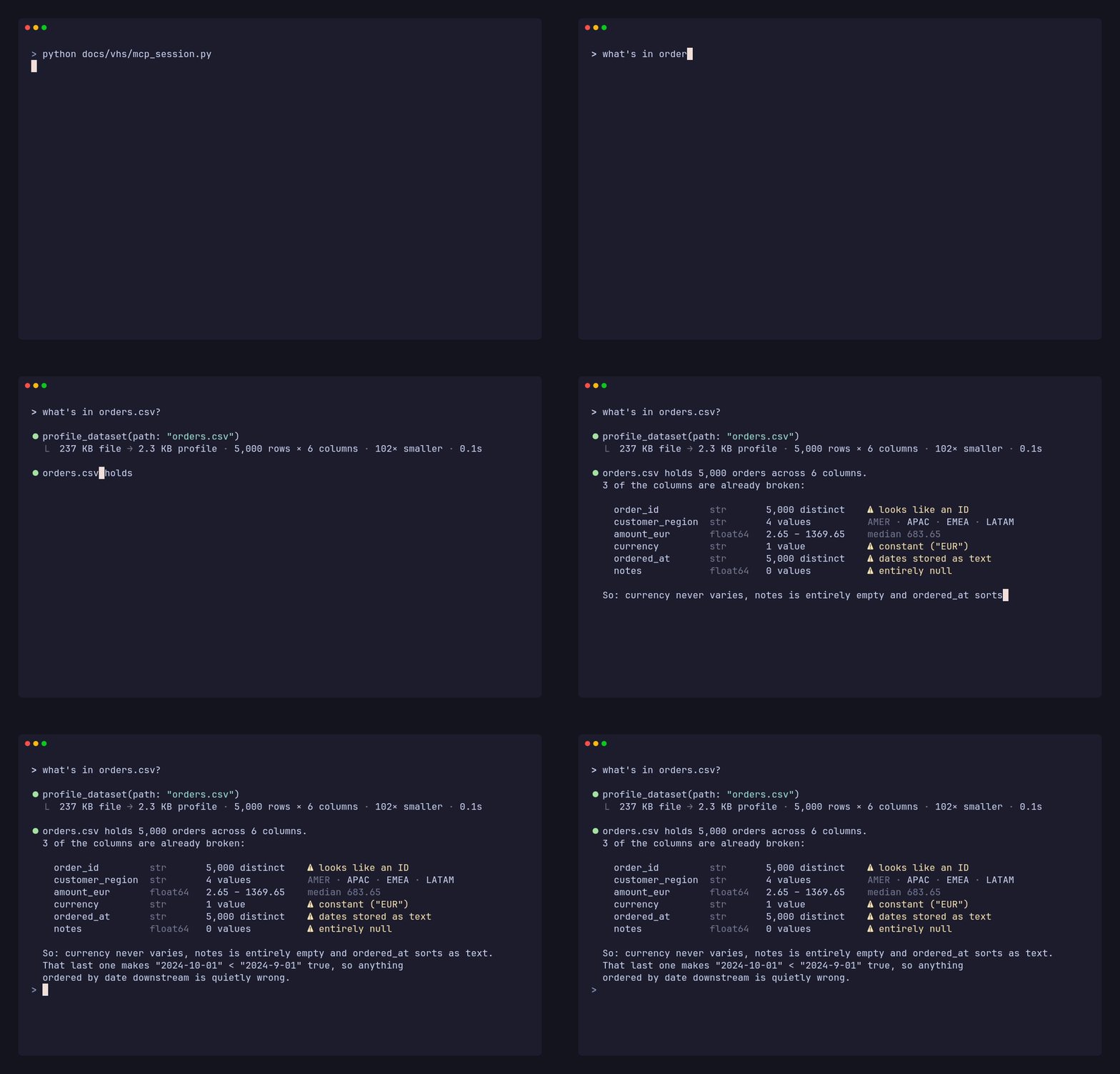
An MCP client is asked what is in orders.csv: it calls profile_dataset, gets a 2.3 KB profile
back, and reports every column with its type, range and quality flags

Three real problems surfaced before any analysis began: a column that never varies, one that is entirely empty, and a date column that sorts as text — so "2024-10-01" < "2024-9-01" — silently corrupting any time-based result.

Features

  • Six data-quality flags — constant, all-null, probable ID, mixed types, and numbers or dates stored as text.
  • Full column statistics — dtype, null count and percentage, distinct count, sample values, quartiles for numerics, ranges for dates, frequent values for categories.
  • Bounded output — the response stays small no matter how wide the input, and always reports what it truncated.
  • Honest sampling — large files are sampled, but never silently; the true row count is always included.
  • Five formats, eleven extensions — .csv .tsv .txt .parquet .pq .json .jsonl .ndjson .xlsx .xlsm .xls, plus .gz variants of the text formats.
  • Path confinement — optional --root restricts profiling to a single directory.
  • Zero configuration — no database, no index, no warm-up. Point it at a file.

Architecture

mermaid
flowchart LR
    A["MCP client<br/>Claude Code, Claude Desktop"]
    B["server.py<br/>MCP adapter"]
    C["profiler.py<br/>pure pandas, no MCP"]
    D[("Local files<br/>CSV, Parquet<br/>JSON, Excel")]

    A -->|"profile_dataset(path)"| B
    B -->|"validate, confine to --root"| C
    C -->|"sampled read"| D
    D -->|"DataFrame"| C
    C -->|"bounded JSON profile"| B
    B -->|"tool result"| A

All profiling logic lives in profiler.py, which imports nothing from MCP. It is unit-testable without a protocol harness and usable as an ordinary Python library. server.py is only the adapter.

Installation

Requires Python 3.10+.

Terminal
pip install mcp-data-profiler
Install the development version
Terminal
pip install git+https://github.com/Ridadata/mcp-data-profiler.git

Claude Code

Terminal
claude mcp add data-profiler -- mcp-data-profiler

Claude Desktop and other MCP clients

Add to your client's MCP configuration:

config.json
{
  "mcpServers": {
    "data-profiler": {
      "command": "mcp-data-profiler"
    }
  }
}

To confine the server to one directory, add "args": ["--root", "/path/to/your/data"].

Usage

Once registered, ask in plain language:

  • "Profile data/orders.csv"
  • "Which columns have missing values?"
  • "Is this dataset clean enough to model?"

Tool reference

profile_dataset(path, sample_rows=50000, max_columns=100, top_k=5, sheet=None)

ArgumentTypeDefaultDescription
pathstrrequiredFile to profile; .gz is decompressed transparently
sample_rowsint | null50000Rows to read. null reads everything — exact, slower
max_columnsint100Cap on columns described, so wide tables stay small
top_kint5Frequent values listed per categorical column
sheetstr | nullfirst sheetWhich Excel sheet to profile, by name

Quality flags

FlagMeaning
all_nullColumn is entirely empty
constantOnly ever one value — no signal
high_cardinality_possible_idNearly all values distinct; an identifier, not a feature
numeric_stored_as_textNumbers typed as strings; comparisons and sorting will be wrong
date_stored_as_textDates typed as strings; same problem
mixed_typesOne column holding several unrelated Python types

As a Python library

server.ts
from mcp_data_profiler import profile_dataset

profile = profile_dataset("data/orders.csv", sample_rows=None)
print(profile["shape"])          # {'rows_profiled': 5000, 'total_rows': 5000, 'columns': 6}
print(profile["duplicate_rows"]) # 0

Example output

Verbatim output for the sample dataset produced by python demo.py, with three of the six columns shown:

config.json
{
  "file": { "name": "orders.csv", "format": "csv", "size_bytes": 247263 },
  "shape": { "rows_profiled": 5000, "total_rows": 5000, "columns": 6 },
  "sampled": false,
  "columns": [
    {
      "name": "order_id",
      "dtype": "str",
      "null_count": 0,
      "null_pct": 0.0,
      "unique_count": 5000,
      "sample_values": ["ORD-000000", "ORD-000001", "ORD-000002"],
      "flags": ["high_cardinality_possible_id"]
    },
    {
      "name": "amount_eur",
      "dtype": "float64",
      "null_count": 0,
      "null_pct": 0.0,
      "unique_count": 1368,
      "stats": {
        "min": 2.65, "max": 1369.65, "mean": 684.2364, "std": 395.254451,
        "q25": 341.65, "median": 683.65, "q75": 1025.65
      },
      "sample_values": [2.65, 39.65, 76.65]
    },
    {
      "name": "currency",
      "dtype": "str",
      "null_count": 0,
      "null_pct": 0.0,
      "unique_count": 1,
      "top_values": [{ "value": "EUR", "count": 5000 }],
      "sample_values": ["EUR", "EUR", "EUR"],
      "flags": ["constant"]
    }
  ],
  "duplicate_rows": 0
}

Note that order_id carries no top_values: for a near-unique column every count would be 1, so the list is omitted rather than padding the response with noise.

When a file is sampled, the profile also carries "sampled": true, the true total_rows, and a sampling_note saying so.

Design notes

Bounded output. The tool must cost less than the data it describes, so the response is capped regardless of input width and long strings are truncated. Near-unique columns skip the frequent-values list, since every count would be 1.

Honest sampling. Large files are profiled from a sample, but the result always carries "sampled": true alongside the true row count — a silently sampled statistic is a wrong statistic. Row counts come from Parquet metadata or a raw newline scan, never a full parse into memory.

No silent wrong answers. The same rule governs every default that could mislead. A workbook's first sheet is often a title page, so Excel profiles always name the sheet used and list the others rather than reporting an untouched sheet as a clean dataset. CSV delimiters are inferred by testing candidates for a stable column count, which handles the semicolon files common in European open data without the header-mangling that character-frequency sniffers cause. Compressed files are decompressed before either check, since inspecting gzip bytes as text yields a plausible-looking answer that is entirely wrong.

Path safety. --root confines profiling to one directory. Paths are canonicalised before the check, so .. and symlinks cannot escape it.

Limitations

Read the full README →View source on GitHub →

Related MCP Servers

View all in Data Science Tools View all alternatives
  • Stata MCP Server logoStata MCP Server

    通过 pystata 驱动真实 Stata 的 MCP 服务器:数据加载/清洗/建模/诊断/图形导出,75 个工具覆盖完整计量工作流。

    🧮 Data Science Tools2 views
    Compare vs Stata MCP Server →
  • Fiftyone MCP Server logoFiftyone MCP Server

    Control FiftyOne computer vision datasets through AI assistants using 80+ operators.

    🧮 Data Science Tools2 views
    Compare vs Fiftyone MCP Server →
  • AutoTS logoAutoTS

    Automated time series forecasting with model search, anomaly detection, and event risk analysis

    🧮 Data Science Tools0 views
    Compare vs AutoTS →
  • ClaudeR   RStudio MCP Server logoClaudeR RStudio MCP Server

    Connect RStudio to AI assistants for interactive R coding and data analysis.

    🧮 Data Science Tools1 views
    Compare vs ClaudeR RStudio MCP Server →

Adoption & maintenance

Factual signals from GitHub, npm, and our automated checks — not a rating.

GitHub stars
1
Stargazers on the source repository.
Last commit
1mo ago
Most recent push to the default branch.
Directory activity
1 views
Config copies, upvotes, and views on AllMCPs.

Reviews

No reviews yet — be the first to share how this listing worked for you.

Frequently Asked Questions about Data Profiler

Add the following block to your claude_desktop_config.json under mcpServers: "mcpServers": { "data-profiler": { "command": "uvx", "args": ["mcp-data-profiler"] } }

AllMCPs Directory Badge

Full Badge Customizer

Showcase your server listing on GitHub or your project documentation. Embed this dynamic SVG badge to highlight official listing status and live engagement.

Badge Style:
Live Dynamic SVG PreviewData Profiler AllMCPs Directory Badge

Markdown (GitHub README)
[![AllMCPs](https://allmcps.com/api/badge/data-profiler?style=directory)](https://allmcps.com/mcp/data-profiler)
HTML Embed
<a href="https://allmcps.com/mcp/data-profiler"><img src="https://allmcps.com/api/badge/data-profiler?style=directory" alt="Data Profiler on AllMCPs" /></a>

Technical Specs & Signals

Category🧮Data Science Tools
More technical detailsExpand ▾
TransportSTDIO
RuntimePython
Last updatedAug 7, 2026
5/9 checks healthy over the last 45d
Views1
Unique ViewsTotal visits recorded for this listing page on AllMCPs.
Installs0
Installs & Copy ActionsTotal times users copied install commands or configuration snippets for this server.
GitHub stars1
GitHub Star CountTotal stargazers on GitHub representing community popularity (1 stars).
Last commit1mo ago
Last Repository CommitThe most recent commit or push recorded for this server's GitHub repository.Last commit on Aug 7, 2026
39Quality signal: Fair · 39/100How this signal is calculated ▾
Server availabilityNot measured

Not scored for repo-hosted servers — we can't reach the running server, only its GitHub page. Hosted MCP endpoints are health-checked live.

Verified ownership10/20
Documentation & tools16/30
Adoption & activity3/15
Community engagement0/10

A guidance signal from public completeness & health data — not a user rating. New listings start lower and rise as they add docs, get verified, and grow adoption. Signals we can't observe for a listing are skipped, not counted against it.

Supply-chain signal

No high-severity advisories surfaced by our automated scan.

Critical 0High 0Medium 0Low 0

Scanned 5d ago via OSV.dev · mcp-data-profiler (PyPI)

★ FeaturedMoxie Docs MCP logo

Moxie Docs MCP

MCP & Agent Skills for Automated Documentation, and codebase conventions + context

Explore Server →

Own this project?

This directory is pre-filled from public sources. Claim via GitHub README, site badge, or DNS TXT to unlock edit access and the Official badge — proof is checked automatically, then reviewed by our team.

Free dofollow backlink: add your website and place the AllMCPs badge on it — no claim needed. We detect it automatically and keep it verified as long as the badge stays live.

Claim & get free dofollow

Share & Embed

Add our SVG badge (dark/light directory styles) or embeddable widget to your site.

Explore more

More in 🧮 Data Science Tools →Best MCP servers for Data Science →Alternatives to Data Profiler →Install in Claude DesktopInstall in CursorInstall in VS CodeSetup guides for all 13 MCP clients

