Connect RStudio to AI assistants for interactive R coding and data analysis.
Quick Install
Automated & IDE SetupCopy the AI prompt to install this server into Claude Code, Cursor, or another agent — or use 1-click editor setup below.
Not yet automatically verified
We haven't yet run this listing's install command through our automated sandbox check. This isn't a red flag — we're steadily working through the catalog.
Manual Client & Custom JSON ConfigExpand JSON ▾
Client Config & Setup
Choose your client or environment
Target File:
💡 Paste the JSON block into your client's configuration file under mcpServers, then restart the application.
Documentation Overview

ClaudeR - The Modern Researcher's Toolkit
Connect a live R or Python session, in RStudio or Positron, to Claude Code, Codex, or any MCP-based LLM agent. For interactive analysis, multi-agent orchestration, and automated manuscript auditing.







ClaudeR connects MCP-configured LLM agents, like Claude Code or Codex, to the R session you are already working in. The agent runs code where your cleaned data and fitted models actually are, sees the plots it draws, reads the objects in your environment, and can edit the file open in your editor. A companion Python package does the same for a live Python session, and both work in RStudio and Positron.
Several agents can share one session and divide the work between them, or you can run separate sessions side by side so each agent works on its own dataset without touching the others.
It covers much of what a paid research AI tool does, with the work happening in your own session and a record of every line an agent ran.
Quick Start
AI agents: See llms-install.md for automated setup instructions.
Demo
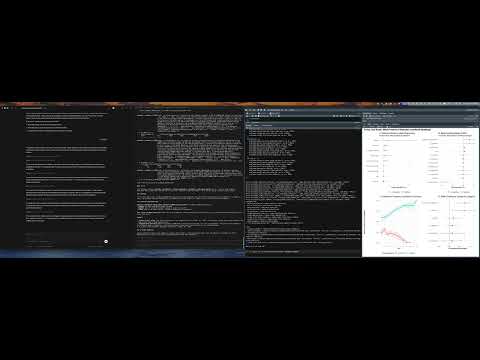
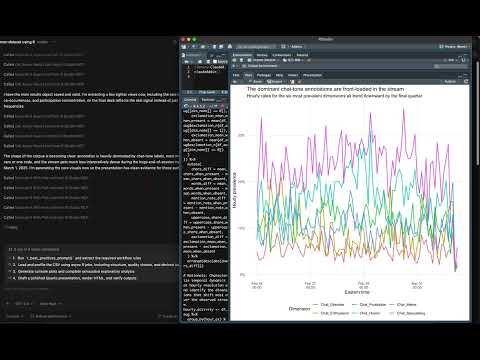
| Single agent via Claude Desktop App | Multi-agent: Codex + Claude Code via CLI | GPT 5.4 Codex: Data analysis + Quarto report |
|---|---|---|
 |  |  |
Recent Updates (click to expand)
-
Console logging from the addin fixed (R 0.14.2). Ticking "Also log my own console commands" in the addin armed nothing on 0.14.1, while calling
start_console_logging()in the console worked. Cause:globalCallingHandlers()(used to observe warnings and messages) can only be called with an empty handler stack, and inside the Shiny observer that handles the checkbox it errors, which aborted the function before the console callback was registered. The callback is now registered first and unconditionally; the handlers are installed only when logging is started from the console, and otherwise warnings are read fromlast.warningafter each command. Started from the addin,message()output is the one thing not captured, and the addin says so. -
Control what reaches the agent, and stop sending plots nobody saw (R 0.15.0 / clauder-mcp 0.15.0). From two user requests. A new AGENT CONTEXT panel in the addin does two things. "Send plots to the agent automatically" can be turned off: the agent is told a plot was drawn and asks for it with
execute_r_with_plot, saving roughly 4,500 tokens per image when you mostly want text. Your Plots pane is unaffected either way. "Tools available to the agent" hides whole groups you are not using (editor, session, coordination, background jobs, manuscript audit); all 41 tools cost about 8,600 tokens of schema on every request, and a programming-only session needs about 1,200 of that. Both settings are per session and take effect without a restart, though some MCP clients only notice a changed tool list on reconnect. Separately, a bug fix:p <- ggplot(...)returned a full image to the agent even though assignment displays nothing, so the agent was sent plots that never appeared in your Plots pane. Capture now requires the plot to have actually been shown. -
Logging fixes (R 0.14.1). Two problems from a user report. Agent output was never written to the log, only the code, because the entry was written before the code ran; the log now records what each call printed. And the output capture added in 0.14.0 could stop console logging entirely: it opened its own output sink before registering the console callback, so if that sink could not be opened, nothing was logged at all. Opening it is now optional and failing back to logging commands and their values, the sink is restored if another execution unwinds it, and an agent run no longer pops a sink it did not open. Logged output lines are marked so that replay, history and notebook export skip them.
-
Console logging now captures output, not just results (R 0.14.0). From follow-up on the logging request. The log recorded the value a command returned, so anything printed as a side effect was missing:
cat(), progress output, andprint()called inside a function. Runningf()showed the call but not whatf()printed, which is exactly the context an agent needs when you hand it an error you hit yourself. Standard output is now teed to the log and grouped under the command that produced it, alongside the warnings, messages, and errors already captured. Your console still shows everything as normal. -
Windows session-liveness fix (R 0.13.2). Checking whether a recorded R session was still alive used
tools::pskill(pid, signal = 0). That is the standard idiom on Unix, but on Windowspskillalways callsTerminateProcessregardless of signal, so the check killed the session it was asking about, then reported it as alive and left the stale discovery file in place. Starting a server could therefore terminate another RStudio session and leave agents routed to a dead port. Liveness is now probed without signalling. Separately, registering a session whose name is already held by a different live session now warns instead of silently overwriting its discovery file, which had left agents holding the wrong port and token. -
Unified console logging (R 0.13.0). The session log recorded what the agent ran, but not what you ran, so asking an agent to explain an error you hit in the console meant re-running the work through it. Tick "Also log my own console commands" under Logging and your console activity joins the same file, tagged by who ran what: the command, its printed result, and any warnings, messages, or errors. "Read the last 100 lines of the log" is now enough for an agent to see both sides of the session. Off by default; toggle it in the addin or call
start_console_logging()/stop_console_logging(). -
Editor tools fixed, plus approve-before-apply edits (R 0.12.5 / clauder-mcp 0.14.4). From two user reports.
modify_code_sectionandinsert_textnow save to disk by default and reportsaved_to_disk, so an agent no longer believes it wrote a file when the change sat unsaved in the buffer. Bounded replacements may change the line count (the old equality constraint is gone). Both tools accept apathto target a specific file, open and focus it, and refuse to edit a different document instead of failing silently.get_active_documentnow reports the path, the document id, and whether the buffer differs from disk, so buffer state and file state stop being confused for each other. Newsuggest_edittool: the agent proposes a change and waits for the user to approve it, usingrstudioapi::showEditSuggestion()when the installed rstudioapi provides it, and otherwise staging the edit unsaved so the user accepts by saving or rejects with undo.
Related MCP Servers
Adoption & maintenance
Factual signals from GitHub, npm, and our automated checks — not a rating.
GitHub stars
345
Stargazers on the source repository.
Last commit
10d ago
Most recent push to the default branch.
Directory activity
1 views
Config copies, upvotes, and views on AllMCPs.
Reviews
No reviews yet — be the first to share how this listing worked for you.
Frequently Asked Questions about ClaudeR RStudio MCP Server
AllMCPs Directory Badge
Showcase your server listing on GitHub or your project documentation. Embed this dynamic SVG badge to highlight official listing status and live engagement.
Badge Style:
Live Dynamic SVG Preview
Markdown (GitHub README)
[](https://allmcps.com/mcp/clauder-rstudio-mcp-server)HTML Embed
<a href="https://allmcps.com/mcp/clauder-rstudio-mcp-server"><img src="https://allmcps.com/api/badge/clauder-rstudio-mcp-server?style=directory" alt="ClaudeR RStudio MCP Server on AllMCPs" /></a>Technical Specs & Signals
CategoryData Science Tools
10/12 checks healthy over the last 46d
45Quality signal: Fair · 45/100How this signal is calculated ▾
Server availabilityNot measured
Not scored for repo-hosted servers — we can't reach the running server, only its GitHub page. Hosted MCP endpoints are health-checked live.
Verified ownership10/20
Documentation & tools15/30
Adoption & activity9/15
Community engagement0/10
A guidance signal from public completeness & health data — not a user rating. New listings start lower and rise as they add docs, get verified, and grow adoption. Signals we can't observe for a listing are skipped, not counted against it.
Supply-chain signal
No high-severity advisories surfaced by our automated scan.
Critical 0High 0Medium 0Low 0
Scanned 3d ago via OSV.dev · clauder-mcp (PyPI)
Own this project?
This directory is pre-filled from public sources. Claim via GitHub README, site badge, or DNS TXT to unlock edit access and the Official badge — proof is checked automatically, then reviewed by our team.
Free dofollow backlink: add your website and place the AllMCPs badge on it — no claim needed. We detect it automatically and keep it verified as long as the badge stays live.
Claim & get free dofollowShare & Embed
Add our SVG badge (dark/light directory styles) or embeddable widget to your site.