sportsbetting-oddsracingstatisticsdata-aggregation
MCP server for comparing live sports odds, scores, fixtures, standings, racing data, and league statistics across providers.
Quick Install
Automated & IDE SetupCopy the AI prompt to install this server into Claude Code, Cursor, or another agent — or use 1-click editor setup below.
Not yet automatically verified
We haven't yet run this listing's install command through our automated sandbox check. This isn't a red flag — we're steadily working through the catalog.
Manual Client & Custom JSON ConfigExpand JSON ▾
Client Config & Setup
Choose your client or environment
Target File:
💡 Paste the JSON block into your client's configuration file under mcpServers, then restart the application.
Overview
Use cases
Compare head-to-head odds across bookmakers
Identify price differences between exchanges, sportsbooks, and prediction markets
Retrieve fixtures, scores, standings, and recent results
Inspect racing odds, tote pools, and exchange money
Query league-specific statistics and official feeds
Key features
Configurable provider and tool groups
Capability tags for interchangeable provider queries
Bookmaker, exchange, and prediction-market odds comparison
Sports league, governing-body, and statistics feeds
Thoroughbred, greyhound, and harness racing data
Meta-tools for group discovery, capability lookup, and resource listing
Capabilities & Tool Schemas
Inspect callable tools, capabilities, and parameters exposed to AI agents by Sportsdata MCP.
Extracted Tool Capabilities
Configurable provider and tool groups
Capability tags for interchangeable provider queries
Bookmaker, exchange, and prediction-market odds comparison
Sports league, governing-body, and statistics feeds
Thoroughbred, greyhound, and harness racing data
Meta-tools for group discovery, capability lookup, and resource listing
Documentation Overview
sportsdata-mcp






Ask your AI which bookmaker is paying more — and get a real answer.
Free & open source (MIT). ~841 tools across 64 providers in Claude Desktop,
Cursor, or any MCP client. uvx sportsdata-mcp serve and you're done.
You: Which book has the best price on Parramatta v Penrith, and how big is the spread?
Claude queries five books at once and comes back with:
| Book | Eels | Panthers |
|---|---|---|
| Betfair | 1.18 | 6.20 |
| BetR | 1.17 | 5.00 |
| PointsBet | 1.17 | 4.80 |
| Pinnacle | 1.17 | 4.78 |
| Sportsbet | 1.19 | 4.75 |
Real captured odds. The same bet on Penrith pays $6.20 at Betfair and $4.75 at Sportsbet — a 30% spread on identical risk. That gap is invisible unless something is reading every book at once.
What this one is for: comparing prices, not just fetching scores. Plenty of sports MCP servers will get you fixtures and standings. This one is built around disagreement between books — eleven bookmakers, the Betfair exchange, and two prediction markets (Kalshi, Polymarket) side by side on the same market, plus twenty-seven official league/stats feeds. Deep on AU/NZ books (Sportsbet, TAB, Ladbrokes, PointsBet, BetR, Dabble) and on racing — thoroughbred, greyhound and harness with tote pools and exchange money — which most catalogues skip entirely. Capability tags make providers interchangeable, so "compare odds across books" is one question rather than forty-three integrations.
Is this for you?
Worth being straight about, because it decides whether the first thing you ask works or looks broken.
Best fit — you follow or bet into Australian markets. The cross-book edge above is the reason this exists, and it is built on 159 tools across eight Australian books: Sportsbet, TAB, PointsBet, BetR, Ladbrokes/Neds, Betfair, Dabble, Unibet. Nothing else exposes that, and racing — thoroughbred, greyhound and harness, with tote pools and exchange money — is covered to the same depth.
Also good — you want sport data anywhere in the world. The other 682 tools across 56 providers are not region-locked: MLB, NBA, NFL, NHL, the Premier League, cricket, golf, tennis, F1, UFC, fantasy (ESPN, Sleeper, FPL), plus Pinnacle and the Kalshi and Polymarket prediction markets. 486 of those need no key at all.
Not a fit — you want US sportsbook odds. Those eight books are licensed for Australia and block traffic from outside it. From the US you get Pinnacle, FanDuel, Kalshi and Polymarket for prices; the stats and fantasy side works in full. If cross-book US pricing is what you came for, this is not the tool.
It can now place bets. Read this bit.
Since 0.31.0 the catalogue includes sportsbet_place_bet, tab_place_bet,
entain_place_bet and unibet_place_bet. These stake real money from your own
account, using credentials you supply. Nothing calls them on its own — they are
ordinary tools, so whatever you connect this server to decides when they run.
Two things follow, and neither is optional reading:
- An LLM with these tools in scope can place a bet. If that is not what you
want, do not enable the account groups; every other group is unaffected, and
list-groupsshows exactly what you have turned on. - Only Sportsbet and TAB have been round-tripped against a real account. Unibet and Ladbrokes/Neds have their request shape captured from placements made in a browser, which proves the request and says nothing about whether a stored credential alone is accepted.
The agent workbench applies its own policy on top of this — everything starts in
paper mode and stakes nothing until you opt a book in — but that is the app's
guardrail, not this server's. On its own, this package does what it is asked.
Rather than take that on trust, ask it:
It probes every provider from your machine and prints what answered, what your location blocks, and what needs a key — so an empty result is never ambiguous between "no data" and "wrong country".
Built on this server
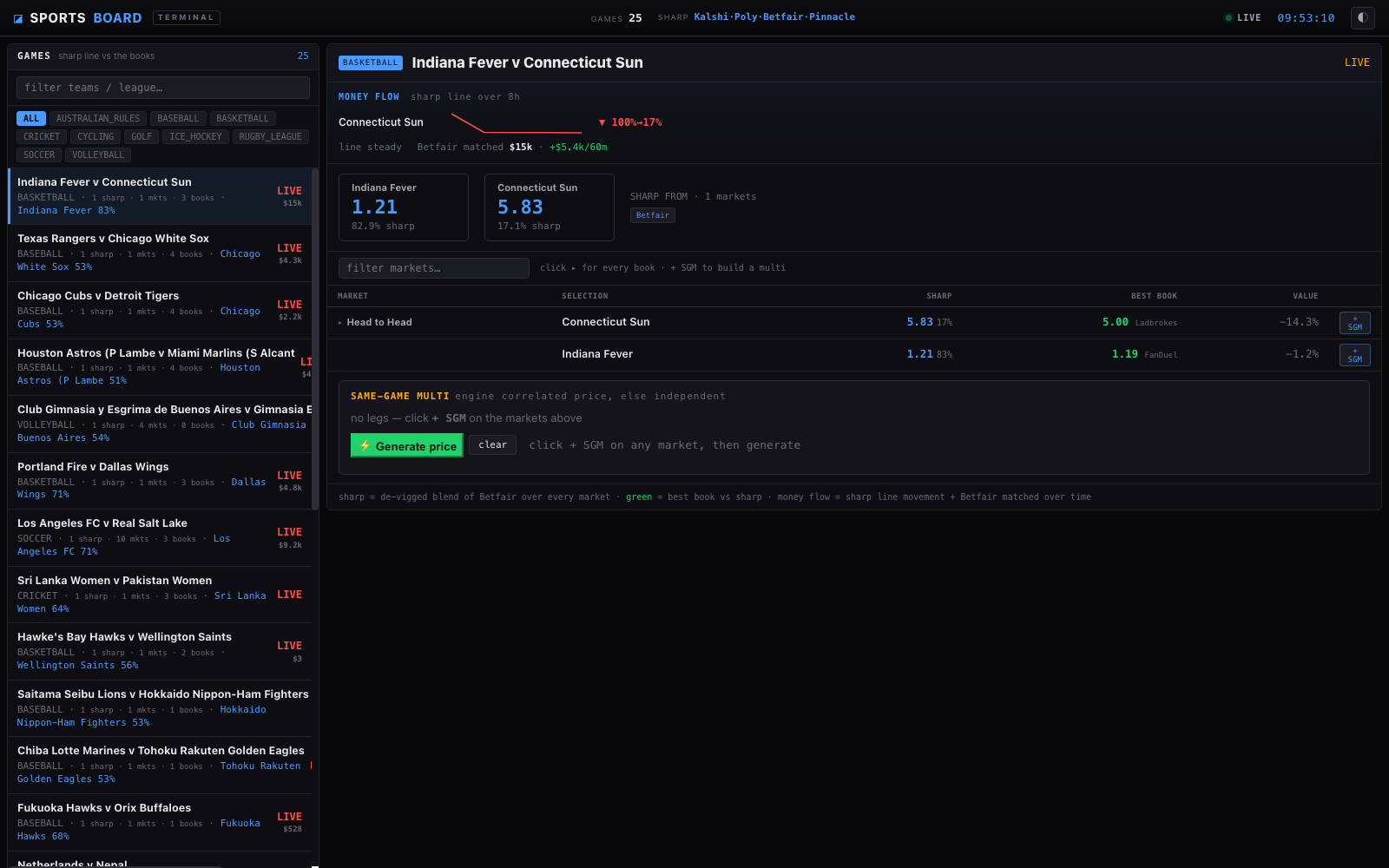
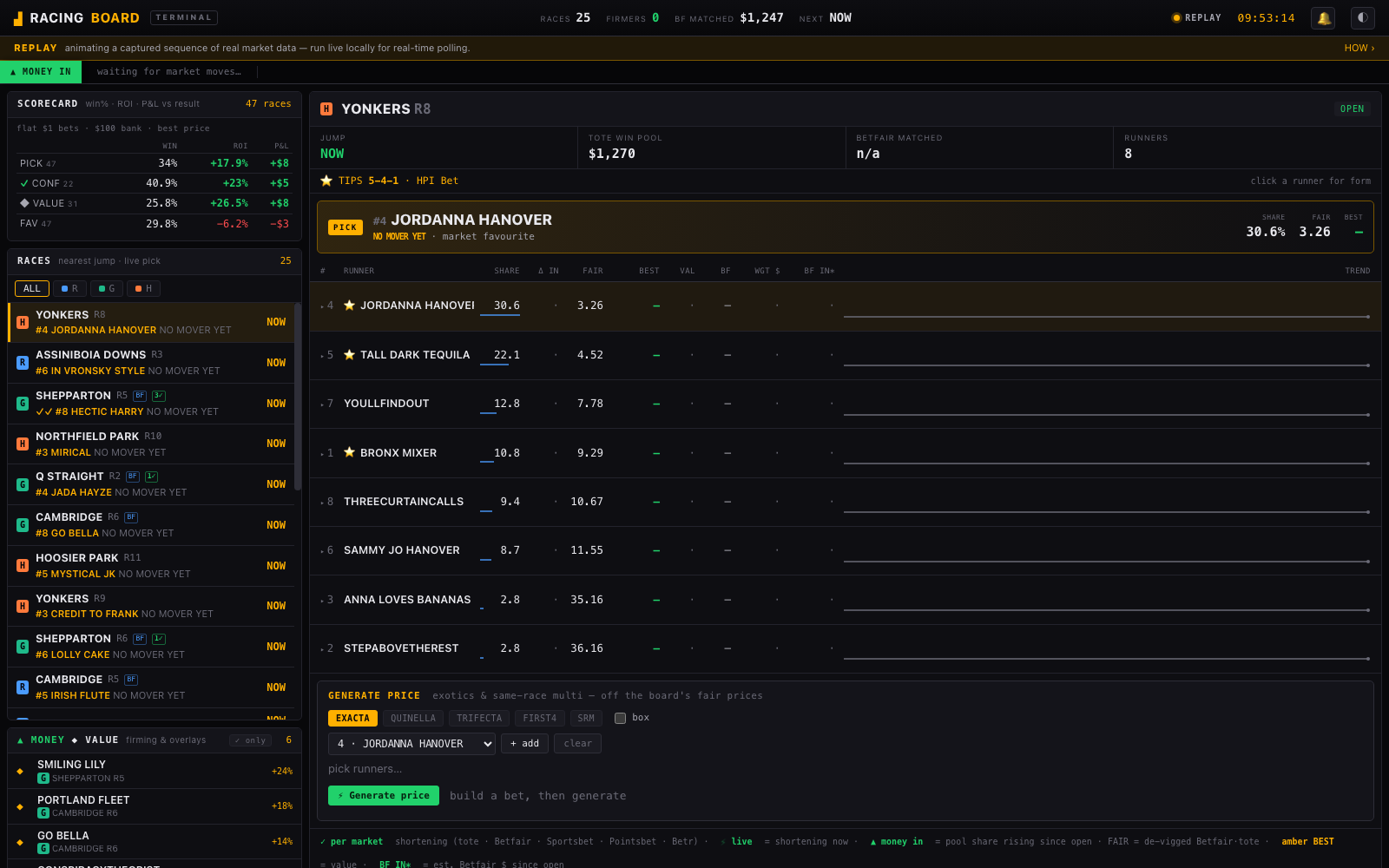
Two live terminals, both open source, both running on nothing but these tools:
sportsdata-ai.com/sports — prediction markets + exchange as a de-vigged sharp line, every book measured against it.
sportsdata-ai.com/board — racing money flow: which runners are firming, fair price vs the field, win%/ROI scorecard.
Try these once it's installed
- "Compare head-to-head odds across every book for tonight's NRL games."
- "Which AFL games have the biggest price disagreement between bookmakers?"
- "What does Betfair imply for the Panthers vs what Sportsbet is offering?"
- "Show me Pinnacle's line on every MLB game today."
- "Pull the ladder and last five results for Hawthorn."
An MCP server that exposes sports-data APIs (bookmakers, league/governing-body feeds, aggregators) as tools, configurable so you only load the tool groups you need. A capability-tag system makes tools from different providers interchangeable wherever they answer the same question — so the model can compare odds across bookies or stats across data sources with one discovery call.
The catalogue spans bookmakers, league/governing-body feeds, and stats
aggregators, and it keeps growing. New providers are added by dropping a YAML
spec into src/sportsdata_mcp/specs/ — the engine needs no code changes — so
the exact provider and tool counts move over time. Run sportsdata-mcp list-groups for the live inventory, and three meta-tools (group discovery,
capability lookup, resource listing) are always on regardless of what you
enable.
Install
One-liner (any MCP client config, via uv):
Prebuilt app (no Python needed): grab the latest
release
(macOS + Windows), unzip, and run sportsdata-mcp setup — it writes the config
for Claude Desktop / Cursor for you. The macOS build is unsigned for now:
right-click → Open the first time.
From source:
Quickstart
Provider endpoints drift (e.g. Entain rotates its GraphQL persisted-query hashes).
update-specs fetches a signed spec bundle and applies it into an overlay under
~/.sportsdata/spec-overlay, which the loader prefers over the packaged copy — so a drift
fix doesn't need a whole new app build. The bundle is Ed25519-verified against a baked key
(a product build refuses an unsigned/forged bundle; anti-rollback refuses a stale replay).
Publish one with scripts/publish-spec-bundle.py; point --url / $SPORTSDATA_SPEC_FEED_URL
at the asset. Restart the server after applying.
Enable tool groups with a config file or the SPORTSDATA_MCP_GROUPS env var:
See examples/ for Claude Desktop / Claude Code config snippets,
a worked cross-bookie odds-comparison prompt,
and an NBA shot-chart + box-score walkthrough that
shows the nba_stats_call dispatcher pattern end to end.
Configuration
Config is resolved in this order (first hit wins):
--config <path>flag$SPORTSDATA_MCP_CONFIG./sportsdata-mcp.yaml~/.config/sportsdata-mcp/config.yaml- built-in defaults
A provider whose auth reads env: SOME_VAR is satisfied by the real environment
variable first, then by a secrets: { SOME_VAR: "..." } entry of the same name
(a local-dev convenience — keep real secrets in the environment in production).
Environment variables
Related MCP Servers
Adoption & maintenance
Factual signals from GitHub, npm, and our automated checks — not a rating.
GitHub stars
14
Stargazers on the source repository.
Last commit
5d ago
Most recent push to the default branch.
Directory activity
1 views
Config copies, upvotes, and views on AllMCPs.
Reviews
No reviews yet — be the first to share how this listing worked for you.
Frequently Asked Questions about Sportsdata MCP
AllMCPs Directory Badge
Showcase your server listing on GitHub or your project documentation. Embed this dynamic SVG badge to highlight official listing status and live engagement.
Badge Style:
Live Dynamic SVG Preview
Markdown (GitHub README)
[](https://allmcps.com/mcp/danieltomaro13-sportsdata-mcp)HTML Embed
<a href="https://allmcps.com/mcp/danieltomaro13-sportsdata-mcp"><img src="https://allmcps.com/api/badge/danieltomaro13-sportsdata-mcp?style=directory" alt="Sportsdata MCP on AllMCPs" /></a>Technical Specs & Signals
CategorySports
PricingFree
7/7 checks healthy over the last 22d
55Quality signal: Good · 55/100How this signal is calculated ▾
Server availabilityNot measured
Not scored for repo-hosted servers — we can't reach the running server, only its GitHub page. Hosted MCP endpoints are health-checked live.
Verified ownership10/20
Documentation & tools25/30
Adoption & activity6/15
Community engagement0/10
A guidance signal from public completeness & health data — not a user rating. New listings start lower and rise as they add docs, get verified, and grow adoption. Signals we can't observe for a listing are skipped, not counted against it.
Supply-chain signal
No high-severity advisories surfaced by our automated scan.
Critical 0High 0Medium 0Low 0
Scanned 27d ago via OSV.dev · sportsdata-mcp (PyPI)
Own this project?
This directory is pre-filled from public sources. Claim via GitHub README, site badge, or DNS TXT to unlock edit access and the Official badge — proof is checked automatically, then reviewed by our team.
Free dofollow backlink: add your website and place the AllMCPs badge on it — no claim needed. We detect it automatically and keep it verified as long as the badge stays live.
Claim & get free dofollowShare & Embed
Add our SVG badge (dark/light directory styles) or embeddable widget to your site.