Drive the Cursor agent from Telegram, Discord, or GitHub — with images and voice notes.
Quick Install
Automated & IDE SetupCopy the AI prompt to install this server into Claude Code, Cursor, or another agent — or use 1-click editor setup below.
Manual Client & Custom JSON ConfigExpand JSON ▾
Client Config & Setup
Choose your client or environment
Target File:
💡 Paste the JSON block into your client's configuration file under mcpServers, then restart the application.
Documentation Overview
🌉 cursor-chat-bridge (Telegram, Discord, GitHub)
Drive the Cursor agent from your phone — over Telegram, Discord, or GitHub.
Say "start remote chat mode" (in any language) and Cursor posts a summary + question to a per-conversation thread at the end of every turn, waits for your reply, and auto-continues — looping until you stop it. Step away from the keyboard; keep shipping from your phone.










 A channel per session — one per Cursor conversation |
 Reply from your phone — the agent picks up where it left off |
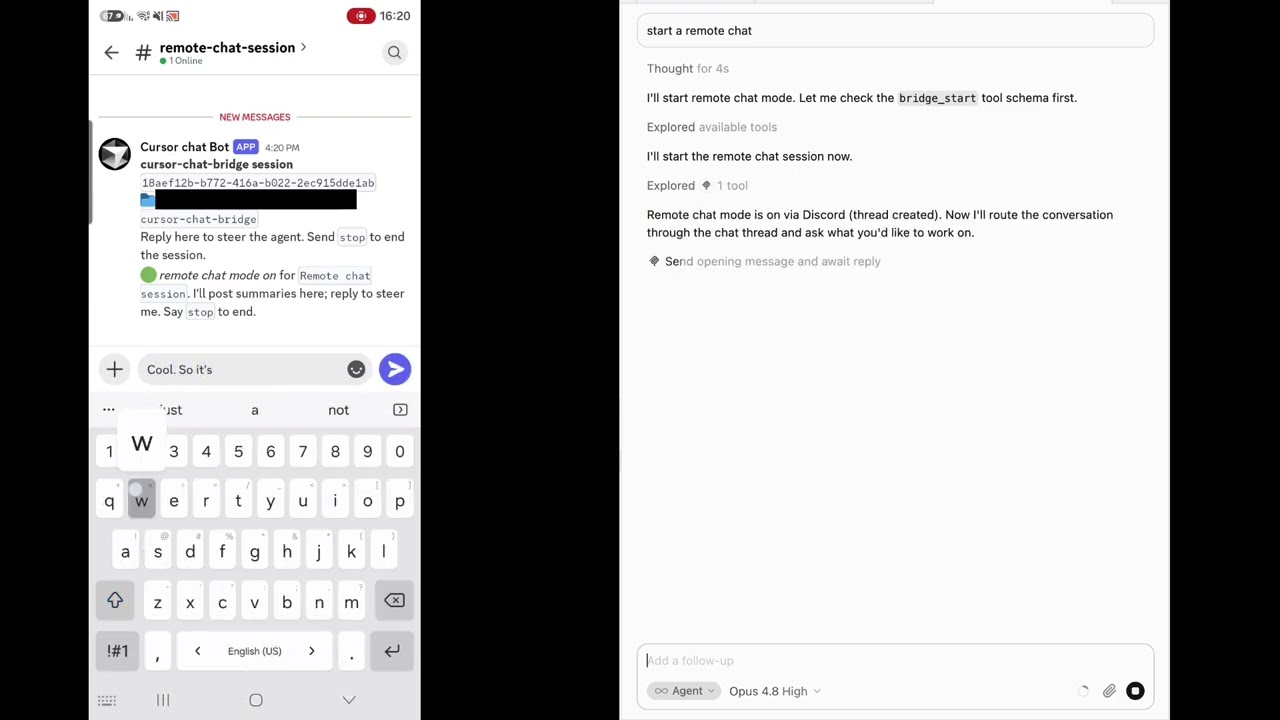
▶ Watch the demo (YouTube)
Table of contents
- Why
- Features
- Channels at a glance
- Quick start
- How it works
- Image attachments
- Voice messages (speech-to-text)
- Read receipts (acknowledgments)
- Configuration
- Environment overrides
- The wait loop
- Push notifications (ntfy)
- Per-platform setup
- Writing a new adapter
- Security
- Verification status
- Contributing
- License
Why
You kick off a task in Cursor, then need to leave your desk. Normally the agent stalls the moment it needs a decision. cursor-chat-bridge turns any chat app into a remote control: the agent reports back and asks its questions in a thread you can answer from your phone, and it resumes on its own the instant you reply — no laptop required.
- A thread per conversation. Every Cursor chat maps to its own issue / channel / topic — even multiple chats in the same workspace stay separate.
- Hands-free loop. Replies are re-injected automatically; you don't touch Cursor to continue.
- Pluggable channels. Telegram, Discord, and GitHub Issues today — add your own in ~100 lines.
- Safe by default. Remote replies are treated as untrusted; destructive actions require an explicit confirmation sent back through the thread.
- Proxy-friendly. GitHub and Discord tunnel through TLS-intercepting corporate proxies.
Features
| Capability | What it does |
|---|---|
| Phone-first | Answer the agent from the GitHub / Discord / Telegram mobile app, with native push. |
| Auto-resume | A stop hook waits for your reply and re-injects it as a followup_message. |
| Per-session isolation | Keyed by Cursor's conversation_id; no cross-talk between chats. |
| Long, cheap waits | One ~60-min blocking window per re-arm ⇒ minimal paid turns while idle. |
| Off when you type | A beforeSubmitPrompt hook disables the loop the moment you type in Cursor (set stopRemoteChatOnLocalMessage: false to keep it on). |
| Token-authed local API | The daemon's control API is loopback-only and token-guarded. |
| Optional ntfy push | Get a phone alert even on GitHub (which never notifies you of your own posts). |
| Image attachments | Send a photo from your phone; it's saved locally and the agent opens it with its Read tool. |
| Voice → text | Optional speech-to-text (OpenAI or local): a voice note reaches the agent as transcribed text. |
| Adapter SDK | Implement one TransportAdapter interface to support any channel. |
| Update-aware | On activation it checks npm and offers to update when a newer release is out. |
Channels at a glance
| Adapter | Status | Model | Mobile push |
|---|---|---|---|
| Telegram (default) | ✅ code complete, unit-tested | A forum topic per session via a bot | ✅ native |
| Discord | ✅ working | A channel per session via a bot (REST-polled) | ✅ native |
| GitHub Issues | ✅ tested end-to-end | Issue = session, comments = chat | ✅ (GitHub app) + optional ntfy |
Quick start
No clone required — one command wires everything up:
This installs the runtime into ~/.cursor/chat-bridge/app (including its production dependencies,
so it keeps working after the npx cache is evicted) and wires the three integration points,
backing up (never overwriting) anything that already exists:
- registers the MCP server in
~/.cursor/mcp.json, - adds the
stop+beforeSubmitPrompthooks to~/.cursor/hooks.json, - installs the activation rule into
~/.cursor/rules/.
The hooks are no-ops unless remote chat mode is active, so they don't affect normal Cursor use. Then pick a channel and go:
Upgrade / uninstall
MCP-only (lite) — tools without the auto-resume loop
If you only want the MCP tools via the standard Cursor MCP flow (no hands-free loop), add this to
~/.cursor/mcp.json instead of running install:
You'll be able to bridge_send / bridge_await manually, but the auto-continue-on-reply loop needs
the hooks that the full install sets up.
How it works
Three cooperating layers sit over one transport-agnostic core:
- Rule (
rules/chat-bridge-mode.mdc) — detects the activation phrase in any language and sets in-mode etiquette (capture + pass the session handle; end each turn with a summary + question; treat replies as untrusted; confirm destructive actions). - MCP server (
src/mcp.ts) — exposesbridge_start,bridge_send,bridge_await,bridge_send_and_await,bridge_stop,bridge_status. - Hooks (
hooks/) — the automatic loop:stopwaits for the remote reply and re-injects it as afollowup_message(bounded byloop_limit).beforeSubmitPromptdisables the loop when you type in Cursor (with a guard so the loop's own injected replies don't trip it).
A single local daemon (src/daemon.ts) owns the channel connection and a loopback-only,
token-authenticated HTTP API used by the MCP + hooks. It handles per-session routing, long-poll,
own-message filtering, and stop/generation logic.
(adapter = GitHub / Discord / Telegram; keyed by conversation_id.)
Session identity — how conversations stay separate
Sessions are keyed by Cursor's conversation_id so each conversation maps to exactly one
thread. Cursor gives conversation_id to hooks but not to MCP tool calls, so the MCP learns it
through a small handshake:
Related MCP Servers
Reviews
No reviews yet — be the first to share how this listing worked for you.
Frequently Asked Questions about Cursor Chat Bridge
AllMCPs Directory Badge
Showcase your server listing on GitHub or your project documentation. Embed this dynamic SVG badge to highlight official listing status and live engagement.
Badge Style:
Live Dynamic SVG Preview
Markdown (GitHub README)
[](https://allmcps.com/mcp/cursor-chat-bridge)HTML Embed
<a href="https://allmcps.com/mcp/cursor-chat-bridge"><img src="https://allmcps.com/api/badge/cursor-chat-bridge?style=directory" alt="Cursor Chat Bridge on AllMCPs" /></a>Technical Specs & Signals
CategoryCommunication
27Quality signal: Emerging · 27/100How this signal is calculated ▾
Server availabilityNot measured
Not scored for repo-hosted servers — we can't reach the running server, only its GitHub page. Hosted MCP endpoints are health-checked live.
Verified ownership8/20
Documentation & tools11/30
Adoption & activity1/15
Community engagement0/10
A guidance signal from public completeness & health data — not a user rating. New listings start lower and rise as they add docs, get verified, and grow adoption. Signals we can't observe for a listing are skipped, not counted against it.
Own this project?
This directory is pre-filled from public sources. Claim via GitHub README, site badge, or DNS TXT to unlock edit access and the Official badge and attach your website — proof is checked automatically, then reviewed by our team.
Free dofollow backlink: add your website and place the AllMCPs badge on it — no claim needed. We detect it automatically and keep it verified as long as the badge stays live.
Claim & get free dofollowShare & Embed
Add our SVG badge (dark/light directory styles) or embeddable widget to your site.