Coolftp README
The full upstream README, mirrored here for reference. Install config, tool schemas, adoption signals, and an original overview live on the Coolftp listing page.
coolFTP
The FTP client your coding agent can drive. A desktop SFTP / FTPS / FTP client for Windows, plus a CLI and an MCP server, built for people who write code with Claude Code, Codex, or Cursor and still have to get files onto a web server.
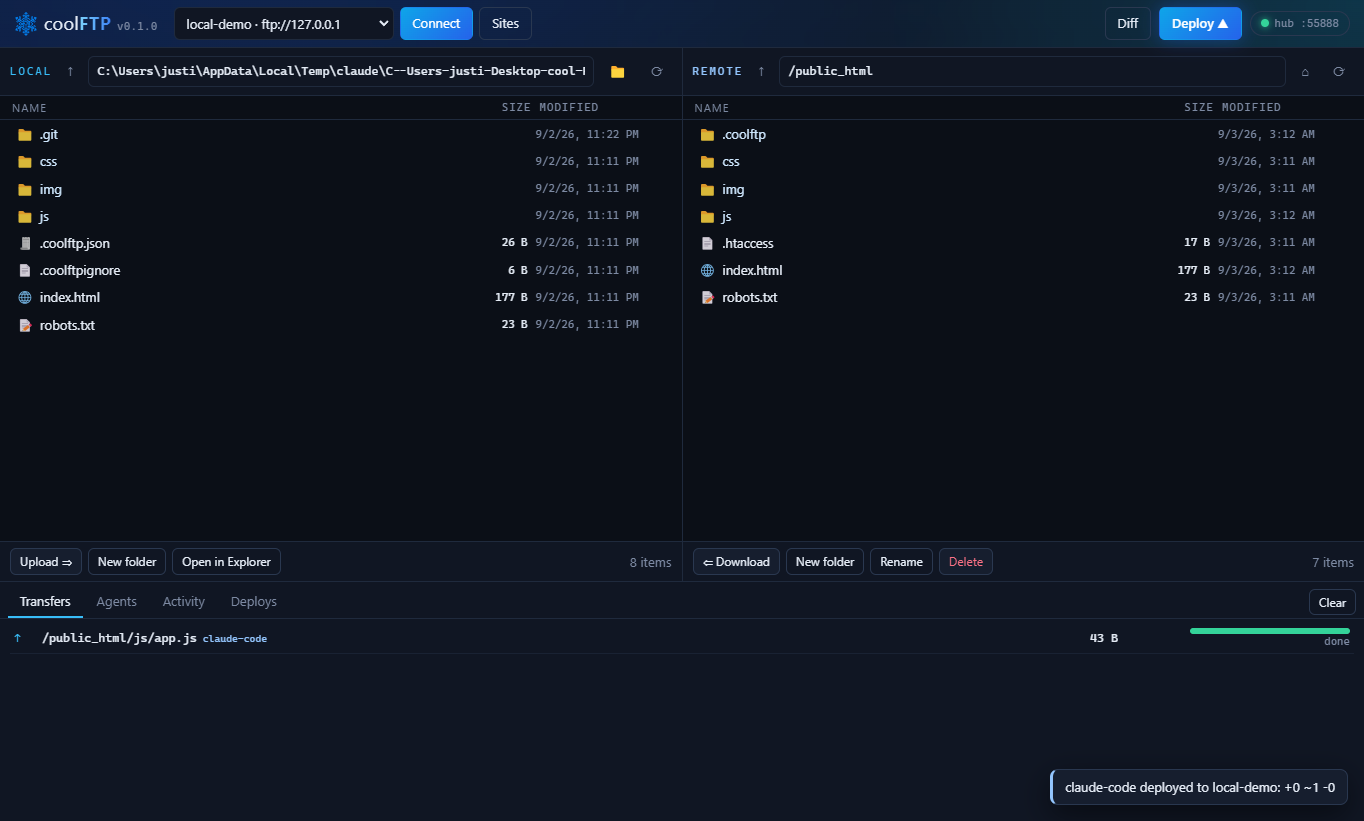
Say "deploy this". The agent calls coolFTP. Only files whose content changed go up, the git commit is recorded next to the deploy, the site is fetched afterward to prove it answers, and you watch every step live in the app. If it went wrong, coolftp undo puts the previous version back, no git needed. Works with any host that speaks SFTP or FTP: Hostinger, HostGator, Bluehost, GoDaddy, any cPanel box, your own VPS. Free and MIT. Website: coolftp.com.
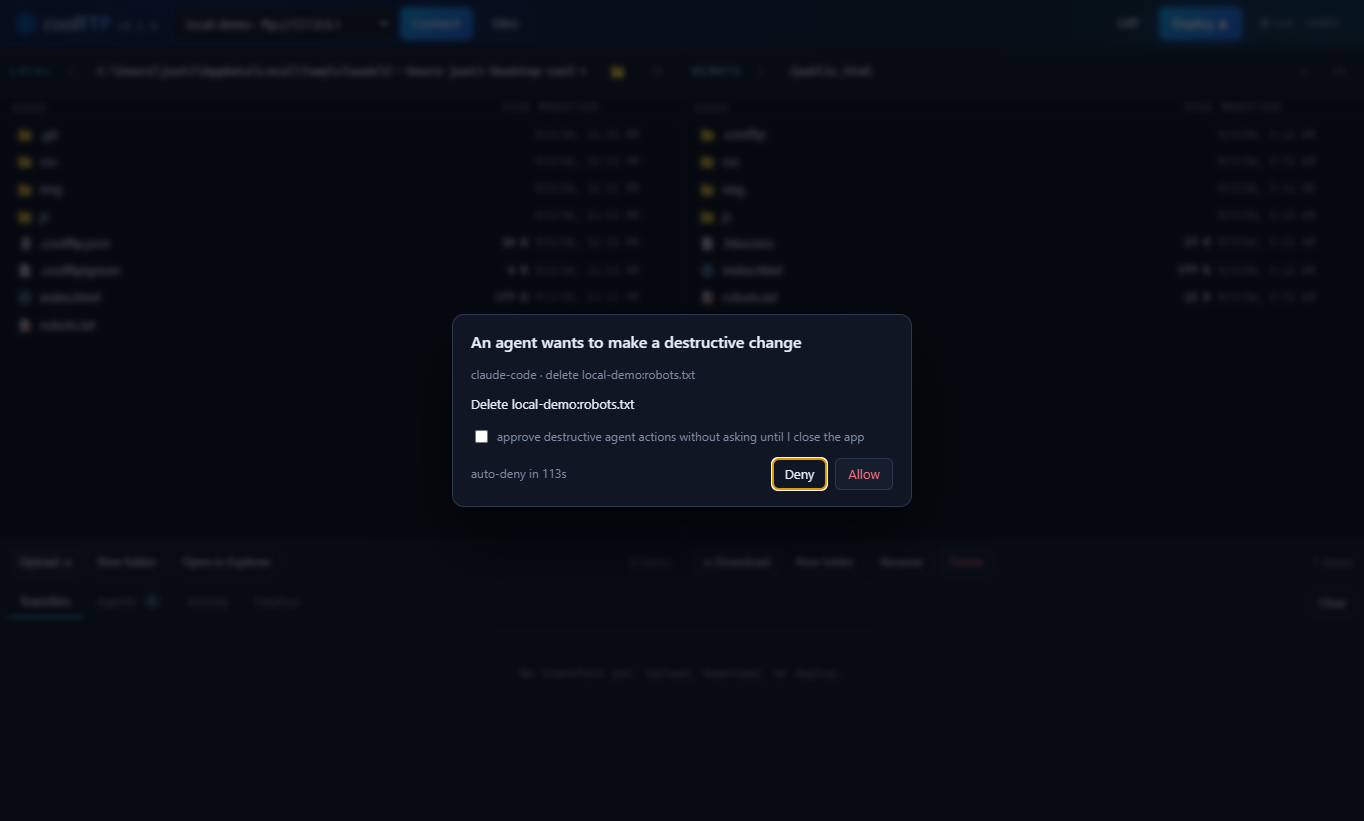
Agents ask before they delete anything:
Why
Every FTP client assumes a human is clicking. coolFTP assumes a human is watching and an agent is doing.
- Hash-based deploys. A manifest on the server records the SHA-256 of every deployed file. Timestamps lie; hashes do not.
- Undo, no git needed. Every deploy moves the files it overwrites or deletes into a backup folder on the server first.
coolftp undoputs them back, even from a dirty tree. - Deploy history with git. Each deploy stores the commit, branch, dirty flag, message, byte count, which agent ran it, and whether the site verified live.
- One-command rollback.
coolftp rollbackrestores the previous live commit through a temporary git worktree. - Verification. Give a site its public URL and every deploy fetches the changed pages, compares static files byte for byte with what you uploaded, and exits non-zero when the site does not answer.
coolftp verifydoes the same on demand. - Live agent feed and approval dialog. Deletes,
--deletedeploys, rollbacks and undos wait for your click while the app is open. Deploys show as a progress card, and a Windows notification tells you how they ended. - Safety by default. Pinned SSH host keys, passwords encrypted with your Windows account, a first-deploy guard that refuses to delete files it never uploaded, changed files swapped into place rather than overwritten, sizes confirmed by the server, resumable deploys.
Install
The CLI and the MCP server run anywhere Node 18 or newer does: Windows, macOS, Linux, a headless box, CI.
No install at all: npx coolftp ... runs the same thing.
The desktop app is Windows for now: the installer, a portable .exe and the Claude Desktop extension (.mcpb) are on the download page with their SHA-256s.
Build from source
To get a global coolftp command from this checkout instead of npm: cd packages/cli && npm link.
Add a server
Or use the Sites button in the app. Sites live in %APPDATA%\coolftp\sites.json on Windows and ~/.config/coolftp/sites.json elsewhere. On Windows, passwords in that file are encrypted with DPAPI under your account; on macOS and Linux they are stored as-is until a keychain backend lands, so prefer keys for SFTP there.
Link a project and deploy
Exit codes: 0 deployed (and verified, when the site has a URL), 1 something failed before or during the upload, 3 the files landed but the live checks did not pass. -q drops progress and per-file output and keeps the result line, warnings, errors and the checks. Deploys of more than 20 files print one progress line every few seconds instead of a line per file, and long plans are summarised by folder.
coolftp init writes .coolftp.json:
Commit it. Add a .coolftpignore (gitignore syntax) for anything that must never go up. .git, node_modules, .env*, *.log and the coolFTP files are always excluded.
When a site's FTP root is not the web root (shared hosts often log you in one level above public_html), point the project at the right folder and tell coolFTP where it is served:
Every command then works relative to that folder: coolftp push js/app.js js/app.js, coolftp ls, coolftp stat, coolftp cat, coolftp rm all resolve against /public_html, the same place deploy writes to. Paths starting with / are still absolute on the server. The url makes the changed-file URLs and the post-deploy check point at https://example.com/js/app.js rather than at the FTP path.
A push confirms the uploaded size with the server, reports any folder it had to create (with a warning when a single file opens a new top-level folder, which is what a stale public_html/ prefix looks like), and records a file pushed inside the project's remote directory in the deploy manifest, so the next deploy does not send it again.
Git Bash rewrites arguments that start with / into Windows paths before any program sees them. coolFTP undoes that when it recognises the Git install prefix and refuses anything else that looks like a drive path, so coolftp ls /public_html works from Git Bash too. If you hit the refusal, use a relative path or set MSYS_NO_PATHCONV=1.
Let Claude Code drive it
MCP (recommended, gives Claude typed tools). With the CLI installed from npm, on macOS and Linux:
On Windows, npm installs coolftp as a .cmd shim, so go through cmd:
Without a global install: claude mcp add --scope user coolftp -- npx -y coolftp mcp (again behind cmd /c on Windows). --scope user registers it for every project on the machine; drop it to register for the current project only.
Cursor, Windsurf and other MCP clients take the same server in their mcp.json:
From a source checkout instead of npm, point at the built file:
Tools exposed: coolftp_sites, coolftp_status, coolftp_init, coolftp_diff, coolftp_deploy, coolftp_undo, coolftp_verify, coolftp_rollback, coolftp_history, coolftp_ls, coolftp_stat, coolftp_read, coolftp_write, coolftp_upload, coolftp_download, coolftp_mkdir, coolftp_delete, coolftp_rename. Results are summarised for an agent: counts and a folder breakdown instead of thousands of paths, a live verdict on every deploy, and the transfer log collapsed after 20 files. The server checks on every call whether the desktop app is running, so the app can be opened and closed during a session.
Use it from the Claude Desktop app
The same MCP server ships as a Claude Desktop extension. npm run mcpb packs it into release/coolFTP-<version>.mcpb (the download page carries the built one); open that file in Claude Desktop and hit Install. Claude gets the coolftp_* tools, and every call still routes through the desktop app while it is open, so deploys show up there and deletes, undos and rollbacks wait for your click. A chat has no working directory, so set Default project folder in the extension's settings or name the folder in the chat; a project's own .coolftp.json is found either way. The bundle is unsigned for now, which the install dialog points out.
server.json describes the server for the MCP Registry twice over: as the coolftp npm package (run with npx coolftp mcp) and as the .mcpb bundle. npm run mcpb keeps the versions and the bundle hash current. The release steps, npm publish included, are in docs/PUBLISHING.md.
Safety rails for agent-driven deploys
- Approval dialog. While the desktop app is open, an agent call that deletes a path, deploys with
--delete, rolls back, or undoes a deploy pops a dialog in the app and waits for your click. No answer within two minutes is a deny. There is a checkbox to auto-approve for the rest of the session. - First-deploy delete guard. Before a manifest exists on the server,
--deleteis refused if the target folder contains files coolFTP never uploaded. Pass--delete-untrackedto override. - Undo. Before a deploy overwrites or deletes a file, the live copy is renamed into
.coolftp/backup/<deployId>/on the server, so nothing extra is transferred.coolftp undorestores those versions, removes the files that deploy added, and is itself undoable;--dry-runshows the work first,--to <deployId>reverts an older deploy when nothing later touched its files. The last five deploys keep their backups (coolftp init --keep-backups <n>, 0 to turn it off). The Deploys tab has an Undo button. - Rollback.
coolftp rollbackrestores the previous commit that was live for the project, using a temporary git worktree so your working tree is untouched.--to <commit|deployId>targets any point in history. The Deploys tab in the app has the same buttons. - Verification. Give a site a public
--url(or a project one withcoolftp init --url) and every deploy prints the URLs of changed files, fetches the homepage and up to four pages and reports the status codes, and compares up to four static files byte for byte with the local copy. A status failure exits with code 3; a byte mismatch is reported as stale (something between the server and the world, a cache or a CDN, is still serving the old version) without failing.coolftp verifyre-runs the checks any time;historyshows live, failed or stale per deploy. MCP results carry the same verdict so an agent never calls an unverified deploy live. - Confirmed uploads. In jobs of up to 50 files, every upload's size is read back from the server and a mismatch is retried. Changed files upload beside the live copy and are swapped in with a rename, and the manifest is written the same way, so a dropped connection never leaves a half-written file or manifest behind.
- Host key pinning. SFTP host keys are recorded on first use in
known_hosts.jsonand a changed key is refused with a loud error.coolftp site trust <name>forgets the recorded key after a legitimate server rebuild;coolftp site keyslists them. - Encrypted passwords. On Windows, passwords and key passphrases in
sites.jsonare encrypted with DPAPI under your user account. The CLI and the app share the store. - Resumable deploys. Transfers retry up to three times. If a deploy still fails partway, files that landed are written to the manifest so the next run does not repeat them.
Any agent with a shell can simply run coolftp deploy inside a linked project. The CLI detects Claude Code, Cursor, Codex, Gemini CLI and Aider from their environment and labels the call accordingly; pass --agent <name> to override.
This repo also ships a /deploy skill for Claude Code in .claude/skills/deploy. Copy that folder to ~/.claude/skills/deploy and register the MCP server with claude mcp add --scope user so every project on the machine gets it, not only this checkout.
How agent calls reach the app
When the desktop app is running it listens on a random 127.0.0.1 port and writes %APPDATA%\coolftp\hub.json with the port and a per-session token. The CLI and MCP server look for that file, and if the app answers, they send the command to the app instead of running it themselves. Events stream back as NDJSON, so the terminal still shows progress, and the app shows the same call in its Agents panel, its transfer queue, and its deploy history. If the app is closed, the CLI runs everything in-process. --direct forces that.
How deploys decide what to upload
- Scan the local folder, hashing files (SHA-256, cached by size and mtime).
- Read
<remoteRoot>/.coolftp/manifest.jsonfrom the server. It maps every deployed path to its hash. - Upload files whose hash differs or which are missing from the manifest, over up to four FTP connections for jobs of eight files or more (
coolftp site add --connections <n>changes the count; SFTP multiplexes one). A changed file is uploaded beside the live one, the live one is moved into the backup folder, and the new one is renamed into place. Files in the manifest but not local are reported as stale and only removed with--delete, which also moves them into the backup. - Write the new manifest (to a temporary name, then swapped in), plus a deploy record (git commit, branch, dirty flag, message, agent, counts, duration, backup, connections), prune backups beyond the kept count, then run the live checks and store the verdict with the record.
On a server with no manifest yet, the remote tree is walked and compared by size; that first deploy establishes the manifest. --force re-uploads everything.
The manifest directory gets a .htaccess with Require all denied. On nginx, deny /.coolftp yourself or point remoteRoot above the web root.
Tests
Starts a local FTP server (ftp-srv) and a local SFTP server (ssh2, in scripts/lib/sftp-server.cjs) in temp directories and drives the CLI through site setup, init, the first-deploy delete guard, deploy, manifest diff, delete sync, --commit, undo and redo from the server-side backup, backup pruning, rollback by previous commit and by deploy id, push (size confirmation, created-folder warning, manifest recording), pull, stat, rename, mkdir, remove, a 30-file deploy over four FTP connections, verification against a local web server (a passing deploy, a stale copy, an unreachable site with exit code 3, quiet mode), history, encrypted passwords, SSH host key pinning (a swapped server key is refused, then trusted), and the MCP server driven over stdio. 190 checks in total.
Try it without a real host
Both seed a temp folder with a few files. Add a site pointing at one, connect in the app, and deploy any folder at it.
Free and Pro
All of the code is MIT. coolFTP is free for personal projects. coolFTP Pro is a 49 dollar one-time license for commercial use, with priority support and a year of updates, sold at coolftp.com. Buying it is how the project gets funded; there is no feature wall in this repository.
Keys are CFP1.<payload>.<signature>, Ed25519-signed, verified offline against the public key in packages/core/src/license-pubkey.ts. A key is valid for every build dated on or before its updatesUntil date.
node scripts/license/keygen.cjscreates the signing key pair once. The private half lives inscripts/license/private/(git-ignored). Back it up; losing it invalidates every key ever issued.node scripts/license/issue.cjs --email x@y.zissues a key by hand.npm run test:licenseexercises activation, tampering, expiry, and removal through the CLI.coolftp license,coolftp license activate <key>,coolftp license remove, or the Pro button in the app.
Purchases run through Stripe Checkout. site/api/stripe-webhook.php receives checkout.session.completed, signs a key with the libsodium copy of the private key, stores a record outside the web root, and emails the key from licenses@coolftp.com. site/api/resend.php re-sends a key for an email address, rate limited. Real values go in site/api/config.php, which is git-ignored; config.example.php shows the shape.
Package the app
Uses electron-builder with packages/app/electron-builder.yml. Output lands in release/. Builds are unsigned.