Deploy a site to its SFTP/FTP host from a coding agent. Changed files only, undo, live checks.
Quick Install
Automated & IDE SetupCopy the AI prompt to install this server into Claude Code, Cursor, or another agent — or use 1-click editor setup below.
One-click editor setup isn’t available for this listing yet — we don’t have a confirmed install command, and we’d rather show nothing than point your editor at the wrong package or host. Follow the project’s own setup instructions, linked above.
Manual Client & Custom JSON ConfigExpand JSON ▾
No confirmed setup config for this listing yet. We only publish a config block when the install details come from the project itself — its README, its docs, or a verified owner. We haven’t found those for coolftp, and we’d rather show nothing than a guess you’d paste into your client. Follow the project’s own setup instructions for the current steps.
Documentation Overview
coolFTP
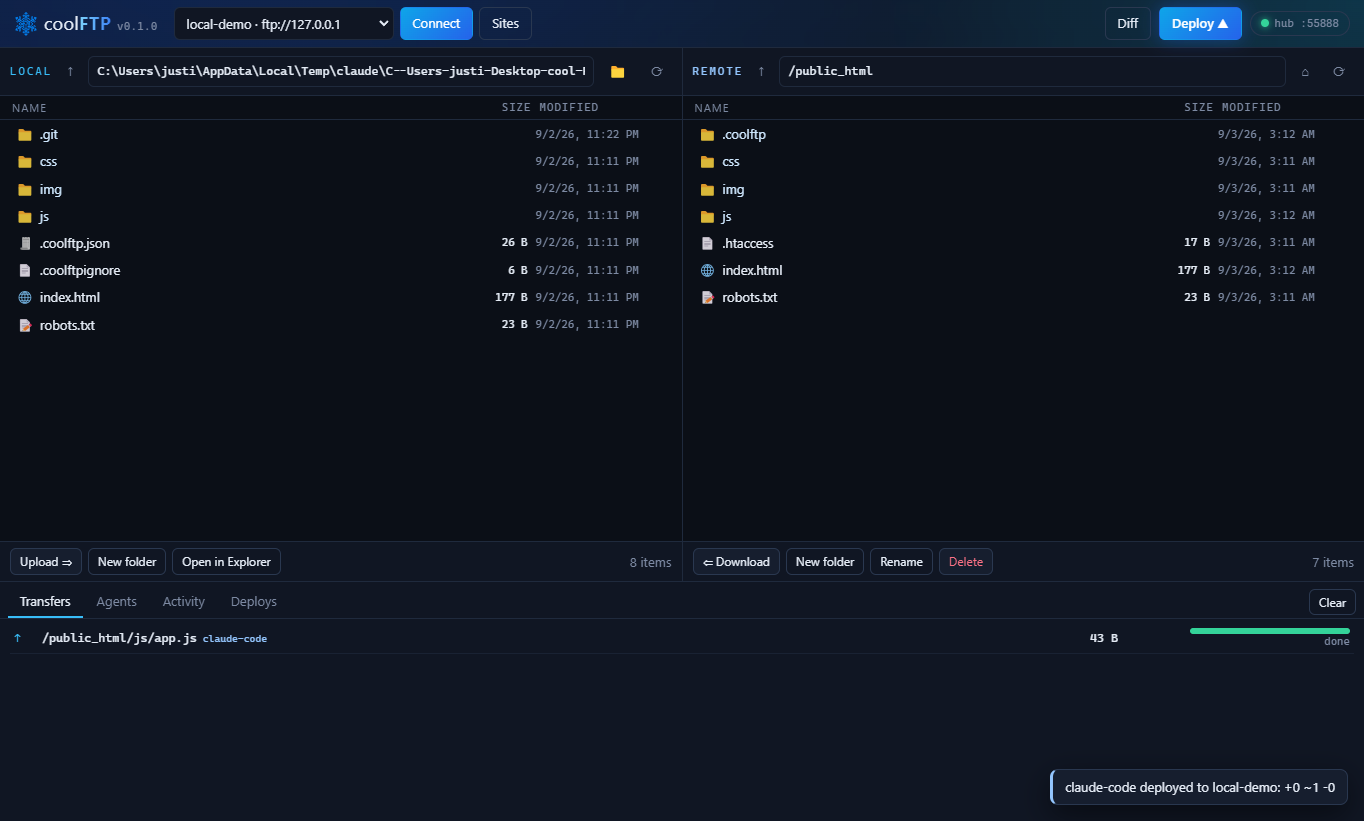
The FTP client your coding agent can drive. A desktop SFTP / FTPS / FTP client for Windows, plus a CLI and an MCP server, built for people who write code with Claude Code, Codex, or Cursor and still have to get files onto a web server.
Say "deploy this". The agent calls coolFTP. Only files whose content changed go up, the git commit is recorded next to the deploy, the site is fetched afterward to prove it answers, and you watch every step live in the app. If it went wrong, coolftp undo puts the previous version back, no git needed. Works with any host that speaks SFTP or FTP: Hostinger, HostGator, Bluehost, GoDaddy, any cPanel box, your own VPS. Free and MIT. Website: coolftp.com.
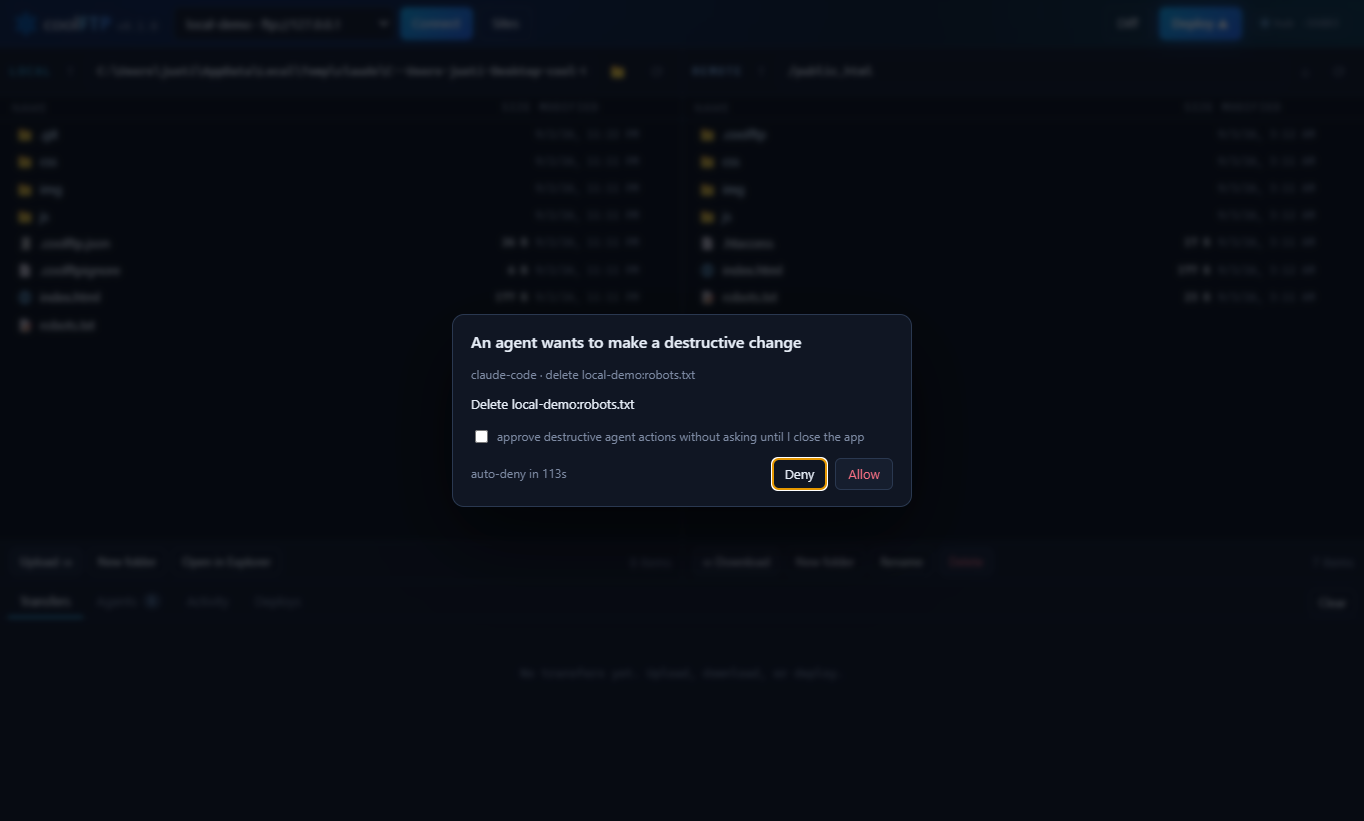
Agents ask before they delete anything:
Why
Every FTP client assumes a human is clicking. coolFTP assumes a human is watching and an agent is doing.
- Hash-based deploys. A manifest on the server records the SHA-256 of every deployed file. Timestamps lie; hashes do not.
- Undo, no git needed. Every deploy moves the files it overwrites or deletes into a backup folder on the server first.
coolftp undoputs them back, even from a dirty tree. - Deploy history with git. Each deploy stores the commit, branch, dirty flag, message, byte count, which agent ran it, and whether the site verified live.
- One-command rollback.
coolftp rollbackrestores the previous live commit through a temporary git worktree. - Verification. Give a site its public URL and every deploy fetches the changed pages, compares static files byte for byte with what you uploaded, and exits non-zero when the site does not answer.
coolftp verifydoes the same on demand. - Live agent feed and approval dialog. Deletes,
--deletedeploys, rollbacks and undos wait for your click while the app is open. Deploys show as a progress card, and a Windows notification tells you how they ended. - Safety by default. Pinned SSH host keys, passwords encrypted with your Windows account, a first-deploy guard that refuses to delete files it never uploaded, changed files swapped into place rather than overwritten, sizes confirmed by the server, resumable deploys.
Install
The CLI and the MCP server run anywhere Node 18 or newer does: Windows, macOS, Linux, a headless box, CI.
No install at all: npx coolftp ... runs the same thing.
The desktop app is Windows for now: the installer, a portable .exe and the Claude Desktop extension (.mcpb) are on the download page with their SHA-256s.
Build from source
To get a global coolftp command from this checkout instead of npm: cd packages/cli && npm link.
Add a server
Or use the Sites button in the app. Sites live in %APPDATA%\coolftp\sites.json on Windows and ~/.config/coolftp/sites.json elsewhere. On Windows, passwords in that file are encrypted with DPAPI under your account; on macOS and Linux they are stored as-is until a keychain backend lands, so prefer keys for SFTP there.
Link a project and deploy
Exit codes: 0 deployed (and verified, when the site has a URL), 1 something failed before or during the upload, 3 the files landed but the live checks did not pass. -q drops progress and per-file output and keeps the result line, warnings, errors and the checks. Deploys of more than 20 files print one progress line every few seconds instead of a line per file, and long plans are summarised by folder.
coolftp init writes .coolftp.json:
Commit it. Add a .coolftpignore (gitignore syntax) for anything that must never go up. .git, node_modules, .env*, *.log and the coolFTP files are always excluded.
When a site's FTP root is not the web root (shared hosts often log you in one level above public_html), point the project at the right folder and tell coolFTP where it is served:
Every command then works relative to that folder: coolftp push js/app.js js/app.js, coolftp ls, coolftp stat, coolftp cat, coolftp rm all resolve against /public_html, the same place deploy writes to. Paths starting with / are still absolute on the server. The url makes the changed-file URLs and the post-deploy check point at https://example.com/js/app.js rather than at the FTP path.
A push confirms the uploaded size with the server, reports any folder it had to create (with a warning when a single file opens a new top-level folder, which is what a stale public_html/ prefix looks like), and records a file pushed inside the project's remote directory in the deploy manifest, so the next deploy does not send it again.
Git Bash rewrites arguments that start with / into Windows paths before any program sees them. coolFTP undoes that when it recognises the Git install prefix and refuses anything else that looks like a drive path, so coolftp ls /public_html works from Git Bash too. If you hit the refusal, use a relative path or set MSYS_NO_PATHCONV=1.
Let Claude Code drive it
MCP (recommended, gives Claude typed tools). With the CLI installed from npm, on macOS and Linux:
On Windows, npm installs coolftp as a .cmd shim, so go through cmd:
Without a global install: claude mcp add --scope user coolftp -- npx -y coolftp mcp (again behind cmd /c on Windows). --scope user registers it for every project on the machine; drop it to register for the current project only.
Cursor, Windsurf and other MCP clients take the same server in their mcp.json:
From a source checkout instead of npm, point at the built file:
Tools exposed: coolftp_sites, coolftp_status, coolftp_init, coolftp_diff, coolftp_deploy, coolftp_undo, coolftp_verify, coolftp_rollback, coolftp_history, coolftp_ls, coolftp_stat, coolftp_read, coolftp_write, coolftp_upload, coolftp_download, coolftp_mkdir, coolftp_delete, coolftp_rename. Results are summarised for an agent: counts and a folder breakdown instead of thousands of paths, a live verdict on every deploy, and the transfer log collapsed after 20 files. The server checks on every call whether the desktop app is running, so the app can be opened and closed during a session.
Use it from the Claude Desktop app
The same MCP server ships as a Claude Desktop extension. npm run mcpb packs it into release/coolFTP-<version>.mcpb (the download page carries the built one); open that file in Claude Desktop and hit Install. Claude gets the coolftp_* tools, and every call still routes through the desktop app while it is open, so deploys show up there and deletes, undos and rollbacks wait for your click. A chat has no working directory, so set Default project folder in the extension's settings or name the folder in the chat; a project's own .coolftp.json is found either way. The bundle is unsigned for now, which the install dialog points out.
server.json describes the server for the MCP Registry twice over: as the coolftp npm package (run with npx coolftp mcp) and as the .mcpb bundle. npm run mcpb keeps the versions and the bundle hash current. The release steps, npm publish included, are in docs/PUBLISHING.md.
Safety rails for agent-driven deploys
Related MCP Servers
Reviews
No reviews yet — be the first to share how this listing worked for you.
Frequently Asked Questions about Coolftp
AllMCPs Directory Badge
Showcase your server listing on GitHub or your project documentation. Embed this dynamic SVG badge to highlight official listing status and live engagement.
Badge Style:
Live Dynamic SVG Preview
Markdown (GitHub README)
[](https://allmcps.com/mcp/coolftp)HTML Embed
<a href="https://allmcps.com/mcp/coolftp"><img src="https://allmcps.com/api/badge/coolftp?style=directory" alt="Coolftp on AllMCPs" /></a>Technical Specs & Signals
CategoryDeveloper Tools
27Quality signal: Emerging · 27/100How this signal is calculated ▾
Server availabilityNot measured
Not scored for repo-hosted servers — we can't reach the running server, only its GitHub page. Hosted MCP endpoints are health-checked live.
Verified ownership8/20
Documentation & tools11/30
Adoption & activity1/15
Community engagement0/10
A guidance signal from public completeness & health data — not a user rating. New listings start lower and rise as they add docs, get verified, and grow adoption. Signals we can't observe for a listing are skipped, not counted against it.
Own this project?
This directory is pre-filled from public sources. Claim via GitHub README, site badge, or DNS TXT to unlock edit access and the Official badge — proof is checked automatically, then reviewed by our team.
Free dofollow backlink: add your website and place the AllMCPs badge on it — no claim needed. We detect it automatically and keep it verified as long as the badge stays live.
Claim & get free dofollowShare & Embed
Add our SVG badge (dark/light directory styles) or embeddable widget to your site.