Individual-analyst context layer over MCP: bootstrap, reconcile, and remember your data context.
Quick Install
Automated & IDE SetupCopy the AI prompt to install this server into Claude Code, Cursor, or another agent — or use 1-click editor setup below.
Manual Client & Custom JSON ConfigExpand JSON ▾
Client Config & Setup
Choose your client or environment
Target File:
💡 Paste the JSON block into your client's configuration file under mcpServers, then restart the application.
Documentation Overview


ClariLayer
Stop re-explaining your data to your AI every session.
The individual-analyst context layer, delivered over MCP.
Connect it to Claude Code, Cursor, Codex, or claude.ai — your agent stops making the same data mistakes.
Website · Docs · Get started (free) · Use cases



ClariLayer is an individual-analyst context layer, delivered over MCP. Connect it to Claude Code, Cursor, Codex, or claude.ai and it bootstraps your real working context from the SQL and dbt you already have, reconciles your definitions against your warehouse, and remembers your corrections — so your agent stops re-explaining your data and stops making the same mistakes every session.
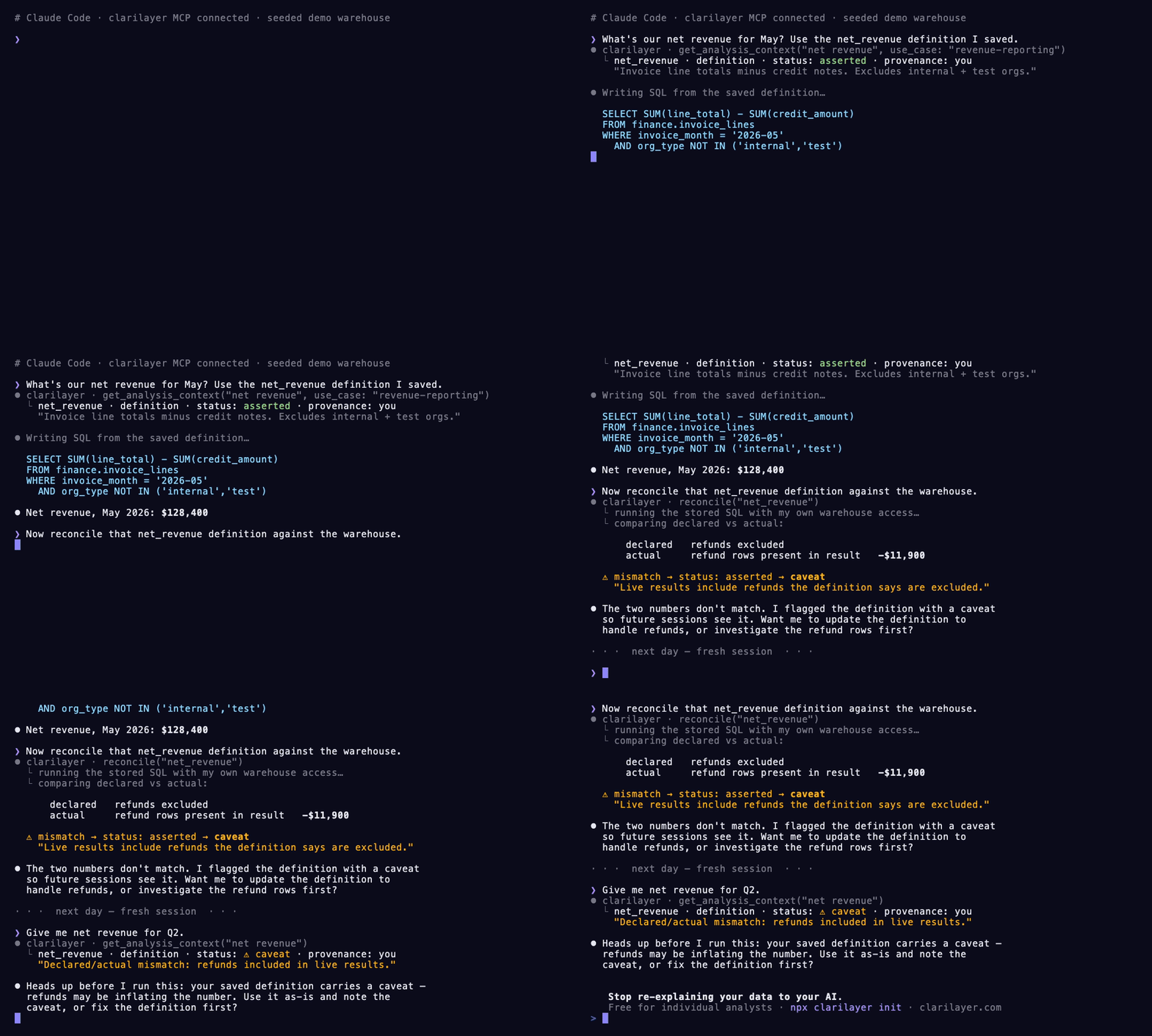
A seeded demo warehouse: your agent recalls a saved definition, reconciles it against real results, and the mismatch is flagged as a caveat that's waiting next session. Statuses are asserted / caveat — never "verified".
The problem
Every new session, your AI coding agent starts from zero about your data. So it makes the same mistakes — queries the wrong table, picks the wrong join, counts refunds in revenue, uses a churn definition you deprecated months ago. You correct it. Next session, it forgets, and you correct it again.
A hand-written CLAUDE.md of definitions helps a little — but it has the same trust problem as the original numbers: it's just asserted text. Nobody checked it against your warehouse.
What ClariLayer does
It gives your agent a durable, reconciled memory of your data context — and it lives inside the agent you already use, over MCP. Four verbs, all live:
| Verb | What it does |
|---|---|
| recall | Before writing SQL, defining a metric, making an engineering decision, or answering a question about your data or codebase, your agent pulls the most relevant saved context — each with its provenance and status. Read-only, in-flow. |
| remember | Saves one durable fact — a definition, schema note, reusable query, assumption, caveat, or decision — so it survives across sessions. Engineering context — a decision, constraint, or incident lesson — saves the same way, via remember's strict engineering object with scope paths and a repo/revision source pointer. |
| bootstrap | Bulk-imports context from artifacts you already have, across five source kinds: a SQL SELECT (deterministically structured), a data dictionary / codebook (structured into one schema-note per variable), dbt models, CLAUDE.md / freeform notes, and a governed semantic-layer model (a Databricks Metric View, dbt semantic model, … imported as canonical metric definitions). No cold empty store. |
| reconcile | Grounds a saved definition against your real warehouse result — or, for a CRM definition, bounded row-free HubSpot evidence. Your agent runs the SQL (or reads the CRM metadata) with its own access and reports back, so a declared-vs-actual mismatch surfaces as a caveat. |
The context you build compounds across sessions and is portable across Claude Code, Cursor, Codex, and claude.ai.
These four verbs are the in-flow core loop. The full contract today is 19 MCP tools at capability v51 (the four above plus propose / propose_batch, the entry and reasoning lifecycle, supersede, the read-only suggest_links, get_context_entry for an entry's full stored content, get_project_stanza, the completion-receipt context_checkpoint, capabilities, and a health check). The canonical, live list is always discoverable by your client at connect — via the initialize response or a capabilities call — so you never have to trust a doc over the wire. See CAPABILITIES.md for what each recent capability bump added.
Install
Fastest — one command. Auto-detects Claude Code, Cursor, and Codex, writes the right config, and offers to add the standing-orders block to your CLAUDE.md:
You'll need a free context key — sign up at clarilayer.com, then open Connect your AI to mint one. The CLI prompts for it and validates it. Full options: CLI.md.
Prefer to wire it up by hand?
Replace cl_YOUR_CONTEXT_KEY with your key.
Claude Code — run in your terminal:
Cursor — add to ~/.cursor/mcp.json:
Codex — add to ~/.codex/config.toml. Recent Codex connects to the URL directly, no Node/npx needed (same as Claude Code and Cursor):
Only on older Codex without direct-HTTP support, bridge it via mcp-remote instead — this route requires Node.js (npx):
On claude.ai? No context key needed — claude.ai connects over OAuth instead. Open Settings → Connectors → Add custom connector, paste https://clarilayer.com/api/mcp/mcp, then sign in and approve when prompted. There is no cl_… key on this path.
See QUICKSTART.md for the full walkthrough and troubleshooting.
Then tell your agent to actually use it
Paste this into your project's CLAUDE.md (or AGENTS.md) so your agent reaches for ClariLayer proactively instead of waiting to be asked. The same stanza, as a ready-to-paste file, is examples/CLAUDE.md:
Related MCP Servers
Reviews
No reviews yet — be the first to share how this listing worked for you.
Frequently Asked Questions about ClariLayer
AllMCPs Directory Badge
Showcase your server listing on GitHub or your project documentation. Embed this dynamic SVG badge to highlight official listing status and live engagement.
Badge Style:
Live Dynamic SVG Preview
Markdown (GitHub README)
[](https://allmcps.com/mcp/clarilayer)HTML Embed
<a href="https://allmcps.com/mcp/clarilayer"><img src="https://allmcps.com/api/badge/clarilayer?style=directory" alt="ClariLayer on AllMCPs" /></a>Technical Specs & Signals
CategoryDeveloper Tools
27Quality signal: Emerging · 27/100How this signal is calculated ▾
Server availabilityNot measured
Not scored for repo-hosted servers — we can't reach the running server, only its GitHub page. Hosted MCP endpoints are health-checked live.
Verified ownership8/20
Documentation & tools11/30
Adoption & activity1/15
Community engagement0/10
A guidance signal from public completeness & health data — not a user rating. New listings start lower and rise as they add docs, get verified, and grow adoption. Signals we can't observe for a listing are skipped, not counted against it.
Own this project?
This directory is pre-filled from public sources. Claim via GitHub README, site badge, or DNS TXT to unlock edit access and the Official badge and attach your website — proof is checked automatically, then reviewed by our team.
Free dofollow backlink: add your website and place the AllMCPs badge on it — no claim needed. We detect it automatically and keep it verified as long as the badge stays live.
Claim & get free dofollowShare & Embed
Add our SVG badge (dark/light directory styles) or embeddable widget to your site.