ChemGlyph README
The full upstream README, mirrored here for reference. Install config, tool schemas, adoption signals, and an original overview live on the ChemGlyph listing page.
ChemGlyph
Publication-quality chemical structure and reaction rendering for AI agents. ChemGlyph is the KaTeX of chemistry: a rendering layer, a validation layer, and an MCP interface on top of RDKit.

Install
Render a molecule
render_molecule takes SMILES, InChI, or molblock and returns SVG (or PNG)
plus canonical_smiles, mol_formula, mol_weight, and warnings.
Styles
Three styles, same molecule (benzoic acid, caffeine, (S)-ibuprofen):
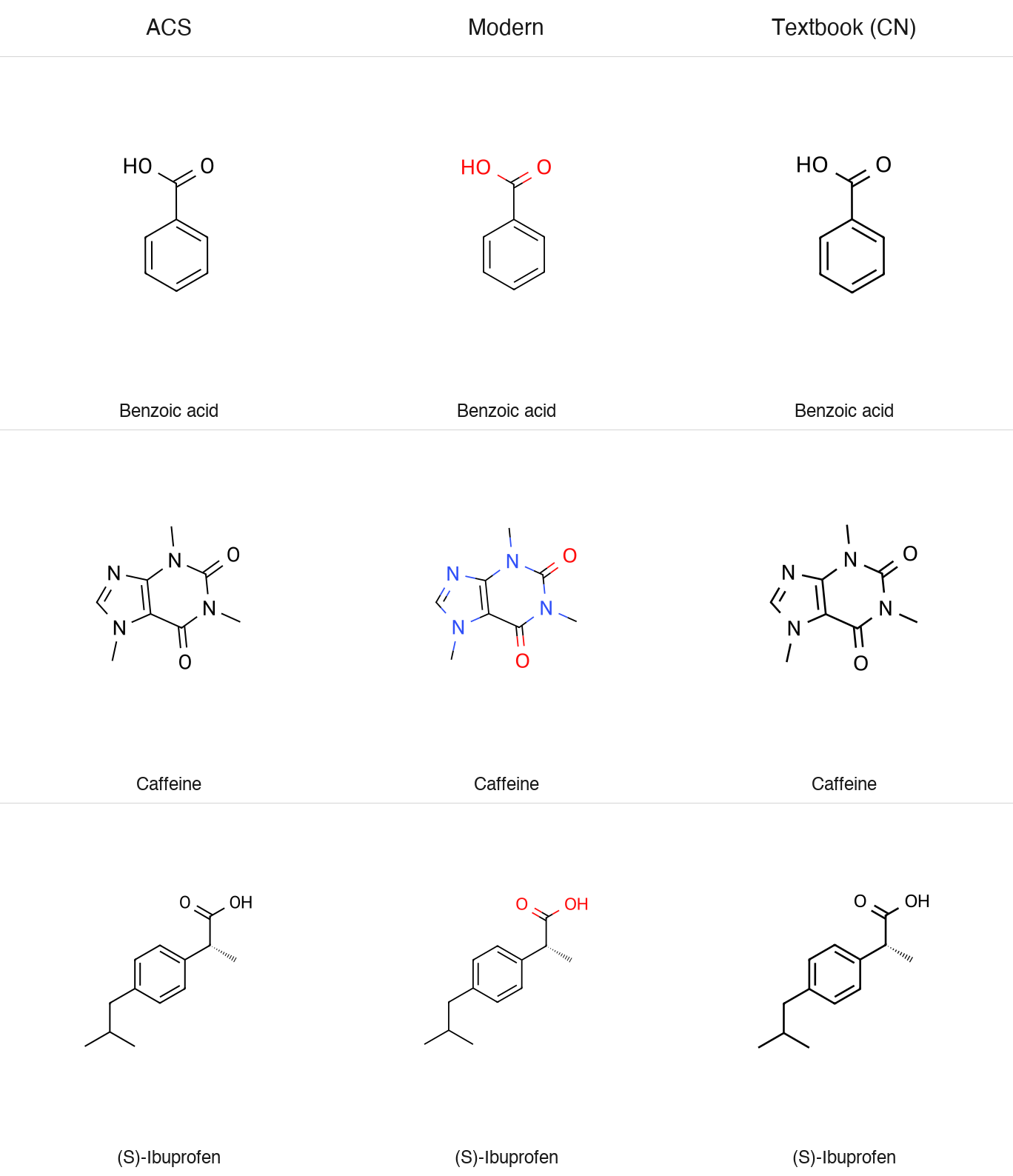
All styles default to a transparent background (transparent=True) and
support fmt="png".
Reactions
Conditions are pre-formatted Unicode text, so pass H₂SO₄, not H2SO4.
ChemGlyph does not parse formulas out of text. The full schema
(multi-step chains, equilibrium and retro arrows, line wrapping) is in
docs/reaction_schema.md.
The aspirin demo writes a two-step route:
Validation
validate_structure reports parse errors and applies four quick fixes:
unmatched brackets and ring closures (reported, not guessed), kekulization
failures of lowercase aromatic atoms, and nitrogen valence errors via a
formal [N+]. Anything else passes RDKit's message through unchanged.
Naming
English IUPAC and common names resolve offline through OPSIN
(pip install 'chemglyph[opsin]', plus a Java runtime). Chinese names use
the built-in dictionary, and the library API accepts a translator callable
for names that are not in it:
ChemGlyph itself never calls an online service, including for translation.
MCP server
Run the bundled console script (stdio transport):
Claude Desktop registration (macOS:
~/Library/Application Support/Claude/claude_desktop_config.json):
| Tool | Use it when | Returns |
|---|---|---|
render_molecule | the user asks to draw one structure from SMILES/InChI/molblock | PNG image plus formula, MW, warnings (SVG source on request) |
render_reaction | the user asks for a reaction or synthesis route | PNG image of the reaction scheme |
validate_structure | a SMILES may be malformed and you need a repair | validation report JSON |
parse_name | the user gives a name like "aspirin" instead of SMILES | canonical SMILES or an error |
One thing to know about clients. Some MCP clients, LM Studio included, only
pass the text part of a tool result to the model and never display the
attached image. The render tools write their PNG to ~/Downloads/chemglyph/
and return that path in the text, so you can always open the file yourself.
If a model claims it rendered a figure but nothing shows up, ask it for the
saved path rather than having it redraw the structure by hand.
Benchmarks
benchmarks/ holds the fixed 20-molecule blind test and a generator that
writes shuffled, numbered PNG/SVG figures plus answer_key.json:
The deck, methodology, and scoring tooling are all open-sourced: the fixed molecule list, the A/B deck generator (which pairs ChemGlyph against an open-source reference renderer), the runbook, and the scorer live in benchmarks/. Anyone can run the protocol and contribute results. The pass threshold and procedure are documented in benchmarks/RUNBOOK.md.
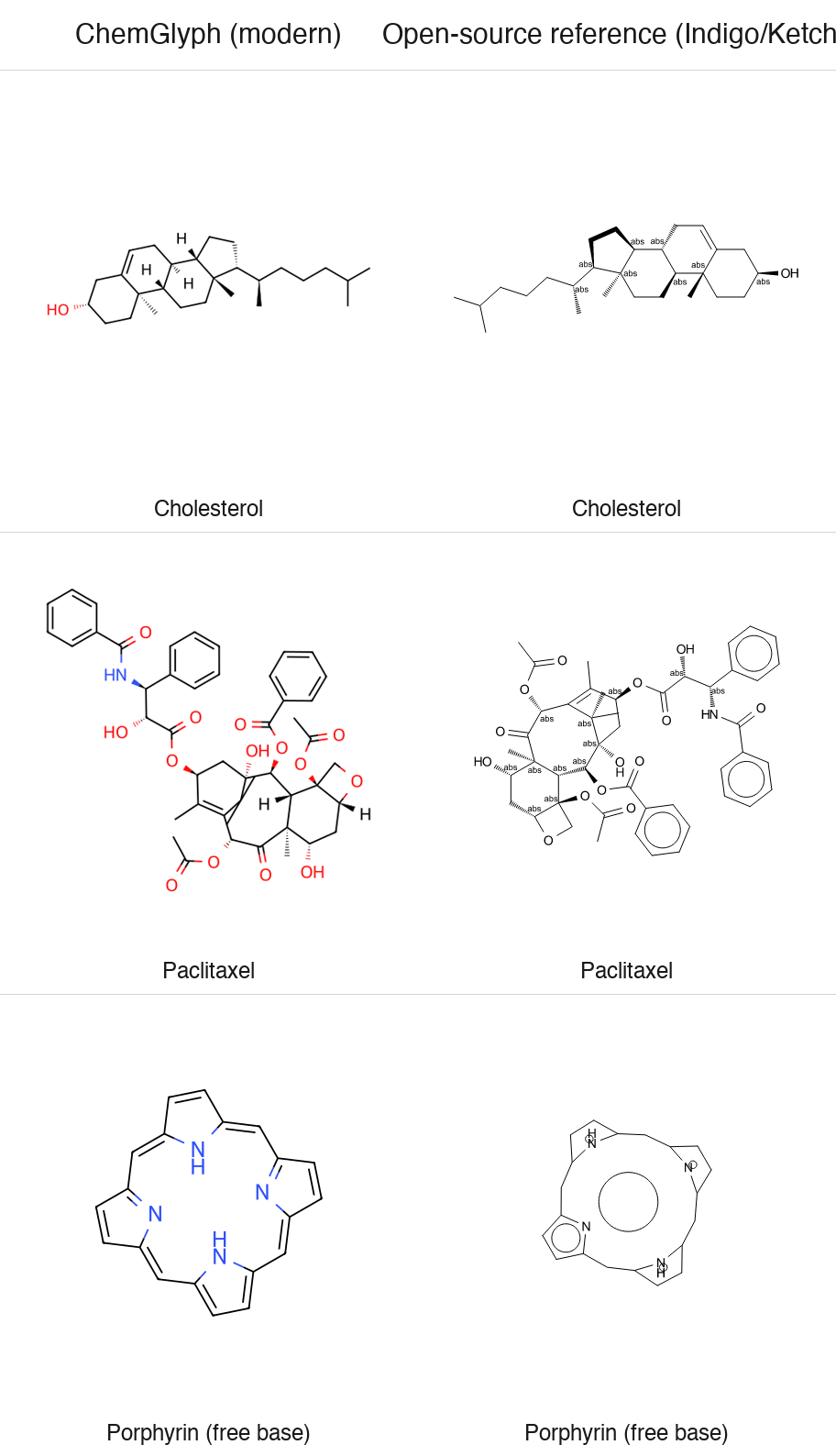
Blind test vs ChemDraw: pending. The image above is an author-generated
comparison of ChemGlyph modern against the open-source reference renderer
(Indigo, the engine behind Ketcher) - it is not an independent review.
Known limitations
- Blind-test figures for ferrocene (metal complex) and the free-base porphyrin (large conjugated macrocycle) are excluded from the benchmark denominator and recorded separately.
- RDKit has no clean 2D layout for paclitaxel: its gem-dimethyl substituent placement inside the central 8-membered ring is a documented layout limitation.
- Full automatic Chinese name-to-structure parsing is not implemented; Chinese names resolve through a small built-in dictionary plus an optional translator hook. English names resolve through OPSIN.
Roadmap
- v0.2: Chinese naming (built-in dictionary plus translator hook), down-arrow line wrapping, arrow column alignment, cropped fragments. All shipped.
- Next: mechanism (electron-pushing) arrows, see docs/progress/v02-research.md.
- Later: a larger Chinese dictionary as an optional data extra.
Non-goals
No structure editor GUI (Ketcher/ChemDraw competition), no 3D visualization, no retrosynthesis or property prediction, no online database queries, and no automatic mechanism generation. The full list is in the project specification.
Development
Python 3.11+, RDKit 2024.9+, MIT license. All errors derive from
chemglyph.errors.ChemGlyphError.