Publication-quality chemical structure and reaction rendering for AI agents.
Quick Install
Automated & IDE SetupCopy the AI prompt to install this server into Claude Code, Cursor, or another agent — or use 1-click editor setup below.
Not yet automatically verified
We haven't yet run this listing's install command through our automated sandbox check. This isn't a red flag — we're steadily working through the catalog.
Manual Client & Custom JSON ConfigExpand JSON ▾
Client Config & Setup
Choose your client or environment
Target File:
💡 Paste the JSON block into your client's configuration file under mcpServers, then restart the application.
Documentation Overview
ChemGlyph
Publication-quality chemical structure and reaction rendering for AI agents. ChemGlyph is the KaTeX of chemistry: a rendering layer, a validation layer, and an MCP interface on top of RDKit.

Install
Render a molecule
render_molecule takes SMILES, InChI, or molblock and returns SVG (or PNG)
plus canonical_smiles, mol_formula, mol_weight, and warnings.
Styles
Three styles, same molecule (benzoic acid, caffeine, (S)-ibuprofen):
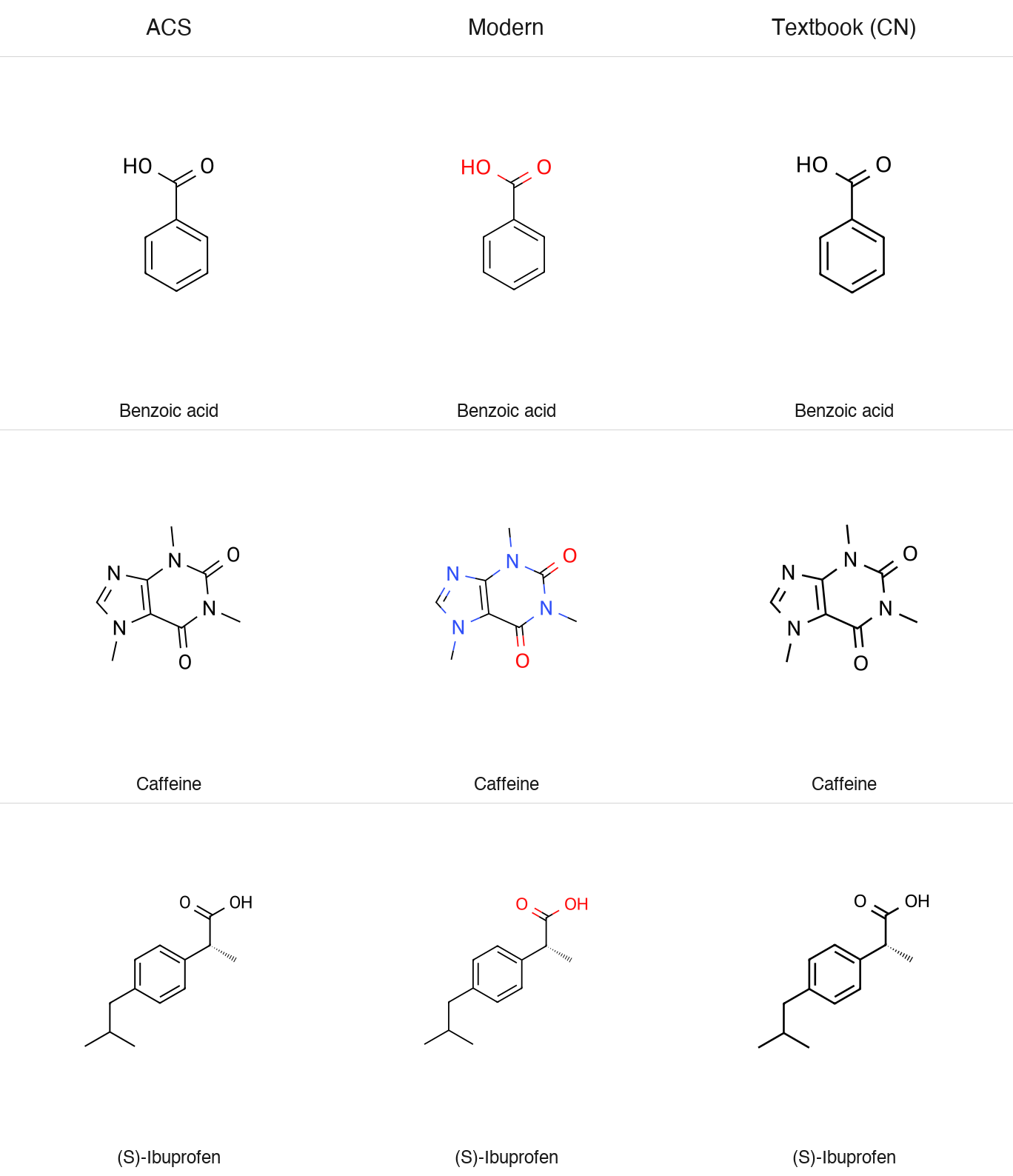
All styles default to a transparent background (transparent=True) and
support fmt="png".
Reactions
Conditions are pre-formatted Unicode text, so pass H₂SO₄, not H2SO4.
ChemGlyph does not parse formulas out of text. The full schema
(multi-step chains, equilibrium and retro arrows, line wrapping) is in
docs/reaction_schema.md.
The aspirin demo writes a two-step route:
Validation
validate_structure reports parse errors and applies four quick fixes:
unmatched brackets and ring closures (reported, not guessed), kekulization
failures of lowercase aromatic atoms, and nitrogen valence errors via a
formal [N+]. Anything else passes RDKit's message through unchanged.
Naming
English IUPAC and common names resolve offline through OPSIN
(pip install 'chemglyph[opsin]', plus a Java runtime). Chinese names use
the built-in dictionary, and the library API accepts a translator callable
for names that are not in it:
ChemGlyph itself never calls an online service, including for translation.
MCP server
Run the bundled console script (stdio transport):
Claude Desktop registration (macOS:
~/Library/Application Support/Claude/claude_desktop_config.json):
| Tool | Use it when | Returns |
|---|---|---|
render_molecule | the user asks to draw one structure from SMILES/InChI/molblock | PNG image plus formula, MW, warnings (SVG source on request) |
render_reaction | the user asks for a reaction or synthesis route | PNG image of the reaction scheme |
validate_structure | a SMILES may be malformed and you need a repair | validation report JSON |
parse_name | the user gives a name like "aspirin" instead of SMILES | canonical SMILES or an error |
One thing to know about clients. Some MCP clients, LM Studio included, only
pass the text part of a tool result to the model and never display the
attached image. The render tools write their PNG to ~/Downloads/chemglyph/
and return that path in the text, so you can always open the file yourself.
If a model claims it rendered a figure but nothing shows up, ask it for the
saved path rather than having it redraw the structure by hand.
Benchmarks
benchmarks/ holds the fixed 20-molecule blind test and a generator that
writes shuffled, numbered PNG/SVG figures plus answer_key.json:
The deck, methodology, and scoring tooling are all open-sourced: the fixed molecule list, the A/B deck generator (which pairs ChemGlyph against an open-source reference renderer), the runbook, and the scorer live in benchmarks/. Anyone can run the protocol and contribute results. The pass threshold and procedure are documented in benchmarks/RUNBOOK.md.
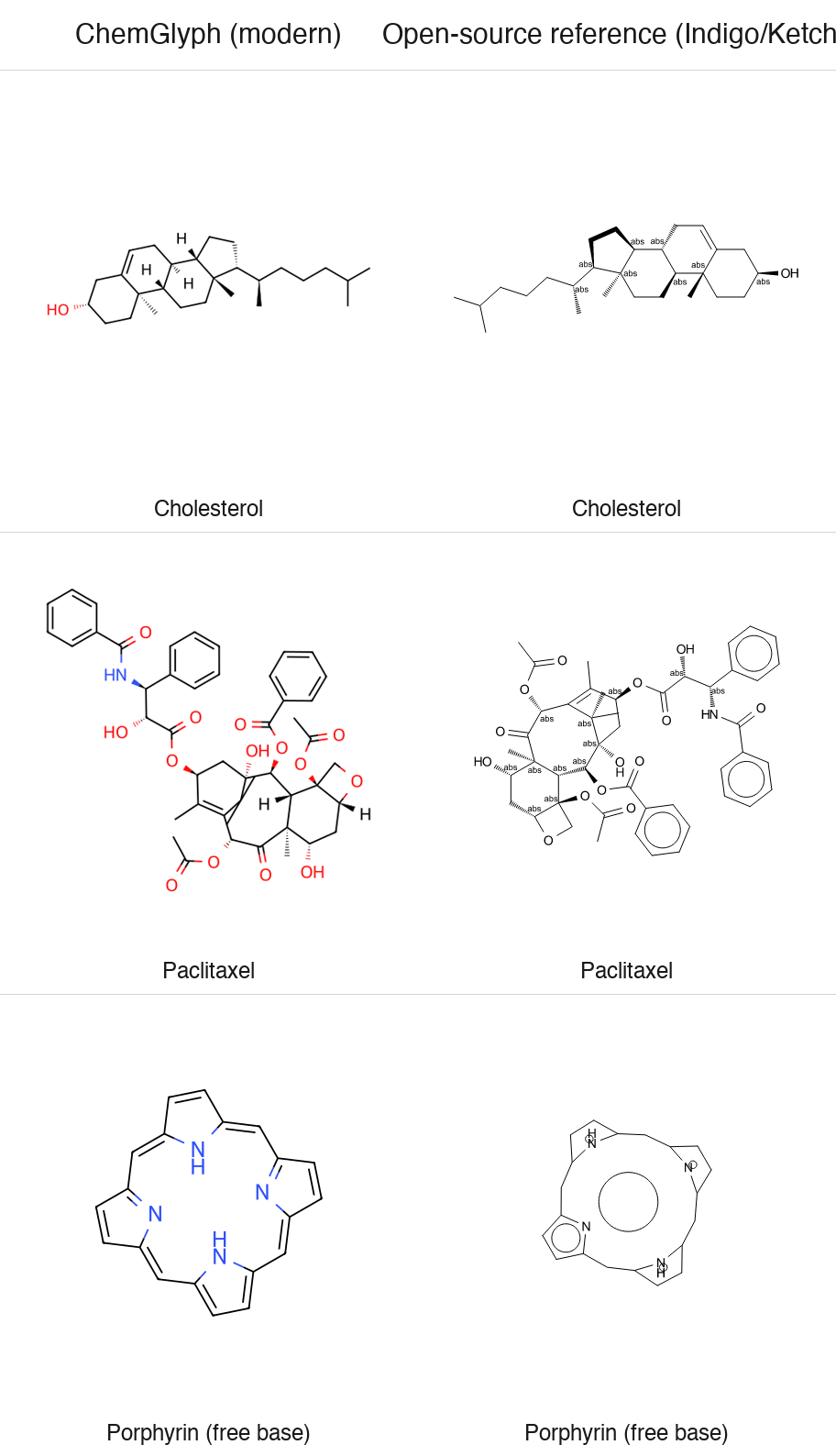
Blind test vs ChemDraw: pending. The image above is an author-generated
comparison of ChemGlyph modern against the open-source reference renderer
(Indigo, the engine behind Ketcher) - it is not an independent review.
Known limitations
- Blind-test figures for ferrocene (metal complex) and the free-base porphyrin (large conjugated macrocycle) are excluded from the benchmark denominator and recorded separately.
- RDKit has no clean 2D layout for paclitaxel: its gem-dimethyl substituent placement inside the central 8-membered ring is a documented layout limitation.
- Full automatic Chinese name-to-structure parsing is not implemented; Chinese names resolve through a small built-in dictionary plus an optional translator hook. English names resolve through OPSIN.
Roadmap
- v0.2: Chinese naming (built-in dictionary plus translator hook), down-arrow line wrapping, arrow column alignment, cropped fragments. All shipped.
- Next: mechanism (electron-pushing) arrows, see docs/progress/v02-research.md.
- Later: a larger Chinese dictionary as an optional data extra.
Non-goals
No structure editor GUI (Ketcher/ChemDraw competition), no 3D visualization, no retrosynthesis or property prediction, no online database queries, and no automatic mechanism generation. The full list is in the project specification.
Development
Python 3.11+, RDKit 2024.9+, MIT license. All errors derive from
chemglyph.errors.ChemGlyphError.
Related MCP Servers
Reviews
No reviews yet — be the first to share how this listing worked for you.
Frequently Asked Questions about ChemGlyph
AllMCPs Directory Badge
Showcase your server listing on GitHub or your project documentation. Embed this dynamic SVG badge to highlight official listing status and live engagement.
Badge Style:
Live Dynamic SVG Preview
Markdown (GitHub README)
[](https://allmcps.com/mcp/chemglyph)HTML Embed
<a href="https://allmcps.com/mcp/chemglyph"><img src="https://allmcps.com/api/badge/chemglyph?style=directory" alt="ChemGlyph on AllMCPs" /></a>Technical Specs & Signals
CategoryDeveloper Tools
39Quality signal: Fair · 39/100How this signal is calculated ▾
Server availabilityNot measured
Not scored for repo-hosted servers — we can't reach the running server, only its GitHub page. Hosted MCP endpoints are health-checked live.
Verified ownership10/20
Documentation & tools15/30
Adoption & activity4/15
Community engagement0/10
A guidance signal from public completeness & health data — not a user rating. New listings start lower and rise as they add docs, get verified, and grow adoption. Signals we can't observe for a listing are skipped, not counted against it.
Own this project?
This directory is pre-filled from public sources. Claim via GitHub README, site badge, or DNS TXT to unlock edit access and the Official badge and attach your website — proof is checked automatically, then reviewed by our team.
Free dofollow backlink: add your website and place the AllMCPs badge on it — no claim needed. We detect it automatically and keep it verified as long as the badge stays live.
Claim & get free dofollowShare & Embed
Add our SVG badge (dark/light directory styles) or embeddable widget to your site.