One searchable memory across Claude Code, Gemini, Codex, OpenCode, Antigravity and Cursor sessions.
Quick Install
Automated & IDE SetupCopy the AI prompt to install this server into Claude Code, Cursor, or another agent — or use 1-click editor setup below.
Not yet automatically verified
We haven't yet run this listing's install command through our automated sandbox check. This isn't a red flag — we're steadily working through the catalog.
Manual Client & Custom JSON ConfigExpand JSON ▾
Client Config & Setup
Choose your client or environment
Target File:
💡 Paste the JSON block into your client's configuration file under mcpServers, then restart the application.
Documentation Overview








chatrecall.dev · How it works · MCP tools · Pricing · Self-host · Security
Turn what your AI coding tools already write into shared team knowledge, leaked-secret alerts, ranked code findings and tracked tasks.
Your agents wrote it all down. Nobody read it.
Every coding agent you run keeps a full transcript of its work: the decisions, the
reasoning, the keys somebody pasted, the problems it found and never filed. Each one
writes to its own directory in its own format, none can read another's, and nothing
reads any of them. chat-recall does, through 61 MCP tools.
| What it does | Tools | |
|---|---|---|
| Shared AI knowledge | Decisions, conventions and project facts one agent learned, available to every other agent and every teammate. Time-aware, so a superseded decision reads as superseded | 16 |
| Security findings | Credentials pasted into past conversations, flagged per session, checked for whether they still work, and tracked until rotated or dismissed | 4 |
| Automated code improvements | Ranks what is actually worth fixing in a repository, then applies or dismisses each recommendation, with code intelligence over the repo itself | 9 |
| Task tracking | A shared board fed by those findings, with rules per repository, so a finding becomes work instead of a report | 5 |
Underneath all four is one index of every session your tools already wrote, and 28 more tools to search, replay and diff it. That index is the mechanism. It is not the pitch, and it is not why anyone buys this.
The cross-tool part is what makes it work. A single tool's built-in history stops at its own boundary. This does not, and neither does your team.
See it work
Every screen below is real output against a real server, captured from the demo account. Nothing is mocked, replayed or re-timed.
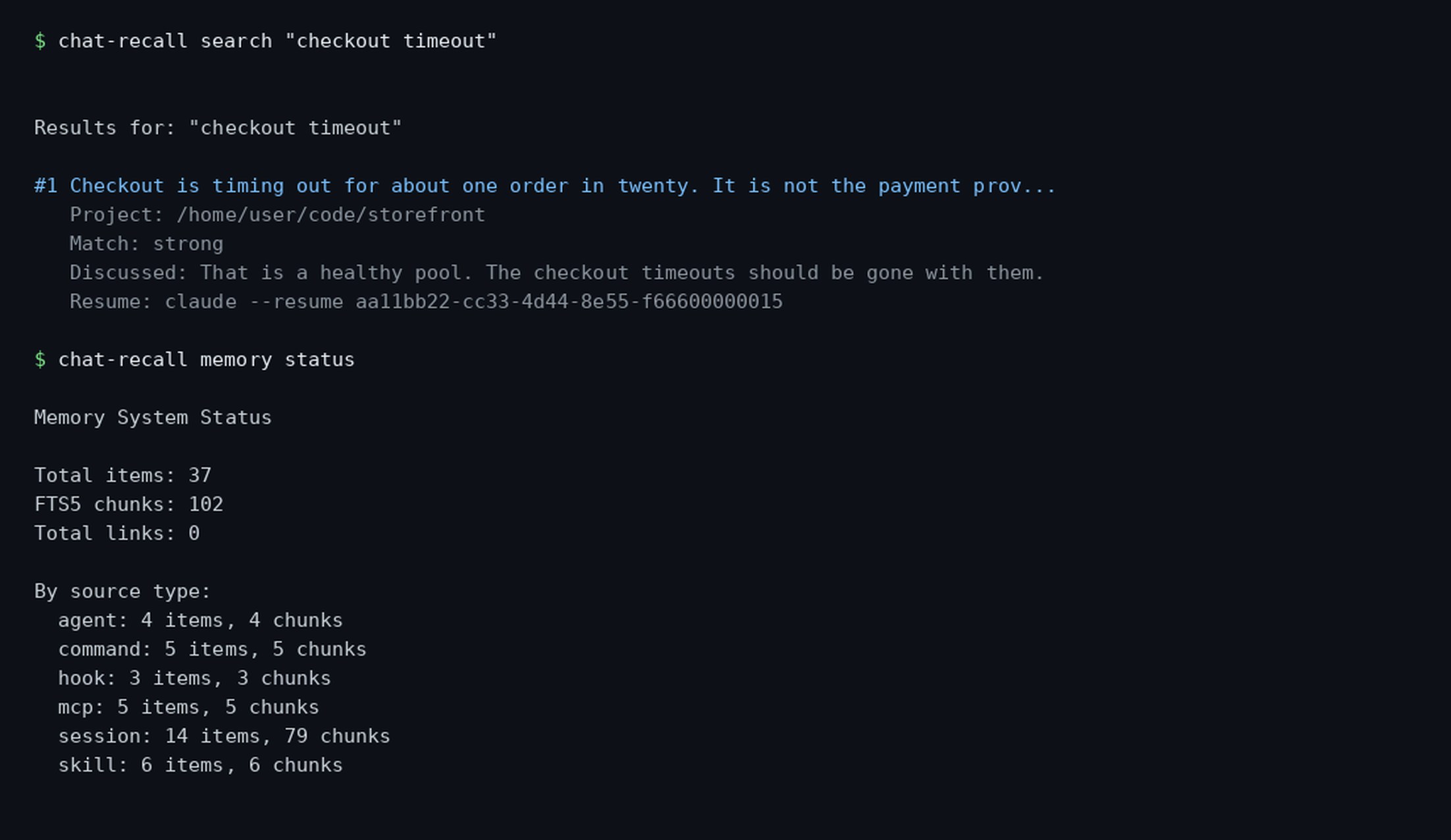
One index, every tool. Search finds a session by what was discussed in it,
not by its filename, and memory status shows every source type in one place —
sessions beside the skills, MCPs, commands, subagents and hooks that produced
them.
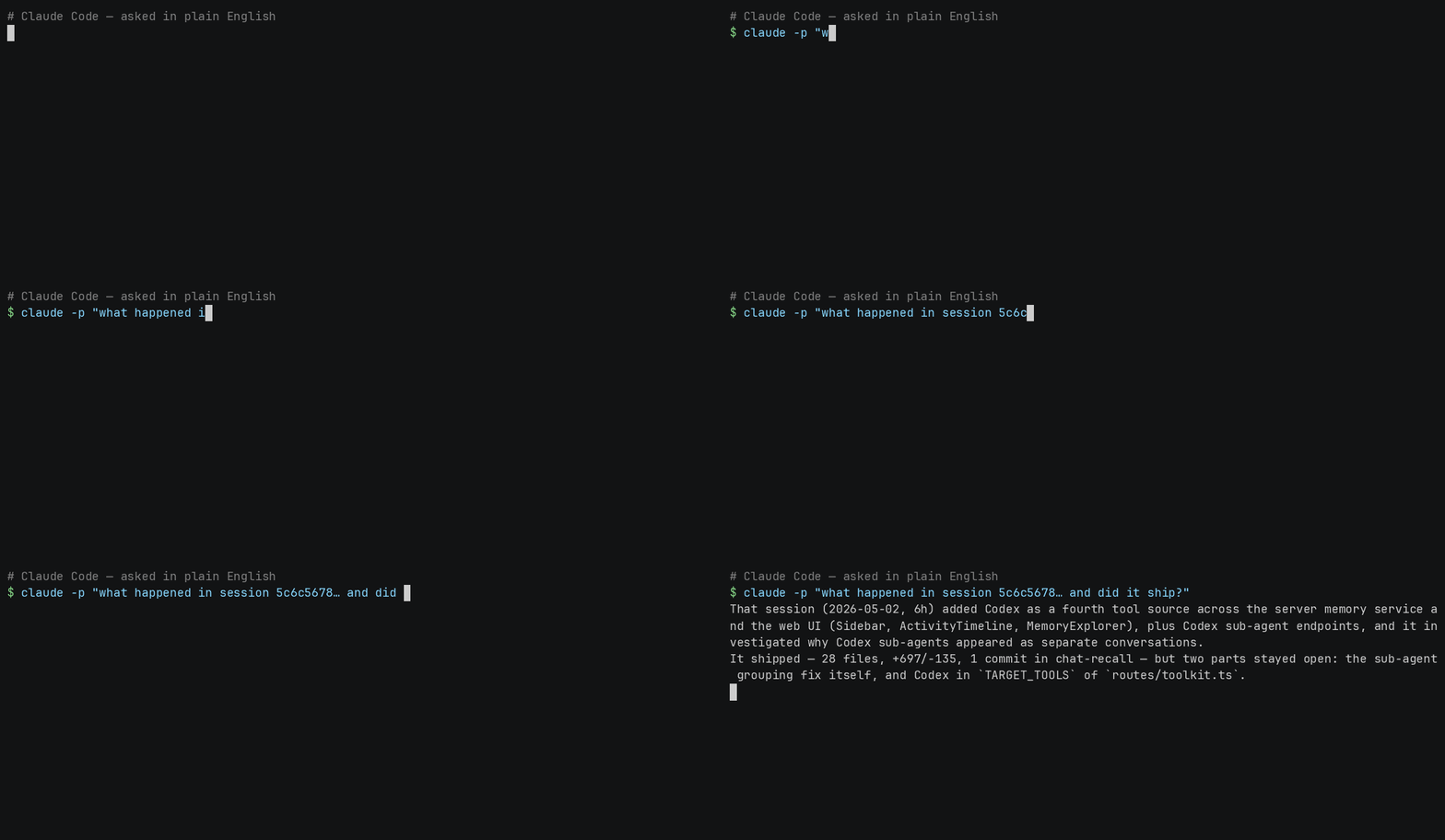
Or just ask in plain English — no tool names, no session ids. The agent picks the call itself:
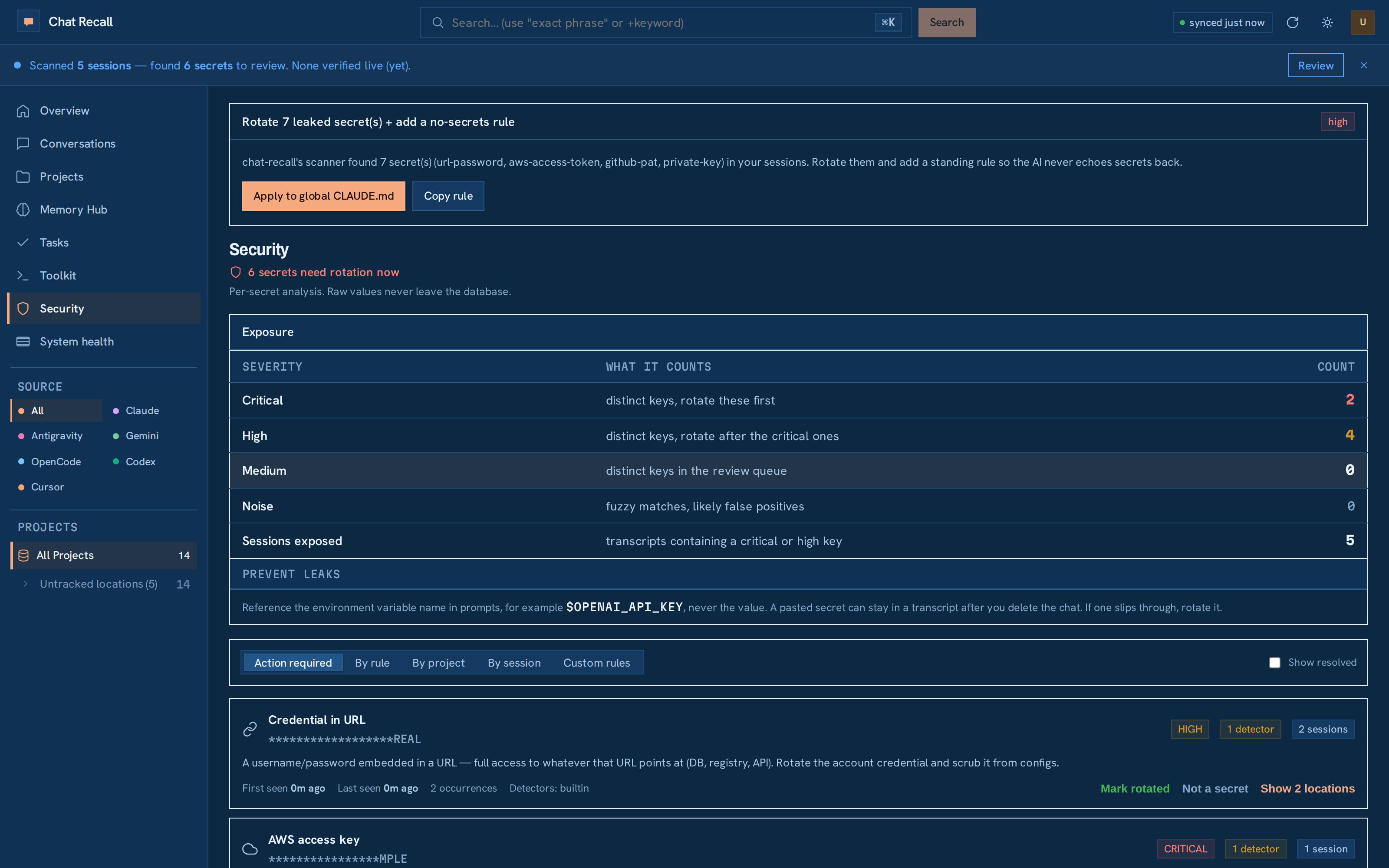
It also finds the credentials you pasted, and checks which ones still work. A dead key is hygiene. A live one is an incident, and only live ones raise an alert.
Install
That indexes the transcripts already on your disk, detects which AI tools you have, and registers the MCP server in each of their configs:
| Tool | File it writes |
|---|---|
| Claude Code | ~/.mcp.json |
| Codex | ~/.codex/config.toml |
| OpenCode | ~/.config/opencode/opencode.json |
| Cursor | ~/.cursor/mcp.json |
It only touches a config whose tool is on this machine, it never overwrites an entry you curated by hand, and chat-recall doctor prints one line per tool so a missing registration is visible. Inside Claude Code you can install the skills and the MCP server together instead:
Any other MCP client (Claude Desktop, Windsurf, Zed, Cline, or a tool init does
not know) takes the same server as a JSON entry. The bin is chat-recall-mcp,
which is why the package name alone is not enough — npx -y chat-recall starts
the CLI, not the server:
The same command as one line, for a claude mcp add-style client: npx -y -p chat-recall chat-recall-mcp.
Then:
By default this syncs to the hosted server at chatrecall.dev, which starts with a 7-day trial that needs no card and is a paid subscription after that — see pricing. To keep everything on your own machine instead, run the server yourself: that is free for one person, forever, with every feature and no licence key — the task board and Toolkit included — and a licence only buys collaboration: a second member, shared history, assigning work. See Self-host below. Either way the CLI is the same binary and the same commands; only the server URL differs.
No API keys are required. Search is Postgres full-text search. AI summaries are an optional upgrade, not a prerequisite.
What never leaves your machine
It indexes every AI session on this disk, so init shows you what would upload — count, tools, and the projects by name — and waits for a yes before the first sync. (--yes, or no TTY, prints the same summary and proceeds; --skip-sync holds the upload back entirely.) Secrets are masked client-side and project paths are sent as hashes; on top of that you choose what is in scope at all:
Some tools file transcripts under a hash rather than a project folder, so those sessions have no path for a path rule to match; exclude tool is the control that covers them, and init prints that count. A retention window deletes from the server on a timer. retention set prints how many sessions it would remove and makes you confirm the number. It is undoable only where the original transcript is still on a machine you have — widen the window and chat-recall sync --full re-ships what it admits. For a laptop you no longer own, history your AI tool rotated, or files you deleted, our copy is the only copy. Export first if you want one.
Exclusions live on the machine that holds the data, so the CLI owns them; they apply from the next sync, and rows already synced stay until deleted. The dashboard's Sync rules panel adds rules across every device — unioned with the local ones, so it can only ever add protection. Full model, limits included: Security.
Four things it actually does
- Cross-tool unified memory. One index, one search, one UI over Claude Code (
~/.claude/projects/), Codex (~/.codex/), OpenCode (~/.local/share/opencode/), Antigravity (~/.gemini/antigravity-cli/) and Cursor (~/.cursor/for the CLI,~/.config/Cursor/for the IDE). Sessions, plans, tasks, CLAUDE.md files, paste cache, shell history and agent diaries all share one pluggableMemorySourceinterface. - The agent recalls itself. 61 MCP tools, so Claude Code can
recall_smart_resume,recall_search(withlike_sessionto find similar work),recall_edits_timeline,recall_subagent_searchandrecall_redundant_filesrather than asking you what happened last time. It writes back too, viarecall_decision_record,recall_kg_addandrecall_set. - Warns before you redo work. A
UserPromptSubmithook searches for similar past sessions on every prompt and injects a short "you have done this before, in session X" note into the agent's context. - Temporal knowledge graph. Decisions and tool mentions become entity-relationship triples with
valid_from/valid_towindows, so you can ask what was decided in March and whether it still holds.
Add your own AI tool
Related MCP Servers
Reviews
No reviews yet — be the first to share how this listing worked for you.
Frequently Asked Questions about Chat Recall
AllMCPs Directory Badge
Showcase your server listing on GitHub or your project documentation. Embed this dynamic SVG badge to highlight official listing status and live engagement.
Badge Style:
Live Dynamic SVG Preview
Markdown (GitHub README)
[](https://allmcps.com/mcp/chat-recall)HTML Embed
<a href="https://allmcps.com/mcp/chat-recall"><img src="https://allmcps.com/api/badge/chat-recall?style=directory" alt="Chat Recall on AllMCPs" /></a>Technical Specs & Signals
CategoryKnowledge & Memory
37Quality signal: Fair · 37/100How this signal is calculated ▾
Server availabilityNot measured
Not scored for repo-hosted servers — we can't reach the running server, only its GitHub page. Hosted MCP endpoints are health-checked live.
Verified ownership10/20
Documentation & tools16/30
Adoption & activity2/15
Community engagement0/10
A guidance signal from public completeness & health data — not a user rating. New listings start lower and rise as they add docs, get verified, and grow adoption. Signals we can't observe for a listing are skipped, not counted against it.
Own this project?
This directory is pre-filled from public sources. Claim via GitHub README, site badge, or DNS TXT to unlock edit access and the Official badge — proof is checked automatically, then reviewed by our team.
Free dofollow backlink: add your website and place the AllMCPs badge on it — no claim needed. We detect it automatically and keep it verified as long as the badge stays live.
Claim & get free dofollowShare & Embed
Add our SVG badge (dark/light directory styles) or embeddable widget to your site.