Capsulate vs IMessage MCP
A side-by-side look at the Capsulate and IMessage MCP MCP servers: transport, auth, tools, quality signals, and the config to install either one in Claude, Cursor, Windsurf or VS Code.
Verdict: choose Capsulate for os automation work as a local process; choose IMessage MCP for os automation as a local process. You can also run both side by side in one mcpServers block.
Which MCP server should you choose?
 Choose Capsulate when
- You need dedicated capabilities in the OS Automation domain.
- You prefer a local stdio subprocess transport.
- You have the keys it needs:
CAPSULATE_API_KEY. - You want tools like
capsulate_launch, capsulate_list, capsulate_get.
 Choose IMessage MCP when
- You need dedicated capabilities in the OS Automation domain.
- You prefer a local stdio subprocess transport.
- You want tools like
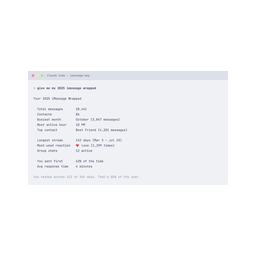
search_messages, get_conversation, list_conversations.
Feature & specification comparison
Rows where the two servers differ are marked.
| Spec | ||
|---|---|---|
| Category | OS Automation | OS Automation |
| Quality signal | 61/100 · Good | 59/100 · Good |
| Install command | Confirmed | Confirmed |
| Transport | Local subprocess (stdio) | Local subprocess (stdio) |
| Auth | Not declared | Not declared |
| Pricing | Not declared | Not declared |
| Required env vars | CAPSULATE_API_KEY | None listed |
| Verified owner | Community listing | Community listing |
| GitHub stars | 0 | 28 |
| Directory activity | 1 views 0 installs 0 upvotes | 3 views 0 installs 0 upvotes |
| Tools | 54 | 8 |
| Full listing | View Capsulate | View IMessage MCP |
Tools & capabilities
Capsulate tools 54
capsulate_launchLaunch a new isolated cloud sandbox (capsule) and (by default) wait until it is ready. Returns the capsule id and connection info. Use the returned sessionId for exec/files/etc. With skill, the capsule is the skill's environment (its saved template with the software set up) and the skill's setup procedure has run, so you can use its procedures right away.capsulate_listList the team's active capsules.capsulate_getFetch a capsule's full details by id.capsulate_destroyTerminate a capsule and release its resources.capsulate_execExecute a command inside a capsule and return stdout, stderr, and the exit code. Provide the command as an argv array, e.g. ['ls','-la','/workspace']. Commands first: files, installs, settings, scripts and data are one call here, a fraction of a second, where the screen takes many steps. On a Linux desktop capsule it runs as the desktop user 'capsulate' (home folder, DISPLAY :1, so apps open on the shared screen); prefix 'sudo' for root. On Windows pass ['powershell.exe', '-Command', '<script>']: it runs in the desktop session's PowerShell, about 0.3 s. It works while a person holds the screen.capsulate_run_codeRun a snippet of code inside a capsule: python, node or bash on Linux, powershell on Windows (about 0.3 s). Returns stdout/stderr/exit. Faster than doing the same on the screen.capsulate_write_fileWrite a UTF-8 text file inside a capsule (the folder is created). One call, far faster than typing it into an editor on the screen; open it afterwards with capsulate_open if the person should see it.capsulate_read_fileRead a UTF-8 text file from inside a capsule. One call, no screen needed.capsulate_set_envSet environment variables inside a running capsule.capsulate_screenshotCapture a screenshot of a desktop capsule. Returns the image so you can see the screen. For a smaller, faster image ask for format 'jpeg', a scale such as 0.5, or only a region (x, y, w, h) of the screen; the text after the image says how its points map back to screen pixels, which click and the other tools take.capsulate_clickClick at pixel (x, y) in a desktop capsule. Pass screenshot:true to see the screen after the click.capsulate_typeType text into the focused field of a desktop capsule.- +42 more on the listing page
IMessage MCP tools 8
search_messagesSearch by substring, exact text, token, or phrase. Message text by default; conversation names and attachment filenames are opt-in. Filter by service, sent or received, and dateget_conversationRead a conversation by `chat_id` or by a contact or group name, with edits, reactions, receipts, replies, group events, and attachments. The cursor pages to older eventslist_conversationsFind conversations by contact, service, kind, reply state, or date, each with its latest message, newest first or by who you text mostget_attachmentShow one attachment from `get_conversation`: images as a JPEG with location and camera metadata removed, text files as text. Needs the `full` privacy modesync_messagesPull every change since a cursor: new, edited, unsent, and deleted messages, conversation memberships, reactions, and receiptsanalyze_communicationMessage counts by hour and weekday, response times, streaks, and who starts conversationsresolve_contactMatch a name, phone number, or email to a contact in your Mac's Address Book, and report ambiguity rather than guessserver_statusVersion, update availability, privacy mode, index and cache state, schema support, conversation membership counts, and Contacts access
Ready-to-paste client configs
Paste either block (or both) into your client config, e.g. claude_desktop_config.json or ~/.cursor/mcp.json. We only show a config when the install command is confirmed.
Capsulate
{
  "mcpServers": {
    "capsulate": {
      "command": "npx",
      "args": [
        "-y",
        "@capsulate/mcp"
      ],
      "env": {
        "CAPSULATE_API_KEY": "YOUR_CAPSULATE_API_KEY_HERE"
      }
    }
  }
}
IMessage MCP
{
  "mcpServers": {
    "imessage-mcp": {
      "command": "npx",
      "args": [
        "-y",
        "imessage-mcp@latest"
      ]
    }
  }
}
Frequently asked questions
Capsulate is categorized under OS Automation and uses a local stdio subprocess. IMessage MCP belongs to OS Automation and uses a local stdio subprocess. Pick Capsulate for os automation work and IMessage MCP for os automation.
Copy the mcpServers block from the config section on this page into your client's config (for example claude_desktop_config.json or ~/.cursor/mcp.json), then fully restart the client.
Capsulate has no declared pricing — check the project's own site. IMessage MCP has no declared pricing — check the project's own site. If a server needs environment variables such as API keys, define them under the env key in your client's MCP config.
Yes. MCP clients support multiple servers: add capsulate and imessage-mcp as separate keys in the same mcpServers object, and your assistant will call tools from either one.
On AllMCPs, Capsulate has a quality signal of 61/100 (Good) with 1 views, 0 installs and 0 GitHub stars. IMessage MCP has 59/100 (Good) with 3 views, 0 installs and 28 GitHub stars.