AllMCPs
BrowseBestCategoriesStackCompareToolsGuidesBlog Log in Submit MCP

Stay in the loop

Get new MCP servers and top picks in your inbox.

AllMCPs

The open directory for discovering and installing Model Context Protocol servers.

Explore

  • Browse servers
  • Best MCP servers
  • Categories
  • MCP clients
  • Agent prompts
  • Stack Builder
  • Compare servers
  • Tags index
  • Submit a server
  • Pricing

Learn

  • Guides hub
  • What is MCP?
  • Install guide
  • Troubleshooting
  • Security
  • Blog
  • Blog RSS

Tools

  • All tools
  • Config generator
  • Config validator
  • MCP playground
  • OpenAPI β†’ MCP
  • Badge generator

For agents

  • API docs
  • Trust & traffic
  • llms.txt β†— (opens in a new tab)
  • Catalog JSON β†— (opens in a new tab)
  • Remote MCP β†— (opens in a new tab)

Company

  • About
  • Contact
  • X (@AllMCPs) β†— (opens in a new tab)
  • GitHub β†— (opens in a new tab)
  • Terms
  • Privacy
AllMCPs VerifiedAllMCPs VerifiedFeatured on Nick LaunchesFeatured on Nick LaunchesLaunch Llama NewsletterLaunch Llama NewsletterVerified DR - allmcps.comVerified DR - allmcps.comFeatured on SaaSGrowFeatured on SaaSGrowFeatured on Twelve ToolsFeatured on Twelve ToolsFeatured on Saaspa.geFeatured on Saaspa.geFeatured on Findly.toolsFeatured on Findly.toolsFeatured on Startup FameFeatured on Startup FameFeatured on LaunchKiwiFeatured on LaunchKiwiFeatured on ScrollLaunchFeatured on ScrollLaunchFeatured on DailyPingsFeatured on DailyPingsFazier badgeFazier badgeFeatured on NewTool.siteFeatured on NewTool.siteFeatured on saasfame.comFeatured on saasfame.comDR Checker - Domain RatingDR Checker - Domain RatingListed on Turbo0Listed on Turbo0Launched on LaunchBoard - Product Launch PlatformLaunched on LaunchBoard - Product Launch PlatformList on SimilarlabsList on Similarlabshttps://codetrendy.comhttps://codetrendy.comListed on DevTool.ioFeatured on BuildlistFeatured on BuildlistAllMCPs VerifiedAllMCPs VerifiedFeatured on Nick LaunchesFeatured on Nick LaunchesLaunch Llama NewsletterLaunch Llama NewsletterVerified DR - allmcps.comVerified DR - allmcps.comFeatured on SaaSGrowFeatured on SaaSGrowFeatured on Twelve ToolsFeatured on Twelve ToolsFeatured on Saaspa.geFeatured on Saaspa.geFeatured on Findly.toolsFeatured on Findly.toolsFeatured on Startup FameFeatured on Startup FameFeatured on LaunchKiwiFeatured on LaunchKiwiFeatured on ScrollLaunchFeatured on ScrollLaunchFeatured on DailyPingsFeatured on DailyPingsFazier badgeFazier badgeFeatured on NewTool.siteFeatured on NewTool.siteFeatured on saasfame.comFeatured on saasfame.comDR Checker - Domain RatingDR Checker - Domain RatingListed on Turbo0Listed on Turbo0Launched on LaunchBoard - Product Launch PlatformLaunched on LaunchBoard - Product Launch PlatformList on SimilarlabsList on Similarlabshttps://codetrendy.comhttps://codetrendy.comListed on DevTool.ioFeatured on BuildlistFeatured on Buildlist
Β© 2026 Jackalope Digital LLC. All rights reserved.
  1. Home
  2. πŸ–₯️ OS Automation
  3. IMessage MCP
I
Health: Not checked yetWe have not completed a health check for this listing yet.Last checked 8/11/2026, 12:26:12 AM

IMessage MCP

Enrichment pendingWe haven’t run our AI enrichment pass on this listing yet, so the overview, use cases, and FAQ below may be sparse or missing. We work through the catalog over time β€” check back soon.
View Repository

25 tools for searching, analyzing, and exploring your iMessage history on macOS.

Quick Install

Automated & IDE Setup

Copy the AI prompt to install this server into Claude Code, Cursor, or another agent β€” or use 1-click editor setup below.

Add to CursorAdd to VS Code
Manual Client & Custom JSON ConfigExpand JSON β–Ύ

Install Config Generator

Choose your client
claude_desktop_config.json
{
  "mcpServers": {
    "imessage-mcp": {
      "command": "npx",
      "args": [
        "-y",
        "imessage-mcp"
      ]
    }
  }
}

πŸ’‘ Paste into ~/Library/Application Support/Claude/claude_desktop_config.json (macOS) or %APPDATA%\Claude\claude_desktop_config.json (Windows)

Install Directory Badge Claim listing AlternativesπŸ–₯️ More in OS Automation

Documentation Overview

imessage-mcp

npm version License: MIT TypeScript MCP CI Node

26 tools for locally exploring your iMessage history with AI.

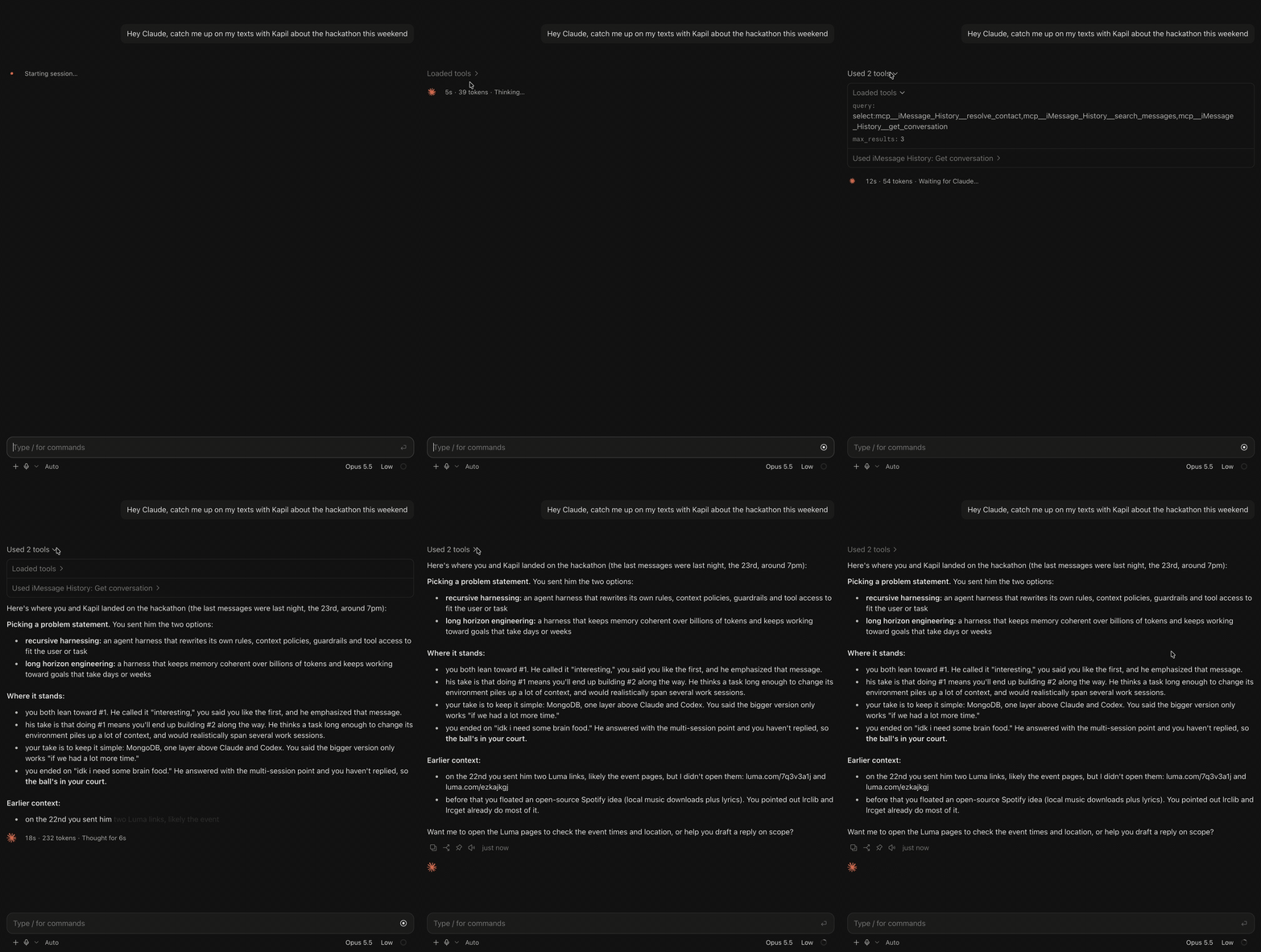
imessage-mcp demo

if this helped you, star it. it helps others find it.

An MCP server that gives AI assistants read-only access to your local iMessage database. Nothing is written, modified, or uploaded. Your messages stay on your Mac; the AI only sees what you ask about.

Read-only access to 2 local files (chat.db + AddressBook). Zero network requests. Nothing is written, uploaded, or shared. All 26 tools are annotated readOnlyHint: true β€” your MCP client can auto-approve every call without prompts.

Install

Terminal
npm install -g imessage-mcp

Or run without installing:

Terminal
npx imessage-mcp doctor

Smithery: One-click install via the Smithery registry β€” search for imessage-mcp.

Add to your AI client

bash
# Claude Code (one command)
claude mcp add imessage -- npx -y imessage-mcp
bash
# Claude Desktop β€” add to ~/Library/Application Support/Claude/claude_desktop_config.json
config.json
{
  "mcpServers": {
    "imessage": {
      "command": "npx",
      "args": ["-y", "imessage-mcp"]
    }
  }
}

See Setup for Cursor, Windsurf, VS Code, Codex CLI, Cline, JetBrains, and Zed.

Claude Code Plugin

For slash commands and agents:

Terminal
claude plugin add anipotts/imessage-mcp

Prerequisites

  1. macOS (iMessage is macOS-only)
  2. Node.js 18+ (node --version)
  3. Database access for your host application β€” macOS protects chat.db with its Application Data permission. Grant access in: System Settings > Privacy & Security > Full Disk Access and enable the app running the MCP server (your terminal, Claude Desktop, or Cursor). GUI apps like Claude Desktop and Cursor may already have this permission.
  4. Messages in iCloud enabled on your Mac (if you use multiple devices) β€” see iCloud Sync & Multiple Devices

Privacy & Security

imessage-mcp reads your local iMessage database in read-only mode. No data leaves your machine. Nothing is written, modified, uploaded, or shared.

PathAccessPurpose
~/Library/Messages/chat.dbRead-onlyYour iMessage database
~/Library/Application Support/AddressBook/Read-onlyContact name resolution

No other files are accessed. No external APIs are called.

Code
chat.db --> [imessage-mcp] --> stdio/http --> [Your MCP Client] --> AI Provider
  ^                                              ^
  Your Mac only                         Already authorized by you

What Can You Ask?

Once connected, ask your AI assistant anything about your messages in plain language:

  • "Give me my 2024 iMessage Wrapped"
  • "Do I always text first with [name]?"
  • "What's my longest texting streak?"
  • "Who reacts to my messages the most?"
  • "What was the first text I ever sent my partner?"
  • "What was I texting about on this day last year?"
  • "Do I double-text [name] a lot?"
  • "Who have I lost touch with?"
More examples
  • "Show me the longest silence between me and [name]"
  • "How many messages have I sent this year?"
  • "Show my conversation with Mom"
  • "What time of day am I most active texting?"
  • "Show me messages people unsent"
  • "What are the most popular group chats?"
iMessage Wrapped β€” year-in-review summary

Tools

26 tools across 10 categories. All read-only. All annotated with readOnlyHint: true.

ToolDescription
search_messagesFull-text search with filters: query, contact, date range, direction, group chat, attachments
yearly_wrappedSpotify Wrapped for iMessage β€” full year summary
who_initiatesWho starts conversations? Initiation ratio per contact
streaksConsecutive-day messaging streaks
get_reactionsTapback distribution, top reactors, most-reacted messages
on_this_dayMessages from this date in past years
All 26 tools
ToolDescription
search_messagesFull-text search with filters: query, contact, date range, direction, group chat, attachments
get_conversationConversation thread with cursor-based pagination
list_contactsAll contacts with message counts and date ranges
get_contactDeep contact info with stats and yearly breakdown
resolve_contactFuzzy-match a name, phone number, or email to a contact
message_statsAggregate stats with time-series grouping
contact_statsPer-contact volumes, trends, and hourly patterns
temporal_heatmap7x24 activity heatmap (day-of-week by hour)
on_this_dayMessages from this date in past years
first_last_messageFirst and last message ever exchanged with a contact
who_initiatesWho starts conversations? Initiation ratio per contact
streaksConsecutive-day messaging streaks
double_textsDetect double-texting and unanswered message patterns
conversation_gapsFind the longest silences in a conversation
forgotten_contactsContacts you've lost touch with
yearly_wrappedSpotify Wrapped for iMessage β€” full year summary
list_group_chatsGroup chats with member counts and activity
get_group_chatPer-member stats and monthly activity timeline
list_attachmentsQuery attachments by contact, MIME type, and date range
get_reactionsTapback distribution, top reactors, most-reacted messages
get_read_receiptsRead/delivery latency and unread patterns
get_threadReconstruct reply thread trees
get_edited_messagesEdited and unsent messages with timing
get_message_effectsSlam, loud, confetti, fireworks analytics
check_new_messagesTrack new messages since your last check (baseline + delta)
helpFull tool guide with usage examples

Setup

Claude Desktop

Add to ~/Library/Application Support/Claude/claude_desktop_config.json:

config.json
{
  "mcpServers": {
    "imessage": {
      "command": "npx",
      "args": ["-y", "imessage-mcp"]
    }
  }
}

Restart Claude Desktop after saving.

Claude Code

Terminal
claude mcp add imessage -- npx -y imessage-mcp

Or add to .mcp.json in your project root:

config.json
{
  "mcpServers": {
    "imessage": {
      "command": "npx",
      "args": ["-y", "imessage-mcp"]
    }
  }
}
OpenAI Codex CLI
bash
codex --mcp-config '{"imessage":{"command":"npx","args":["-y","imessage-mcp"]}}'

Or add to ~/.codex/config.json:

config.json
{
  "mcpServers": {
    "imessage": {
      "command": "npx",
      "args": ["-y", "imessage-mcp"]
    }
  }
}
Cursor

Add to ~/.cursor/mcp.json:

config.json
{
  "mcpServers": {
    "imessage": {
      "command": "npx",
      "args": ["-y", "imessage-mcp"]
    }
  }
}
Windsurf

Add to ~/.codeium/windsurf/mcp_config.json:

config.json
{
  "mcpServers": {
    "imessage": {
      "command": "npx",
      "args": ["-y", "imessage-mcp"]
    }
  }
}
VS Code (GitHub Copilot)

Add to .vscode/mcp.json in your project root:

stdio (default):

config.json
{
  "servers": {
    "imessage": {
      "command": "npx",
      "args": ["-y", "imessage-mcp"]
    }
  }
}

HTTP transport (remote / Docker):

config.json
{
  "servers": {
    "imessage": {
      "type": "http",
      "url": "http://localhost:3000/mcp"
    }
  }
}
Cline (VS Code)

Add via the Cline MCP settings UI, or edit cline_mcp_settings.json:

config.json
{
  "mcpServers": {
    "imessage": {
      "command": "npx",
      "args": ["-y", "imessage-mcp"]
    }
  }
}
JetBrains IDEs

Settings > Tools > AI Assistant > MCP Servers > Add:

  • Name: imessage
  • Command: npx
  • Args: -y imessage-mcp
Zed

Add to ~/.config/zed/settings.json:

config.json
{
  "context_servers": {
    "imessage": {
      "command": {
        "path": "npx",
        "args": ["-y", "imessage-mcp"]
      }
    }
  }
}

CLI Commands

imessage-mcp doctor β€” run setup diagnostics

Checks macOS version, Node.js version, chat.db access, database permissions, AddressBook, and message count.

Code
$ npx imessage-mcp doctor

imessage-mcp doctor

  βœ“ macOS: Running on macOS (darwin)
  βœ“ Node.js: Node v22.0.0 (>= 18 required)
  βœ“ chat.db: Found at /Users/you/Library/Messages/chat.db
  βœ“ Database access: Database readable
  βœ“ Messages: 97,432 messages indexed
  βœ“ AddressBook: 342 contacts resolved

All checks passed β€” ready to use!
imessage-mcp doctor output

Pass --json for machine-readable output:

Terminal
npx imessage-mcp doctor --json
imessage-mcp dump β€” export messages or contacts to JSON
bash
# Export last 1000 messages
npx imessage-mcp dump > messages.json

# Filter by contact
npx imessage-mcp dump --contact "+15551234567"

# Date range with custom limit
npx imessage-mcp dump --from 2024-01-01 --to 2024-12-31 --limit 5000

# Export contacts (excluding spam/promo by default)
npx imessage-mcp dump --contacts > contacts.json

# Include all contacts (even ones you never replied to)
npx imessage-mcp dump --contacts --all > all-contacts.json

# Export all messages (including unfiltered contacts)
npx imessage-mcp dump --all > all-messages.json

Transport Modes

By default, imessage-mcp uses stdio transport β€” the standard for local MCP clients like Claude Desktop and Claude Code. For workflow tools (n8n, Lutra, Copilot Studio) or remote access, HTTP transport is available.

FlagShortDefaultDescription
--transport-tstdioTransport mode: stdio, http, or sse
--port-p3000Port for HTTP/SSE transport
--host-H127.0.0.1Bind address (use 0.0.0.0 for Docker/remote)
Streamable HTTP (recommended for HTTP)
Terminal
npx imessage-mcp --transport http --port 3000

Starts a Streamable HTTP server on http://127.0.0.1:3000/mcp. Supports POST, GET, and DELETE on /mcp with session management via mcp-session-id headers. This is the MCP 2025-03-26 standard.

Legacy SSE (for older clients)
Terminal
npx imessage-mcp --transport sse --port 3000

Starts a legacy SSE server: GET /sse to establish the stream, POST /messages?sessionId=<id> for JSON-RPC requests. Use this only if your client does not support Streamable HTTP.

Docker

Run imessage-mcp as an HTTP server in Docker. Copy your chat.db to a volume mount:

Terminal
docker build -t imessage-mcp .
docker run -p 3000:3000 -v /path/to/chat.db:/data/chat.db:ro imessage-mcp

The container starts with --transport http --host 0.0.0.0 on port 3000 by default. Connect any MCP client to http://localhost:3000/mcp.

To secure the HTTP endpoint with authentication:

Terminal
docker run -p 3000:3000 -e IMESSAGE_API_TOKEN=your-secret-token -v /path/to/chat.db:/data/chat.db:ro imessage-mcp

All requests must then include the Authorization: Bearer your-secret-token header.

Safe Mode β€” redact all message bodies

Prevent message bodies from being sent to the AI. Only metadata (counts, dates, contact names) is returned. No actual message text.

config.json
{
  "mcpServers": {
    "imessage": {
      "command": "npx",
      "args": ["-y", "imessage-mcp"],
      "env": { "IMESSAGE_SAFE_MODE": "1" }
    }
  }
}
Safe Mode β€” all message bodies redacted

Useful for demos, shared environments, or when you want analytics without exposing private conversations.

Smart Filtering β€” spam/promo exclusion

By default, listing and global search tools only include contacts you have actually replied to. This filters out spam, promo texts, and unknown senders.

Filtered tools: search_messages (global), list_contacts, message_stats (global), temporal_heatmap (global), who_initiates (global), streaks (global), on_this_day (global), forgotten_contacts, yearly_wrapped.

Unfiltered tools: get_conversation, get_contact, contact_stats, first_last_message, conversation_gaps, get_reactions, get_read_receipts, get_thread, get_edited_messages, get_message_effects, group chats, attachments, check_new_messages.

To include all contacts (including unrecognized senders), pass include_all: true to any filtered tool.

Sync & New Messages β€” real-time notifications

Looking for iCloud sync? This section covers real-time message tracking within imessage-mcp. To sync your full message history from iPhone/iPad to your Mac, see iCloud Sync & Multiple Devices.

By default, every query reads the latest data β€” if someone texts you, your next tool call sees it immediately. No sync needed.

For proactive awareness, the check_new_messages tool tracks what arrived since your last check:

  1. First call sets a baseline
  2. Subsequent calls report the delta β€” count, who messaged, and optional text previews

For push notifications (opt-in):

config.json
{
  "mcpServers": {
    "imessage": {
      "command": "npx",
      "args": ["-y", "imessage-mcp"],
      "env": { "IMESSAGE_SYNC": "watch" }
    }
  }
}

This watches your iMessage database for changes and notifies your AI client within seconds. Uses macOS FSEvents β€” zero CPU when idle.

Configuration

VariableDefaultDescription
IMESSAGE_DB~/Library/Messages/chat.dbPath to iMessage database
IMESSAGE_SAFE_MODEfalseSet to 1 to redact all message bodies
IMESSAGE_SYNCoffSync mode: off, watch (FSEvents), or poll:N (every N seconds)
IMESSAGE_API_TOKEN(none)Bearer token for HTTP/SSE auth. If set, requests must include Authorization: Bearer <token>
iCloud Sync & Multiple Devices

iCloud Sync & Multiple Devices

imessage-mcp reads your Mac's local database (~/Library/Messages/chat.db). This database only contains messages that have been synced to your Mac. If your conversations live on your iPhone or iPad but haven't synced, imessage-mcp won't see them.

If you only use iMessage on your Mac, you can skip this β€” your messages are already in chat.db.

How iMessage sync works

Apple's "Messages in iCloud" keeps your full message history synchronized across all your Apple devices:

Code
β”Œβ”€β”€β”€β”€β”€β”€β”€β”€β”€β”€β”€β”€β”€β”         β”Œβ”€β”€β”€β”€β”€β”€β”€β”€β”€β”€β”         β”Œβ”€β”€β”€β”€β”€β”€β”€β”€β”€β”€β”€β”€β”€β”€β”
β”‚ iPhone/iPad β”‚ ──────►  β”‚  iCloud  β”‚ ──────►  β”‚   Your Mac   β”‚
β”‚  (sends &   β”‚ ◄──────  β”‚(Messages β”‚ ◄──────  β”‚              β”‚
β”‚  receives)  β”‚         β”‚in iCloud)β”‚         β”‚  chat.db      β”‚
β””β”€β”€β”€β”€β”€β”€β”€β”€β”€β”€β”€β”€β”€β”˜         β””β”€β”€β”€β”€β”€β”€β”€β”€β”€β”€β”˜         β””β”€β”€β”€β”€β”€β”€β”¬β”€β”€β”€β”€β”€β”€β”€β”˜
                                                     β”‚
                                                     β–Ό
                                              imessage-mcp
                                              reads this ↑

Without "Messages in iCloud" enabled on your Mac, the Mac's chat.db only contains messages sent and received while Messages.app was actively running on that Mac.

Setup

1. Enable on your Mac

Messages.app Settings β€” Enable Messages in iCloud
  1. Open Messages.app on your Mac
  2. Go to Settings (Cmd+,) > iMessage tab
  3. Check "Enable Messages in iCloud"
  4. Keep Messages.app open β€” sync begins automatically

2. Enable on your iPhone/iPad

iPhone Settings β€” Messages in iCloud toggle
  1. Open Settings > tap your name (Apple ID) > iCloud > Messages
  2. Toggle "Use on this iPhone" ON

3. Same Apple ID on all devices

All devices must be signed into the same Apple ID. Check: Mac (System Settings > Apple ID), iPhone (Settings > tap your name).

4. Wait for sync to complete

Initial sync can take hours or even days for large message histories. During sync:

  • Messages.app must remain open on your Mac
  • Your Mac should be connected to Wi-Fi and power
  • You'll see a "Syncing with iCloud" status in Messages.app
Messages.app β€” Downloading messages from iCloud progress

5. Sync contacts for name resolution

imessage-mcp resolves phone numbers to names using your Mac's AddressBook. If contacts only exist on your iPhone:

  1. Open System Settings > Apple ID > iCloud
  2. Find Contacts and toggle it ON
  3. Wait for contacts to sync (usually under a minute)

Verify sync is complete

Terminal
npx imessage-mcp doctor

Look for the Messages line β€” it shows how many messages are indexed locally. If this number seems low, iCloud sync is likely still in progress. Run doctor again later to confirm the count has stabilized.

Tip: On your iPhone, go to Settings > General > iPhone Storage > Messages to see your total message history size. Compare with what doctor reports on your Mac.

Common sync issues

Messages on iPhone don't appear on Mac: "Messages in iCloud" must be enabled on both devices. Ensure both use the same Apple ID. Keep Messages.app open on your Mac. Run npx imessage-mcp doctor periodically to check if the count is growing.

Brand-new Mac shows no history: Expected β€” enable "Messages in iCloud," connect to Wi-Fi and power, keep Messages.app open. For large histories (100K+ messages), initial sync may take 1–2 days.

History is incomplete: Sync may still be in progress. If iCloud storage is full, sync pauses (check System Settings > Apple ID > iCloud > Manage Storage). Messages sent while sync was disabled won't sync retroactively.

Group chats missing members: Group chat sync can lag behind 1:1 conversations. Ensure sync is enabled on all devices and has had time to complete. If members show as phone numbers, enable iCloud Contacts sync (step 5 above).

Troubleshooting

"Cannot read chat.db" / SQLITE_CANTOPEN

macOS protects chat.db with its Application Data permission. To grant access:

  1. Open System Settings > Privacy & Security > Full Disk Access
  2. Enable the app running the MCP server (your terminal, Claude Desktop, Cursor, etc.)
  3. Restart the app after granting access

GUI apps like Claude Desktop and Cursor may already have this permission β€” try running npx imessage-mcp doctor first.

Messages are missing or history is incomplete

imessage-mcp reads only messages synced to your Mac. See iCloud Sync & Multiple Devices for full setup steps.

Quick checklist:

  1. Open Messages.app > Settings > iMessage > enable "Messages in iCloud"
  2. Ensure the same Apple ID is signed in on all your devices
  3. Connect to Wi-Fi and power β€” initial sync can take hours
  4. Run npx imessage-mcp doctor to check message count
"No messages found"

Make sure Messages.app has been used on this Mac and has synced your messages. If you recently set up this Mac or just enabled "Messages in iCloud," sync may still be in progress β€” see iCloud Sync & Multiple Devices. Run npx imessage-mcp doctor to verify your setup and message count.

Messages show phone numbers instead of names

Contact resolution uses your macOS AddressBook. If contacts are only on your phone and not synced to your Mac, names will not resolve. See iCloud Sync & Multiple Devices for instructions on enabling iCloud contact sync, or add contacts manually in the Contacts app.

Node.js version mismatch (MODULE_NOT_FOUND / NODE_MODULE_VERSION)

Your MCP client's bundled Node.js version differs from the one that compiled better-sqlite3's native module. Fix by pointing to your system Node directly:

  1. Find your Node path: which node
  2. Find imessage-mcp: npm root -g
  3. Replace "command": "npx" with your system Node:
config.json
{
  "mcpServers": {
    "imessage": {
      "command": "/opt/homebrew/bin/node",
      "args": ["/path/to/node_modules/imessage-mcp/bin/imessage-mcp.js"]
    }
  }
}
Claude Desktop does not show the tools
  1. Verify the config file is at ~/Library/Application Support/Claude/claude_desktop_config.json
  2. Restart Claude Desktop completely (Cmd+Q, then reopen)
  3. Run npx imessage-mcp doctor to confirm the server works independently

Uninstall

Terminal
npm uninstall -g imessage-mcp

How It Works

imessage-mcp reads ~/Library/Messages/chat.db using better-sqlite3 in read-only mode with query_only = ON. Zero network requests. Contact names are resolved from your macOS AddressBook automatically.

On macOS 14 (Sonoma) and later, Apple changed how message text is stored. Some messages have NULL in the text column but contain the actual text in the attributedBody binary blob. imessage-mcp extracts text from this blob automatically so no messages are left behind.

All 26 tools are annotated with readOnlyHint: true so MCP clients can auto-approve them without user prompts.

part of claude-code-tips

tools i built while living in claude code every day.

  • claude-code-tips Β· practical patterns for agentic coding
  • claudemon Β· real-time session monitor
  • cc Β· cross-session messaging
  • mine Β· session mining to sqlite

more from me

  • anipotts.com/thoughts Β· long-form
  • buttondown.com/anipotts Β· newsletter
  • @anipottsbuilds Β· short-form

License

MIT

Related MCP Servers

View all in OS Automation View all alternatives
  • M
    MacOS Only MCP server that exposes iMessage chat

    macOS-only MCP server that exposes iMessage chat.db to Claude and exports per-chat history to an…

    πŸ–₯️ OS Automation0 views
    Compare vs MacOS Only MCP server that exposes iMessage chat β†’
  • Dash Mcp Server logoDash Mcp Server

    MCP server for Dash, the macOS API documentation browser. Instant search over 200+ documentation sets.

    πŸ–₯️ OS Automation1 views
    Compare vs Dash Mcp Server β†’
  • Mcp Nixos logoMcp Nixos

    MCP server providing accurate information about NixOS packages, system options, Home Manager configurations, and nix-darwin macOS settings to prevent AI hallucinations.

    πŸ–₯️ OS Automation1 views
    Compare vs Mcp Nixos β†’
  • A
    Apple Calendar

    List, create, update, and delete events in Apple Calendar on macOS.

    πŸ–₯️ OS Automation0 views
    Compare vs Apple Calendar β†’

Frequently Asked Questions about IMessage MCP

Add the following block to your claude_desktop_config.json under mcpServers: "mcpServers": { "imessage-mcp": { "command": "npx", "args": ["-y", "iMessage MCP"] } }

AllMCPs Directory Badge

Full Badge Customizer

Showcase your server listing on GitHub or your project documentation. Embed this dynamic SVG badge to highlight official listing status and live engagement.

Badge Style:
Live Dynamic SVG PreviewIMessage MCP AllMCPs Directory Badge

Markdown (GitHub README)
[![AllMCPs](https://allmcps.com/api/badge/imessage-mcp?style=directory)](https://allmcps.com/mcp/imessage-mcp)
HTML Embed
<a href="https://allmcps.com/mcp/imessage-mcp"><img src="https://allmcps.com/api/badge/imessage-mcp?style=directory" alt="IMessage MCP on AllMCPs" /></a>

Technical Specs & Signals

CategoryπŸ–₯️OS Automation
More technical detailsExpand β–Ύ
TransportSTDIO
RuntimeNode.js
Views0
Unique ViewsTotal visits recorded for this listing page on AllMCPs.
Installs0
Installs & Copy ActionsTotal times users copied install commands or configuration snippets for this server.
27Quality signal: Emerging Β· 27/100How this signal is calculated β–Ύ
Server availabilityNot measured

Not scored for repo-hosted servers β€” we can't reach the running server, only its GitHub page. Hosted MCP endpoints are health-checked live.

Verified ownership8/20
Documentation & tools11/30
Adoption & activity1/15
Community engagement0/10

A guidance signal from public completeness & health data β€” not a user rating. New listings start lower and rise as they add docs, get verified, and grow adoption. Signals we can't observe for a listing are skipped, not counted against it.

β˜… FeaturedMoxie Docs MCP logo

Moxie Docs MCP

MCP & Agent Skills for Automated Documentation, and codebase conventions + context

Explore Server β†’

Own this project?

This directory is pre-filled from public sources. Claim via GitHub README, site badge, or DNS TXT to get the verified badge and attach your website.

Free dofollow backlink: after claiming, verify your product site and place a dofollow AllMCPs badge β€” we recheck it stays live.

Claim & get free dofollow

Share & Embed

Add our SVG badge (dark/light directory styles) or embeddable widget to your site.

Explore more

More in πŸ–₯️ OS Automation β†’Alternatives to IMessage MCP β†’Install in Claude DesktopInstall in CursorInstall in VS Code