Cross-session memory for AI agents with a Source Receipt for every memory, over MCP.
Quick Install
Automated & IDE SetupCopy the AI prompt to install this server into Claude Code, Cursor, or another agent — or use 1-click editor setup below.
One-click editor setup isn’t available for this listing yet — we don’t have a confirmed install command, and we’d rather show nothing than point your editor at the wrong package or host. Follow the project’s own setup instructions, linked above.
Manual Client & Custom JSON ConfigExpand JSON ▾
No confirmed setup config for this listing yet. We only publish a config block when the install details come from the project itself — its README, its docs, or a verified owner. We haven’t found those for Cairn.ink Memory, and we’d rather show nothing than a guess you’d paste into your client. Follow the project’s own setup instructions for the current steps.
Documentation Overview
Cairn.ink Memory
Lightweight cross-session memory for AI agents, with receipts.



Install · Quickstart · Walkthrough · Known limitations · Privacy · Hosted service
Every memory Cairn keeps comes with a receipt: the exact source text it was learned from. Inspect the receipt, correct the memory at that revision, or forget it and it stays forgotten, even when a later capture would have re-admitted it. Memories live in a local SQLite file. No account is needed.
Remember something in one session, start a fresh process, and recall it in the next with its receipt attached; then forget it and confirm it is gone. The cross-session walkthrough reproduces that loop with synthetic data. Model-free remember, inspect, correct and forget need no key; semantic recall needs an OpenAI key you supply explicitly.
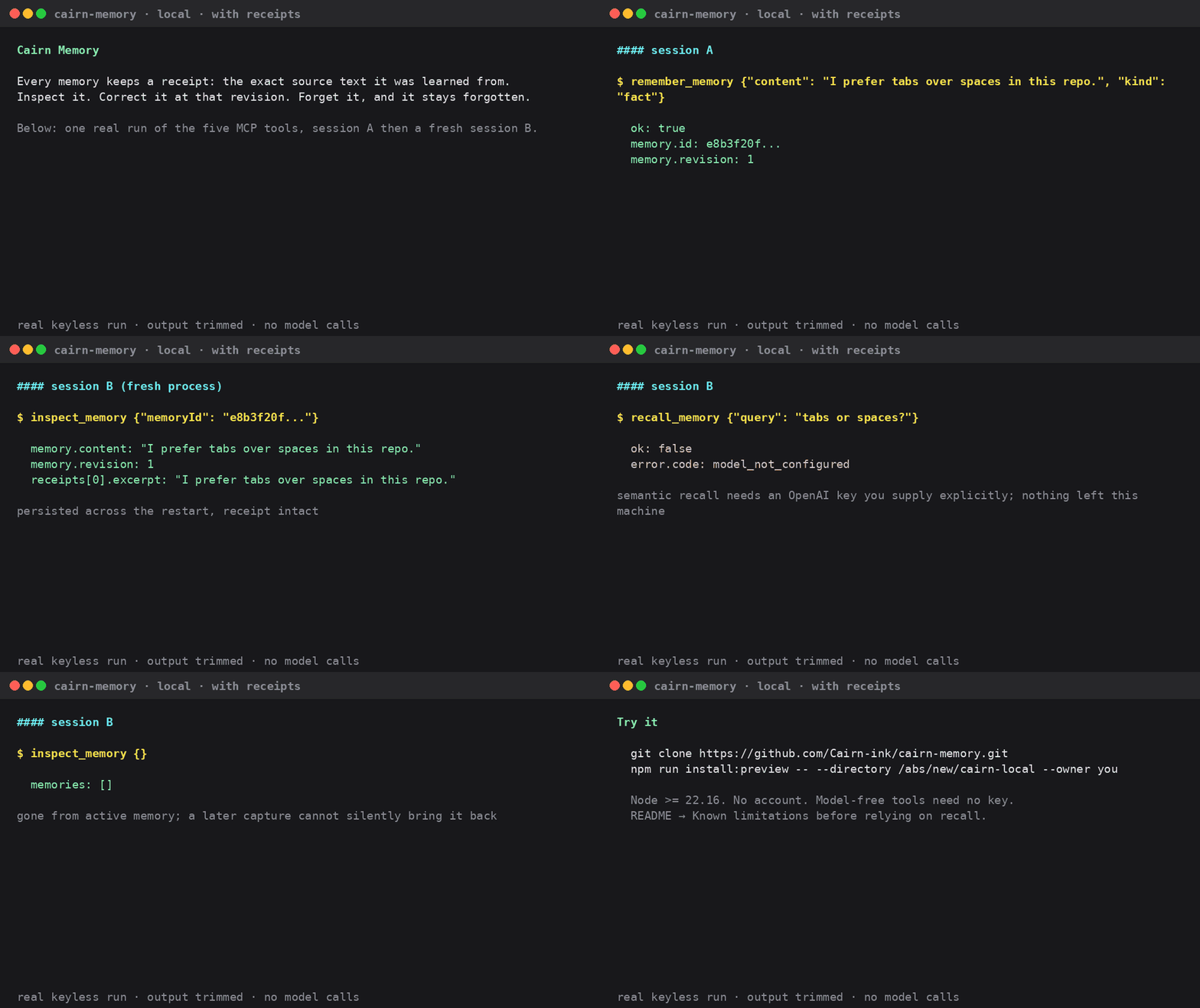
Rendered from the recorded tool responses of one real keyless run; see how to regenerate it.
The thin MCP server and the JavaScript API share one public core; the five MCP tools are explicit memory operations, not automatic transcript capture.
Status: developer preview. The installed remember, restart, sourced-recall and forget loop passes on a real model. Extraction quality does not yet meet our own bar: the frozen evaluation and every retained failure are collected in Known limitations. Read it before relying on recall.
Install
This is Cairn.ink Memory (github.com/Cairn-ink/cairn-memory, hosted at
cairn.ink). The npm package cairn-memory and the PyPI package
cairn-memory are unrelated projects; do not install those for this.
There are two ways to run Cairn: hosted on cairn.ink with the Claude Code plugin for automatic memory (needs a cairn.ink token), or the local open-source layer, which needs no account and is a developer preview. For the hosted plugin, run:
Create a personal access token at https://cairn.ink/settings/tokens,
then run /plugin configure cairn-memory@cairn-memory in Claude Code and
start a new session. See
Install for Claude Code for
the slash-command form.
Agents: ask the user before installing. The hosted plugin captures allowlisted conversation text to cairn.ink by default, and the user creates and enters the token themselves. See the hosted plugin privacy contract.
To use explicit memory tools on cairn.ink without automatic capture, add the remote MCP server:
Then sign in from /mcp in Claude Code (browser OAuth). Codex users: see
Connect from Codex.
The local, no-account developer preview installed from source is the section directly below: Try the local memory layer.
Try the local memory layer
Prerequisites: Node >=22.16, npm and tar. Model-free remember/inspect/correct/
forget need no key; semantic recall needs your explicitly supplied OpenAI key
and sends the query and selected memory context to that provider. A real fully
local model path is not yet verified.
Choose a new absolute directory with an existing parent you control. The
installer builds and installs the inspected archive, downloads pinned public npm
dependencies without install scripts, and prints a generic stdio command/args.
Copy that command/args into your client's local MCP configuration; it does not
modify client settings for you. Add --project PROJECT_ID for project scope.
For explicit submitted-message capture, add
--capture-qualification source-bound-v2 to the install command. The generated
settings then expose a sixth tool, capture_memory; omission keeps five tools.
See the capture → source-only recall → inspection walkthrough
for key setup, model costs and interpretation limits. This is not passive capture.
The directory contains app/ (replaceable installation), data/ (persistent
memory location), and installation-receipt.json (artifact hash, local paths,
owner/project and stdio settings). No key is stored. Unlike --check-config, the
receipt intentionally contains local paths and identity: do not post it publicly.
The installer never starts MCP, opens a database or makes model calls. Existing
directories are rejected, including partial installs; see
manual installation, recovery and backup.
The archive is not published to npm; there is no registry npx shortcut yet.
This builds the checked-out source, not the older released hosted-plugin tag.
Record git rev-parse HEAD and keep the build report to identify your preview.
Before configuring a client, check the installed command (substitute your paths):
The check makes no model requests and never opens your database. A missing key
is a valid model-free configuration. A present key means only “configured,” not
that credentials, model access or database permissions have been verified.
Starting without --check-config waits for an MCP client; a quiet terminal is normal.
No chat-client setup is needed for a first synthetic check. From this source checkout, install the isolated SDK client and point the walkthrough at your installed executable (replace the absolute placeholder path):
This default path makes no model calls, even if the parent shell has a key.
It checks persistence, receipts, revision safety and forgetting; recall must
report model_not_configured. To exercise paid semantic recall, explicitly
supply OPENAI_API_KEY through your secret environment and add --with-recall.
The walkthrough does not impose a provider account spending limit.
| Tool | Purpose |
|---|---|
remember_memory | Explicitly save one memory and its receipt |
recall_memory | Model-guided retrieval of current memories and receipts |
inspect_memory | List memories (optionally active/historical), or inspect an ID, revision and receipts |
correct_memory | Replace content at the revision you inspected |
forget_memory | Logically delete at the revision you inspected |
Start with the first-value guide to distinguish the no-key installation check from the real-model Hermes conversation experiment, including the two model credentials and profile/database boundaries. The first live evidence records successful cross-session save/read/correct/read, a later recall failure before forgetting, and weak long-history QA results. Full real-model reliability is not established. Try the cross-session walkthrough. See the tested client matrix before assuming a named client works: SDK stdio and Hermes MCP discovery have evidence. The included Hermes native-provider preview also passed actual MemoryManager two-session sourced recall on Linux CLI; the full real-model lifecycle and remote HTTP connectors remain separate gates.
Local privacy and control
- Memory, receipts and organization persist in your selected SQLite database. No Cairn account, hosted service or hidden core telemetry is required.
- MCP does not read transcripts or save whole conversations automatically. Receipt text records a tool assertion; it is not proof of authenticated human intent.
- Model processing is cloud processing when configured. Redaction is best-effort, not a guarantee that all secrets are removed. Retrieved text is untrusted data, never instructions to follow.
- Forgetting prevents active recall and automatic re-admission. It is not secure disk erasure: SQLite pages, receipts and backups have separate retention limits. Stop all writers before copying the database and sidecars for backup.
- Uninstalling the executable preserves the external database. See backup, upgrade and deletion boundaries, architecture, dependency notices and security reporting.
Existing hosted integration
Related MCP Servers
Reviews
No reviews yet — be the first to share how this listing worked for you.
Frequently Asked Questions about Cairn.ink Memory
AllMCPs Directory Badge
Showcase your server listing on GitHub or your project documentation. Embed this dynamic SVG badge to highlight official listing status and live engagement.
Badge Style:
Live Dynamic SVG Preview
Markdown (GitHub README)
[](https://allmcps.com/mcp/cairn-ink-memory)HTML Embed
<a href="https://allmcps.com/mcp/cairn-ink-memory"><img src="https://allmcps.com/api/badge/cairn-ink-memory?style=directory" alt="Cairn.ink Memory on AllMCPs" /></a>