BigQuery Data Platform vs Dbt MCP
A side-by-side look at the BigQuery Data Platform and Dbt MCP MCP servers: transport, auth, tools, quality signals, and the config to install either one in Claude, Cursor, Windsurf or VS Code.
Verdict: choose BigQuery Data Platform for data platforms work as a local process; choose Dbt MCP for data platforms as a local process. You can also run both side by side in one mcpServers block.
Which MCP server should you choose?
 Choose BigQuery Data Platform when
- You need dedicated capabilities in the Data Platforms domain.
- You prefer a local stdio subprocess transport.
- You have the keys it needs:
BQ_CODE_ASSET_LOCATION. - You want tools like
list_environments, list_datasets, list_tables.
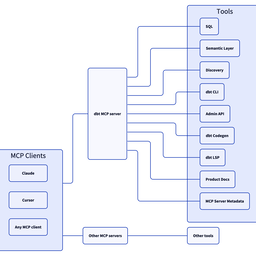 Choose Dbt MCP when
- You need dedicated capabilities in the Data Platforms domain.
- You prefer a local stdio subprocess transport.
- Its auth model fits you: API key required.
- You want tools like
search_product_docs, get_product_doc_pages, list_metrics.
Feature & specification comparison
Rows where the two servers differ are marked.
| Spec | ||
|---|---|---|
| Category | Data Platforms | Data Platforms |
| Quality signal | 55/100 · Good | 85/100 · Excellent |
| Install command | Confirmed | Confirmed |
| Transport | Local subprocess (stdio) | Local subprocess (stdio) |
| Auth | Not declared | API key required |
| Pricing | Not declared | BYOK (pay the provider) |
| Required env vars | BQ_CODE_ASSET_LOCATION | None listed |
| Verified owner | Community listing | Verified |
| GitHub stars | 0 | 609 |
| Directory activity | 2 views 0 installs 0 upvotes | 8 views 0 installs 0 upvotes |
| Tools | 14 | 39 |
| Full listing | View BigQuery Data Platform | View Dbt MCP |
Tools & capabilities
BigQuery Data Platform tools 14
list_environmentsList the configured BigQuery environments and which one is the default. Call this when the user names an environment you have not seen, or when a question could plausibly be about more than one. Free — reads only this server's configuration.list_datasetsList the BigQuery datasets available in the data platform project. Call this first to discover what data exists. Free — scans no data. Args: environment: Which configured BigQuery environment to use. Omit to use the default. Call list_environments to see what exists.list_tablesList tables and views inside a dataset. Free — scans no data. Args: dataset_id: The dataset to inspect, e.g. "events_raw". environment: Which configured BigQuery environment to use. Omit to use the default. Call list_environments to see what exists.get_table_schemaGet a table's columns, partitioning, size and freshness. Free — scans no data. Call this before writing a query, for two reasons beyond column names: - `partitioning` says whether a WHERE clause can actually limit the scan. A date-shaped column name does NOT mean the table is partitioned; if this field is null, every query reads the whole table. - Nested columns are expanded to dotted paths and flagged `repeated`, which is what tells you a column needs UNNEST. Args: dataset_id: The dataset, e.g. "events_raw". table_id: The table or view name. environment: Which configured BigQuery environment to use. Omit to use the default. Call list_environments to see what exists.check_table_freshnessReport when tables were last written, to catch stale or dead sources. Several plausible-looking tables on this platform stopped being updated without being dropped, so a query against one silently returns old data. Check before trusting a table you have not used before. Free — reads table metadata only, scanning no data. Args: dataset_id: The dataset to check, e.g. "events_raw". table_id: A single table to check. Omit to report every table in the dataset, which is the faster way to spot a dead one. environment: Which configured BigQuery environment to use. Omit to use the default. Call list_environments to see what exists.list_scheduled_queriesList scheduled queries: what they write, when they run, and their state. Use this to answer "what populates this table?" and "why is this table stale?" — a disabled or failing scheduled query is the usual cause, and check_table_freshness can see the staleness but not the reason. The SQL is not included here; call get_scheduled_query for one of them. Args: dataset: Only queries writing into this destination dataset. contains: Only queries whose name contains this text. include_disabled: Keep disabled queries in the result. They are the most likely explanation for a table that stopped updating, so this defaults to True. environment: Which configured environment to look in. Scheduled queries are regional, so this must be the environment whose location holds them.get_scheduled_queryGet one scheduled query in full: its SQL, destination, and recent runs. Call this after list_scheduled_queries to see why a query is failing, or what SQL actually produces a table. Args: query: The scheduled query's name, or the id from list_scheduled_queries. runs: How many recent runs to include, newest first. environment: Which configured environment to look in.list_code_assetsList Colab notebooks and saved queries in BigQuery Studio. Use this for anything the user calls a Colab notebook, Colab Enterprise notebook, "colab script", BigQuery notebook, saved query or data canvas -- BigQuery Studio stores all of them as code assets and this lists them all. Free -- this reads metadata only and never opens an asset. Bodies are what cost quota, so filter here first and open individual assets afterwards. Args: environment: Which configured environment to read. Omit for the default. asset_type: Restrict to one of 'sql', 'notebook', 'data_canvas'. Saved queries usually outnumber notebooks by a wide margin, so this is the difference between a readable answer and 600 rows. name_contains: Case-insensitive substring match on the display name. limit: Maximum assets to return.get_code_assetReturn one Colab notebook or saved query's contents, by name or id. Notebook outputs are stripped -- across 52 real notebooks they were 77% of the bytes, and none of the logic. Args: asset: Display name (as shown in BigQuery Studio) or the asset id. environment: Which configured environment to read. Omit for the default.find_code_assets_using_tableFind which Colab notebooks and saved queries reference a table. The question to ask before changing or dropping a table: ``list_scheduled_queries`` says what writes it, this says who reads it. Unlike the other tools here this one opens every asset it considers, which costs Dataform read quota. It is bounded by ``max_assets`` and reports how much of the project it actually covered -- a result is evidence about the assets scanned, never proof that nothing else uses the table. Args: table: Table name to search for. A bare name matches any qualification; 'dataset.table' or a fully-qualified name narrows it. environment: Which configured environment to read. Omit for the default. asset_type: Restrict to 'sql', 'notebook' or 'data_canvas'. max_assets: Ceiling on how many bodies to read.list_notebook_schedulesList scheduled Colab notebooks with how many recent runs passed or failed. This is the health overview for scheduled notebook work: what is scheduled, whether it is active or paused, and — the part that is otherwise invisible — how its actual runs have been going. Do not read a schedule's own state as health. A schedule reports its last scheduled run as "OK" when it successfully *launched* the notebook, whether or not the notebook then failed; on this platform every schedule says OK while hundreds of runs have failed. The pass/fail numbers here come from the execution jobs, which is the only place the outcome exists. Args: environment: Which configured environment to read. Omit for the default. state: Restrict to 'active' or 'paused'. A paused schedule that used to fail is a common find — someone paused it instead of fixing it. name_contains: Case-insensitive substring match on the schedule name. lookback_days: How far back to read runs for the pass/fail counts. Defaults to 30 so monthly schedules show at least one run. Larger windows cost proportionally more (90 days is roughly 23 API pages). Set to 0 to skip run history entirely and just list what exists.list_notebook_runsList individual scheduled-notebook runs, by default the failed ones. Use this for "what has been failing?" across every scheduled notebook at once, rather than per schedule. Runs are returned newest first. Outcome cannot be filtered server-side — the API rejects a jobState filter — so this reads the runs in the window and filters here. That makes lookback_days the cost control: each 100 runs is one API call. Args: status: 'failed' (default), 'succeeded', 'running', or 'all'. environment: Which configured environment to read. Omit for the default. schedule: Restrict to one schedule, by its name or id. lookback_days: How far back to read. Defaults to 30. limit: Maximum runs to return.- +2 more on the listing page
Dbt MCP tools 39
search_product_docsSearch the dbt product documentation at docs.getdbt.com for pages matching a query. Returns matching page titles, URLs, and descriptions ranked by relevance. Only returns metadata, not page content — use get_product_doc_pages with URLs from the results to retrieve full page content. If the title/description search finds few matches, it automatically falls back to a deep full-text search across all documentation content to find pages where the topic is discussed in the body text. If your first query returns few results, try rephrasing with synonyms or the full term (e.g. 'user-defined functions' instead of 'UDFs', 'version control' instead of 'git'). Use the abbreviations on the page as well. VERSION AWARENESS: The response includes a `dbt_project_version` field (e.g. "1.8") detected by running `dbt --version` against the user's installed dbt binary. If null, the version could not be detected — present docs normally without version-specific callouts. When presenting results to the user, you MUST: 1. State the user's detected dbt version upfront if available (e.g. "Based on your project (dbt 1.8), here's what I found:"). 2. If a result title or description clearly references an older/EOL version (v1.6 or earlier), flag it: "Note: this page covers dbt v1.X, which has reached end-of-life and is no longer supported." 3. Search results only include titles, descriptions, and URLs — not page content. Do NOT make version-specific claims based on search results alone. If the user needs to know whether a feature applies to their version, fetch the page with `get_product_doc_pages` first.get_product_doc_pagesRetrieve the Markdown content of one or more dbt documentation pages from docs.getdbt.com. Pass a list of URLs or relative paths (e.g. from search_product_docs results). Up to 5 pages can be fetched per call; pages are fetched in parallel for speed. Pass the optional `query` parameter to retrieve only the most relevant sections of each page rather than the full content — this significantly reduces response size and is recommended when you already know what topic you are looking for. IMPORTANT — how to present docs content to the user: 1. Give a direct answer first, then explain. Don't just summarize — be specific about WHERE to find a feature in the UI and HOW it works. 2. Structure around the user's task: lead with what they asked, not the doc's own structure. Include step-by-step actionable detail when the docs describe a workflow or UI feature. 3. Call out practical limitations and edge cases from the docs. 4. Close with clear guidance: if the feature only partially answers the question, say what else they can do and where. 5. ALWAYS include the docs page URL(s) as markdown hyperlinks at the end of your response, e.g. [Page title](https://docs.getdbt.com/...). VERSION AWARENESS: The response includes a `dbt_project_version` field with the user's installed dbt version (detected via `dbt --version`). Page content is automatically filtered to show only sections relevant to the detected version — VersionBlock tags from the docs site are resolved so you receive clean, version-appropriate markdown. Pages may also have a `version_note` field if they cover an EOL version. If `dbt_project_version` is null, the version could not be detected — all version-specific content is kept with tags stripped. When presenting page content to the user, you MUST: 1. If `dbt_project_version` is set, tell the user their detected version upfront (e.g. "You're on dbt 1.8"). 2. If `version_note` is set, prominently warn the user that the page is for an end-of-life version and the information may be outdated. Suggest they look at the current docs instead. 3. Page content has already been filtered to show only sections relevant to the detected version. If the content seems sparse or incomplete, let the user know that some sections may have been filtered out because they apply to a different dbt version, and suggest they check the full page on docs.getdbt.com.list_metricsList metrics from the dbt Semantic Layer. The `result` field is a CSV string with a header row. Columns are dynamic: a column is only present if at least one metric has a non-empty value for it. `name` and `type` are always present; `label`, `description`, `metadata`, `dimensions`, and `entities` are included only when at least one metric has a value. The `dimensions` and `entities` cells contain comma-separated lists of names. When the number of metrics is below the configured threshold (default: 10), each metric includes the names of its available dimensions and entities. Use get_dimensions or get_entities for full details (types, granularities, descriptions) on specific metrics. When above the threshold, only metrics are returned. `metric_time` is a standard time dimension available on most metrics — you can often query directly without calling `get_dimensions` first. Call `get_dimensions` only when you need non-time dimensions or specific granularity details. For listings that exceed the text budget, columns are dropped progressively to save tokens: `description` is dropped first; `metadata` is dropped only if removing `description` alone is not enough. The CSV is prefixed with one or more `# Note:` lines listing which columns were omitted. When that happens, call `list_metrics` again with the `search` parameter to retrieve those fields for the specific metrics you care about. `search` accepts either a single substring or a list of substrings; when a list is provided, metrics whose name matches **any** of the substrings are returned (deduplicated), so you can fetch details for several metrics in one call. `meta_filter` accepts a dict of key-value pairs and restricts results to metrics whose `config.meta` contains all specified pairs — for example `{"agent_accessible": true}`. Apply it on broad searches to keep the result set small enough that the `metadata` column is preserved in the response. If the user is asking a data-related or business-related question, use this tool as a first step. Returns one source page in `result`, with `pagination.has_more` and `pagination.next_page`. Pass the next page as `page_num` with the same filters and `page_size` (default 50, maximum 100). Local filtering may leave an empty page with more pages available. Restart at page 1 if you reduce the page size after a size-limit error.list_saved_queriesList all saved queries from the dbt Semantic Layer. Saved queries are pre-defined queries that have been saved in the Semantic Layer. They contain specific metrics, group-by dimensions, and filters that are commonly used. This tool helps discover what predefined queries are available for quick execution. Use this tool when: - The user wants to see what pre-built queries are available - The user mentions "saved queries" or "predefined queries" - You need to find commonly used analytical queries Examples: - "What saved queries are available?" - "Show me the predefined reports" - "List all saved queries for revenue analysis" Returns one source page in `result`, with `pagination.has_more` and `pagination.next_page`. Pass the next page as `page_num` with the same filters and `page_size` (default 50, maximum 100). Local filtering may leave an empty page with more pages available. Restart at page 1 if you reduce the page size after a size-limit error.get_dimensions<instructions> Get the dimensions for specified metrics Note: `metric_time` is a standard time dimension available on most metrics. You do not need to call this tool just to confirm time dimensions exist — call it only when you need categorical dimensions or specific granularity details. If this tool returns no results, proceed to query directly using `metric_time`. Dimensions are the attributes, features, or characteristics that describe or categorize data. Each dimension includes a metadata field containing config.meta from semantic model YAML files. The metadata contains fields relevant to the semantic models. </instructions> <examples> <example> Question: "I want to analyze revenue trends - what dimensions are available?" Thinking step-by-step: - Using list_metrics(), I find "revenue" is available - Now I can get the dimensions for this metric - The search parameter is not needed here since the user is interested in all available dimensions. Parameters: metrics=["revenue"] search=null </example> <example> Question: "Are there any time-related dimensions for my sales metrics?" Thinking step-by-step: - Using list_metrics(), I find "total_sales" and "average_order_value" are available - The user is interested in time dimensions specifically - I should use the search parameter to filter for dimensions with "time" in the name - This will narrow down the results to just time-related dimensions Parameters: metrics=["total_sales", "average_order_value"] search="time" </example> </examples> Returns one source page in `result`, with `pagination.has_more` and `pagination.next_page`. Pass the next page as `page_num` with the same filters and `page_size` (default 50, maximum 100). Local filtering may leave an empty page with more pages available. Restart at page 1 if you reduce the page size after a size-limit error.get_entities<instructions> Get the entities for specified metrics Entities are real-world concepts in a business such as customers, transactions, and ad campaigns. Analysis is often focused around specific entities, such as customer churn or annual recurring revenue modeling. </instructions> <examples> <example> Question: "I want to analyze revenue - what entities are available?" Thinking step-by-step: - Using list_metrics(), I find "revenue" is available - Now I can get the entities for this metric - The search parameter is not needed here since the user is interested in all available entities. Parameters: metrics=["revenue"] search=null </example> <example> Question: "Are there any customer-related entities for my sales metrics?" Thinking step-by-step: - Using list_metrics(), I find "total_sales" and "average_order_value" are available - The user is interested in customer entities specifically - I should use the search parameter to filter for entities with "customer" in the name - This will narrow down the results to just customer-related entities Parameters: metrics=["total_sales", "average_order_value"] search="customer" </example> </examples> Returns one source page in `result`, with `pagination.has_more` and `pagination.next_page`. Pass the next page as `page_num` with the same filters and `page_size` (default 50, maximum 100). Local filtering may leave an empty page with more pages available. Restart at page 1 if you reduce the page size after a size-limit error.get_dimension_values<instructions> Get the distinct values for a given dimension, optionally scoped to specific metrics. Use this tool to discover what values exist for a dimension before building a `where` filter in `query_metrics`. For example, to filter by country you first call this tool to see which country values exist, then use those values in the `where` clause. If the response includes `truncated: true`, there are more values than the current `limit`. Increase `limit` to retrieve more, or add `metrics` to narrow the scope. </instructions> <examples> <example> Question: "I want to filter revenue for a specific country — what countries are available?" Thinking step-by-step: - The user wants to know valid values for a country dimension - I should scope to the "revenue" metric for accurate results Parameters: dimension="customer__country" metrics=["revenue"] limit=100 </example> <example> Question: "What are the possible order statuses?" Thinking step-by-step: - The user wants all distinct values for an order status dimension - No specific metric context needed Parameters: dimension="order__status" metrics=null limit=100 </example> </examples>query_metrics<instructions> Queries the dbt Semantic Layer to answer business questions from the data warehouse. This tool allows ordering and grouping by dimensions and entities. To use this tool, you must first know about specific metrics, dimensions and entities to provide. You can call the list_metrics, get_dimensions, and get_entities tools to get information about which metrics, dimensions, and entities to use. When using the `order_by` parameter, each item must refer to either a metric name or a field that also appears in `group_by`. For time dimensions, you may specify a `grain` in `order_by` independently from `group_by`; if omitted, it defaults to the grain of the matching `group_by` entry. `grain` only applies to time dimensions and should be omitted for metrics and categorical dimensions. When fulfilling a lookback query, prefer using order_by and limit instead of using the where parameter. A lookback query requires that the `order_by` parameter includes a descending order for a time dimension. The `where` parameter should be database agnostic SQL syntax, however dimensions and entity are referenced differently. For categorical dimensions, use `{{ Dimension('<name>') }}` and for time dimensions add the grain like `{{ TimeDimension('<name>', '<grain>') }}`. For entities, use `{{ Entity('<name>') }}`. When referencing dates in the `where` parameter, only use the format `yyyy-mm-dd`. Pass the `where` value as a plain string — do not wrap it in additional quotes. Don't call this tool if the user's question cannot be answered with the provided metrics, dimensions, and entities. Instead, clarify what metrics, dimensions, and entities are available and suggest a new question that can be answered and is approximately the same as the user's question. For queries that may return large amounts of data, it's recommended to use a two-step approach: 1. First make a query with a small limit to verify the results are what you expect 2. Then make a follow-up query without a limit (or with a larger limit) to get the full dataset IMPORTANT: Do the below if the GET_MODEL_HEALTH tool is enabled. When responding to user requests to pull metrics data, check the health of the dbt models that are the parents of the dbt semantic models. Use the instructions from the "ASSESSING MODEL HEALTH" section of the get_model_health() prompts to do this. </instructions> <examples> <example> Question: "What were our total sales last month?" Thinking step-by-step: - I know "total_sales" is the metric I need - I know "metric_time" is a valid dimension for this metric and supports MONTH grain - I need to group by metric_time to get monthly data - Since this is time-based data, I should order by metric_time. I am also grouping by metric_time, so this is valid. - The user is asking for a lookback query, so I should set descending to true so the most recent month is at the top of the results. - The user is asking for just the last month, so I should limit to 1 month of data Parameters: metrics=["total_sales"] group_by=[{"name": "metric_time", "grain": "MONTH", "type": "time_dimension"}] order_by=[{"name": "metric_time", "grain": "MONTH", "descending": true}] limit=1 </example> <example> Question: "Show me our top customers by revenue in the last quarter" Thinking step-by-step: - First, I need to find the revenue metric - Using list_metrics(), I find "revenue" is available - I need to check what dimensions are available for revenue - Using get_dimensions(["revenue"]), I see "customer_name" and "metric_time" supports QUARTER grain - I need to check what entities are available - Using get_entities(["revenue"]), I confirm "customer" is an entity - I need quarterly time grain - Since this is time-based data, I should order by metric_time. I am grouping by metric_time, so this is valid. This is a lookback query, so I should set descending to true. - I should also order by revenue to see top customers. I am grouping by revenue, so this is valid. The user is asking for the highest revenue customers, so I should set descending to true. - I should limit to top 5 results to verify the query works Parameters: metrics=["revenue"] group_by=[{"name": "customer_name", "type": "dimension"}, {"name": "metric_time", "grain": "QUARTER", "type": "time_dimension"}] order_by=[{"name": "metric_time", "grain": "QUARTER", "descending": true}, {"name": "revenue", "descending": true}] limit=5 Follow-up Query (after verifying results): metrics=["revenue"] group_by=[{"name": "customer_name", "type": "dimension"}, {"name": "metric_time", "grain": "QUARTER", "type": "time_dimension"}] order_by=[{"name": "metric_time", "grain": "QUARTER", "descending": true}, {"name": "revenue", "descending": true}] limit=null </example> <example> Question: "What's our average order value by product category for orders over $100?" Thinking step-by-step: - I know "average_order_value" is the metric I need - I know "product_category" is a valid dimension - I need to filter for orders over $100 - No time dimension needed - I should first limit results to verify the query works Parameters (initial query): metrics=["average_order_value"] group_by=[{"name": "product_category", "type": "dimension"}] where="{{ Dimension('order_value') }} > 100" limit=10 Follow-up Query (after verifying results): metrics=["average_order_value"] group_by=[{"name": "product_category", "type": "dimension"}] where="{{ Dimension('order_value') }} > 100" limit=null </example> <example> Question: "How many new users did we get each week last year?" Thinking step-by-step: - First, I need to find the new users metric - Using list_metrics(), I find "new_users" is available - I need to check what dimensions are available - Using get_dimensions(["new_users"]), I see "metric_time" supports WEEK grain - I need to check what entities are available - Using get_entities(["new_users"]), I confirm "user" is an entity - I need weekly time grain - I need to group by metric_time - Since this is time-based data, I should order by metric_time to show progression - I need to filter for the previous year's data using proper time dimension syntax - Should first get a few weeks to verify the query works Parameters (initial query): metrics=["new_users"] group_by=[{"name": "metric_time", "grain": "WEEK", "type": "time_dimension"}] order_by=[{"name": "metric_time", "grain": "WEEK", "descending": false}] where="{{ TimeDimension('metric_time', 'WEEK') }} >= '2023-01-01' AND {{ TimeDimension('metric_time', 'WEEK') }} < '2024-01-01'" limit=4 Follow-up Query (after verifying results): metrics=["new_users"] group_by=[{"name": "metric_time", "grain": "WEEK", "type": "time_dimension"}] order_by=[{"name": "metric_time", "grain": "WEEK", "descending": false}] where="{{ TimeDimension('metric_time', 'WEEK') }} >= '2023-01-01' AND {{ TimeDimension('metric_time', 'WEEK') }} < '2024-01-01'" limit=null </example> <example> Question: "What's our customer satisfaction score by region?" Thinking step-by-step: - First, I need to check if we have a customer satisfaction metric - Using list_metrics(), I find we don't have a direct "customer_satisfaction" metric - I should check what metrics we do have that might be related - I see we have "net_promoter_score" and "customer_retention_rate" - I should inform the user that we don't have a direct customer satisfaction metric - I can suggest using NPS as a proxy for customer satisfaction Response to user: "I don't have a direct customer satisfaction metric, but I can show you Net Promoter Score (NPS) by region, which is often used as a proxy for customer satisfaction. Would you like to see that instead?" If user agrees, then: Parameters: metrics=["net_promoter_score"] group_by=[{"name": "region", "type": "dimension"}] order_by=[{"name": "net_promoter_score", "descending": true}] limit=10 </example> </examples>get_metrics_compiled_sql<instructions> Gets compiled SQL for given metrics and dimensions/entities from the dbt Semantic Layer. This tool generates the underlying SQL that would be executed for a given metric query by the `query_metrics` tool, without actually running the query. This is useful for understanding what SQL is being generated, debugging query issues, or getting SQL to run elsewhere. To use this tool, you must first know about specific metrics, dimensions and entities to provide. You can call the list_metrics, get_dimensions, and get_entities tools to get information about which metrics, dimensions, and entities to use. When using the `group_by` parameter, ensure that the dimensions and entities you specify are valid for the given metrics. Time dimensions can include grain specifications (e.g., MONTH, DAY, YEAR). The tool will return the compiled SQL that the dbt Semantic Layer would generate to calculate the specified metrics with the given groupings. Don't call this tool if the user's question cannot be answered with the provided metrics, dimensions, and entities. Instead, clarify what metrics, dimensions, and entities are available and suggest a new question that can be answered and is approximately the same as the user's question. This tool is particularly useful when: - Users want to see the underlying SQL for a metric calculation - Debugging complex metric definitions - Understanding how grouping affects the generated SQL - Getting SQL to run in other tools or systems </instructions> Returns the compiled SQL as a string, or an error message if the compilation fails.get_mart_modelsGet the name and description of all mart models in the environment. A mart model is part of the presentation layer of the dbt project. It's where cleaned, transformed data is organized for consumption by end-users, like analysts, dashboards, or business tools. Returns one source page in `result`, with `pagination.has_more` and `pagination.next_cursor`. Pass the next cursor as `after` with the same filters. `limit` defaults to 50 and is capped at 100. Local filtering may leave an empty page with more pages available.get_all_modelsGet a page of dbt model names and descriptions in the environment. Returns one source page in `result`, with `pagination.has_more` and `pagination.next_cursor`. Pass the next cursor as `after` with the same filters. `limit` defaults to 50 and is capped at 100. Local filtering may leave an empty page with more pages available.get_node_detailsRetrieves full details for a dbt resource by type and name or unique ID. Use this tool when you need the full schema, definition, or metadata for a specific dbt resource. The `resource_type` determines what fields are returned. **Parameters:** - `resource_type`: The type of dbt resource. One of: `model`, `source`, `exposure`, `test`, `seed`, `snapshot`, `macro`, `semantic_model`. The resource type is also encoded in the `unique_id` prefix (e.g. `model.my_project.orders` → `model`). - `name`: The resource's short name (e.g. `orders`). Provide `name` or `unique_id`, not both. - `unique_id`: The resource's fully qualified unique ID (e.g. `model.my_project.orders`). Preferred when available — avoids ambiguity when multiple resources share a name. **Usage examples:** ```python # Get details for a model by unique_id get_node_details(resource_type="model", unique_id="model.analytics.orders") # Get details for a source by name get_node_details(resource_type="source", name="raw_users") # Get details for a semantic model get_node_details(resource_type="semantic_model", unique_id="semantic_model.analytics.orders") ```- +27 more on the listing page
Ready-to-paste client configs
Paste either block (or both) into your client config, e.g. claude_desktop_config.json or ~/.cursor/mcp.json. We only show a config when the install command is confirmed.
BigQuery Data Platform
{
  "mcpServers": {
    "bigquery-data-platform": {
      "command": "uvx",
      "args": [
        "data-platform-mcp"
      ],
      "env": {
        "BQ_CODE_ASSET_LOCATION": "YOUR_BQ_CODE_ASSET_LOCATION_HERE"
      }
    }
  }
}
Dbt MCP
{
  "mcpServers": {
    "dbt-labs-dbt-mcp": {
      "command": "uvx",
      "args": [
        "dbt-mcp"
      ]
    }
  }
}
Frequently asked questions
BigQuery Data Platform is categorized under Data Platforms and uses a local stdio subprocess. Dbt MCP belongs to Data Platforms and uses a local stdio subprocess. Pick BigQuery Data Platform for data platforms work and Dbt MCP for data platforms.
Copy the mcpServers block from the config section on this page into your client's config (for example claude_desktop_config.json or ~/.cursor/mcp.json), then fully restart the client.
BigQuery Data Platform has no declared pricing — check the project's own site. Dbt MCP is bring-your-own-key: usage is billed by the API provider you supply a key for. Auth: api key required. If a server needs environment variables such as API keys, define them under the env key in your client's MCP config.
Yes. MCP clients support multiple servers: add bigquery-data-platform and dbt-labs-dbt-mcp as separate keys in the same mcpServers object, and your assistant will call tools from either one.
On AllMCPs, BigQuery Data Platform has a quality signal of 55/100 (Good) with 2 views, 0 installs and 0 GitHub stars. Dbt MCP has 85/100 (Excellent) with 8 views, 0 installs and 609 GitHub stars.