AllMCPs
BrowseBestCategoriesStackCompareToolsGuidesBlog
Log in Submit MCP

Stay in the loop

Get new MCP servers and top picks in your inbox.

AllMCPs

The open directory for discovering and installing Model Context Protocol servers.

Follow AllMCPs on X (opens in a new tab)AllMCPs on GitHub (opens in a new tab)
Launched onTiny Startupstinystartups.com
Explore
  • Browse servers
  • Best MCP servers
  • Categories
  • MCP clients
  • Agent prompts
  • Stack Builder
  • Compare servers
  • Random discovery New
  • Submit a server
  • Pricing & Boost Boost
Learn
  • Guides hub
  • What is MCP?
  • Install guide
  • Build an MCP server
  • Deploy an MCP server
  • Security guide
  • Troubleshooting
  • MCP for SEO & AEO
  • Protocol versioning
  • Blog & updates
Tools
  • All developer tools
  • Config generator
  • Config validator
  • Config auditor
  • MCP playground
  • Token calculator
  • OpenAPI → MCP
  • Badge generator
For agents
  • REST API docs
  • Trust & traffic Live
  • Remote MCP server SSE ↗ (opens in a new tab)
  • llms.txt ↗ (opens in a new tab)
  • Catalog JSON ↗ (opens in a new tab)
Company
  • About
  • Advertise Sponsor
  • Contact
  • X (@AllMCPs) ↗ (opens in a new tab)
  • GitHub ↗ (opens in a new tab)
  • Terms
  • Privacy
AllMCPs VerifiedAllMCPs VerifiedFeatured on Nick LaunchesFeatured on Nick LaunchesLaunch Llama NewsletterLaunch Llama NewsletterVerified DR - allmcps.comVerified DR - allmcps.comFeatured on SaaSGrowFeatured on SaaSGrowFeatured on Twelve ToolsFeatured on Twelve ToolsFeatured on Saaspa.geFeatured on Saaspa.geFeatured on Findly.toolsFeatured on Findly.toolsFeatured on Startup FameFeatured on Startup FameFeatured on LaunchKiwiFeatured on LaunchKiwiFeatured on ScrollLaunchFeatured on ScrollLaunchFeatured on DailyPingsFeatured on DailyPingsFazier badgeFazier badgeFeatured on NewTool.siteFeatured on NewTool.siteFeatured on saasfame.comFeatured on saasfame.comDR Checker - Domain RatingDR Checker - Domain RatingListed on Turbo0Listed on Turbo0Launched on LaunchBoard - Product Launch PlatformLaunched on LaunchBoard - Product Launch PlatformList on SimilarlabsList on Similarlabshttps://codetrendy.comhttps://codetrendy.comListed on DevTool.ioFeatured on BuildlistFeatured on BuildlistLaunched on Tiny StartupsFeatured on ShowMeBestAIFeatured on ShowMeBestAIFind us on LaunchZoneFind us on LaunchZoneAllMCPs VerifiedAllMCPs VerifiedFeatured on Nick LaunchesFeatured on Nick LaunchesLaunch Llama NewsletterLaunch Llama NewsletterVerified DR - allmcps.comVerified DR - allmcps.comFeatured on SaaSGrowFeatured on SaaSGrowFeatured on Twelve ToolsFeatured on Twelve ToolsFeatured on Saaspa.geFeatured on Saaspa.geFeatured on Findly.toolsFeatured on Findly.toolsFeatured on Startup FameFeatured on Startup FameFeatured on LaunchKiwiFeatured on LaunchKiwiFeatured on ScrollLaunchFeatured on ScrollLaunchFeatured on DailyPingsFeatured on DailyPingsFazier badgeFazier badgeFeatured on NewTool.siteFeatured on NewTool.siteFeatured on saasfame.comFeatured on saasfame.comDR Checker - Domain RatingDR Checker - Domain RatingListed on Turbo0Listed on Turbo0Launched on LaunchBoard - Product Launch PlatformLaunched on LaunchBoard - Product Launch PlatformList on SimilarlabsList on Similarlabshttps://codetrendy.comhttps://codetrendy.comListed on DevTool.ioFeatured on BuildlistFeatured on BuildlistLaunched on Tiny StartupsFeatured on ShowMeBestAIFeatured on ShowMeBestAIFind us on LaunchZoneFind us on LaunchZone
© 2026 Jackalope Digital LLC. All rights reserved.
  1. Home
  2. 💻 Developer Tools
  3. Batch Review
B
Health: Not checked yetWe have not completed a health check for this listing yet.No health check has run yet.

Batch Review

User RatingsBe the first to rate and review this MCP server! Enrichment pendingWe haven’t run our AI enrichment pass on this listing yet, so the overview, use cases, and FAQ below may be sparse or missing. We work through the catalog over time — check back soon.
View Repository

Git diff and markdown review with a web UI plus MCP stdio for AI agents.

Quick Install

Automated & IDE Setup

Copy the AI prompt to install this server into Claude Code, Cursor, or another agent — or use 1-click editor setup below.

Add to CursorAdd to VS Code
Manual Client & Custom JSON ConfigExpand JSON â–¾

Client Config & Setup

Choose your client or environment
Target File:~/Library/Application Support/Claude/claude_desktop_config.json
claude_desktop_config.json
{
  "mcpServers": {
    "batch-review": {
      "command": "npx",
      "args": [
        "-y",
        "batch-review"
      ]
    }
  }
}

💡 Paste the JSON block into your client's configuration file under mcpServers, then restart the application.

Install Directory Badge Claim listing Alternatives💻 More in Developer Tools

Documentation Overview

Batch Review

A collaborative code and markdown review tool that bridges human reviewers and AI agents. Both can browse files, inspect git diffs, leave structured comments, and save a final review report — all from the same UI, in real time.
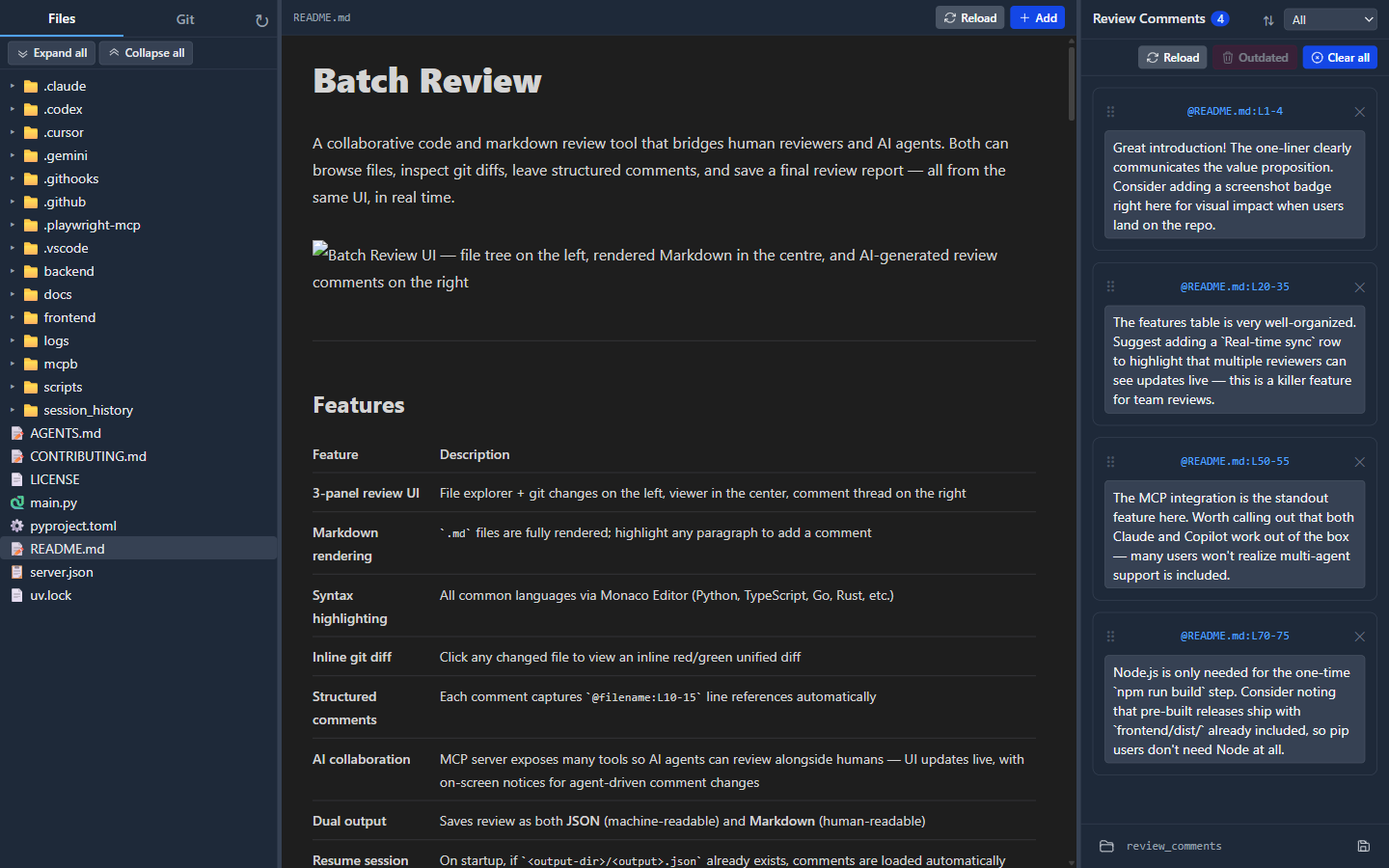
Batch Review UI — file tree on the left, rendered Markdown with GitHub-style math equations and a WaveDrom timing diagram in the centre, and the review comments panel on the right


Features

FeatureDescription
3-panel review UIFile explorer + git changes on the left, viewer in the center, comment thread on the right
Markdown rendering.md files are fully rendered, including GitHub-style math with KaTeX: inline $…$ and GitHub’s dollar-backtick inline form, display $$…$$ blocks, and fenced math code blocks; plus Mermaid fenced diagrams and WaveDrom fenced diagrams (digital timing diagrams, bit-field/register diagrams, and logic/schematic diagrams), each with a toolbar toggle between rendered and source views; highlight any paragraph to add a comment
HTML previewing.html and .htm files render in a sandboxed center-panel preview with scripts disabled; select rendered elements, text, or a visual region to add source-backed comments, including a saved PNG crop for region comments
PDF viewing.pdf files render in the center panel with page-aware text or region comments and reload support
DOCX/PPTX viewing.docx and .pptx files render locally in the browser with docx-preview and @aiden0z/pptx-renderer; select document text or a normalized page/slide region to add comments, with Office region selections saved as PNG screenshots beside the review JSON/Markdown output, without LibreOffice or Microsoft Office
Office document safetyOffice packages are fetched as binary data; git diff mode reports them as binary instead of showing misleading ZIP/XML text
Syntax highlightingAll common languages via Monaco Editor (Python, TypeScript, Go, Rust, etc.)
Inline git diffClick changed files to view inline red/green unified diffs for local changes, a previous commit/ref vs HEAD, or current checkout vs a GitHub PR head
Structured commentsEach comment captures @filename:L10-15 line references automatically, with richer rendered-view anchors where useful; Office anchors include document kind, page/slide, normalized region, selected text, and a renderer fingerprint
Outdated recoveryWhen a text comment goes stale, refresh its stored highlight from the current file directly from the right panel
AI collaborationMCP server exposes many tools so AI agents can review alongside humans — UI updates live, with on-screen notices for agent-driven comment changes. Also ships a token-efficient CLI client mode (batch-review <verb>) for coding agents and a Claude Code plugin with a review-workflow skill
Dual outputSaves review as both JSON (machine-readable) and Markdown (human-readable)
Resume sessionOn startup, if {output-dir}/{output}.json already exists, comments are loaded automatically
Cross-platformRuns on Windows and Linux
Theme toggleSwitch the web UI between the original dark theme and a warm light theme from the left-panel top bar

GitHub-style math example

The preview uses the delimiter rules from Writing mathematical expressions: inline $…$, GitHub’s dollar-backtick inline form (rewritten to $…$ before parsing), display $$…$$, and fenced math code blocks. Rendering is KaTeX rather than GitHub’s MathJax, so a few uncommon macros can differ even when markdown syntax matches.

This app does not embed raw HTML in the markdown preview, so GitHub’s <span>$</span> workaround for literal dollar signs in prose is unavailable here—inside math, escape $ as \$ per GitHub’s docs.

Examples:

Inline: $\sqrt{3x-1}+(1+x)^2$

Dollar-backtick (GitHub-compatible): $e^{i\pi} + 1 = 0$

$$ \nabla_\theta J(\theta) = \mathbb{E}{(s, a) \sim \pi\theta} \left[\nabla_\theta \log \pi_\theta(a \mid s), R(s, a)\right] $$

WaveDrom example

Fenced ```wavedrom blocks are parsed as WaveJSON (via JSON5, so unquoted/single-quoted keys are fine) and rendered inline, with the same source/rendered toolbar toggle as Mermaid. Three diagram kinds are supported, selected automatically from the JSON shape:

A digital timing diagram (signal):

JSON Config
{signal: [
  {name: 'clk',  wave: 'p.....'},
  {name: 'data', wave: 'x.345x', data: ['head', 'body', 'tail']},
  {name: 'req',  wave: '0.1..0'},
  {name: 'ack',  wave: '1.....'}
]}

A bit-field / register diagram (reg):

JSON Config
{reg: [
  {bits: 7, name: 'opcode'},
  {bits: 5, name: 'rd'},
  {bits: 3, name: 'funct3'},
  {bits: 5, name: 'rs1'},
  {bits: 12, name: 'imm[11:0]'}
], config: {bits: 32}}

A logic / schematic diagram (assign):

JSON Config
{assign: [["z", ["|", "a", ["&", "b", "c"]]]]}

Architecture

At runtime, Batch Review is a single Python application that serves the browser UI, exposes REST and WebSocket endpoints for that UI, and optionally exposes the same review session to MCP clients.

mermaid
flowchart LR
    CLI["CLI entry point<br/>`uv run batch-review`"]
    Browser["Browser UI<br/>React + Zustand"]
    McpHost["MCP host<br/>Cursor / Claude Desktop / VS Code / other clients"]
    AgentCli["Coding agent<br/>Claude Code / Cursor CLI / Codex<br/>`batch-review <verb>`"]

    subgraph Backend["Batch Review backend process"]
        Server["FastAPI app<br/>static frontend `/`<br/>REST `/api/*`<br/>WebSocket `/ws`"]
        Mcp["FastMCP server<br/>stdio transport<br/>HTTP transport `/mcp`"]
        State["Shared AppState<br/>repo root, comments, MCP session,<br/>connected WebSocket clients"]
    end

    Repo["Git repository under review"]
    Output["Saved review output<br/>`review_comments.json`<br/>`review_comments.md`"]
    PortFile[".batch_review/server.json<br/>discovery file"]

    CLI --> Server
    CLI --> Mcp
    Server --> Browser
    Browser -->|"REST reads/writes"| Server
    Browser <-->|"live sync"| Server
    Server --> State
    Mcp --> State
    McpHost -->|"stdio or HTTP MCP"| Mcp
    AgentCli -->|"REST `/api/*`"| Server
    AgentCli -.->|"reads for discovery"| PortFile
    Server -.->|"writes on start"| PortFile
    State -->|"read files, diffs, existing review data"| Repo
    State -->|"save/load review reports"| Output
    State -.->|"broadcast UI events"| Browser
  • The browser loads the React app from the FastAPI server, fetches files/comments/config over REST, and stays synchronized through /ws.
  • MCP tools and REST routes both operate on the same in-memory AppState, so agent-created comments appear in the UI immediately.
  • In --mcp mode, the HTTP server keeps the web UI available while FastMCP also runs over stdio for editor and CLI hosts.
  • In CLI client mode, coding agents invoke batch-review <verb> (e.g. add-comment, diff) which calls the same REST endpoints — no MCP tool schemas loaded into agent context. The server writes .batch_review/server.json on startup so CLI verbs can discover it.

Distribution

  • PyPI — batch-review-mcp — published wheels and sdist for pip / uv.
  • Official MCP Registry — io.github.hevangel/batch-review-mcp — latest published server metadata (JSON API; the registry site is still preview).

Requirements

  • Python ≥ 3.13 with uv
  • Node.js ≥ 22 (for the one-time frontend build; matches GitHub Actions)

Installation

bash
git clone https://github.com/hevangel/batch-review-mcp.git
cd batch-review-mcp
uv sync

The first run will automatically build the React frontend if frontend/dist/ does not exist (requires Node.js + npm on PATH).


Usage

Standalone mode (browser opens by default)

bash
# Review the current directory
uv run batch-review

# Review a specific git repository
uv run batch-review --root /path/to/your/repo

# Custom host / port
uv run batch-review --root /path/to/repo --host 0.0.0.0 --port 9100

# Specify output filenames
uv run batch-review --root /path/to/repo --output review --output-dir /tmp/reviews
# → saves /tmp/reviews/review.json and /tmp/reviews/review.md

The server auto-selects a free port in the 9000–9999 range if the default port is already in use.

MCP stdio mode (Claude Desktop / Cursor / any MCP client; browser opens by default)

bash
uv run batch-review --mcp --root /path/to/repo

The HTTP server starts in a background thread (so the browser UI remains accessible), your default browser opens to the app URL (same as standalone mode; use --no-browser to skip), and the MCP stdio transport runs in the main thread.

Claude Desktop config (claude_desktop_config.json):

config.json
{
  "mcpServers": {
    "batch-review": {
      "command": "uv",
      "args": ["run", "batch-review", "--mcp", "--root", "/path/to/repo"]
    }
  }
}

CLI client mode (token-efficient agent interface)

Read the full README →View source on GitHub →

Related MCP Servers

View all in Developer Tools View all alternatives
  • Tinysearch logoTinysearch

    Self-hosted web research for MCP agents.

    💻 Developer Tools1 views
    Compare vs Tinysearch →
  • Codealive MCP logoCodealive MCP

    Semantic code search and analysis from CodeAlive for AI assistants and agents.

    💻 Developer Tools0 views
    Compare vs Codealive MCP →
  • Pagewatch logoPagewatch

    A real browser for agents. Turn any URL into clean markdown, a PNG screenshot, or a PDF.

    💻 Developer Tools2 views
    Compare vs Pagewatch →
  • PraisonAI logoPraisonAI

    AI Agents Framework with Self Reflection and MCP support

    💻 Developer Tools1 views
    Compare vs PraisonAI →

Reviews

No reviews yet — be the first to share how this listing worked for you.

Frequently Asked Questions about Batch Review

Add the following block to your claude_desktop_config.json under mcpServers: "mcpServers": { "batch-review": { "command": "npx", "args": ["-y", "Batch Review"] } }

AllMCPs Directory Badge

Full Badge Customizer

Showcase your server listing on GitHub or your project documentation. Embed this dynamic SVG badge to highlight official listing status and live engagement.

Badge Style:
Live Dynamic SVG PreviewBatch Review AllMCPs Directory Badge

Markdown (GitHub README)
[![AllMCPs](https://allmcps.com/api/badge/batch-review?style=directory)](https://allmcps.com/mcp/batch-review)
HTML Embed
<a href="https://allmcps.com/mcp/batch-review"><img src="https://allmcps.com/api/badge/batch-review?style=directory" alt="Batch Review on AllMCPs" /></a>

Technical Specs & Signals

Category💻Developer Tools
More technical detailsExpand â–¾
TransportSTDIO
RuntimeNode.js
Last updatedSep 7, 2026
Views0
Unique ViewsTotal visits recorded for this listing page on AllMCPs.
Installs0
Installs & Copy ActionsTotal times users copied install commands or configuration snippets for this server.
27Quality signal: Emerging · 27/100How this signal is calculated ▾
Server availabilityNot measured

Not scored for repo-hosted servers — we can't reach the running server, only its GitHub page. Hosted MCP endpoints are health-checked live.

Verified ownership8/20
Documentation & tools11/30
Adoption & activity1/15
Community engagement0/10

A guidance signal from public completeness & health data — not a user rating. New listings start lower and rise as they add docs, get verified, and grow adoption. Signals we can't observe for a listing are skipped, not counted against it.

★ FeaturedMoxie Docs MCP logo

Moxie Docs MCP

MCP & Agent Skills for Automated Documentation, and codebase conventions + context

Explore Server →

Own this project?

This directory is pre-filled from public sources. Claim via GitHub README, site badge, or DNS TXT to unlock edit access and the Official badge and attach your website — proof is checked automatically, then reviewed by our team.

Free dofollow backlink: add your website and place the AllMCPs badge on it — no claim needed. We detect it automatically and keep it verified as long as the badge stays live.

Claim & get free dofollow

Share & Embed

Add our SVG badge (dark/light directory styles) or embeddable widget to your site.

Explore more

More in 💻 Developer Tools →Best MCP servers for Developers →Alternatives to Batch Review →Install in Claude DesktopInstall in CursorInstall in VS Code
