AllMCPs
BrowseBestCategoriesStackCompareToolsGuidesBlog Log in Submit MCP

Stay in the loop

Get new MCP servers and top picks in your inbox.

AllMCPs

The open directory for discovering and installing Model Context Protocol servers.

Explore

  • Browse servers
  • Best MCP servers
  • Categories
  • MCP clients
  • Agent prompts
  • Stack Builder
  • Compare servers
  • Tags index
  • Submit a server
  • Pricing

Learn

  • Guides hub
  • What is MCP?
  • Install guide
  • Troubleshooting
  • Security
  • Blog
  • Blog RSS

Tools

  • All tools
  • Config generator
  • Config validator
  • MCP playground
  • OpenAPI β†’ MCP
  • Badge generator

For agents

  • API docs
  • Trust & traffic
  • llms.txt β†— (opens in a new tab)
  • Catalog JSON β†— (opens in a new tab)
  • Remote MCP β†— (opens in a new tab)

Company

  • About
  • Contact
  • X (@AllMCPs) β†— (opens in a new tab)
  • GitHub β†— (opens in a new tab)
  • Terms
  • Privacy
AllMCPs VerifiedAllMCPs VerifiedFeatured on Nick LaunchesFeatured on Nick LaunchesLaunch Llama NewsletterLaunch Llama NewsletterVerified DR - allmcps.comVerified DR - allmcps.comFeatured on SaaSGrowFeatured on SaaSGrowFeatured on Twelve ToolsFeatured on Twelve ToolsFeatured on Saaspa.geFeatured on Saaspa.geFeatured on Findly.toolsFeatured on Findly.toolsFeatured on Startup FameFeatured on Startup FameFeatured on LaunchKiwiFeatured on LaunchKiwiFeatured on ScrollLaunchFeatured on ScrollLaunchFeatured on DailyPingsFeatured on DailyPingsFazier badgeFazier badgeFeatured on NewTool.siteFeatured on NewTool.siteFeatured on saasfame.comFeatured on saasfame.comDR Checker - Domain RatingDR Checker - Domain RatingListed on Turbo0Listed on Turbo0Launched on LaunchBoard - Product Launch PlatformLaunched on LaunchBoard - Product Launch PlatformList on SimilarlabsList on Similarlabshttps://codetrendy.comhttps://codetrendy.comListed on DevTool.ioFeatured on BuildlistFeatured on BuildlistAllMCPs VerifiedAllMCPs VerifiedFeatured on Nick LaunchesFeatured on Nick LaunchesLaunch Llama NewsletterLaunch Llama NewsletterVerified DR - allmcps.comVerified DR - allmcps.comFeatured on SaaSGrowFeatured on SaaSGrowFeatured on Twelve ToolsFeatured on Twelve ToolsFeatured on Saaspa.geFeatured on Saaspa.geFeatured on Findly.toolsFeatured on Findly.toolsFeatured on Startup FameFeatured on Startup FameFeatured on LaunchKiwiFeatured on LaunchKiwiFeatured on ScrollLaunchFeatured on ScrollLaunchFeatured on DailyPingsFeatured on DailyPingsFazier badgeFazier badgeFeatured on NewTool.siteFeatured on NewTool.siteFeatured on saasfame.comFeatured on saasfame.comDR Checker - Domain RatingDR Checker - Domain RatingListed on Turbo0Listed on Turbo0Launched on LaunchBoard - Product Launch PlatformLaunched on LaunchBoard - Product Launch PlatformList on SimilarlabsList on Similarlabshttps://codetrendy.comhttps://codetrendy.comListed on DevTool.ioFeatured on BuildlistFeatured on Buildlist
Β© 2026 Jackalope Digital LLC. All rights reserved.
  1. Home
  2. πŸ’» Developer Tools
  3. Tinysearch
T
Health: Not checked yetWe have not completed a health check for this listing yet.Last checked 8/11/2026, 12:17:56 AM

Tinysearch

Enrichment pendingWe haven’t run our AI enrichment pass on this listing yet, so the overview, use cases, and FAQ below may be sparse or missing. We work through the catalog over time β€” check back soon.
View Repository

Self-hosted web research for MCP agents.

Quick Install

Automated & IDE Setup

Copy the AI prompt to install this server into Claude Code, Cursor, or another agent β€” or use 1-click editor setup below.

Add to CursorAdd to VS Code
Manual Client & Custom JSON ConfigExpand JSON β–Ύ

Install Config Generator

Choose your client
claude_desktop_config.json
{
  "mcpServers": {
    "tinysearch": {
      "command": "npx",
      "args": [
        "-y",
        "tinysearch"
      ]
    }
  }
}

πŸ’‘ Paste into ~/Library/Application Support/Claude/claude_desktop_config.json (macOS) or %APPDATA%\Claude\claude_desktop_config.json (Windows)

Install Directory Badge Claim listing AlternativesπŸ’» More in Developer Tools

Documentation Overview

TinySearch

TinySearch

Spend tokens on answers, not webpages.

TinySearch searches, crawls, and reranks the web locally, then gives your agent only the evidence worth putting in its context.

Documentation Β· Quick start Β· Python Β· Discord

Website PyPI version License: MIT Release Last Commit Docker Pulls Discord MCP Server FastAPI

TinySearch is a self-hosted web-research tool for AI agents. It searches the web, reads the best pages, removes low-value content, and returns compact evidence with source URLs.

Your model receives the useful passages instead of paying to process entire webpages.

TinySearch is part of TinySuite, a suite of focused tools designed to make agentic operations cheaper by minimizing token usage through smart retrieval, selection, and context-management techniques.

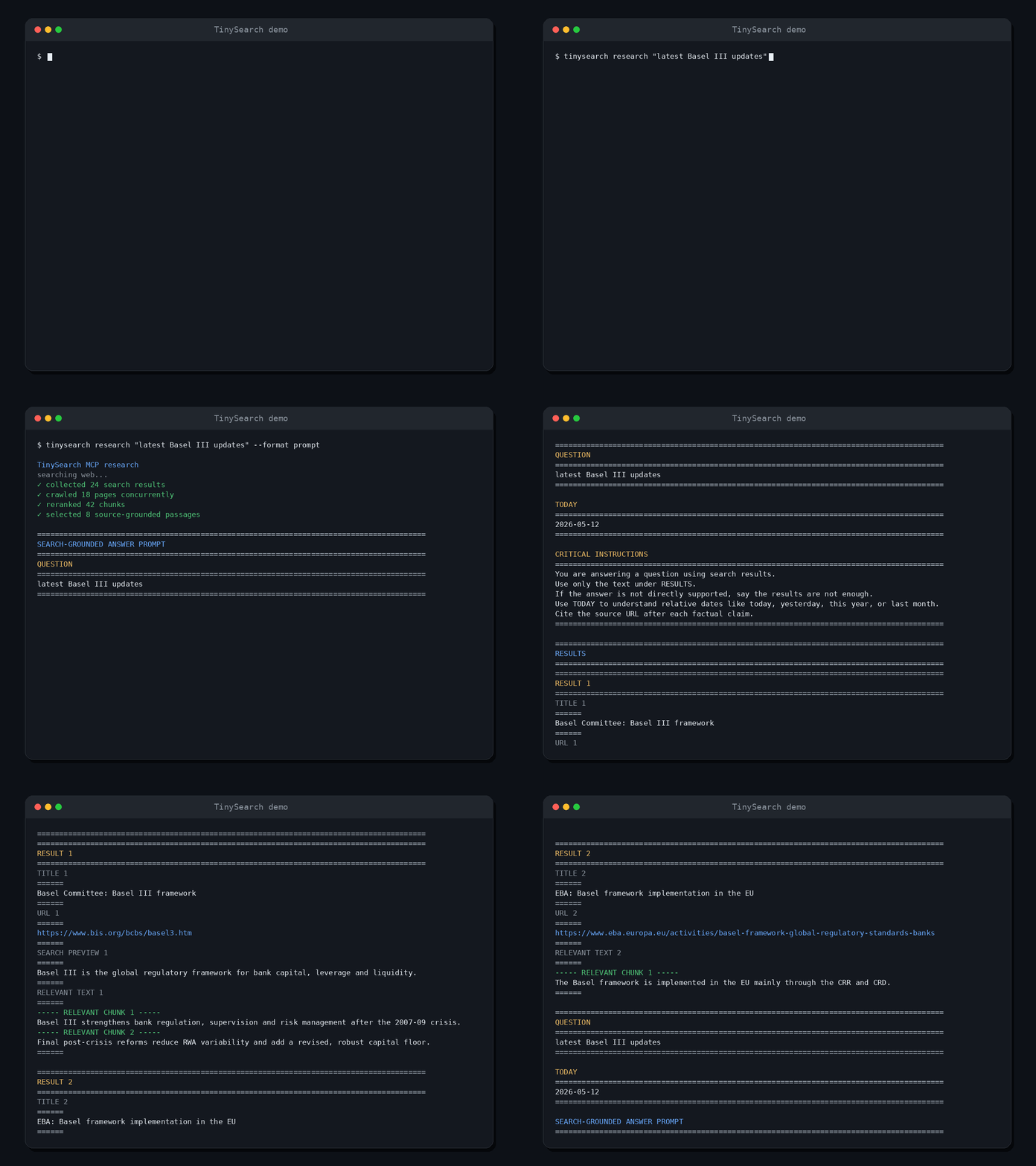
TinySearch returning source-grounded web evidence to an AI agent

Choose a tier

TierUse it whenEntry pointSearch backend
1. Python libraryYou are building with TinySuite or Pythonpip install tinysuite-searchDDGS
2. One-command MCPAn MCP client should launch TinySearch for youuvx --from "tinysuite-search[server]" tinysearchDDGS
3. Docker + SearXNGYou want the full self-hosted stack and HTTP MCPdocker compose ... up -dBundled SearXNG

Tiers 1 and 2 need no search service. Tier 3 adds a dedicated SearXNG service, persistent model storage, and a network MCP endpoint. See the installation guide for the Docker setup.

The expensive part of agent research is context

A search result is not yet useful evidence. Agents often have to open several pages, ingest navigation and boilerplate, and spend paid input tokens deciding which passages matter.

TinySearch moves that work in front of the model:

mermaid
flowchart LR
    A[Question] --> B[Search and crawl]
    B --> C[Local hybrid reranking]
    C --> D[Compact evidence<br/>with source URLs]
    D --> E[Your agent]

That lowers cost in three ways:

  • Smaller model context. Only the best-ranked evidence chunks are returned, within a controlled evidence budget.
  • No metered search API required by default. TinySearch can search through DDGS without a paid search provider.
  • Local retrieval by default. ONNX embeddings and hybrid reranking run on your machine instead of creating embedding API charges.

Search broadly. Read locally. Pay the model only for the evidence that matters.

Actual savings depend on the pages, evidence limits, client model, and provider pricing. TinySearch reduces the web content sent to the model; it does not control what the client does with that evidence afterward.
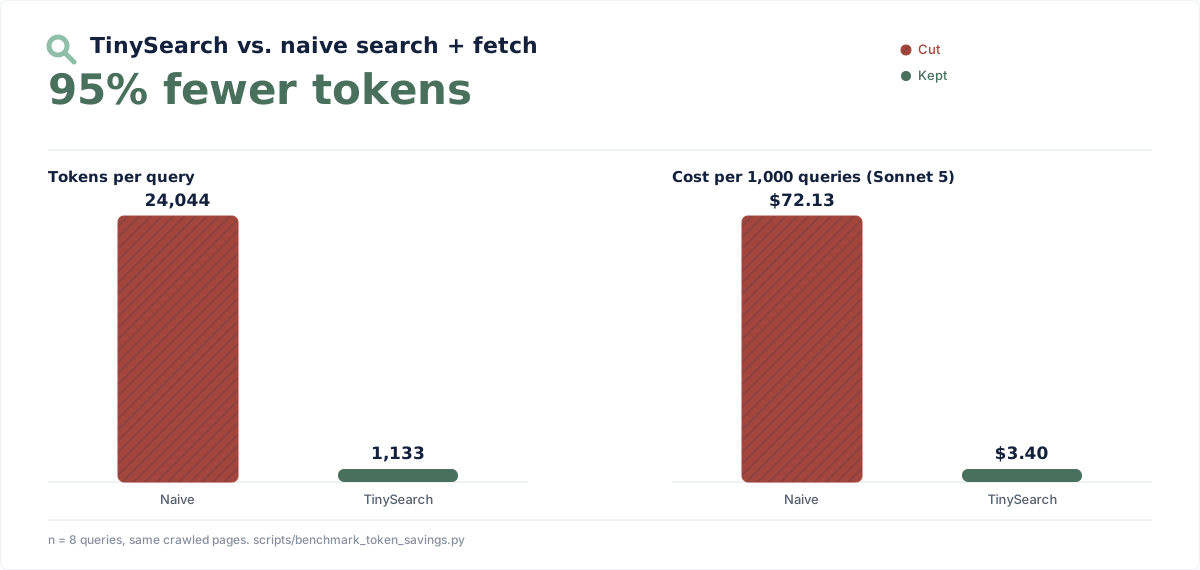
Benchmark: TinySearch uses 95% fewer tokens than a naive search-and-fetch agent across 8 research queries, cutting modeled input cost per 1,000 queries from $72.13 to $3.40 at $3 per million tokens

The cost panel uses an illustrative $3.00 per million input-token rate and excludes search, crawling, model output, and downstream agent use.

The naive baseline isn't a strawman product, it's the same pages TinySearch crawled for each query, fed to the model unfiltered, the way a generic "search, then fetch the page" tool (a plain web-search-plus-fetch loop, the kind built into most coding agents) would. Reproduce or rerun it yourself:

bash
python scripts/benchmark_token_savings.py --json-out report.json

Quick start

With uv installed, add TinySearch to any MCP client:

config.json
{
  "mcpServers": {
    "tinysearch": {
      "command": "uvx",
      "args": [
        "--python",
        "3.12",
        "--from",
        "tinysuite-search[server]",
        "tinysearch"
      ]
    }
  }
}

The client launches TinySearch over stdio when it needs it. No repository clone, hosted account, or paid search key is required.

Fast search starts without Chromium or an embedding model. The first scrape initializes Chromium; focused scraping and the legacy research tool also initialize the configured embedding model. Pre-warm both ahead of time if you will use those workflows:

bash
uvx --from "tinysuite-search[server]" tinysearch setup

TinySearch CLI setup and first run in a terminal

Prefer Docker, a remote MCP endpoint, or a source checkout? Follow the installation guide.

Four MCP tools

ToolUse it when
search(query)You need fast, backend-ordered discovery without crawling or reranking
scrape_urls(items)You know one to five pages; each item may use * for its configured clean page-order token budget
get_current_datetime()A question depends on the current date or time
research(query)Legacy compatibility only; deprecated in favor of search followed by scraping

TinySearch deliberately stays focused. It is a retrieval layer, not another agent, chat interface, hosted search product, or permanent web index.

See the complete MCP tool reference for parameters and response contracts.

What your agent gets

TinySearch does not spend another model call writing the final answer. The recommended flow is search for lightweight discovery, then scrape_urls for the pages worth reading.

Successful MCP tool-result text is XML. A search result looks like this:

xml
<search_results>
  <query>Python asyncio cancellation</query>
  <results>
    <result index="1">
      <title>Coroutines and Tasks</title>
      <url>https://docs.python.org/3/library/asyncio-task.html</url>
      <search_preview>Tasks can be cancelled...</search_preview>
    </result>
  </results>
</search_results>

scrape_urls returns each page's selected Markdown chunks under one <url_grounded_answers> batch root, and get_current_datetime returns <current_datetime>. Dynamic values are escaped so retrieved content cannot forge the XML boundaries around it.

MCP still uses its standard JSON-RPC transport envelope, including protocol-level errors and optional structuredContent. Python and FastAPI keep their structured JSON contracts for applications that need to store, inspect, or transform the evidence.

How it works

  1. search returns backend-ordered titles, URLs, previews, and upstream dates without starting Chromium or an embedding model.
  2. scrape_urls reads one to five known pages concurrently. Omit an item's query or use "*" to keep clean Markdown in page order within the configured token budget.
  3. Supply a focused item query when TinySearch should chunk and hybrid-rank that page before returning evidence.

The deprecated MCP research tool retains the older all-in-one search, crawl, and rerank pipeline for compatibility. New MCP integrations should compose search with scrape_urls instead.

Python library

TinySearch also works as a regular Python package:

Terminal
pip install tinysuite-search
server.ts
import asyncio
from tinysearch import scrape_urls, search


async def main():
    results = await search("Python async tasks")
    print(results["results"])

    page_url = results["results"][0]["url"]
    evidence = await scrape_urls([{
        "url": page_url,
        "query": "How does asyncio cancellation work?",
    }])
    print(evidence["results"])


asyncio.run(main())

The Python API returns stable, JSON-serializable results. search accepts a per-call limit from 1 to 50. scrape_urls accepts a per-call max_tokens budget (4,000 by default); omit an item's scrape query or use "*" for page-order mode. Rendering structured evidence into an LLM prompt is explicit, so applications can store, inspect, transform, or budget the result first.

The optional FastAPI app mirrors these surfaces. POST /search and POST /research accept output_format (prompt or json) and always respond with JSON; prompt mode places rendered text in the answer field. POST /scrape accepts one to five { "url", "query" } items and always returns structured per-item outcomes. The app also exposes /health, /current_datetime, and read-only /config; configuration writes require explicit environment opt-in.

Search backends

TinySearch selects a web-search backend from config, so you can start with no search service and add one later without changing code.

  • "ddgs" (native default): queries the ddgs package's automatic backend selection in-process. No SearXNG deployment required.
  • "searxng" (Docker default): queries a self-hosted SearXNG instance. Falls back to ddgs on backend failure unless search_backend_fallback is set to false.
  • "duckduckgo": skips SearXNG and queries ddgs in DuckDuckGo-only mode.
  • "auto": tries SearXNG, then falls back to ddgs on any backend failure.

Set the BRAVE_SEARCH_API_KEY environment variable to add Brave's official Web Search API as a keyed fallback for the ddgs and duckduckgo backends. Brave is only consulted when the primary call errors or returns no results.

Full key reference, SearXNG JSON-output setup, and Compose details live in the configuration reference.

Why TinySearch

  • Built around token efficiency. Page selection and passage selection happen before content enters model context.
  • Source-grounded by construction. Every evidence group stays attached to its originating URL.
  • Useful without paid infrastructure. DDGS search and local ONNX embeddings are the defaults.
  • Bring your own stack when needed. SearXNG and OpenAI-compatible embedding providers remain optional.
  • Works where agents already work. Use MCP over stdio, Streamable HTTP, Python, FastAPI, or Docker.
  • Self-hosted and inspectable. No TinySearch account, analytics service, or hosted scraped-data cache.

Part of TinySuite

TinySuite is a product suite built around one idea: agents should spend tokens on useful work, not operational overhead.

Each tool focuses on a different part of the agent workflow and uses targeted techniques to reduce unnecessary context before it reaches the model. TinySearch handles the web-research layer by turning pages into a small, ranked, source-grounded evidence packet.

Documentation

The README is the product overview. Detailed setup and operational material lives in the TinySuite documentation:

  • TinySearch overview and installation
  • Configuration reference
  • MCP tools
  • Troubleshooting

The repository also contains an annotated example configuration at configs/tinysearch_config.json.

When not to use TinySearch

TinySearch is intentionally lightweight. Use a commercial search API, persistent crawler, or full search index when you need:

  • guaranteed search coverage or an SLA
  • large-scale or scheduled indexing
  • long-term page storage and change history
  • enterprise observability and access controls

Development

bash
git clone https://github.com/TinySuiteHQ/TinySearch
cd TinySearch
python -m venv .venv
source .venv/bin/activate
pip install -e ".[server]"
python -m unittest discover tests

TinySearch supports Python 3.12 and newer. CI tests Python 3.12, 3.13, and 3.14 across Linux, macOS, and Windows.

Entrypoints

  • tinysearch.search and tinysearch.scrape_urls: structured Python API
  • tinysearch.research: legacy all-in-one structured Python research pipeline
  • tinysearch.get_current_datetime: structured UTC date and time
  • tinysearch.to_prompt: pure structured-evidence prompt renderer
  • tinysearch mcp: stdio MCP server (also the no-argument default)
  • tinysearch serve: Streamable HTTP MCP server
  • tinysearch.servers.fastapi_server:app: optional FastAPI application

Community

Questions, ideas, and bug reports are welcome:

  • Join the TinySearch Discord
  • Open a GitHub issue
  • Email the maintainer

Privacy and license

TinySearch reads public pages and returns selected excerpts to the calling client. Search, crawling, local embeddings, and reranking can run without sending page content to an embedding provider. If you choose an OpenAI-compatible embedding backend, that provider receives the text sent for vectorization.

TinySearch is available under the MIT License. Downloaded model weights remain subject to their respective model-card licenses. See NOTICE for third-party distribution details.

Related MCP Servers

View all in Developer Tools View all alternatives
  • A
    Ai Netcafe

    Compare LLM cost & latency on one prompt, translate PDF keeping layout, cited research, make PPTX

    πŸ’» Developer Tools0 views
    Compare vs Ai Netcafe β†’
  • N
    Ninelayer

    Agent-native search engine with live web research optimized for AI agents.

    πŸ’» Developer Tools0 views
    Compare vs Ninelayer β†’
  • M
    Mcp

    AI-powered user research for everyone

    πŸ’» Developer Tools0 views
    Compare vs Mcp β†’
  • S
    Sofya

    Web search, fetch, extract, and research for AI agents. Markdown output + AI-synthesized answers.

    πŸ’» Developer Tools0 views
    Compare vs Sofya β†’

Frequently Asked Questions about Tinysearch

Add the following block to your claude_desktop_config.json under mcpServers: "mcpServers": { "tinysearch": { "command": "npx", "args": ["-y", "tinysearch"] } }

AllMCPs Directory Badge

Full Badge Customizer

Showcase your server listing on GitHub or your project documentation. Embed this dynamic SVG badge to highlight official listing status and live engagement.

Badge Style:
Live Dynamic SVG PreviewTinysearch AllMCPs Directory Badge

Markdown (GitHub README)
[![AllMCPs](https://allmcps.com/api/badge/tinysearch?style=directory)](https://allmcps.com/mcp/tinysearch)
HTML Embed
<a href="https://allmcps.com/mcp/tinysearch"><img src="https://allmcps.com/api/badge/tinysearch?style=directory" alt="Tinysearch on AllMCPs" /></a>

Technical Specs & Signals

CategoryπŸ’»Developer Tools
More technical detailsExpand β–Ύ
TransportSTDIO
RuntimeNode.js
0/4 checks healthy over the last 6h
Views0
Unique ViewsTotal visits recorded for this listing page on AllMCPs.
Installs0
Installs & Copy ActionsTotal times users copied install commands or configuration snippets for this server.
npm downloads22/mo
Monthly npm DownloadsAverage monthly package installs recorded from npm registry statistics.
25Quality signal: Emerging Β· 25/100How this signal is calculated β–Ύ
Server availabilityNot measured

Not scored for repo-hosted servers β€” we can't reach the running server, only its GitHub page. Hosted MCP endpoints are health-checked live.

Verified ownership8/20
Documentation & tools9/30
Adoption & activity2/15
Community engagement0/10

A guidance signal from public completeness & health data β€” not a user rating. New listings start lower and rise as they add docs, get verified, and grow adoption. Signals we can't observe for a listing are skipped, not counted against it.

β˜… FeaturedAllMCPs Server logo

AllMCPs Server

The official MCP server for AllMCPs.com - submit and manage tools directly from your AI. The open directory for MCP servers. Connect Claude, Cursor, Windsurf, and AI agents to databases, tools, files, and APIs. Explore 3,181+ servers. AllMCPs is the premier, open directory for discovering, evaluating, and installing Model Context Protocol (MCP) servers to equip AI agents and LLMs with real-world superpowers.

Explore Server β†’

Own this project?

This directory is pre-filled from public sources. Claim via GitHub README, site badge, or DNS TXT to get the verified badge and attach your website.

Free dofollow backlink: after claiming, verify your product site and place a dofollow AllMCPs badge β€” we recheck it stays live.

Claim & get free dofollow

Share & Embed

Add our SVG badge (dark/light directory styles) or embeddable widget to your site.

Explore more

More in πŸ’» Developer Tools β†’Best MCP servers for Developers β†’Alternatives to Tinysearch β†’Install in Claude DesktopInstall in CursorInstall in VS Code