Avito MCP
Universal MCP server for the Avito API - 145 tools, safe-by-default (dry-run, idempotency).
Install Avito MCP
Pick your client, then add it in one click or paste the config.
~/Library/Application Support/Claude/claude_desktop_config.json{
"mcpServers": {
"avito-mcp": {
"command": "npx",
"args": [
"-y",
"avito-mcp@2"
]
}
}
}
Settings → Developer → Edit Config, merge this into mcpServers, then fully quit and reopen Claude Desktop.
Automated check passed— started and listed 144 tools correctly (12d ago).
Overview
Tools144
What Avito MCP lets your agent do. Expand a tool for its parameters.
Security & health
What it can reach and how reliably it runs — from our own checks, not the maintainer’s claims.
Recent health check succeeded.
What it can do
From the 144 tools this server returned when we ran it; 144 declare their own safety hints.
Observed 2026-10-16 in an isolated sandbox. A description of reach, not a security audit.
Supply-chain signal
No high-severity advisories surfaced by our automated scan.
Scanned 5d ago via OSV.dev · avito-mcp@2 (npm)
Adoption & maintenance
Factual signals from GitHub, npm, and our automated checks — not a rating.
From the project README
avito-mcp




Connect your AI client to your Avito account: read chats and statistics, prepare replies, and manage listings and orders.
Ask your AI client in plain language; it uses this MCP server to call the official Avito APIs. 148 tools across 18 APIs cover buyer chats, listings, statistics, promotion and orders. Run it on your computer or your own server.
You bring an AI client and an Avito account with API access. The client provides the model; this project provides the connection and tools. Automatic replies and scheduled reports need an agent or scheduler configured separately.
Русская версия → · Documentation · Client setup · Workflows · Troubleshooting
New in v2.1.1: step-by-step setup, complete English and Russian workflow and troubleshooting guides, and explicit demo versus live-account instructions. Release notes.
| Your next step | Guide |
|---|---|
| See it work without an Avito account | Run the demo |
| Connect your own account | Quick start |
| Set up a client you already use | Client configurations |
| Deploy or contribute | Operations · Contributing |
Try without Avito credentials
npx -y avito-mcp@2 --demo
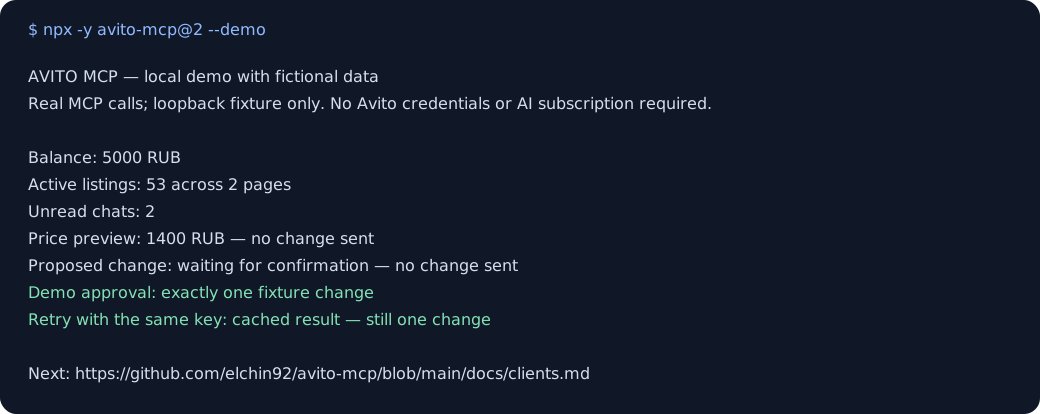
The demo uses fictional data: 53 listings and 2 unread chats. It runs locally, needs no Avito keys and sends no requests to Avito. It walks through a report, a price preview, confirmation and a repeated request that changes the price only once. The first npx run downloads the npm package; from source, use npm run demo.
To use your own Avito account, follow the quick start and omit --demo. Normal server calls use your configured account; demo data never replaces it.
What you can do
| Task | Start here | Result |
|---|---|---|
| Check how your listings are doing | Morning report, analytics profile | Balance, listing activity and spending, with dates and source IDs |
| Work through buyer messages | Unread-chat triage, messenger profile | Prioritised chats and draft replies; sending is a separate confirmed action |
| Change a listing price | Preview and confirm, seller profile | Request preview, pending action, then a result to check |
Profiles use existing environment variables to expose a focused tool set. The recipes explain what to ask, which tools are involved, and how to check the result.
Quick start
1. Prepare your account
You need Node.js 22.12+, an MCP-capable AI client, and Avito API credentials for your account. Obtain Client_id, Client_secret, and numeric Profile_id through Avito's API account page. Available methods depend on your account's API access; installing this server does not grant additional Avito permissions.
2. Add the server to your client
For Claude Desktop, merge this into its MCP config using Settings → Developer → Edit Config. For Cursor, use your personal ~/.cursor/mcp.json. Replace the three placeholders locally and keep the filled config out of Git.
{
  "mcpServers": {
    "avito": {
      "command": "npx",
      "args": ["-y", "avito-mcp@2"],
      "env": {
        "Client_id": "YOUR_CLIENT_ID",
        "Client_secret": "YOUR_CLIENT_SECRET",
        "Profile_id": "YOUR_PROFILE_ID",
        "AVITO_MCP_MODE": "read_only"
      }
    }
  }
}
3. Check a real read
Restart the client and ask: “Use Avito to show my account balance and the first page of active listings. Do not change anything.” A successful answer should show your real balance and listing IDs, or an empty list if the account has no listings. The example starts in read_only; without this setting the server's default remains full_access.
VS Code, Zed, Codex and ChatGPT use their own setup formats. Copy the client-specific config, then try a workflow. The examples pin major version 2; pin an exact published version for controlled deployments.
Connect your AI client
| Client | Ready-to-copy config |
|---|---|
| Claude Desktop | JSON + setup |
| Cursor | JSON + setup |
| VS Code / Copilot | servers JSON |
| Zed | context_servers JSON |
| Codex CLI / IDE extension | TOML |
| ChatGPT desktop | Settings → MCP servers or shared TOML |
| ChatGPT web | Remote plugin setup and limits |
These are documented configurations, not a claim that every client/version has been tested against a live Avito account. Report compatibility results with the client version and operating system.
API coverage
| Domain | Examples |
|---|---|
| Messenger | Chats, messages, images, subscriptions and webhook events |
| Listings and statistics | Listing details, prices, views, contacts and spending |
| Orders and stock | Delivery statuses, tracking, labels, marking codes and stock |
| Promotion | VAS, CPA bids, forecasts and promotion orders |
| Autoload | Feed uploads, reports and ID mapping |
| Account and other APIs | Balance, reviews, staff, tariffs and calls |
| Logistics partners | 3PL delivery endpoints; most sellers do not need these |
The bundled API snapshot covers 138 Swagger operations plus local and meta tools. The full manifest has 148 tools; default registration exposes 144, because token-returning tools and local image uploads require separate opt-ins. read_only exposes 80 before allowlist filtering. Inspect avito://manifest or build dist/manifest.json for exact names, schemas and risks.
Resources include the tool manifest, active configuration, rate limits, pending confirmations and webhook events. Five built-in prompts cover a daily overview, unread chats, promotion preparation, tool explanations and a safety report. Resource and prompt reference.
Safety and retries
read_only,guarded, andfull_access, plusAVITO_MCP_ALLOW_TOOLS/AVITO_MCP_DENY_TOOLS, control which tools are available.dryRun: truepreviews a destructive request without sending it. It does not reserve an action or validate the live account's permission to execute it.- Money and customer-visible actions use a two-call confirmation flow by default. The agent can make both calls: this is not proof of human approval. Use client-side approvals or the separate approval controls described in safety configuration.
- An
idempotencyKeydeduplicates the same tool and arguments within the configured retention period. Reuse the same key for the same intended operation. If the outcome is uncertain, reconcile with Avito before retrying or choosing a new key. - Credentials go directly to Avito; there is no project-operated proxy or telemetry. Tool results are visible to your AI client and may be sent to its model provider under that client's settings.
Business calls use the real Avito account. Start with reads and previews. Ready-to-use safety configurations describe stronger approval controls, upload boundaries and recovery.
Remote MCP over HTTP (OAuth 2.1)
Reviews
No reviews yet — be the first to share how it worked for you.
Frequently Asked Questions about Avito MCP
Related MCP servers
Add a badge to your READMEShow it’s listed — live SVG, Markdown or HTML.
AllMCPs Directory Badge
Showcase your server listing on GitHub or your project documentation. Embed this dynamic SVG badge to highlight official listing status and live engagement.
[](https://allmcps.com/mcp/avito-mcp)<a href="https://allmcps.com/mcp/avito-mcp"><img src="https://allmcps.com/api/badge/avito-mcp?style=directory" alt="Avito MCP on AllMCPs" /></a>