AllMCPs
BrowseBestCategoriesStackCompareToolsGuidesBlog Log in Submit MCP

Stay in the loop

Get new MCP servers and top picks in your inbox.

AllMCPs

The open directory for discovering and installing Model Context Protocol servers.

Explore

  • Browse servers
  • Best MCP servers
  • Categories
  • MCP clients
  • Agent prompts
  • Stack Builder
  • Compare servers
  • Tags index
  • Submit a server
  • Pricing

Learn

  • Guides hub
  • What is MCP?
  • Install guide
  • Troubleshooting
  • Security
  • Blog
  • Blog RSS

Tools

  • All tools
  • Config generator
  • Config validator
  • MCP playground
  • OpenAPI β†’ MCP
  • Badge generator

For agents

  • API docs
  • Trust & traffic
  • llms.txt β†— (opens in a new tab)
  • Catalog JSON β†— (opens in a new tab)
  • Remote MCP β†— (opens in a new tab)

Company

  • About
  • Contact
  • X (@AllMCPs) β†— (opens in a new tab)
  • GitHub β†— (opens in a new tab)
  • Terms
  • Privacy
AllMCPs VerifiedAllMCPs VerifiedFeatured on Nick LaunchesFeatured on Nick LaunchesLaunch Llama NewsletterLaunch Llama NewsletterVerified DR - allmcps.comVerified DR - allmcps.comFeatured on SaaSGrowFeatured on SaaSGrowFeatured on Twelve ToolsFeatured on Twelve ToolsFeatured on Saaspa.geFeatured on Saaspa.geFeatured on Findly.toolsFeatured on Findly.toolsFeatured on Startup FameFeatured on Startup FameFeatured on LaunchKiwiFeatured on LaunchKiwiFeatured on ScrollLaunchFeatured on ScrollLaunchFeatured on DailyPingsFeatured on DailyPingsFazier badgeFazier badgeFeatured on NewTool.siteFeatured on NewTool.siteFeatured on saasfame.comFeatured on saasfame.comDR Checker - Domain RatingDR Checker - Domain RatingListed on Turbo0Listed on Turbo0Launched on LaunchBoard - Product Launch PlatformLaunched on LaunchBoard - Product Launch PlatformList on SimilarlabsList on Similarlabshttps://codetrendy.comhttps://codetrendy.comListed on DevTool.ioFeatured on BuildlistFeatured on BuildlistAllMCPs VerifiedAllMCPs VerifiedFeatured on Nick LaunchesFeatured on Nick LaunchesLaunch Llama NewsletterLaunch Llama NewsletterVerified DR - allmcps.comVerified DR - allmcps.comFeatured on SaaSGrowFeatured on SaaSGrowFeatured on Twelve ToolsFeatured on Twelve ToolsFeatured on Saaspa.geFeatured on Saaspa.geFeatured on Findly.toolsFeatured on Findly.toolsFeatured on Startup FameFeatured on Startup FameFeatured on LaunchKiwiFeatured on LaunchKiwiFeatured on ScrollLaunchFeatured on ScrollLaunchFeatured on DailyPingsFeatured on DailyPingsFazier badgeFazier badgeFeatured on NewTool.siteFeatured on NewTool.siteFeatured on saasfame.comFeatured on saasfame.comDR Checker - Domain RatingDR Checker - Domain RatingListed on Turbo0Listed on Turbo0Launched on LaunchBoard - Product Launch PlatformLaunched on LaunchBoard - Product Launch PlatformList on SimilarlabsList on Similarlabshttps://codetrendy.comhttps://codetrendy.comListed on DevTool.ioFeatured on BuildlistFeatured on Buildlist
Β© 2026 Jackalope Digital LLC. All rights reserved.
  1. Home
  2. πŸ’» Developer Tools
  3. Astro
A
Health: Not checked yetWe have not completed a health check for this listing yet.Last checked 8/11/2026, 12:28:35 AM

Astro

Enrichment pendingWe haven’t run our AI enrichment pass on this listing yet, so the overview, use cases, and FAQ below may be sparse or missing. We work through the catalog over time β€” check back soon.
View Repository

Multi-tradition astrology. 19 modes, 18 tools. Deterministic ephemeris engine.

Quick Install

Automated & IDE Setup

Copy the AI prompt to install this server into Claude Code, Cursor, or another agent β€” or use 1-click editor setup below.

Add to CursorAdd to VS Code
Manual Client & Custom JSON ConfigExpand JSON β–Ύ

Install Config Generator

Choose your client
claude_desktop_config.json
{
  "mcpServers": {
    "astro": {
      "command": "npx",
      "args": [
        "-y",
        "astro"
      ]
    }
  }
}

πŸ’‘ Paste into ~/Library/Application Support/Claude/claude_desktop_config.json (macOS) or %APPDATA%\Claude\claude_desktop_config.json (Windows)

Install Directory Badge Claim listing AlternativesπŸ’» More in Developer Tools

Documentation Overview

Astro β€” Multi-Tradition Astrology Engine for AI Agents

Trustworthy birth charts, transits, and synastry across Western, Vedic/Jyotish, and Chinese BaZi. The engine computes; the model interprets.

MIT Python 3.10+ MCP REST Deploy smithery badge


Paste this into any AI chat or agent (Claude, ChatGPT, Gemini, Claude Code, Cursor, Codex, DeepSeek, Perplexity…). It installs Astro itself β€” you don't set anything up first:

Code
You are my personal astrologer powered by Astro, an open-source multi-tradition astrology engine that computes mathematically real charts instead of guessing: https://github.com/aryaminus/astro

SET YOURSELF UP now using whatever you're capable of β€” try in this order, don't ask me first:
1. If you can run shell/terminal commands, get the pure-Python engine (zero dependencies β€” no pip install) by ANY of these:
   - `git clone https://github.com/aryaminus/astro` β€” most reliable; engine at astro/skills/astrology/scripts/astro_engine.py
   - `npx skills add aryaminus/astro -g` β€” installs the skill on Claude Code, Cursor, Codex, Gemini CLI + 50+ hosts (engine at skills/astrology/scripts/astro_engine.py)
   - latest packaged release (needs only curl + unzip): `curl -L -o astrology.skill https://github.com/aryaminus/astro/releases/latest/download/astrology.skill && unzip astrology.skill` β€” engine then at scripts/astro_engine.py
   Then run it: `python3 <path>/astro_engine.py --json '{"year":1990,"month":6,"day":15,"hour":14,"minute":30,"lat":40.7128,"lng":-74.0060,"tz":"America/New_York"}'`. Required: year, month, day, lat, lng (decimals, East +/West βˆ’), tz (IANA name like "America/New_York"); optional: hour+minute (omit β†’ Sun-sign level), name, gender, "mode" (transit / synastry / compatibility / solar_return / …), "systems":["western","vedic","bazi"]. Look up the user's city's lat/lng/tz yourself.
2. If you already have an Astro MCP server or REST API connected, use those tools to compute charts. Public MCP SSE endpoint: `https://astro-api-a2rc.onrender.com/mcp/sse` (~30s cold start after idle).
3. If you can only browse the web: read the canonical spec and follow it as your operating instructions β€” https://raw.githubusercontent.com/aryaminus/astro/main/skills/astrology/SKILL.md β€” and fetch the classical reference rulesets it links (western, vedic, bazi, synastry-and-timing, consultation) from https://github.com/aryaminus/astro/tree/main/skills/astrology/references
4. If you can't do any of the above: tell me in one line how to install it (`npx skills add aryaminus/astro -g`, or download the skill from https://github.com/aryaminus/astro/releases/latest for claude.ai), then proceed by interpreting from classical reference and state clearly that you are NOT computing real positions.

THEN behave exactly as Astro's SKILL.md defines:
- COMPUTE the real chart before interpreting β€” NEVER invent a planetary position, house, or aspect. If no compute path worked, say so honestly.
- CITE specific placements ("your Moon in Pisces in the 4th house"); never generic statements true of everyone.
- ROUTE by question: love β†’ synastry/compatibility; timing/career β†’ transits; year ahead β†’ solar return + progressions; where to live β†’ astrocartography; auspicious dates β†’ electional + panchang.
- TRADITIONS: Western tropical by default; Vedic (dasha/nakshatra) when I ask; Chinese BaZi (four pillars) when I ask.
- ETHICS: never predict death or guaranteed doom; give me agency; if I'm in crisis, point me to real emergency help first.

Now ask me for my birth details (date β€” and ideally exact time + city) and let's begin.

Local install β€” works on Claude Code, Cursor, Codex, Copilot, Gemini CLI, and 50+ Agent Skills hosts:
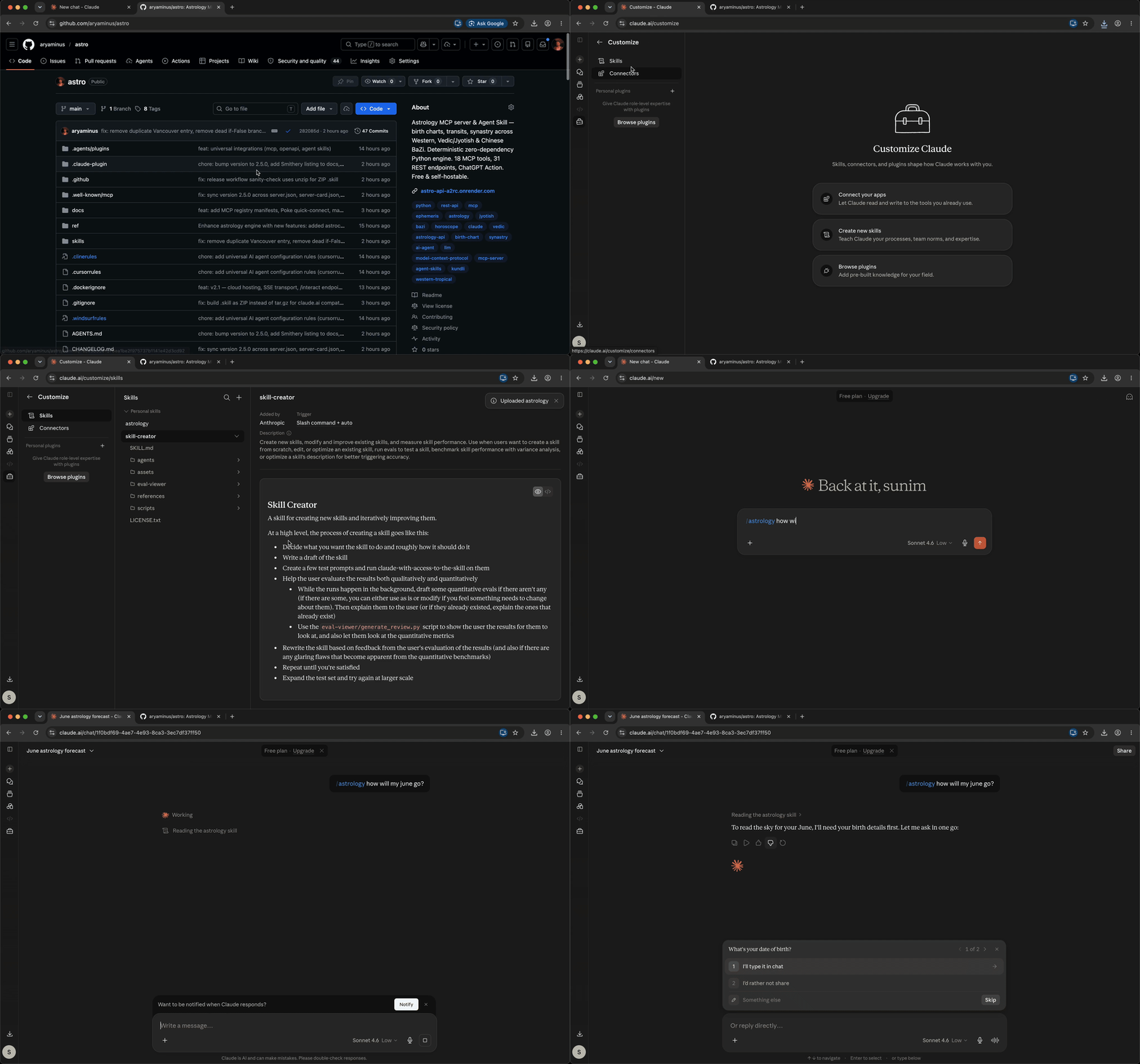
Terminal
npx skills add aryaminus/astro -g

Astro skill in action

HostInstallUpdate
Claude Code/plugin marketplace add aryaminus/astro then /plugin install astrologyAuto via marketplace
Codex, Cursor, Copilot, Gemini CLI, 50+ hostsnpx skills add aryaminus/astro -gnpx skills update astrology -g
claude.aiDownload .skill β†’ Customize β†’ Skills β†’ +Re-download
ChatGPTCopy openapi.yaml into Custom GPT β†’ Actions β†’ ImportManual
Poke (Messages/WhatsApp/Telegram)Add as MCP integration β†’ URL: https://astro-api-a2rc.onrender.com/mcp/sseβ€”
Claude Desktop / Zednpx @smithery/cli install astrology --client claudeRe-run
Manual / devgit clone https://github.com/aryaminus/astro.git && ln -sfn "$(pwd)/astro/skills/astrology" ~/.agents/skills/astrologygit pull

Why this exists

A raw LLM cannot tell you where Mars was on a Tuesday in 1997 β€” it hallucinates chart data. Astro splits the work:

  1. Engine β€” deterministic Python math computes real sky positions (zero deps, pure stdlib)
  2. Skill β€” orchestrates the engine + loads classical interpretation rulesets
  3. Glue β€” MCP, REST, CLI, ChatGPT Actions reach the engine from any platform

The model never guesses a position. It interprets structured output grounded in 8 classical rulesets.

19 modes Β· 3 traditions Β· zero dependencies

Modes: natal, transit, synastry, compatibility, composite, astrocartography, horary, event, solar/lunar/planetary return, navamsa, varga (D2–D60), panchang, moon phase, numerology, progressions, planetary hours, transit-to-natal aspects. Full list and parameters in skills/astrology/SKILL.md.

Traditions: Western tropical, Vedic/Jyotisha (Lahiri sidereal), Chinese BaZi + Tibetan/Buddhist.

Auto-included in every natal chart: Aspect patterns (Grand Trine, Kite, T-Square, Grand Cross, Yod, Mystic Rectangle, Stellium) Β· Part of Fortune Β· Vertex Β· Black Moon Lilith Β· Moon phase Β· 10 Arabic Parts Β· 23 fixed-star conjunctions Β· Navamsa D9 Β· Panchang Β· Mangal Dosha Β· Kaalsarpa Dosha.

Try it

After installing, ask any of these:

  • "What's my chart?" β†’ full natal
  • "Am I compatible with…?" β†’ synastry + 0–100 scoring
  • "When's my Saturn return?" β†’ planetary return + timing
  • "Where should I live for career?" β†’ astrocartography
  • "What time should I start the meeting?" β†’ Chaldean planetary hours
  • "Pick an auspicious wedding date" β†’ electional + panchang
  • "Should I have surgery this month?" β†’ medical timing
  • "What does today have in store?" β†’ transits + natal aspects

Project layout

Code
astro/
β”œβ”€β”€ skills/astrology/
β”‚   β”œβ”€β”€ SKILL.md                    # runtime spec the model reads
β”‚   β”œβ”€β”€ scripts/astro_engine.py     # deterministic engine (~2930 lines)
β”‚   β”œβ”€β”€ scripts/mcp_server.py       # MCP wrapper (18 tools, stdio + SSE)
β”‚   β”œβ”€β”€ scripts/api.py              # REST API (31 endpoints)
β”‚   └── references/                 # 8 classical rulesets
β”‚       β”œβ”€β”€ western.md Β· vedic.md Β· bazi.md Β· tibetan.md
β”‚       β”œβ”€β”€ health.md Β· synastry-and-timing.md
β”‚       β”œβ”€β”€ specialty-systems.md Β· consultation.md
β”œβ”€β”€ openapi.yaml                    # OpenAPI 3.1 (ChatGPT, Agentforce, Coze)
β”œβ”€β”€ smithery.yaml                   # Smithery registry
β”œβ”€β”€ Dockerfile Β· docker-compose.yml Β· render.yaml   # cloud deploy
└── AGENTS.md Β· CONTRIBUTING.md Β· SECURITY.md Β· CHANGELOG.md

Cloud hosting

Free by default. No auth, no rate limits. Set ASTRO_API_KEY to gate, ASTRO_RATE_LIMIT to throttle.

Render (one-click, free tier): Connect this repo β†’ New β†’ Blueprint. render.yaml provisions everything. Verify with curl https://astro-api-a2rc.onrender.com/health. Free tier spins down after 15 min idle; first request after idle takes ~30s.

Docker:

Terminal
docker compose up --build    # API on :8000, docs at /docs

Raw Python:

Terminal
pip install -r requirements.txt
uvicorn skills.astrology.scripts.api:app --host 0.0.0.0 --port 8000

MCP SSE (Smithery, Cloudflare, Poke):

bash
ASTRO_MCP_TRANSPORT=sse python -m skills.astrology.scripts.mcp_server

Cloud MCP SSE (no deploy needed): https://astro-api-a2rc.onrender.com/mcp/sse β€” free Render instance. ~30s cold start.

Env vars and operational endpoints documented in AGENTS.md.

Documentation

FileWhat it covers
AGENTS.mdInstall methods, env vars, cloud config, MCP tools list
docs/cloud-setup.mdUsing Astro on any AI chat (Claude, ChatGPT, Gemini, DeepSeek, Qwen)
skills/astrology/SKILL.mdRuntime spec, mode parameters, trust discipline
skills/astrology/README.mdEngine internals, API surface, specialty branches
openapi.yamlREST API schema (ChatGPT, Agentforce, Coze)
CHANGELOG.mdRelease history
CONTRIBUTING.mdHard rules, dev workflow, PR checklist
SECURITY.mdVulnerability reporting

Contributing

PRs welcome. Hard rules: engine stays zero-dep, engine never imports frameworks, touch all 4 surfaces (engine + MCP + REST + OpenAPI), the skill is honest. See CONTRIBUTING.md.

License

MIT. Reference texts in skills/astrology/references/ are original MIT-licensed syntheses of classical sources.

Related MCP Servers

View all in Developer Tools View all alternatives
  • G
    Graphql

    Turn any GraphQL API into MCP tools. Zero config, zero code.

    πŸ’» Developer Tools0 views
    Compare vs Graphql β†’
  • World Monitor logoWorld Monitor

    Live global intelligence: real-time markets, conflicts, country risk, chokepoints, energy. 39 tools.

    πŸ’» Developer Tools1 views
    Compare vs World Monitor β†’
  • A
    Ai Netcafe

    Compare LLM cost & latency on one prompt, translate PDF keeping layout, cited research, make PPTX

    πŸ’» Developer Tools0 views
    Compare vs Ai Netcafe β†’
  • Claude Task Master logoClaude Task Master

    AI-powered task management system for AI-driven development. Features PRD parsing, task expansion, multi-provider support (Claude, OpenAI, Gemini, Perplexity, xAI), and selective tool loading for optimized context usage.

    πŸ’» Developer Tools7 views
    Compare vs Claude Task Master β†’

Frequently Asked Questions about Astro

Add the following block to your claude_desktop_config.json under mcpServers: "mcpServers": { "astro": { "command": "npx", "args": ["-y", "astro"] } }

AllMCPs Directory Badge

Full Badge Customizer

Showcase your server listing on GitHub or your project documentation. Embed this dynamic SVG badge to highlight official listing status and live engagement.

Badge Style:
Live Dynamic SVG PreviewAstro AllMCPs Directory Badge

Markdown (GitHub README)
[![AllMCPs](https://allmcps.com/api/badge/astro?style=directory)](https://allmcps.com/mcp/astro)
HTML Embed
<a href="https://allmcps.com/mcp/astro"><img src="https://allmcps.com/api/badge/astro?style=directory" alt="Astro on AllMCPs" /></a>

Technical Specs & Signals

CategoryπŸ’»Developer Tools
More technical detailsExpand β–Ύ
TransportSTDIO
RuntimeNode.js
0/4 checks healthy over the last 6h
Views0
Unique ViewsTotal visits recorded for this listing page on AllMCPs.
Installs0
Installs & Copy ActionsTotal times users copied install commands or configuration snippets for this server.
27Quality signal: Emerging Β· 27/100How this signal is calculated β–Ύ
Server availabilityNot measured

Not scored for repo-hosted servers β€” we can't reach the running server, only its GitHub page. Hosted MCP endpoints are health-checked live.

Verified ownership8/20
Documentation & tools11/30
Adoption & activity1/15
Community engagement0/10

A guidance signal from public completeness & health data β€” not a user rating. New listings start lower and rise as they add docs, get verified, and grow adoption. Signals we can't observe for a listing are skipped, not counted against it.

β˜… FeaturedMoxie Docs MCP logo

Moxie Docs MCP

MCP & Agent Skills for Automated Documentation, and codebase conventions + context

Explore Server β†’

Own this project?

This directory is pre-filled from public sources. Claim via GitHub README, site badge, or DNS TXT to get the verified badge and attach your website.

Free dofollow backlink: after claiming, verify your product site and place a dofollow AllMCPs badge β€” we recheck it stays live.

Claim & get free dofollow

Share & Embed

Add our SVG badge (dark/light directory styles) or embeddable widget to your site.

Explore more

More in πŸ’» Developer Tools β†’Best MCP servers for Developers β†’Alternatives to Astro β†’Install in Claude DesktopInstall in CursorInstall in VS Code

