Asterwise vs Dbt MCP
A side-by-side look at the Asterwise and Dbt MCP MCP servers: transport, auth, tools, quality signals, and the config to install either one in Claude, Cursor, Windsurf or VS Code.
Verdict: choose Asterwise for spirituality & esoterica work; choose Dbt MCP for data platforms as a local process. You can also run both side by side in one mcpServers block.
Which MCP server should you choose?
 Choose Asterwise when
- You need dedicated capabilities in the Spirituality & Esoterica domain.
- Its auth model fits you: API key required.
- You have the keys it needs:
ASTERWISE_API_BASE_URL. - You want tools like
asterwise_get_natal_chart, asterwise_get_divisional_chart, asterwise_get_chart_strength.
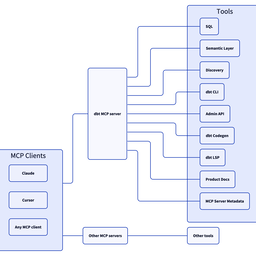 Choose Dbt MCP when
- You need dedicated capabilities in the Data Platforms domain.
- You prefer a local stdio subprocess transport.
- Its auth model fits you: API key required.
- You want tools like
search_product_docs, get_product_doc_pages, list_metrics.
Feature & specification comparison
Rows where the two servers differ are marked.
| Spec | ||
|---|---|---|
| Category | Spirituality & Esoterica | Data Platforms |
| Quality signal | 55/100 · Good | 85/100 · Excellent |
| Install command | Not confirmed yet | Confirmed |
| Transport | — | Local subprocess (stdio) |
| Auth | API key required | API key required |
| Pricing | Freemium | Free |
| Required env vars | ASTERWISE_API_BASE_URL | None listed |
| Verified owner | Community listing | Verified |
| GitHub stars | 0 | 612 |
| Directory activity | 2 views 0 installs 0 upvotes | 9 views 0 installs 0 upvotes |
| Tools | 118 | 39 |
| Full listing | View Asterwise | View Dbt MCP |
Tools & capabilities
Asterwise tools 118
asterwise_get_natal_chartComputes the full sidereal natal chart from BirthData and returns planet rows, houses, aspects, arudhas, upapada, bhava cusps, and avakhada metadata. WORKFLOW: BEFORE: None — this tool is standalone. AFTER: RECOMMENDED — asterwise_get_yogas — layer classical combinations after the base chart exists. INPUT CONTRACT: BirthData enforces date YYYY-MM-DD, time HH:MM, lat -90..90, lon -180..180, ayanamsa enum locally (Pydantic). Unknown birth time: omit time (a sunrise chart is cast and birth_time_provided=false); never pass time='00:00' for unknown, which is read as midnight. Lagna-sensitive results (houses, lagna, arudhas) are then approximate. DO NOT CONFUSE WITH: asterwise_get_divisional_chart — sixteen vargas only, not the primary radix bundle returned here. Full output and error contract: https://docs.asterwise.com/mcp/tools/get-natal-chart/asterwise_get_divisional_chartComputes divisional (varga) charts from BirthData; pass chart_type for one varga, or omit chart_type for all sixteen. Each planet in each varga comes with its dignity there and whether it is vargottama; with a known birth time, each chart also has its own lagna, every planet's whole-sign house from that lagna, and a houses table. WORKFLOW: BEFORE: RECOMMENDED — asterwise_get_natal_chart — anchor D1 before reading higher vargas. AFTER: None. INPUT CONTRACT: chart_type enum is enforced locally. BirthData follows the global contract. Unknown birth time: omit time; lagna, houses and the houses table are then left out (birth_time_provided=false). DO NOT CONFUSE WITH: asterwise_get_natal_chart — radix chart with houses and drishti, not the varga set. asterwise_get_chart_strength — varga-based strength scores, not placements. Full output and error contract: https://docs.asterwise.com/mcp/tools/get-divisional-chart/asterwise_get_chart_strengthAggregates the chart's strength measures from BirthData: Shadbala, Bhavbala and Vimshopaka (with per-varga contributions). Also returns the sixteen vargas, Ashtakavarga, karaka maps and graha yuddha pairs. WORKFLOW: BEFORE: RECOMMENDED — asterwise_get_natal_chart — contextualises houses before reading bala tables. AFTER: asterwise_get_yogas — optional configuration pass after strength review. INPUT CONTRACT: BirthData only; no extra toggles. DO NOT CONFUSE WITH: asterwise_get_yogas — boolean yoga catalogue, not numeric bala. asterwise_get_ashtakavarga — standalone AVK when strength bundle is not needed. Full output and error contract: https://docs.asterwise.com/mcp/tools/get-chart-strength/asterwise_get_special_ascendantsCalls atmakaraka and ishta-devata endpoints sequentially and merges their payloads into top-level atmakaraka and ishta_devata objects for one BirthData. WORKFLOW: BEFORE: RECOMMENDED — asterwise_get_natal_chart — understand chart basics before devotional pointers. AFTER: None. INPUT CONTRACT: Wrapper returns { atmakaraka: <upstream dict>, ishta_devata: <upstream dict> } — not a flat data.* root; consumers must read nested .data fields inside each branch per upstream shape. DO NOT CONFUSE WITH: asterwise_get_natal_chart — general chart; does not compute ishta devata workflow. asterwise_get_char_dasha — timing system using karakas, not deity discovery. Full output and error contract: https://docs.asterwise.com/mcp/tools/get-special-ascendants/asterwise_get_nakshatra_detailsLooks up static metadata for one of twenty-seven nakshatras by name and returns interpretive, professional, activity, and body-map reference data. WORKFLOW: BEFORE: None — this tool is standalone. AFTER: None. INPUT CONTRACT: nakshatra_name is sent as given; the API ignores case, spaces, hyphens and common romanisation differences ('uttarashadha', 'Aswini', 'Moola' and 'Krithika' all match). An unknown name returns 404 with the 27 valid names and, for a near miss, a suggestion. DO NOT CONFUSE WITH: asterwise_get_natal_chart — computes birth nakshatra from time/place, not encyclopaedic copy. asterwise_get_dasha — uses Moon nakshatra for timing, not this lookup table. Full output and error contract: https://docs.asterwise.com/mcp/tools/get-nakshatra-details/asterwise_check_sade_satiEvaluates Saturn's seven-and-a-half-year Sade Sati cycle against the natal Moon sign for the current day. Returns intensity, upcoming cycles, and historical rows. WORKFLOW: BEFORE: RECOMMENDED — asterwise_get_natal_chart — confirm Moon sign context. AFTER: asterwise_get_gochar — broader transit canvas if needed. INPUT CONTRACT: No explicit query date — API pins to current day. BirthData global contract applies. DO NOT CONFUSE WITH: asterwise_get_gochar — nine-planet daily scan including sade_sati_active flag but less Sade Sati detail than this tool. asterwise_get_transits — ingress/station feed, not Moon-focused Saturn phase model. Full output and error contract: https://docs.asterwise.com/mcp/tools/check-sade-sati/asterwise_get_prashna_chartCasts a Prashna chart for the query instant from the supplied date, time, place and a single-topic keyword. Returns houses, Moon diagnostics, a verdict, and cusps. WORKFLOW: BEFORE: None — standalone for horary. AFTER: None. INPUT CONTRACT: question must be exactly one of: self, wealth, siblings, property, children, health, marriage, death, travel, career, gains, loss. Full sentences are not validated locally and are rejected upstream → MCP INTERNAL_ERROR at the tool layer. PrashnaInput enforces date/time/lat/lon/ayanamsa patterns locally. DO NOT CONFUSE WITH: asterwise_get_natal_chart — requires birth data, not query-moment prashna. asterwise_get_kp_chart — natal KP from birth time, not horary keyword mapping. Full output and error contract: https://docs.asterwise.com/mcp/tools/get-prashna-chart/asterwise_get_lal_kitab_chartProduces a Lal Kitab chart from BirthData following the 1952 Lal Kitab: houses counted from the Vedic lagna, the lagna house read as house 1 (Aries). Returns planets with pakka ghar, uchcha/neecha, fixed or doubtful effect and malefic reasons, the twelve houses, and the nine Lal Kitab debts (rin). WORKFLOW: BEFORE: None — standalone for Lal Kitab queries. AFTER: asterwise_get_lal_kitab_remedies — remedies for the planets that need them. INPUT CONTRACT: BirthData global contract. ayanamsa: lahiri (default), raman or kp is used as sent; tropical is refused (INVALID_PARAMS) because Lal Kitab starts from the sidereal Indian chart. Unknown birth time: omit time (a sunrise chart is cast and birth_time_provided=false); houses are then approximate. DO NOT CONFUSE WITH: asterwise_get_natal_chart — classical radix, not Lal Kitab rules. asterwise_get_lal_kitab_remedies — remedies only, for the planets that need them. Full output and error contract: https://docs.asterwise.com/mcp/tools/get-lal-kitab-chart/asterwise_get_lal_kitab_remediesLists Lal Kitab remedies (from the 1952 Lal Kitab) for the planets that need them, plus remedies for any indicated debts (rin). WORKFLOW: BEFORE: RECOMMENDED — asterwise_get_lal_kitab_chart — see the chart and malefic reasons first. AFTER: None. INPUT CONTRACT: BirthData only. ayanamsa: lahiri (default), raman or kp is used as sent; tropical is refused (INVALID_PARAMS) because Lal Kitab starts from the sidereal Indian chart. Unknown birth time: omit time (a sunrise chart is cast and birth_time_provided=false); houses, and so the remedies, are then approximate. DO NOT CONFUSE WITH: asterwise_get_remedies — mantra/gem prescriptions, not Lal Kitab remedies. asterwise_get_gemstone_recommendations — classical Ratna focus, not household remedies. Full output and error contract: https://docs.asterwise.com/mcp/tools/get-lal-kitab-remedies/asterwise_get_kp_chartBuilds a KP natal chart with sub-lords on grahas and twelve cusps from BirthData using the KP ayanamsa in the response. WORKFLOW: BEFORE: RECOMMENDED — cross-check birth record before trusting sub-lords. AFTER: asterwise_get_kp_significators — house-level significator chains. INPUT CONTRACT: ayanamsa is accepted but ignored (always KP). Birth time is required: this tool has no sunrise fallback. If the user doesn't know it, say so rather than guessing; never pass time='00:00' for unknown. DO NOT CONFUSE WITH: asterwise_get_natal_chart — classical bundle without KP sub-lords. asterwise_get_kp_ruling_planets — rulers at the moment of judgment (now or a given time), not natal cusps. Full output and error contract: https://docs.asterwise.com/mcp/tools/get-kp-chart/asterwise_get_kp_significatorsComputes KP significator chains for all houses or one optional house from BirthData and returns house tables plus planet-tier reverse indexes. WORKFLOW: BEFORE: RECOMMENDED — asterwise_get_kp_chart — establish cusps before significators. AFTER: None. INPUT CONTRACT: house_number optional int 1..12; omit for all twelve. DO NOT CONFUSE WITH: asterwise_get_kp_chart — cusps and sub-lords, not tiered significator unions. asterwise_get_natal_chart — classical drishti matrices differ from KP significator tiers. Full output and error contract: https://docs.asterwise.com/mcp/tools/get-kp-significators/asterwise_get_kp_ruling_planetsComputes KP ruling planets at a latitude and longitude for the current instant or a given local date and time, with no birth data. Returns the day lord, Moon and Ascendant lord chains, and a deduplicated ruling_planets list. WORKFLOW: BEFORE: None — this tool is standalone. AFTER: asterwise_get_kp_chart — if natal confirmation is needed afterwards. INPUT CONTRACT: lat and lon required. Optional target_date (YYYY-MM-DD), target_time (HH:MM), target_timezone (IANA; defaults to the zone at lat/lon). With neither date nor time the server uses the current instant (KP judges ruling planets at the moment of judgment); time only = that time today; date only = 12:00 local. data.target_utc and data.target_timezone show what was used. target_date must be within 1800-01-01 to 2099-12-31. A time skipped by a daylight-saving change is read with the offset before the change (moved forward by the gap); a time that occurred twice is read as the first occurrence; data.local_time_status is 'nonexistent' / 'ambiguous' / 'ok'. DO NOT CONFUSE WITH: asterwise_get_kp_chart — needs BirthData and returns full natal KP cusps. asterwise_get_prashna_chart — horary keyword workflow, not ruling-planet snapshot. Full output and error contract: https://docs.asterwise.com/mcp/tools/get-kp-ruling-planets/- +106 more on the listing page
Dbt MCP tools 39
search_product_docsSearch the dbt product documentation at docs.getdbt.com for pages matching a query. Returns matching page titles, URLs, and descriptions ranked by relevance. Only returns metadata, not page content — use get_product_doc_pages with URLs from the results to retrieve full page content. If the title/description search finds few matches, it automatically falls back to a deep full-text search across all documentation content to find pages where the topic is discussed in the body text. If your first query returns few results, try rephrasing with synonyms or the full term (e.g. 'user-defined functions' instead of 'UDFs', 'version control' instead of 'git'). Use the abbreviations on the page as well. VERSION AWARENESS: The response includes a `dbt_project_version` field (e.g. "1.8") detected by running `dbt --version` against the user's installed dbt binary. If null, the version could not be detected — present docs normally without version-specific callouts. When presenting results to the user, you MUST: 1. State the user's detected dbt version upfront if available (e.g. "Based on your project (dbt 1.8), here's what I found:"). 2. If a result title or description clearly references an older/EOL version (v1.6 or earlier), flag it: "Note: this page covers dbt v1.X, which has reached end-of-life and is no longer supported." 3. Search results only include titles, descriptions, and URLs — not page content. Do NOT make version-specific claims based on search results alone. If the user needs to know whether a feature applies to their version, fetch the page with `get_product_doc_pages` first.get_product_doc_pagesRetrieve the Markdown content of one or more dbt documentation pages from docs.getdbt.com. Pass a list of URLs or relative paths (e.g. from search_product_docs results). Up to 5 pages can be fetched per call; pages are fetched in parallel for speed. Pass the optional `query` parameter to retrieve only the most relevant sections of each page rather than the full content — this significantly reduces response size and is recommended when you already know what topic you are looking for. IMPORTANT — how to present docs content to the user: 1. Give a direct answer first, then explain. Don't just summarize — be specific about WHERE to find a feature in the UI and HOW it works. 2. Structure around the user's task: lead with what they asked, not the doc's own structure. Include step-by-step actionable detail when the docs describe a workflow or UI feature. 3. Call out practical limitations and edge cases from the docs. 4. Close with clear guidance: if the feature only partially answers the question, say what else they can do and where. 5. ALWAYS include the docs page URL(s) as markdown hyperlinks at the end of your response, e.g. [Page title](https://docs.getdbt.com/...). VERSION AWARENESS: The response includes a `dbt_project_version` field with the user's installed dbt version (detected via `dbt --version`). Page content is automatically filtered to show only sections relevant to the detected version — VersionBlock tags from the docs site are resolved so you receive clean, version-appropriate markdown. Pages may also have a `version_note` field if they cover an EOL version. If `dbt_project_version` is null, the version could not be detected — all version-specific content is kept with tags stripped. When presenting page content to the user, you MUST: 1. If `dbt_project_version` is set, tell the user their detected version upfront (e.g. "You're on dbt 1.8"). 2. If `version_note` is set, prominently warn the user that the page is for an end-of-life version and the information may be outdated. Suggest they look at the current docs instead. 3. Page content has already been filtered to show only sections relevant to the detected version. If the content seems sparse or incomplete, let the user know that some sections may have been filtered out because they apply to a different dbt version, and suggest they check the full page on docs.getdbt.com.list_metricsList metrics from the dbt Semantic Layer. The `result` field is a CSV string with a header row. Columns are dynamic: a column is only present if at least one metric has a non-empty value for it. `name` and `type` are always present; `label`, `description`, `metadata`, `dimensions`, and `entities` are included only when at least one metric has a value. The `dimensions` and `entities` cells contain comma-separated lists of names. When the number of metrics is below the configured threshold (default: 10), each metric includes the names of its available dimensions and entities. Use get_dimensions or get_entities for full details (types, granularities, descriptions) on specific metrics. When above the threshold, only metrics are returned. `metric_time` is a standard time dimension available on most metrics — you can often query directly without calling `get_dimensions` first. Call `get_dimensions` only when you need non-time dimensions or specific granularity details. For listings that exceed the text budget, columns are dropped progressively to save tokens: `description` is dropped first; `metadata` is dropped only if removing `description` alone is not enough. The CSV is prefixed with one or more `# Note:` lines listing which columns were omitted. When that happens, call `list_metrics` again with the `search` parameter to retrieve those fields for the specific metrics you care about. `search` accepts either a single substring or a list of substrings; when a list is provided, metrics whose name matches **any** of the substrings are returned (deduplicated), so you can fetch details for several metrics in one call. `meta_filter` accepts a dict of key-value pairs and restricts results to metrics whose `config.meta` contains all specified pairs — for example `{"agent_accessible": true}`. Apply it on broad searches to keep the result set small enough that the `metadata` column is preserved in the response. If the user is asking a data-related or business-related question, use this tool as a first step. Returns one source page in `result`, with `pagination.has_more` and `pagination.next_page`. Pass the next page as `page_num` with the same filters and `page_size` (default 50, maximum 100). Local filtering may leave an empty page with more pages available. Restart at page 1 if you reduce the page size after a size-limit error.list_saved_queriesList all saved queries from the dbt Semantic Layer. Saved queries are pre-defined queries that have been saved in the Semantic Layer. They contain specific metrics, group-by dimensions, and filters that are commonly used. This tool helps discover what predefined queries are available for quick execution. Use this tool when: - The user wants to see what pre-built queries are available - The user mentions "saved queries" or "predefined queries" - You need to find commonly used analytical queries Examples: - "What saved queries are available?" - "Show me the predefined reports" - "List all saved queries for revenue analysis" Returns one source page in `result`, with `pagination.has_more` and `pagination.next_page`. Pass the next page as `page_num` with the same filters and `page_size` (default 50, maximum 100). Local filtering may leave an empty page with more pages available. Restart at page 1 if you reduce the page size after a size-limit error.get_dimensions<instructions> Get the dimensions for specified metrics Note: `metric_time` is a standard time dimension available on most metrics. You do not need to call this tool just to confirm time dimensions exist — call it only when you need categorical dimensions or specific granularity details. If this tool returns no results, proceed to query directly using `metric_time`. Dimensions are the attributes, features, or characteristics that describe or categorize data. Each dimension includes a metadata field containing config.meta from semantic model YAML files. The metadata contains fields relevant to the semantic models. </instructions> <examples> <example> Question: "I want to analyze revenue trends - what dimensions are available?" Thinking step-by-step: - Using list_metrics(), I find "revenue" is available - Now I can get the dimensions for this metric - The search parameter is not needed here since the user is interested in all available dimensions. Parameters: metrics=["revenue"] search=null </example> <example> Question: "Are there any time-related dimensions for my sales metrics?" Thinking step-by-step: - Using list_metrics(), I find "total_sales" and "average_order_value" are available - The user is interested in time dimensions specifically - I should use the search parameter to filter for dimensions with "time" in the name - This will narrow down the results to just time-related dimensions Parameters: metrics=["total_sales", "average_order_value"] search="time" </example> </examples> Returns one source page in `result`, with `pagination.has_more` and `pagination.next_page`. Pass the next page as `page_num` with the same filters and `page_size` (default 50, maximum 100). Local filtering may leave an empty page with more pages available. Restart at page 1 if you reduce the page size after a size-limit error.get_entities<instructions> Get the entities for specified metrics Entities are real-world concepts in a business such as customers, transactions, and ad campaigns. Analysis is often focused around specific entities, such as customer churn or annual recurring revenue modeling. </instructions> <examples> <example> Question: "I want to analyze revenue - what entities are available?" Thinking step-by-step: - Using list_metrics(), I find "revenue" is available - Now I can get the entities for this metric - The search parameter is not needed here since the user is interested in all available entities. Parameters: metrics=["revenue"] search=null </example> <example> Question: "Are there any customer-related entities for my sales metrics?" Thinking step-by-step: - Using list_metrics(), I find "total_sales" and "average_order_value" are available - The user is interested in customer entities specifically - I should use the search parameter to filter for entities with "customer" in the name - This will narrow down the results to just customer-related entities Parameters: metrics=["total_sales", "average_order_value"] search="customer" </example> </examples> Returns one source page in `result`, with `pagination.has_more` and `pagination.next_page`. Pass the next page as `page_num` with the same filters and `page_size` (default 50, maximum 100). Local filtering may leave an empty page with more pages available. Restart at page 1 if you reduce the page size after a size-limit error.get_dimension_values<instructions> Get the distinct values for a given dimension, optionally scoped to specific metrics. Use this tool to discover what values exist for a dimension before building a `where` filter in `query_metrics`. For example, to filter by country you first call this tool to see which country values exist, then use those values in the `where` clause. If the response includes `truncated: true`, there are more values than the current `limit`. Increase `limit` to retrieve more, or add `metrics` to narrow the scope. </instructions> <examples> <example> Question: "I want to filter revenue for a specific country — what countries are available?" Thinking step-by-step: - The user wants to know valid values for a country dimension - I should scope to the "revenue" metric for accurate results Parameters: dimension="customer__country" metrics=["revenue"] limit=100 </example> <example> Question: "What are the possible order statuses?" Thinking step-by-step: - The user wants all distinct values for an order status dimension - No specific metric context needed Parameters: dimension="order__status" metrics=null limit=100 </example> </examples>query_metrics<instructions> Queries the dbt Semantic Layer to answer business questions from the data warehouse. This tool allows ordering and grouping by dimensions and entities. To use this tool, you must first know about specific metrics, dimensions and entities to provide. You can call the list_metrics, get_dimensions, and get_entities tools to get information about which metrics, dimensions, and entities to use. When using the `order_by` parameter, each item must refer to either a metric name or a field that also appears in `group_by`. For time dimensions, you may specify a `grain` in `order_by` independently from `group_by`; if omitted, it defaults to the grain of the matching `group_by` entry. `grain` only applies to time dimensions and should be omitted for metrics and categorical dimensions. When fulfilling a lookback query, prefer using order_by and limit instead of using the where parameter. A lookback query requires that the `order_by` parameter includes a descending order for a time dimension. The `where` parameter should be database agnostic SQL syntax, however dimensions and entity are referenced differently. For categorical dimensions, use `{{ Dimension('<name>') }}` and for time dimensions add the grain like `{{ TimeDimension('<name>', '<grain>') }}`. For entities, use `{{ Entity('<name>') }}`. When referencing dates in the `where` parameter, only use the format `yyyy-mm-dd`. Pass the `where` value as a plain string — do not wrap it in additional quotes. Don't call this tool if the user's question cannot be answered with the provided metrics, dimensions, and entities. Instead, clarify what metrics, dimensions, and entities are available and suggest a new question that can be answered and is approximately the same as the user's question. For queries that may return large amounts of data, it's recommended to use a two-step approach: 1. First make a query with a small limit to verify the results are what you expect 2. Then make a follow-up query without a limit (or with a larger limit) to get the full dataset IMPORTANT: Do the below if the GET_MODEL_HEALTH tool is enabled. When responding to user requests to pull metrics data, check the health of the dbt models that are the parents of the dbt semantic models. Use the instructions from the "ASSESSING MODEL HEALTH" section of the get_model_health() prompts to do this. </instructions> <examples> <example> Question: "What were our total sales last month?" Thinking step-by-step: - I know "total_sales" is the metric I need - I know "metric_time" is a valid dimension for this metric and supports MONTH grain - I need to group by metric_time to get monthly data - Since this is time-based data, I should order by metric_time. I am also grouping by metric_time, so this is valid. - The user is asking for a lookback query, so I should set descending to true so the most recent month is at the top of the results. - The user is asking for just the last month, so I should limit to 1 month of data Parameters: metrics=["total_sales"] group_by=[{"name": "metric_time", "grain": "MONTH", "type": "time_dimension"}] order_by=[{"name": "metric_time", "grain": "MONTH", "descending": true}] limit=1 </example> <example> Question: "Show me our top customers by revenue in the last quarter" Thinking step-by-step: - First, I need to find the revenue metric - Using list_metrics(), I find "revenue" is available - I need to check what dimensions are available for revenue - Using get_dimensions(["revenue"]), I see "customer_name" and "metric_time" supports QUARTER grain - I need to check what entities are available - Using get_entities(["revenue"]), I confirm "customer" is an entity - I need quarterly time grain - Since this is time-based data, I should order by metric_time. I am grouping by metric_time, so this is valid. This is a lookback query, so I should set descending to true. - I should also order by revenue to see top customers. I am grouping by revenue, so this is valid. The user is asking for the highest revenue customers, so I should set descending to true. - I should limit to top 5 results to verify the query works Parameters: metrics=["revenue"] group_by=[{"name": "customer_name", "type": "dimension"}, {"name": "metric_time", "grain": "QUARTER", "type": "time_dimension"}] order_by=[{"name": "metric_time", "grain": "QUARTER", "descending": true}, {"name": "revenue", "descending": true}] limit=5 Follow-up Query (after verifying results): metrics=["revenue"] group_by=[{"name": "customer_name", "type": "dimension"}, {"name": "metric_time", "grain": "QUARTER", "type": "time_dimension"}] order_by=[{"name": "metric_time", "grain": "QUARTER", "descending": true}, {"name": "revenue", "descending": true}] limit=null </example> <example> Question: "What's our average order value by product category for orders over $100?" Thinking step-by-step: - I know "average_order_value" is the metric I need - I know "product_category" is a valid dimension - I need to filter for orders over $100 - No time dimension needed - I should first limit results to verify the query works Parameters (initial query): metrics=["average_order_value"] group_by=[{"name": "product_category", "type": "dimension"}] where="{{ Dimension('order_value') }} > 100" limit=10 Follow-up Query (after verifying results): metrics=["average_order_value"] group_by=[{"name": "product_category", "type": "dimension"}] where="{{ Dimension('order_value') }} > 100" limit=null </example> <example> Question: "How many new users did we get each week last year?" Thinking step-by-step: - First, I need to find the new users metric - Using list_metrics(), I find "new_users" is available - I need to check what dimensions are available - Using get_dimensions(["new_users"]), I see "metric_time" supports WEEK grain - I need to check what entities are available - Using get_entities(["new_users"]), I confirm "user" is an entity - I need weekly time grain - I need to group by metric_time - Since this is time-based data, I should order by metric_time to show progression - I need to filter for the previous year's data using proper time dimension syntax - Should first get a few weeks to verify the query works Parameters (initial query): metrics=["new_users"] group_by=[{"name": "metric_time", "grain": "WEEK", "type": "time_dimension"}] order_by=[{"name": "metric_time", "grain": "WEEK", "descending": false}] where="{{ TimeDimension('metric_time', 'WEEK') }} >= '2023-01-01' AND {{ TimeDimension('metric_time', 'WEEK') }} < '2024-01-01'" limit=4 Follow-up Query (after verifying results): metrics=["new_users"] group_by=[{"name": "metric_time", "grain": "WEEK", "type": "time_dimension"}] order_by=[{"name": "metric_time", "grain": "WEEK", "descending": false}] where="{{ TimeDimension('metric_time', 'WEEK') }} >= '2023-01-01' AND {{ TimeDimension('metric_time', 'WEEK') }} < '2024-01-01'" limit=null </example> <example> Question: "What's our customer satisfaction score by region?" Thinking step-by-step: - First, I need to check if we have a customer satisfaction metric - Using list_metrics(), I find we don't have a direct "customer_satisfaction" metric - I should check what metrics we do have that might be related - I see we have "net_promoter_score" and "customer_retention_rate" - I should inform the user that we don't have a direct customer satisfaction metric - I can suggest using NPS as a proxy for customer satisfaction Response to user: "I don't have a direct customer satisfaction metric, but I can show you Net Promoter Score (NPS) by region, which is often used as a proxy for customer satisfaction. Would you like to see that instead?" If user agrees, then: Parameters: metrics=["net_promoter_score"] group_by=[{"name": "region", "type": "dimension"}] order_by=[{"name": "net_promoter_score", "descending": true}] limit=10 </example> </examples>get_metrics_compiled_sql<instructions> Gets compiled SQL for given metrics and dimensions/entities from the dbt Semantic Layer. This tool generates the underlying SQL that would be executed for a given metric query by the `query_metrics` tool, without actually running the query. This is useful for understanding what SQL is being generated, debugging query issues, or getting SQL to run elsewhere. To use this tool, you must first know about specific metrics, dimensions and entities to provide. You can call the list_metrics, get_dimensions, and get_entities tools to get information about which metrics, dimensions, and entities to use. When using the `group_by` parameter, ensure that the dimensions and entities you specify are valid for the given metrics. Time dimensions can include grain specifications (e.g., MONTH, DAY, YEAR). The tool will return the compiled SQL that the dbt Semantic Layer would generate to calculate the specified metrics with the given groupings. Don't call this tool if the user's question cannot be answered with the provided metrics, dimensions, and entities. Instead, clarify what metrics, dimensions, and entities are available and suggest a new question that can be answered and is approximately the same as the user's question. This tool is particularly useful when: - Users want to see the underlying SQL for a metric calculation - Debugging complex metric definitions - Understanding how grouping affects the generated SQL - Getting SQL to run in other tools or systems </instructions> Returns the compiled SQL as a string, or an error message if the compilation fails.get_mart_modelsGet the name and description of all mart models in the environment. A mart model is part of the presentation layer of the dbt project. It's where cleaned, transformed data is organized for consumption by end-users, like analysts, dashboards, or business tools. Returns one source page in `result`, with `pagination.has_more` and `pagination.next_cursor`. Pass the next cursor as `after` with the same filters. `limit` defaults to 50 and is capped at 100. Local filtering may leave an empty page with more pages available.get_all_modelsGet a page of dbt model names and descriptions in the environment. Returns one source page in `result`, with `pagination.has_more` and `pagination.next_cursor`. Pass the next cursor as `after` with the same filters. `limit` defaults to 50 and is capped at 100. Local filtering may leave an empty page with more pages available.get_node_detailsRetrieves full details for a dbt resource by type and name or unique ID. Use this tool when you need the full schema, definition, or metadata for a specific dbt resource. The `resource_type` determines what fields are returned. **Parameters:** - `resource_type`: The type of dbt resource. One of: `model`, `source`, `exposure`, `test`, `seed`, `snapshot`, `macro`, `semantic_model`. The resource type is also encoded in the `unique_id` prefix (e.g. `model.my_project.orders` → `model`). - `name`: The resource's short name (e.g. `orders`). Provide `name` or `unique_id`, not both. - `unique_id`: The resource's fully qualified unique ID (e.g. `model.my_project.orders`). Preferred when available — avoids ambiguity when multiple resources share a name. **Usage examples:** ```python # Get details for a model by unique_id get_node_details(resource_type="model", unique_id="model.analytics.orders") # Get details for a source by name get_node_details(resource_type="source", name="raw_users") # Get details for a semantic model get_node_details(resource_type="semantic_model", unique_id="semantic_model.analytics.orders") ```- +27 more on the listing page
Ready-to-paste client configs
Paste either block (or both) into your client config, e.g. claude_desktop_config.json or ~/.cursor/mcp.json. We only show a config when the install command is confirmed.
Asterwise
No confirmed install command for Asterwise yet — follow the setup steps linked from its listing page rather than a guessed package name.
Dbt MCP
{
  "mcpServers": {
    "dbt-labs-dbt-mcp": {
      "command": "uvx",
      "args": [
        "dbt-mcp"
      ]
    }
  }
}
Frequently asked questions
Asterwise is categorized under Spirituality & Esoterica and uses an install path we have not confirmed yet. Dbt MCP belongs to Data Platforms and uses a local stdio subprocess. Pick Asterwise for spirituality & esoterica work and Dbt MCP for data platforms.
Copy the mcpServers block from the config section on this page into your client's config (for example claude_desktop_config.json or ~/.cursor/mcp.json), then fully restart the client. Asterwise has no confirmed install command yet — follow its own setup instructions.
Asterwise is listed as freemium — a free tier with paid plans. Auth: api key required. Dbt MCP is listed as free. Auth: api key required. If a server needs environment variables such as API keys, define them under the env key in your client's MCP config.
Yes. MCP clients support multiple servers: add asterwise-2 and dbt-labs-dbt-mcp as separate keys in the same mcpServers object, and your assistant will call tools from either one.
On AllMCPs, Asterwise has a quality signal of 55/100 (Good) with 2 views, 0 installs and 0 GitHub stars. Dbt MCP has 85/100 (Excellent) with 9 views, 0 installs and 612 GitHub stars.