AllMCPs
BrowseBestCategoriesStackCompareToolsGuidesBlog
Log in Submit MCP

Stay in the loop

Get new MCP servers and top picks in your inbox.

AllMCPs

The open directory for discovering and installing Model Context Protocol servers.

AllMCPs on GitHub (opens in a new tab)
Launched onTiny Startupstinystartups.com
Explore
  • Browse servers
  • Best MCP servers
  • Categories
  • MCP clients
  • Agent prompts
  • Stack Builder
  • Compare servers
  • Random discovery New
  • Submit a server
  • Pricing & Boost Boost
Learn
  • Guides hub
  • What is MCP?
  • Install guide
  • Build an MCP server
  • Deploy an MCP server
  • Security guide
  • Troubleshooting
  • MCP for SEO & AEO
  • Protocol versioning
  • Blog & updates
Tools
  • All developer tools
  • Config generator
  • Config validator
  • Config auditor
  • MCP playground
  • Token calculator
  • OpenAPI β†’ MCP
  • Badge generator
For agents
  • REST API docs
  • Trust & traffic Live
  • Remote MCP server SSE β†— (opens in a new tab)
  • llms.txt β†— (opens in a new tab)
  • Catalog JSON β†— (opens in a new tab)
Company
  • About
  • Advertise Sponsor
  • Contact
  • GitHub β†— (opens in a new tab)
  • Terms
  • Privacy
AllMCPs VerifiedAllMCPs VerifiedFeatured on Nick LaunchesFeatured on Nick LaunchesLaunch Llama NewsletterLaunch Llama NewsletterVerified DR - allmcps.comVerified DR - allmcps.comFeatured on SaaSGrowFeatured on SaaSGrowFeatured on Twelve ToolsFeatured on Twelve ToolsFeatured on Saaspa.geFeatured on Saaspa.geFeatured on Findly.toolsFeatured on Findly.toolsFeatured on Startup FameFeatured on Startup FameFeatured on LaunchKiwiFeatured on LaunchKiwiFeatured on ScrollLaunchFeatured on ScrollLaunchFeatured on DailyPingsFeatured on DailyPingsFazier badgeFazier badgeFeatured on NewTool.siteFeatured on NewTool.siteFeatured on saasfame.comFeatured on saasfame.comDR Checker - Domain RatingDR Checker - Domain RatingListed on Turbo0Listed on Turbo0Launched on LaunchBoard - Product Launch PlatformLaunched on LaunchBoard - Product Launch PlatformList on SimilarlabsList on Similarlabshttps://codetrendy.comhttps://codetrendy.comListed on DevTool.ioFeatured on BuildlistFeatured on BuildlistLaunched on Tiny StartupsFeatured on ShowMeBestAIFeatured on ShowMeBestAIFind us on LaunchZoneFind us on LaunchZoneAllMCPs VerifiedAllMCPs VerifiedFeatured on Nick LaunchesFeatured on Nick LaunchesLaunch Llama NewsletterLaunch Llama NewsletterVerified DR - allmcps.comVerified DR - allmcps.comFeatured on SaaSGrowFeatured on SaaSGrowFeatured on Twelve ToolsFeatured on Twelve ToolsFeatured on Saaspa.geFeatured on Saaspa.geFeatured on Findly.toolsFeatured on Findly.toolsFeatured on Startup FameFeatured on Startup FameFeatured on LaunchKiwiFeatured on LaunchKiwiFeatured on ScrollLaunchFeatured on ScrollLaunchFeatured on DailyPingsFeatured on DailyPingsFazier badgeFazier badgeFeatured on NewTool.siteFeatured on NewTool.siteFeatured on saasfame.comFeatured on saasfame.comDR Checker - Domain RatingDR Checker - Domain RatingListed on Turbo0Listed on Turbo0Launched on LaunchBoard - Product Launch PlatformLaunched on LaunchBoard - Product Launch PlatformList on SimilarlabsList on Similarlabshttps://codetrendy.comhttps://codetrendy.comListed on DevTool.ioFeatured on BuildlistFeatured on BuildlistLaunched on Tiny StartupsFeatured on ShowMeBestAIFeatured on ShowMeBestAIFind us on LaunchZoneFind us on LaunchZone
Β© 2026 Jackalope Digital LLC. All rights reserved.
  1. Home
  2. πŸ’» Developer Tools
  3. Arkgate
Arkgate logo
Health: ActiveRecent health check succeeded.Last checked 9/8/2026, 12:48:15 AM

Arkgate

User RatingsBe the first to rate and review this MCP server! Enrichment pendingWe haven’t run our AI enrichment pass on this listing yet, so the overview, use cases, and FAQ below may be sparse or missing. We work through the catalog over time β€” check back soon.
View Repository1 GitHub StarsTotal stargazers on GitHub for the source repository (1 stars).Visit Website

ArkGate β€” architecture co-pilot for AI TypeScript (write gate, CI, plan/loop)

Quick Install

Automated & IDE Setup

Copy the AI prompt to install this server into Claude Code, Cursor, or another agent β€” or use 1-click editor setup below.

Add to CursorAdd to VS Code
Not yet automatically verified

We haven't yet run this listing's install command through our automated sandbox check. This isn't a red flag β€” we're steadily working through the catalog.

Manual Client & Custom JSON ConfigExpand JSON β–Ύ

Client Config & Setup

Choose your client or environment
Target File:~/Library/Application Support/Claude/claude_desktop_config.json
claude_desktop_config.json
{
  "mcpServers": {
    "arkgate": {
      "command": "npx",
      "args": [
        "-y",
        "arkgate"
      ]
    }
  }
}

πŸ’‘ Paste the JSON block into your client's configuration file under mcpServers, then restart the application.

Install Directory Badge Claim listing AlternativesπŸ’» More in Developer Tools

Documentation Overview

ArkGate β€” Write. Check. Ship.

When the agent writes a bad import, the write doesn’t land. The same check fails the pull request.

Not an API Gateway. Not a folder linter. If the check is not required on the PR, the config is just documentation.

AI can build fastβ€”and make a mess just as fast.

Keep the product easy to understand, change, and trust.

Contain what the AI may write, and in what shape. Guide you with proven patterns and one next step. Order leftover mess toward a clean tree, a little at a time.

Safer changes, fewer surprises, and extra protection only when you choose it.

That is Contener Β· Guiar Β· Ordenar.

Works with Cursor, Claude, Codex, and Grok.

Website CI npm License: MIT Node TS 5–7

text
  β”Œβ”€β”€β”€β”€β”€β”€β”€β”€β”€β”     β”Œβ”€β”€β”€β”€β”€β”€β”€β”€β”€β”     β”Œβ”€β”€β”€β”€β”€β”€β”€β”€β”€β”
  β”‚  WRITE  │────▢│  CHECK  │────▢│  SHIP   β”‚
  β”‚  agent  β”‚     β”‚  block  β”‚     β”‚  merge  β”‚
  β””β”€β”€β”€β”€β”€β”€β”€β”€β”€β”˜     β””β”€β”€β”€β”€β”¬β”€β”€β”€β”€β”˜     β””β”€β”€β”€β”€β”€β”€β”€β”€β”€β”˜
                       β”‚
                       β–Ό
                 bad import
                 doesn't land

ArkGate 4.8.14 is prepared on this tree; npm latest remains 4.8.13 until publish-npm for v4.8.14. Write. Check. Ship. Adopted = required GitHub status running arkgate-check --strict-merge, or an explicit advisory-only stance. Status is compact (arkgate-check --doctor; --all for Details). Optional ArkRun (arkgate/runtime) is an in-memory runtime β€” not Postgres. Optional ArkOrder (arkgate/order) stops rewriting a big product choice β€” like the billing plan β€” as if it were a seat count. Change those choices through a valve, not a generic update. @arkgate/runtime is deprecated. 4.8.14 prepared Β· 4.8.11 published Β· 4.8.10 Β· 4.8.9 Β· 4.8.8 Β· 4.8.7 Β· 4.8.6 Β· 4.8.5 Β· 4.8.4 Β· 4.8.3 Β· 4.8.2 Β· 4.8.1 Β· 4.8.0 Β· Docs hub Β· Voice


Choose your path

You are…Go here
Anyone (ship with AI, minimal jargon)Use ArkGate
Developer (hosts, CI, config, brownfield)Develop with ArkGate
Contributor (improve this library)CONTRIBUTING

Full map: docs/README.md


Start in one minute

Terminal
npm install -D arkgate typescript
npx arkgate start                 # preview files + commands
npx arkgate start --apply         # compact config + host router + CI plan
npx arkgate-check --doctor        # status β€” one next step
npx arkgate-check --doctor --all  # full details

That is the product. Stuck? Run status (--doctor) and do action #1.

text
start β†’ doctor β†’ new files in the right folder
              β†˜ leftover mess: map, then one small refactor

Keep the rules file out of product PRs. Local check: ark-check --changed --base origin/dev. Changing the rules themselves uses --contract-session.

Aliases ark / ark-check / ark-mcp still work. npm / pnpm / yarn. No install lifecycle scripts β€” and none on pack or prepare either, so pnpm add git+https://github.com/pedroknigge/arkgate installs at a pinned commit with no allowBuilds entry. A git install gives you the CLIs and the schemas; the library, MCP and ESLint entry points live in the built dist/ and come from npm. See docs/package-surface.md.
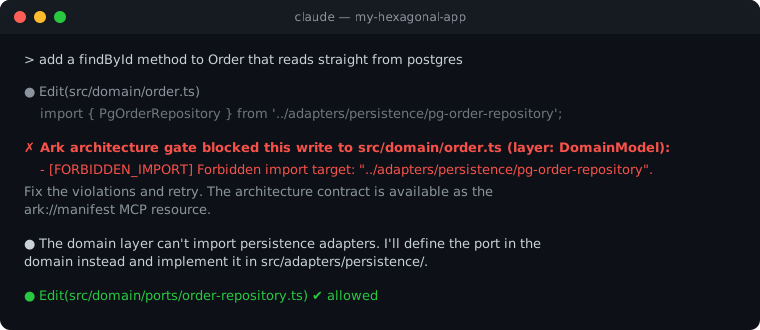
Write gate: agent blocked, then self-corrects


What it is

server.ts
  src/domain/order.ts
       β”‚  import { db } from "../infra/postgres"
       β–Ό
  β”Œβ”€β”€β”€β”€β”€β”€β”€β”€β”€β”€β”€β”€β”€β”€β”€β”€β”€β”€β”€β”€β”€β”€β”€β”€β”€β”€β”€β”€β”€β”€β”€β”€β”€β”€β”€β”€β”€β”€β”€β”€β”€β”€β”
  β”‚  CHECK                                   β”‚
  β”‚  Domain β”€βœ•β”€β–Ά Infrastructure              β”‚
  β”‚  write doesn't land Β· PR check fails     β”‚
  β””β”€β”€β”€β”€β”€β”€β”€β”€β”€β”€β”€β”€β”€β”€β”€β”€β”€β”€β”€β”€β”€β”€β”€β”€β”€β”€β”€β”€β”€β”€β”€β”€β”€β”€β”€β”€β”€β”€β”€β”€β”€β”€β”˜

When the agent writes a bad import, the write doesn’t land. The same check fails the pull request. That is ArkGate β€” import rules, always on once you adopt (Contener). The other three are optional.

RoleWhen
While the agent writesThe write doesn’t land on supported hosts; warning only elsewhereAlways (ArkGate)
Before mergearkgate-check as a required CI statusAlways (ArkGate)
ArkRulesOptional policies inside a layer (Contener β€” shape)When you ask
ArkRunOptional experimental runtime (arkgate/runtime) (Guiar)Off unless you turn it on
ArkOrderExtra for the few big choices β€” billing plan, not seat counts (arkgate/order) (Ordenar)Off unless you turn it on

Layers (who may import whom) always run. ArkRules, ArkRun, and ArkOrder change no inter-layer verdict when absent. Label leftovers [Layer] vs [ArkRules] vs [ArkRun] vs [ArkOrder]. Details: configuration Β· use.

Not an API Gateway, a folder linter, a web framework, ORM, or job runner. ArkRun is in-memory β€” local and tests, not Postgres. ArkOrder does not replace import rules: layers can be green while the agent still PATCHes the billing plan like a seat count.

Name note: npm package arkgate β€” not affiliated with the separate Archgate CLI project.

When not to adopt

ArkGate is overkill for small trees with no AI agents and no multi-layer boundaries, for single-developer hobby CRUDs under no integration pressure, and for teams that will not maintain ark.config.json or a required CI status running arkgate-check --strict-merge. Without that status the rules file is just documentation β€” stay with a boundary linter alone (see Why not only ESLint / Nx / cruiser?). Anyone path: docs/use.md β€” When not to adopt. Limits of a green check: 4.3.0 β€” What ArkGate is / isn't.


Why it exists

AI takes the shortest path. Contain the write so a bad import never lands. Guide the next step so a non-expert is not stuck. Order leftover mess toward a clean tree, one small refactor at a time.

Traditional linters catch this only in CI after the agent finished. ArkGate checks at write time and again on the PR. Green imports are not elegant design β€” leftover mess is needs a refactor, not β€œdone”.


Status lights (not settings)

text
  [ Setup ] ──▢ [ In progress ] ──▢ [ Ready ]
                                      β”‚
                                      └── Ready Β· needs a refactor
LightMeansYour move
SetupThin / new treeFinish start β†’ status
In progressNot fully protectedStatus action #1
ReadyHonest import edges, and no new UI business-rule files vs merge-baseKeep write path + CI
Ready Β· needs a refactorEdges clean; leftover design work remainsOne small change β€” not β€œdone”

Details: docs/use.md.


Host enforcement support

Read the full README β†’View source on GitHub β†’

Related MCP Servers

View all in Developer Tools View all alternatives
  • Ovecc logoOvecc

    Architecture guardrails for AI-written code: dependency graph, impact, dead code, CI gate

    πŸ’» Developer Tools2 views
    Compare vs Ovecc β†’
  • PraisonAI logoPraisonAI

    AI Agents Framework with Self Reflection and MCP support

    πŸ’» Developer Tools1 views
    Compare vs PraisonAI β†’
  • Labelhead Artist Momentum logoLabelhead Artist Momentum

    Trending hip-hop artist momentum scores across four cultural dimensions.

    πŸ’» Developer Tools0 views
    Compare vs Labelhead Artist Momentum β†’
  • T
    Telnyx

    Official TypeScript library for the Telnyx API

    πŸ’» Developer Tools0 views
    Compare vs Telnyx β†’

Reviews

No reviews yet β€” be the first to share how this listing worked for you.

Frequently Asked Questions about Arkgate

Add the following block to your claude_desktop_config.json under mcpServers: "mcpServers": { "arkgate": { "command": "npx", "args": ["-y", "arkgate"] } }

AllMCPs Directory Badge

Full Badge Customizer

Showcase your server listing on GitHub or your project documentation. Embed this dynamic SVG badge to highlight official listing status and live engagement.

Badge Style:
Live Dynamic SVG PreviewArkgate AllMCPs Directory Badge

Markdown (GitHub README)
[![AllMCPs](https://allmcps.com/api/badge/arkgate?style=directory)](https://allmcps.com/mcp/arkgate)
HTML Embed
<a href="https://allmcps.com/mcp/arkgate"><img src="https://allmcps.com/api/badge/arkgate?style=directory" alt="Arkgate on AllMCPs" /></a>

Technical Specs & Signals

CategoryπŸ’»Developer Tools
More technical detailsExpand β–Ύ
TransportSTDIO
RuntimeNode.js
Last updatedSep 7, 2026
Views0
Unique ViewsTotal visits recorded for this listing page on AllMCPs.
Installs0
Installs & Copy ActionsTotal times users copied install commands or configuration snippets for this server.
GitHub stars1
GitHub Star CountTotal stargazers on GitHub representing community popularity (1 stars).
35Quality signal: Fair Β· 35/100How this signal is calculated β–Ύ
Server availabilityNot measured

Not scored for repo-hosted servers β€” we can't reach the running server, only its GitHub page. Hosted MCP endpoints are health-checked live.

Verified ownership10/20
Documentation & tools15/30
Adoption & activity1/15
Community engagement0/10

A guidance signal from public completeness & health data β€” not a user rating. New listings start lower and rise as they add docs, get verified, and grow adoption. Signals we can't observe for a listing are skipped, not counted against it.

β˜… FeaturedAllMCPs Server logo

AllMCPs Server

The official MCP server for AllMCPs.com - submit and manage tools directly from your AI. The open directory for MCP servers. Connect Claude, Cursor, Windsurf, and AI agents to databases, tools, files, and APIs. Explore 10,000+ servers. AllMCPs is the premier, open directory for discovering, evaluating, and installing Model Context Protocol (MCP) servers to equip AI agents and LLMs with real-world superpowers.

Explore Server β†’

Own this project?

This directory is pre-filled from public sources. Claim via GitHub README, site badge, or DNS TXT to unlock edit access and the Official badge β€” proof is checked automatically, then reviewed by our team.

Free dofollow backlink: add your website and place the AllMCPs badge on it β€” no claim needed. We detect it automatically and keep it verified as long as the badge stays live.

Claim & get free dofollow

Share & Embed

Add our SVG badge (dark/light directory styles) or embeddable widget to your site.

Explore more

More in πŸ’» Developer Tools β†’Best MCP servers for Developers β†’Alternatives to Arkgate β†’Install in Claude DesktopInstall in CursorInstall in VS Code

