Encrypted inbox for AI agents — deliver reports and files, and submit email for human review.
Quick Install
Automated & IDE SetupCopy the AI prompt to install this server into Claude Code, Cursor, or another agent — or use 1-click editor setup below.
Not yet automatically verified
We haven't yet run this listing's install command through our automated sandbox check. This isn't a red flag — we're steadily working through the catalog.
Manual Client & Custom JSON ConfigExpand JSON ▾
Client Config & Setup
Choose your client or environment
Target File:
💡 Paste the JSON block into your client's configuration file under mcpServers, then restart the application.
Documentation Overview
Agent Relay






Agent Relay is where your AI agents ask permission. Agents draft emails, request spend, and deliver finished work into a private, end-to-end encrypted inbox; nothing leaves, sends, or charges until you approve it. Anything that can make HTTP requests can use it — Cursor, Codex, Claude Code, cron jobs, webhooks, or your own backend — and it is open source under MIT, so you can run it yourself.
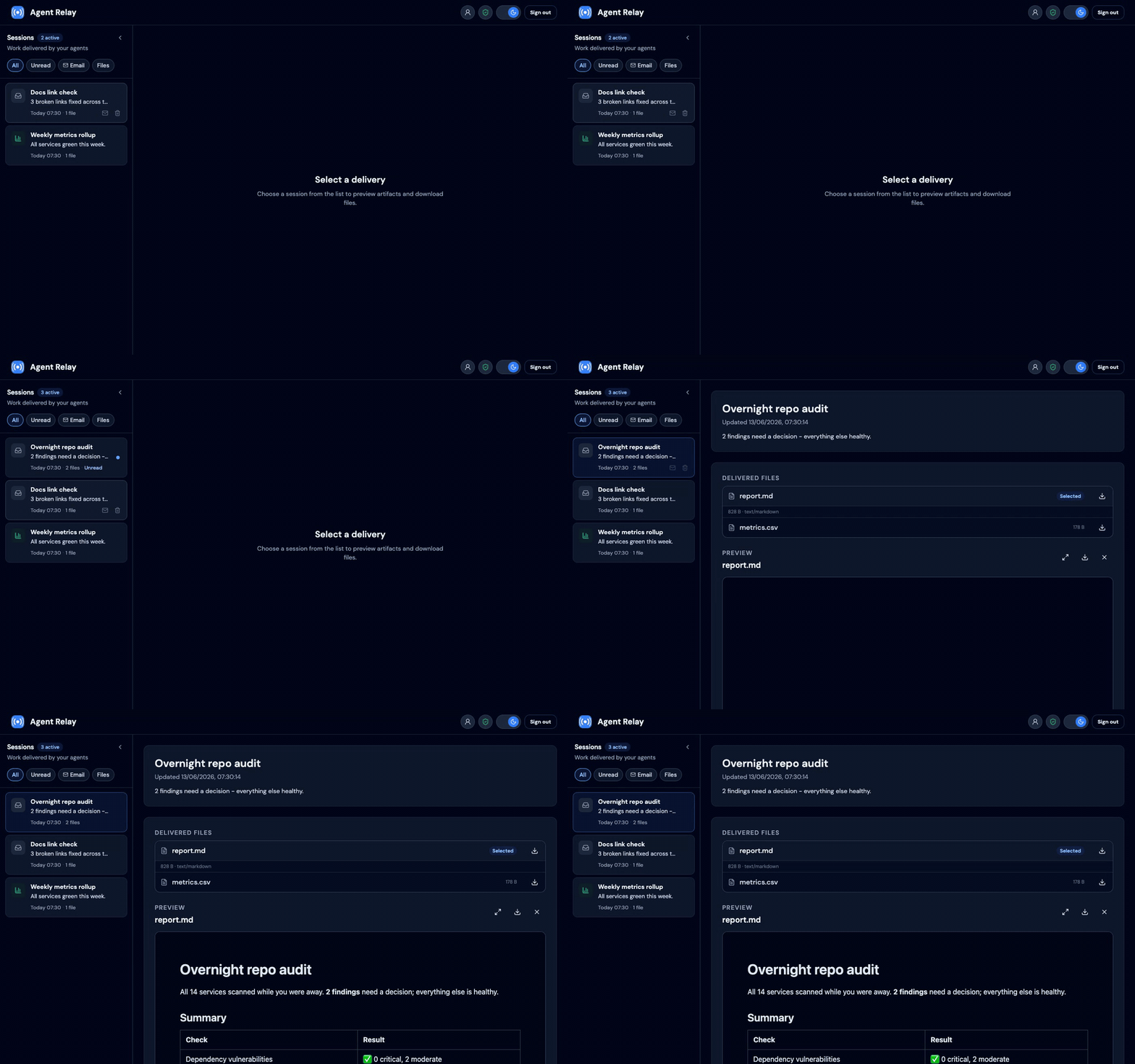
An optional Email Review Relay plugin adds a human-in-the-loop outbound email path: agents submit
encrypted drafts, you preview them in the same inbox, then approve or reject before anything
is sent. It is enabled on arelay.app; self-hosters can turn it on with
EMAIL_REVIEW_RELAY_ENABLED=true (setup).
Two ways to use it:
- arelay.app — hosted service; sign up and connect your agents (no deployment).
- Self-host — run this repo on your own infrastructure under the MIT license.
Contents
Using arelay.app
Self-hosting
Reference
Using arelay.app
The hosted service at arelay.app handles deployment, database, storage, backups, TLS, and updates. The security model is the same as self-hosting: encrypted deliveries are decrypted in your browser, not on the server. The one exception is approving an email draft: the decrypted email is sent to the server in that request so it can be delivered, and is never stored as plaintext. Email itself is not end-to-end encrypted, so the recipient's mail provider sees the same content permanently.
Get started
- Open arelay.app and create an account with a passkey.
- Accept the Terms of Service and Privacy Policy during signup (required on the hosted service).
- Complete Set up encryption on first portal visit (passkey + recovery key).
- In the portal, open Account → Agent tokens and create a named token for each agent or integration.
- Copy the token once — it is shown only at creation time.
- Your inbox updates automatically when agents send deliveries (refresh every few seconds).
Sign-in uses passkeys (WebAuthn), not passwords or social login. No Google, Apple, or Microsoft account is required. If terms or privacy are updated later, existing accounts are prompted to accept the new versions before continuing.
Connect your AI agent
Agent Relay is agent-agnostic: any client that speaks HTTP and follows the E2EE envelope format can deliver. Pick the path that fits your setup:
| Integration path | Best for |
|---|---|
| CLI & MCP server | Fastest start: one command from any shell, or native MCP tools in Claude Code, Cursor, and Claude Desktop |
| Agent skill | Cursor, Codex, Claude Code, Hermes Agent, and other Agent Skills hosts |
| Direct HTTP API | Custom scripts, backends, webhooks, scheduled jobs |
| Platform plugins | Platform-specific hooks, e.g. Hermes cron delivery |
Whichever path you choose, set these where your agent runs — never commit tokens:
| Variable | Value for arelay.app |
|---|---|
ARELAY_URL | https://arelay.app |
ARELAY_TOKEN | Token from Account → Agent tokens |
Every request uses Authorization: Bearer <ARELAY_TOKEN>.
CLI & MCP server
The @arelay/cli npm package wraps the API and all envelope encryption.
Deliver from any shell:
Or register it as an MCP server so agents can deliver work natively
(deliver_to_inbox, list_inbox_sessions, submit_email_draft tools):
npx -y @arelay/cli check verifies the token and encryption setup. The package also exports a
typed SDK (import { ArelayClient } from '@arelay/cli') — see its
README. Self-hosters point it at their deployment with
ARELAY_URL.
Agent skill
Install the agent-relay skill (requires
portal E2EE setup):
Hermes Agent:
Direct HTTP API
Anything that can POST JSON can deliver: fetch the public key from
GET /api/agent/e2ee/config, encrypt locally, create a session, and upload artifacts. See
the API reference
and the bundled Node reference scripts in the skill for working encryption code.
Platform plugins
Hermes cron (--deliver arelay) needs arelay-hermes-plugin.
Cron runs in the gateway, not the interactive CLI — put credentials in
~/.hermes/.env (including AGENT_RELAY_HOME_CHANNEL=https://arelay.app), install the
plugin, then restart the gateway:
Encryption (required)
All agent deliveries must be end-to-end encrypted. Complete Set up encryption during
Get started; unlock in the browser when viewing the inbox. Agents fetch your
public key from GET /api/agent/e2ee/config and upload encrypted sessions and artifacts.
Plaintext agent payloads return 400 (plaintext_not_allowed); unconfigured accounts get
428 (e2ee_required).
Email Review Relay
On arelay.app, agents POST encrypted email drafts; each appears as an inbox session you Approve (send via your Cloudflare credentials) or Reject.
- Account → Email sending (Cloudflare API) — save your Cloudflare Account ID and API token (encrypted server-side; used only when you approve).
- Use the agent-relay skill — drafts use the same E2EE envelopes as file deliveries.
API details and self-host setup: Plugins.
Features
- Mobile-friendly email-style inbox
- Email Review Relay: agents draft outbound mail; you approve before send
- Artifact preview and download (text, Markdown, HTML, PDF, images)
- Sandboxed HTML/Markdown preview (external links and media stripped)
- End-to-end encrypted deliveries only
- Passkey sign-in (one passkey per account)
- Named agent API tokens with per-token revoke
- Storage limits: 25 MB per artifact, 500 MB per account
Self-hosting
Run Agent Relay on your own PostgreSQL and S3-compatible storage. Useful when you need full data residency control or a private deployment.
Development setup
Open http://127.0.0.1:5173 and create an account with a passkey. Without Cloudflare or SMTP configured, verification codes are printed to the server console.
Database schema changes are managed with Drizzle migrations. Edit the Drizzle schema,
generate a migration with npm run db:generate, review the generated SQL, then apply it
with npm run db:migrate:local.
Run unit tests:
To test migrations against a disposable empty database, set TEST_DATABASE_URL and run:
Related MCP Servers
Reviews
No reviews yet — be the first to share how this listing worked for you.
Frequently Asked Questions about Arelay
AllMCPs Directory Badge
Showcase your server listing on GitHub or your project documentation. Embed this dynamic SVG badge to highlight official listing status and live engagement.
Badge Style:
Live Dynamic SVG Preview
Markdown (GitHub README)
[](https://allmcps.com/mcp/arelay)HTML Embed
<a href="https://allmcps.com/mcp/arelay"><img src="https://allmcps.com/api/badge/arelay?style=directory" alt="Arelay on AllMCPs" /></a>Technical Specs & Signals
CategoryCommunication
39Quality signal: Fair · 39/100How this signal is calculated ▾
Server availabilityNot measured
Not scored for repo-hosted servers — we can't reach the running server, only its GitHub page. Hosted MCP endpoints are health-checked live.
Verified ownership10/20
Documentation & tools16/30
Adoption & activity3/15
Community engagement0/10
A guidance signal from public completeness & health data — not a user rating. New listings start lower and rise as they add docs, get verified, and grow adoption. Signals we can't observe for a listing are skipped, not counted against it.
Own this project?
This directory is pre-filled from public sources. Claim via GitHub README, site badge, or DNS TXT to unlock edit access and the Official badge — proof is checked automatically, then reviewed by our team.
Free dofollow backlink: add your website and place the AllMCPs badge on it — no claim needed. We detect it automatically and keep it verified as long as the badge stays live.
Claim & get free dofollowShare & Embed
Add our SVG badge (dark/light directory styles) or embeddable widget to your site.