Agent Spreadsheet MCP README
The full upstream README, mirrored here for reference. Install config, tool schemas, adoption signals, and an original overview live on the Agent Spreadsheet MCP listing page.
agent-spreadsheet




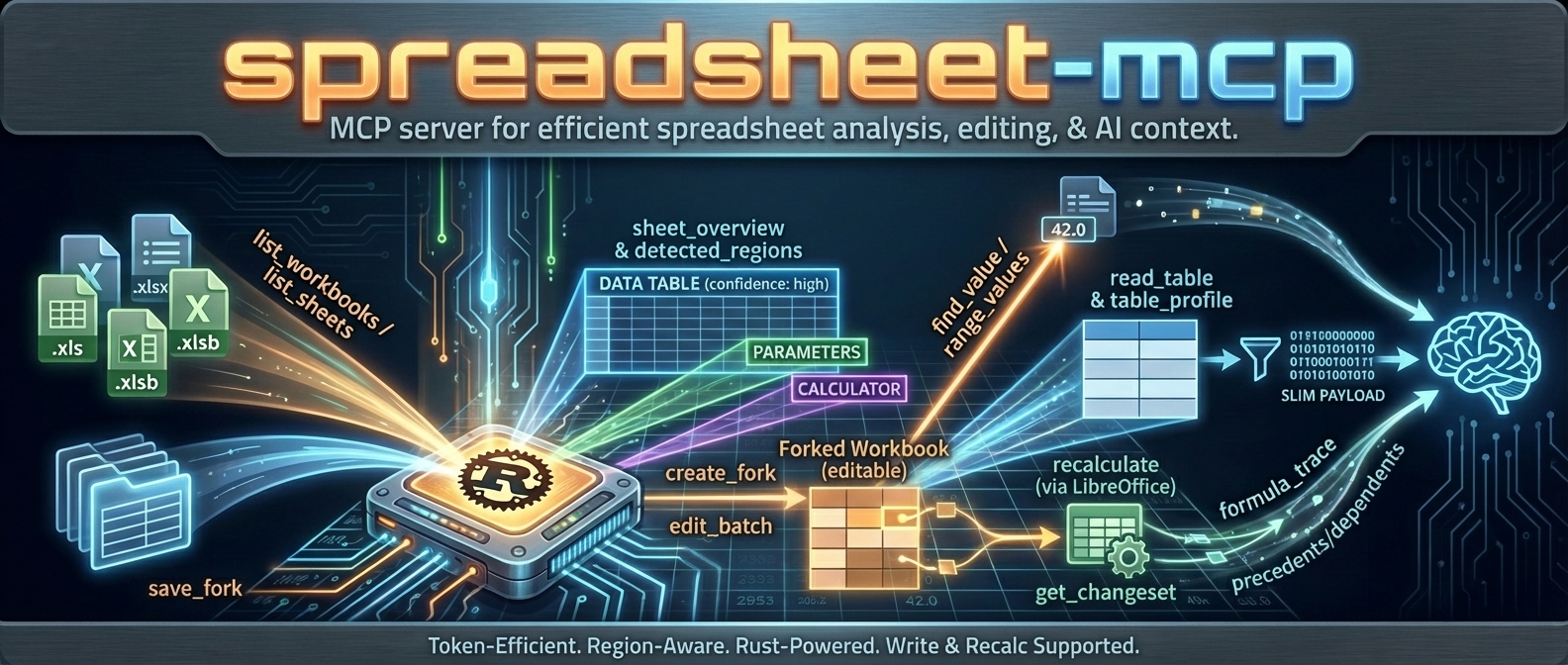
agent-spreadsheet is the tool interaction service for agent-based spreadsheet usage.
It gives agents a safe, inspectable, token-efficient way to read, analyze, mutate, verify, and operationalize Excel workbooks without falling back to brittle UI automation.
If you want an agent to work with spreadsheets like a real system instead of a screenshot puppet, this is the stack.
What this project is
agent-spreadsheet ships a unified spreadsheet interaction layer across three surfaces:
| Surface | Binary / Package | Mode | Best for |
|---|---|---|---|
| CLI | agent-spreadsheet / asp | Stateless | One-shot reads, safe edits, pipelines, CI, agent tool calls |
| MCP server | agent-spreadsheet-mcp | Stateful | Multi-turn agent sessions, workbook caching, fork/recalc workflows |
| TypeScript SDK | agent-spreadsheet-sdk | Library | App integrations — drives the server's canonical /v1 route, or runs fully in-process via the embedded WASM engine (no server required) |
The WASM build (agent-spreadsheet-wasm) is the SDK's local runtime, not a separate product surface: JS and TypeScript code targets one object model and the execution substrate (server vs embedded engine) is a configuration choice.
Supported workbook modes:
.xlsx/.xlsm— read + write.xls/.xlsb— discovery/read-oriented workflows only
Powered by Formualizer
Every computed value in this stack comes from Formualizer — a permissively licensed (MIT/Apache-2.0) spreadsheet engine written in Rust: formula parsing, dependency-graph recalculation, 400+ Excel functions, dynamic arrays, and deterministic evaluation built for agents. No Excel COM, no headless LibreOffice.
That native engine is why this project can offer what most spreadsheet tooling for agents cannot: recalculate the actual workbook, trace which cells changed and why, and prove it — not just read cached values or push blind edits.
Embedding spreadsheet logic in your own product rather than driving workbooks as an agent? Use Formualizer directly (Rust, Python, JS/WASM).
Why agents use agent-spreadsheet
Built for tool use, not just humans
- deterministic JSON contracts
- schema and example discovery from the CLI itself
- explicit pagination and compact output modes
- machine-readable warnings and error envelopes
Safe mutation, not blind mutation
- dry-run first workflows
- stateless output modes and overwrite safety
- event-sourced session editing
- verification surfaces for proving downstream outcomes
- structural impact analysis before risky workbook changes
Spreadsheet-aware, not generic file editing
- region detection
- table and footer-aware append helpers
- template row / row band cloning
- formula-specific replace and diagnostics
- named range CRUD
- recalculation + diff + proof flows
Good agent ergonomics
- nested command groups with legacy alias compatibility
- token-efficient reads
- exact-cell inspection and layout inspection
- workflow helpers for the repetitive parts agents usually get wrong
What is new / what makes this stack different
The current surface is much stronger than a plain “read some cells” tool. Major capabilities now include:
aspas the primary CLI withagent-spreadsheetpreserved as a compatibility alias- grouped verification via
asp verify proofandasp verify diff - preview-first workflow helpers for:
write appendwrite clone-template-rowwrite clone-row-band
- formula-safe batch workflows with parse-policy diagnostics
- cell/layout/export/import inspection surfaces
- named range management (
write name define|update|delete) - formula-only replacement (
write formulas replace) - event-sourced session editing with log, branch, undo/redo, fork, apply, and materialize
- SheetPort manifest lifecycle + execution for contract-driven spreadsheet automation
Install
Shell installer
The installer downloads a prebuilt CLI to ~/.local/bin and creates the asp command. Pin a release with ASP_VERSION=0.15.0, set ASP_INSTALL_DIR to choose another destination, or pass --mcp to install the MCP server too:
npm
This installs both asp (the primary command) and agent-spreadsheet (the compatibility alias) from a prebuilt native binary. No Rust toolchain is required.
cargo-binstall
This installs the prebuilt CLI in seconds.
Cargo
This builds the CLI from source. Formualizer (the native Rust recalc engine) is included by default.
mise
MCP server
Docker
JavaScript SDK
Prebuilt binaries
Download raw binaries and archives from GitHub Releases.
Published native assets include:
- Linux x86_64
- Linux arm64
- macOS x86_64
- macOS arm64
- Windows x86_64
Start here: the core workflows
1) Orient the workbook before reading cells
2) Inspect exactly what an agent needs
3) Do a safe stateless edit → recalc → proof → diff loop
A representative label-mode lookup:
4) Preview structural risk before mutating the workbook
This is intentionally read-only. It surfaces shifted spans, absolute-reference warnings, token counts, and optional before/after formula samples.
5) Use workflow helpers instead of reinventing row logic
6) Use a stateful session when the edit story gets complex
And when you need proper history and branching:
7) Turn workbook interfaces into contracts with SheetPort
CLI overview
The primary CLI is asp.
agent-spreadsheet remains available as a compatibility alias, so both of these are valid:
Preferred command groups
asp read ...asp analyze ...asp write ...asp workbook ...asp verify ...asp session ...asp sheetport ...
Legacy aliases
Legacy flat commands are still normalized to the new nested surface where practical. That makes migration easier for older prompts, docs, and automation.
Discoverability built into the CLI
When an agent is unsure of payload shape, it can ask the tool directly:
Canonical machine calls use the same registry and dispatcher as other surfaces. asp schema <canonical-op> and asp example <canonical-op> project the native adapter contract: resource_id and, for verification, baseline_resource_id are omitted from required JSON because --bind and --baseline inject ephemeral resources. The host-independent asp registry --all remains unchanged.
--bind reads the current workbook, while --baseline supplies the second workbook only for verify_workbook. Canonical mutable CLI calls require exactly one persistence target: --output <path> writes a new file or --in-place atomically replaces the bound file; pure preview persists nothing and accepts neither. Durable fork, checkpoint, stage, and history operations are intentionally absent from stateless CLI discovery. This is a core design principle: the surface should explain itself to the agent.
Command families
read — extraction and inspection
| Command | Purpose |
|---|---|
asp read sheets <file> | List sheets with summary metadata |
asp read overview <file> <sheet> | Detect regions, headers, and orientation |
asp read values <file> <sheet> <range> [range...] | Pull raw values for exact A1 ranges |
asp read export <file> <sheet> <range> | Export a bounded range to csv or grid json |
asp read cells <file> <sheet> <target> [target...] | Inspect exact cells/ranges with value/formula/cached/style snapshots |
asp read page <file> <sheet> ... | Deterministic sheet paging with next_start_row |
asp read table <file> ... | Structured table/region read with deterministic next_offset |
asp read names <file> | Named ranges, named formulas, and table items |
asp read workbook <file> | Workbook-level metadata |
asp read layout <file> <sheet> | Layout-aware rendering with widths, merges, borders, and optional ascii output |
Why these matter for agents
Agents rarely need “the whole spreadsheet.” They need:
- the right region
- the right page
- the right cells
- just enough layout to understand intent
That is why the read surface combines region detection, structured reads, detail inspection, and explicit continuation.
analyze — search, diagnostics, and impact understanding
| Command | Purpose |
|---|---|
asp analyze find-value <file> <query> | Search by value or by label semantics |
asp analyze find-formula <file> <query> | Text search within formulas |
asp analyze formula-map <file> <sheet> | Summarize formulas by complexity/frequency |
asp analyze formula-trace <file> <sheet> <cell> <precedents|dependents> | Dependency tracing with continuation |
asp analyze scan-volatiles <file> | Find volatile formulas |
asp analyze sheet-statistics <file> <sheet> | Density and type statistics |
asp analyze table-profile <file> | Header/type/cardinality profiling |
asp analyze ref-impact <file> --ops @structure_ops.json | Preflight structural edit impact without mutation |
Why this matters
Headless spreadsheet automation wins when it can explain consequences, not just execute mutations. ref-impact, formula-trace, and grouped diagnostics are all part of that story.
write — safe mutations and workflow helpers
| Command | Purpose |
|---|---|
asp write cells <file> <sheet> ... | Direct shorthand cell edits |
asp write import <file> <sheet> ... | Import grid json or csv into a workbook range |
asp write append ... | Footer-aware row append into a region or table |
asp write clone-template-row ... | Clone one template row with preview-first planning |
asp write clone-row-band ... | Clone a multi-row template band repeatedly |
asp write formulas replace ... | Formula-only find/replace on a sheet/range |
| `asp write name define | update |
asp write batch transform ... | Stateless transform pipeline |
asp write batch style ... | Stateless style edits |
asp write batch formula-pattern ... | Autofill-like formula application |
asp write batch structure ... | Rows/cols/sheets/copy/move style mutations |
asp write batch column-size ... | Column width operations |
asp write batch sheet-layout ... | Freeze panes, zoom, page setup, print area |
asp write batch rules ... | Data validation + conditional formatting |
Safety model
Most mutating commands support a strict mode matrix:
--dry-run--in-place--output <PATH>
This matters for agents because it allows:
- dry-run planning
- non-destructive execution
- explicit overwrite control
Formula maintenance
Formula mutation is now a first-class surface:
Named range maintenance
workbook — file-level flows
| Command | Purpose |
|---|---|
asp workbook create <path> | Create a new workbook |
asp workbook copy <source> <dest> | Safe copy for edit workflows |
asp workbook recalculate <file> | Recalculate formulas via the configured backend |
verify — proof, not vibes
| Command | Purpose |
|---|---|
asp verify proof <baseline> <current> | Prove target deltas and isolate new/resolved/preexisting errors |
asp verify diff <original> <modified> | Summary-first grouped workbook diff with optional paged details |
Why verification matters
Most spreadsheet automation tools stop at “the edit applied.”
agent-spreadsheet goes further:
- did the target cells change the way we expected?
- did the workbook introduce new errors?
- which changes were direct edits vs recalculation fallout?
- what changed overall, grouped in a way an agent can reason about?
This verification layer is a big part of why this project is a serious agent substrate rather than a utility script.
session — event-sourced stateful editing
The session surface is for workflows that are too complex for a single stateless write.
What sessions give you
- persistent editing state
- staged dry-run operations
- compare-and-swap apply semantics
- logs and replayability
- branch/switch/fork flows
- undo / redo / checkout
- explicit materialization back to a workbook file
Canonical loop
History and branching
Use sessions when you want repeatability, auditability, and multi-step safety.
sheetport — spreadsheet interfaces as executable contracts
SheetPort is the workflow surface for turning workbook inputs/outputs into explicit machine contracts.
Manifest lifecycle
Bind-check + run
Use this when you want a workbook to behave less like an opaque file and more like a declared service interface.
Output contracts for agents
Canonical vs compact shapes
All commands default to JSON. Many also support:
Policy:
- canonical keeps the full stable schema
- compact removes wrapper noise where the contract allows it while preserving continuation fields and command-specific semantics
Shape policy:
- Canonical (default): preserve the full response schema.
- range-values: returns a stable
values: [...]envelope in both canonical and compact modes. - range-values default encoding: dense JSON (
dense.encoding = "dense_v1") withdictionary+ run-lengthrow_runs. - range-values
--include-formulas: includes sparse formula coordinates in dense mode (dense.formulas), or a matrix in explicitjsonformat. - read-table and sheet-page: compact preserves the active branch and continuation fields (
next_offset,next_start_row). - formula-trace compact: omits per-layer
highlightswhile preservinglayersandnext_cursor.
Deterministic pagination loops
sheet-page machine contract
- Inspect top-level
formatbefore reading payload fields. format=full: read top-levelrowsplus optionalheader_rowandnext_start_row.format=compact: readcompact.headers,compact.header_row,compact.rowsplus optionalnext_start_row.format=values_only: readvalues_only.rowsplus optionalnext_start_row.- Continuation is always driven by top-level
next_start_rowwhen present. - Global
--shape compactpreserves the activesheet-pagebranch; it does not flattensheet-pagepayloads.
Machine continuation example:
- Request page 1 without
--start-row. - If
next_start_rowis present, callsheet-pageagain with--start-row <next_start_row>. - Stop when
next_start_rowis omitted.
Self-describing payloads
When the agent is unsure what to send, ask for a schema or example:
Batch payload examples
All batch payloads use a top-level envelope object. Most commands require {"ops":[...]}; column-size-batch prefers {"sheet_name":"...","ops":[...]} and also accepts per-op sheet_name inside {"ops":[...]}.
transform-batch payloads (@transform_ops.json)
- Minimal:
{"ops":[{"kind":"fill_range","sheet_name":"Sheet1","target":{"kind":"range","range":"B2:B4"},"value":"0"}]} - Advanced:
{"ops":[{"kind":"replace_in_range","sheet_name":"Sheet1","target":{"kind":"region","region_id":1},"find":"N/A","replace":"","match_mode":"contains","case_sensitive":false,"include_formulas":true}]}
style-batch payloads (@style_ops.json)
- Minimal:
{"ops":[{"sheet_name":"Sheet1","target":{"kind":"range","range":"B2:B2"},"patch":{"font":{"bold":true}}}]} - Advanced:
{"ops":[{"sheet_name":"Sheet1","target":{"kind":"cells","cells":["B2","B3"]},"patch":{"number_format":"$#,##0.00","alignment":{"horizontal":"right"}},"op_mode":"merge"}]}
write batch formula-pattern payloads (@formula_ops.json)
- Minimal:
{"ops":[{"sheet_name":"Sheet1","target_range":"C2:C4","anchor_cell":"C2","base_formula":"B2*2"}]} - Advanced:
{"ops":[{"sheet_name":"Sheet1","target_range":"C2:E4","anchor_cell":"C2","base_formula":"B2*2","fill_direction":"both","relative_mode":"excel"}]} relative_modevalid values:excel,abs_cols,abs_rows
structure-batch payloads (@structure_ops.json)
- Minimal:
{"ops":[{"kind":"rename_sheet","old_name":"Summary","new_name":"Dashboard"}]} - Advanced:
{"ops":[{"kind":"copy_range","sheet_name":"Sheet1","dest_sheet_name":"Summary","src_range":"A1:C4","dest_anchor":"A1","include_styles":true,"include_formulas":true}]}
column-size-batch payloads (@column_size_ops.json)
- Minimal (preferred):
{"sheet_name":"Sheet1","ops":[{"range":"A:A","size":{"kind":"width","width_chars":12.0}}]} - Advanced (preferred):
{"sheet_name":"Sheet1","ops":[{"target":{"kind":"columns","range":"A:C"},"size":{"kind":"auto","min_width_chars":8.0,"max_width_chars":24.0}}]} - Also accepted (harmonized shape):
{"ops":[{"sheet_name":"Sheet1","range":"A:A","size":{"kind":"width","width_chars":12.0}}]}
sheet-layout-batch payloads (@layout_ops.json)
- Minimal:
{"ops":[{"kind":"freeze_panes","sheet_name":"Sheet1","freeze_rows":1,"freeze_cols":1}]} - Advanced:
{"ops":[{"kind":"set_page_setup","sheet_name":"Sheet1","orientation":"landscape","fit_to_width":1,"fit_to_height":1}]}
rules-batch payloads (@rules_ops.json)
- Minimal:
{"ops":[{"kind":"set_data_validation","sheet_name":"Sheet1","target_range":"B2:B4","validation":{"kind":"list","formula1":"\"A,B,C\""}}]} - Advanced:
{"ops":[{"kind":"set_conditional_format","sheet_name":"Sheet1","target_range":"C2:C10","rule":{"kind":"expression","formula":"C2>100"},"style":{"fill_color":"#FFF2CC","bold":true}}]}
write batch formula-pattern clears cached results for touched formula cells; run workbook recalculate to refresh computed values.
Formula parse policy
Formula-aware commands support:
fail— abortwarn— continue and attach grouped diagnosticsoff— skip silently
This lets agents choose between strictness and progress depending on the workflow.
CLI reference excerpts
read values <file> <sheet> <range> [range...] [--format dense\|json\|values\|csv] [--include-formulas]read cells <file> <sheet> <target> [target...] [--include-empty]read page <file> <sheet> --format <full|compact|values_only> [--start-row ROW] [--page-size N]workbook create <path> [--sheets Inputs,Calc,...] [--overwrite]analyze find-value <file> <query> [--sheet S] [--mode value\|label] [--label-direction right\|below\|any]write batch transform <file> --ops @ops.json (--dry-run\|--in-place\|--output PATH)
Formula write-path provenance (write_path_provenance)
Formula-writing commands emit optional provenance metadata for troubleshooting:
written_via: write path (edit,transform_batch,apply_formula_pattern)formula_targets: sheet/cell or sheet/range targets touched by formula writes
Debug compare workflow:
- Apply the same formula target via two paths.
- Compare
write_path_provenance.written_viaandformula_targetsin responses. - Use
inspect-cellsplusrecalculateto compare resulting behavior.
Financial presentation starter defaults
- Keep label columns (often column A) explicitly sized (roughly
24–36chars) to prevent clipping. - Apply consistent number formats by semantic type:
- Currency:
"$"#,##0.00_);[Red](https://github.com/PSU3D0/agent-spreadsheet/blob/HEAD/"$"#,##0.00) - Percent:
0.0% - Integer/count:
#,##0
- Currency:
- Apply
sheet-layout-batchfreeze panes after header layout stabilizes.
JSON output is compact by default; use --quiet to suppress warnings.
Global --output-format csv is currently unsupported; use command-specific CSV options like read table --table-format csv.
MCP server quickstart
The MCP surface is the stateful server version of agent-spreadsheet.
Use it when you want:
- workbook caching across calls
- fork lifecycle instead of stateless file replacement
- multi-turn agent workflows
- screenshots and richer server-side orchestration
Claude Code / Claude Desktop
Add to ~/.claude.json or project .mcp.json:
Docker
:latest is the read-only slim image (write/fork/recalc tools disabled); :latest-full includes the write tools and recalculation (LibreOffice-backed).
HTTP mode
The same process also serves a plain canonical HTTP route for programmatic clients that do not speak MCP:
| Route | Purpose |
|---|---|
POST /v1/op/{operation} | Run a canonical operation; the body is the canonical input object, the response is the canonical envelope |
GET /v1/operations | Runtime-filtered operation discovery for this process |
GET /v1/registry | Full canonical registry projection plus the error schema |
GET /v1/artifacts/{handle} | Bytes for an artifact:sha256:<hex> handle produced by screenshot_sheet |
Canonical errors return the canonical error envelope with the status mapped from the error code (400 invalid request, 404 unknown operation / resource, 409 revision conflict, 500 operation failed, 501 capability unavailable). Like /mcp, /v1 has no authentication; the loopback default bind is the security boundary. See docs/architecture/canonical-http-route.md.
Configuration
Every setting is available as a CLI flag (agent-spreadsheet-mcp --help), an environment variable, or a config file key (--config file.yaml). CLI takes precedence over the config file.
| Variable | Default | Description |
|---|---|---|
SPREADSHEET_MCP_WORKSPACE | . | Workspace root containing spreadsheet files |
SPREADSHEET_MCP_WORKBOOK | none | Lock the server to a single workbook path |
SPREADSHEET_MCP_EXTENSIONS | xlsx,xlsm,xls,xlsb | Comma-separated list of allowed workbook extensions |
SPREADSHEET_MCP_ENABLED_TOOLS | all tools | Restrict execution to the provided tool names (comma-separated) |
SPREADSHEET_MCP_TRANSPORT | http | Transport to expose (http or stdio) |
SPREADSHEET_MCP_HTTP_BIND | 127.0.0.1:8079 | HTTP bind address when using http transport |
SPREADSHEET_MCP_RECALC_ENABLED | false | Enable write/recalc tools (uses the native Formualizer backend by default) |
SPREADSHEET_MCP_RECALC_BACKEND | auto | Recalc backend preference: auto, formualizer, or libreoffice |
SPREADSHEET_MCP_MAX_CONCURRENT_RECALCS | 2 | Max concurrent LibreOffice instances |
SPREADSHEET_MCP_VBA_ENABLED | false | Enable VBA introspection tools (read-only) |
SPREADSHEET_MCP_ALLOW_OVERWRITE | false | Allow save_fork to overwrite original workbook files |
SPREADSHEET_MCP_CACHE_CAPACITY | 5 | Maximum number of workbooks kept in memory |
SPREADSHEET_MCP_TOOL_TIMEOUT_MS | 30000 | Tool request timeout in milliseconds |
SPREADSHEET_MCP_MAX_RESPONSE_BYTES | 1000000 | Max response size in bytes |
SPREADSHEET_MCP_MAX_PAYLOAD_BYTES | 65536 | Max tool payload size in bytes before truncation |
SPREADSHEET_MCP_MAX_CELLS | 10000 | Max cells per tool payload before truncation |
SPREADSHEET_MCP_MAX_ITEMS | 500 | Max items per tool payload before truncation |
SPREADSHEET_MCP_OUTPUT_PROFILE | token_dense | Output profile for tool responses (token_dense or verbose) |
SPREADSHEET_MCP_SLIM_SURFACE | true | Canonical-only router; set false to add legacy 0.13 tool names |
SPREADSHEET_MCP_SCREENSHOT_DIR | <workspace_root>/screenshots | Directory to write screenshot PNGs |
SPREADSHEET_MCP_PATH_MAP | none | Path mapping(s) INTERNAL=CLIENT to include client-visible paths in responses (comma-separated; useful for Docker volume mounts) |
Setting any of the timeout/limit variables (TOOL_TIMEOUT_MS, MAX_RESPONSE_BYTES, MAX_PAYLOAD_BYTES, MAX_CELLS, MAX_ITEMS) to 0 disables that limit.
MCP tool surface
The default MCP router is generated from the canonical operation registry. A write-capable baseline exposes 27 operations: 17 discovery/read/analysis operations and 10 write/lifecycle operations. Capability-backed deployments can add screenshot_sheet, sheetport_manifest, execute_sheetport, and inspect_vba, for up to 31. Nineteen canonical operations are read-only.
Each tool uses the registry descriptor's closed input schema and returns the canonical schema_version / operation / resource_id / revision_id / data envelope. A revision_id identifies the complete observable resource state, not only workbook cell-content bytes: recalculation, evaluation/provenance state, or lifecycle metadata can advance it without a content edit. Clients must use the revision from the latest response envelope for compare-and-swap, cursor, and freshness decisions rather than computing or retaining a content hash. Static MCP annotations report the descriptor's worst-case risk; descriptions identify action-specific risk. close_workbook is excluded because cache eviction is runtime administration.
For the complete operation list and contracts, see Canonical Operation Surface. To add the legacy 0.13 names for one compatibility window, set SPREADSHEET_MCP_SLIM_SURFACE=false; shared names use their legacy schema and envelope in compatibility mode and are registered only once.
JS SDK
agent-spreadsheet-sdk is the app-facing integration layer — the one surface JS/TS code should target.
It provides generated canonical convenience methods, legacy input aliases, unchanged canonical envelopes, and typed capability errors. The complete 31-operation manifest supplies schemas and methods, while availability always comes from the selected live backend.
Backends are a configuration choice, not separate APIs:
- MCP backend — connect to a running
agent-spreadsheet-mcpserver (shared state, forks, multi-client) - Embedded WASM backend — the engine runs in-process on workbook bytes, no server or filesystem required (browser, Node, serverless). The
agent-spreadsheet-wasmcrate in this repo is that backend's build artifact; it is an internal dependency of the SDK, not a package you consume directly.
Install:
Backend status: MCP backend is stable and negotiates operations through live tool discovery (or an explicit supportedOperations list); the embedded WASM backend derives support from its generated binding's operations() descriptors and is tested against the real wasm-bindgen Node package in CI.
Recalc backends
Formula recalculation is pluggable.
| Backend | How | Default | Best for |
|---|---|---|---|
| Formualizer | Native Rust engine | Yes | Fast default recalc with no external dependency |
| LibreOffice | Headless soffice | Docker :latest-full / explicit builds | Maximum compatibility and screenshot flows |
Feature notes:
recalc-formualizeris enabled by defaultrecalc-libreofficeis available for LibreOffice-backed builds- read and many write flows still work without recalc; only recalculate itself requires a backend
Docker images
Published at ghcr.io/psu3d0/agent-spreadsheet-mcp:
| Image | Size | Recalc | Best for |
|---|---|---|---|
latest | ~15 MB | No | Read-only analysis and lightweight agent deployments |
latest-full | ~800 MB | Yes | Write + recalc + screenshots |
Examples:
Workspace layout
Package roles
| Package | Role |
|---|---|
agent-spreadsheet | shared engine and CLI binaries |
agent-spreadsheet-mcp | stateful MCP transport + server surface |
agent-spreadsheet-wasm | WASM-facing byte/session wrapper |
agent-spreadsheet | npm wrapper for the CLI binary |
agent-spreadsheet-sdk | JS SDK for MCP/WASM-style integrations |
Architecture notes

Core ideas:
- one semantic core shared across CLI, MCP, session, and WASM-facing work
- region detection for structural awareness
- token-efficient defaults so agents do not over-read spreadsheets
- verification as a first-class feature rather than an afterthought
- workflow helpers for the common mutations that spreadsheet agents repeatedly struggle with
Token-efficient workflow reference:

Recommended progression:
- discover workbook + sheets
- detect regions / table-like structures
- inspect only the exact region or cells needed
- mutate with dry-run or session staging
- recalculate if needed
- verify proof and review grouped diffs
Development
Local MCP iteration:
Or point your MCP client directly at the local binary:
Read more
- CLI package README:
npm/agent-spreadsheet - Core crate README:
crates/agent-spreadsheet - MCP crate README:
crates/agent-spreadsheet-mcp - JS SDK README:
npm/agent-spreadsheet-sdk - WASM wrapper README:
crates/agent-spreadsheet-wasm - Packaging/versioning notes:
docs/PACKAGING.md - Heuristics and region detection:
docs/HEURISTICS.md - Recalc architecture:
docs/RECALC.md
License
Apache-2.0