Cut AI agent token costs 5-15x — routes only relevant code symbols instead of full files.
Quick Install
Automated & IDE SetupCopy the AI prompt to install this server into Claude Code, Cursor, or another agent — or use 1-click editor setup below.
Manual Client & Custom JSON ConfigExpand JSON ▾
Client Config & Setup
Choose your client or environment
Target File:
💡 Paste the JSON block into your client's configuration file under mcpServers, then restart the application.
Documentation Overview
Agent Booster
Cut AI coding agent token costs 5–15x by routing only the code that matters.
Instead of sending full source files to the model on every read, Agent Booster builds a symbol index of your codebase and returns only the functions and classes relevant to the current task.
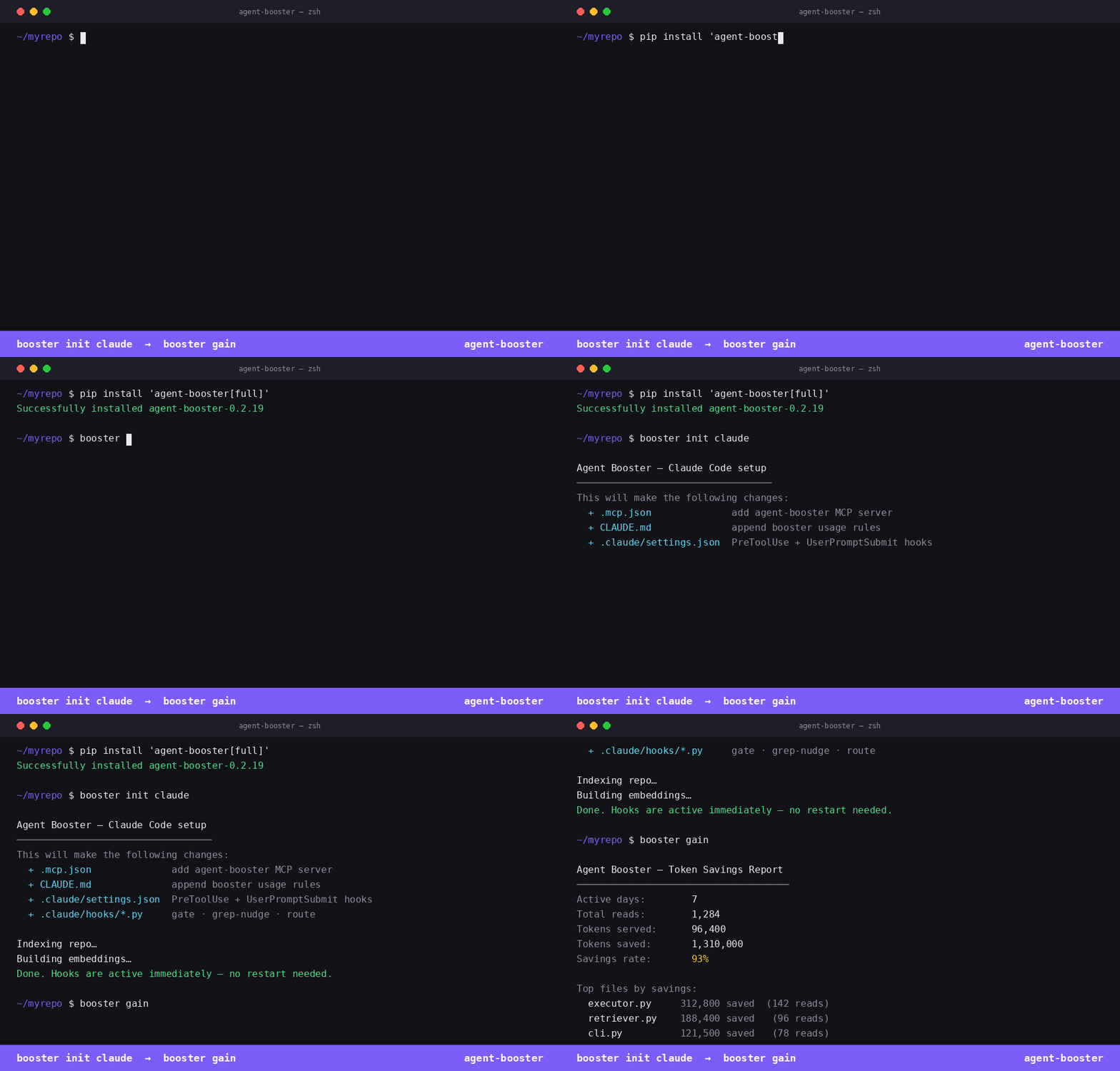
How it works
Five layers work together:
| Layer | What it does |
|---|---|
| Symbol index | tree-sitter parses every .py, .ts, .tsx, .js, .jsx file, extracts functions/classes into SQLite |
| Vector embeddings | sentence-transformers encodes each symbol for semantic search |
| Smart read | given a file + task, runs per-file vector search and returns only matching symbol line ranges |
| MCP server | exposes four tools over stdio — any MCP-compatible agent can call them |
| Platform init | one command writes the right config for Claude Code, Cursor, Windsurf, or Codex |
Installation
Requires Python 3.10+.
Quickstart
Step 1 — Wire up your AI tool
Each command shows exactly what files will change, asks for confirmation, then writes them. Fully reversible:
Example — wiring up OpenAI Codex (booster init codex → booster start → booster gain):
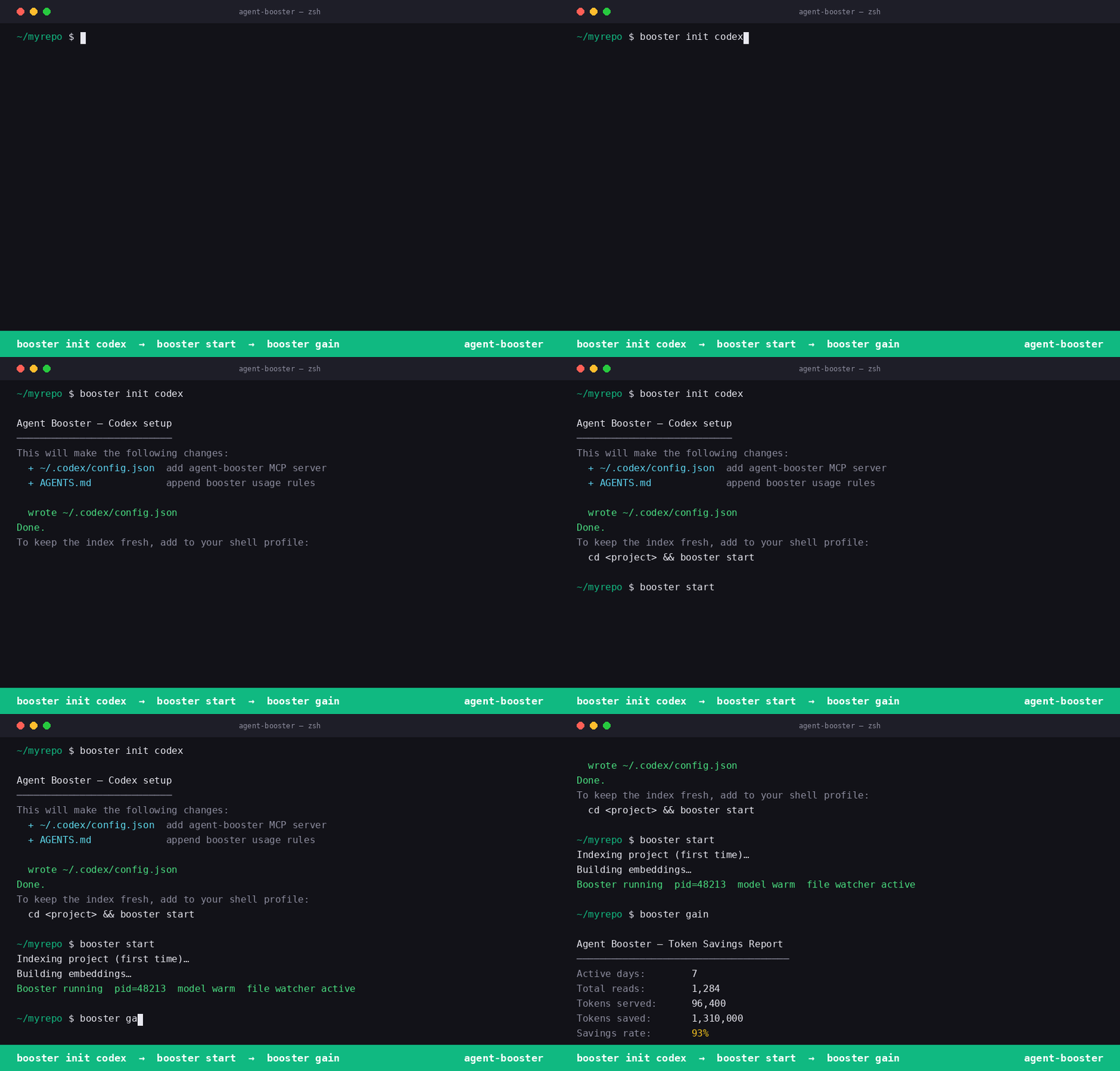
Run once per project, not once per session. The hooks live in
.claude/settings.jsonand.mcp.jsonat the project root. Every Claude Code session opened in this directory — any terminal window, same machine — picks them up automatically. No per-session setup needed.
Step 2 — Index your codebase
Run once from your project root. Re-run after large refactors.
The index is stored at .booster/ (gitignored). The index is shared across all sessions.
Step 3 — Restart your AI tool
The agent-booster MCP server is now available in every session. Claude Code (and other tools) will use smart_read and search_context automatically on indexed files.
Step 4 — Track savings
CLI reference
booster init <platform>
Writes the MCP server config and rules file for the target platform. Asks for confirmation before making any changes.
booster remove <platform>
Cleanly undoes everything init wrote. No residue.
booster index
Scans all .py, .ts, .tsx, .js, .jsx files from the current directory. Extracts functions, classes, methods, and interfaces into .booster/symbols.db. Skips node_modules, .venv, __pycache__, .git, .booster, .next, dist, build.
booster embed
Builds sentence-transformer vector embeddings for all indexed symbols. Required for semantic search_context calls. Uses all-MiniLM-L6-v2 (local, no data leaves your machine).
booster search "<query>"
Keyword search across all indexed symbols. Returns file path, line number, kind, name, and signature.
booster route "<task>"
Recommends haiku, sonnet, or opus based on task complexity — keyword signals, file count, and symbol count.
booster serve
Starts the MCP server over stdio. Called automatically by Claude Code, Cursor, Windsurf, and Codex when configured via booster init. You rarely need to run this directly.
booster gain
Shows token savings from past smart_read calls — total reads, tokens served vs. tokens saved, savings rate, and top files by savings.
MCP tools
Once booster serve is running, these four tools are available to the agent:
get_symbols(file)
Returns all indexed symbols for a file — name, kind, line range, and signature. No file read required.
search_context(task)
Semantic vector search across all symbols in the index. Returns top 10 matches by cosine similarity. Falls back to keyword search if embeddings haven't been built.
smart_read(file, task)
Runs per-file vector search and returns only the source lines for matching symbols, with a header showing name and line range. If no symbols match, returns an explicit message so the model knows to fall back to a full Read rather than silently receiving the whole file.
route_model(task, files?)
Recommends haiku, sonnet, or opus based on task complexity signals. If files is omitted, auto-detects via search_context.
What booster init claude writes
| File | Change |
|---|---|
.mcp.json | Adds agent-booster to mcpServers |
CLAUDE.md | Appends booster usage rules block (sentinel markers) |
.claude/settings.json | Wires PreToolUse (Read + Grep) and UserPromptSubmit hooks |
.claude/hooks/booster-gate.py | Blocks Read on indexed files — forces smart_read |
.claude/hooks/booster-grep-nudge.py | Nudges semantic Grep patterns toward search_context |
.claude/hooks/booster-route.py | Auto route_model — recommends haiku/sonnet/opus on every user turn |
booster remove claude removes all six, cleanly. No residue.
Where it fits
Agent Booster is the third layer in a three-layer token reduction stack:
Each layer is independent and addable separately.
Common questions
Does it work if I open a second terminal?
Yes. The hooks are wired into .claude/settings.json and .mcp.json in your project root — not inside a specific terminal session. Any new Claude Code window you open in this project picks them up automatically.
Do I need to run booster init again after restarting my machine?
No. booster init writes files to disk once. They persist across restarts and across sessions. The only time you re-run it is if you delete those files or switch to a new project.
Do teammates need to run booster init too?
Yes — once per developer, once per project. If you commit .mcp.json and .claude/settings.json to the repo, teammates get the hooks when they clone. They still need to run pip install agent-booster[embed] and booster index && booster embed locally, since the symbol index is gitignored.
Can I undo it completely?
Yes. booster remove claude removes all six files and cleans the settings entries. No residue.
Claude Desktop
Add to ~/Library/Application Support/Claude/claude_desktop_config.json (macOS) or %APPDATA%\Claude\claude_desktop_config.json (Windows):
Run booster index && booster embed once from your project root before starting Claude Desktop. No env vars required.
Project layout
Related MCP Servers
Reviews
No reviews yet — be the first to share how this listing worked for you.
Frequently Asked Questions about Agent Booster
AllMCPs Directory Badge
Showcase your server listing on GitHub or your project documentation. Embed this dynamic SVG badge to highlight official listing status and live engagement.
Badge Style:
Live Dynamic SVG Preview
Markdown (GitHub README)
[](https://allmcps.com/mcp/agent-booster)HTML Embed
<a href="https://allmcps.com/mcp/agent-booster"><img src="https://allmcps.com/api/badge/agent-booster?style=directory" alt="Agent Booster on AllMCPs" /></a>