MCP server for generating advanced mock 2D PNG assets for game prototypes.
Quick Install
Automated & IDE SetupCopy the AI prompt to install this server into Claude Code, Cursor, or another agent — or use 1-click editor setup below.
Not yet automatically verified
We haven't yet run this listing's install command through our automated sandbox check. This isn't a red flag — we're steadily working through the catalog.
Manual Client & Custom JSON ConfigExpand JSON ▾
Client Config & Setup
Choose your client or environment
Target File:
💡 Paste the JSON block into your client's configuration file under mcpServers, then restart the application.
Documentation Overview
2d-assets-mcp
Design your game's feel before you design its art.




Just like wireframing helps designers visualize user flows before start sketching, 2d-assets-mcp helps game developers visualize timing, frames-per-second (FPS), collision boundaries, and UI layouts before spending hours on final artwork.
This MCP (Model Context Protocol) server lets any AI assistant (Antigravity, Claude Code, Codex, Devin, or any of them as long as it's MCP-compatible) generate advanced 2D mock/placeholder assets in PNG format right into your project folder. Save time and prototype faster, nail your game's feel with 2d-assets-mcp, and then replace the mockups with original artwork when you are ready.
This MCP is engine-agnostic and it works flawlessly with any game engine that supports PNG import, like:
- Godot
- Unity
- Unreal Engine
- GameMaker
- Construct
- RPG Maker
- And many more!
Save time and create placeholder health bars, spritesheets, and whatever UI elements you can think of with full support for gradients, patterns, transparency, text rotation, and auto-scaling, all via chat and without ever opening an image editor. The idea behind it is to help you test and iterate how your game feels first by prototiping scale, jump arcs, and animation timing without waiting on final art assets, and also with zero friction: Need that placeholder button to be 20% larger? Just ask your AI client to regenerate it.
[!TIP] 2d-assets-mcp has AI-Friendly Metadata → meaning each generated PNG embeds rich JSON metadata (dimensions, color, shape, gradient properties, pattern details, text properties, stroke properties, description) directly in its EXIF data, so AI models without vision can still understand what an asset contains.
Generated Assets Examples
Here are some example assets generated by this MCP server:
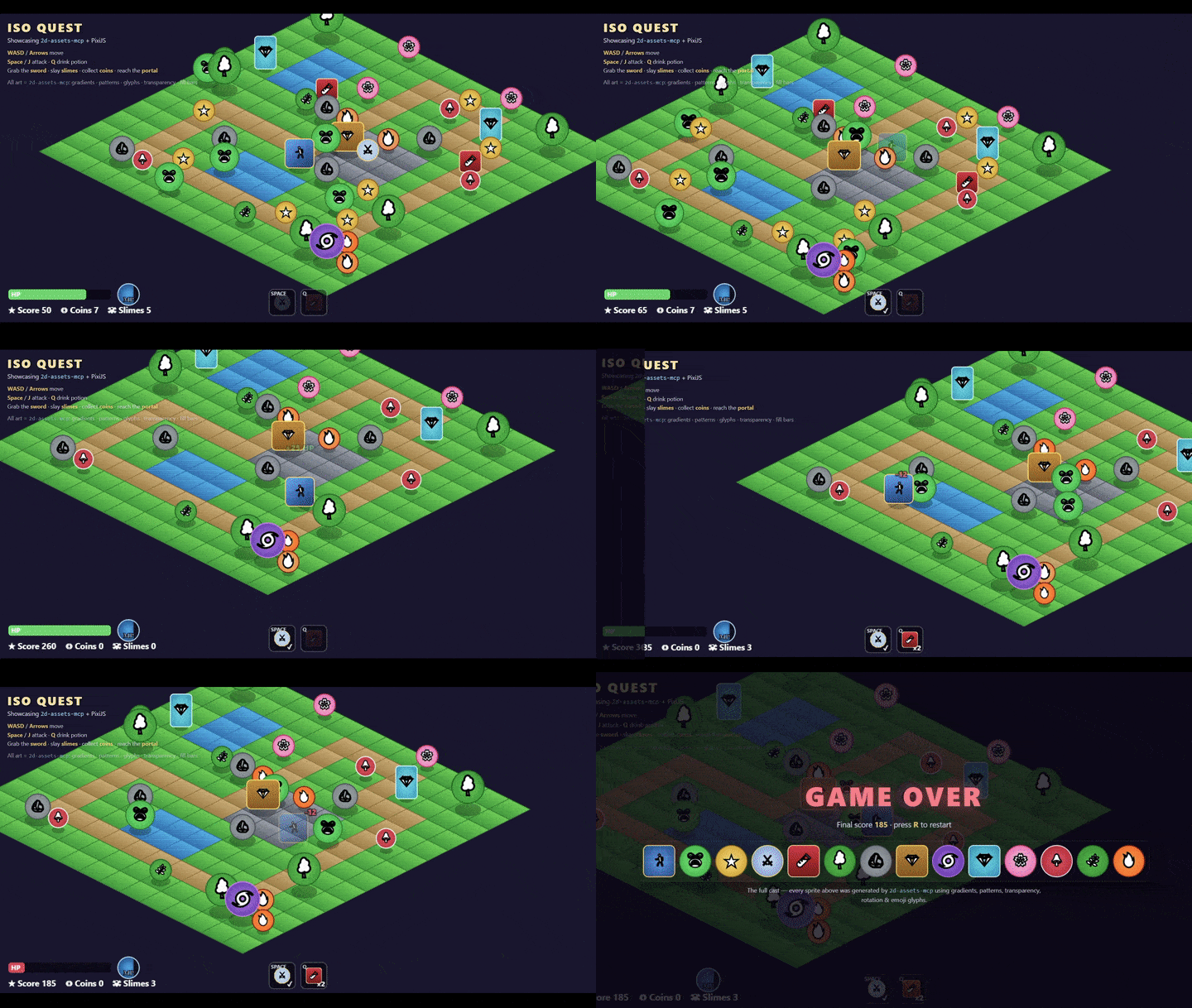

Character Sprites & Animations
Hero Idle Animation (8 frames, 512x64)

8-frame idle animation spritesheet with effect
UI Elements
Attack Button (128×48)

Button with red gradient, rounded corners, and "ATTACK" label
Health Bar (200×24)

Health bar at 75% fill with green color and dark gray track
Game Items
Gold Coin (32×32)

Circular coin with radial gradient, dot pattern overlay, and "COIN" label
Grass and water


Trees

Animation Spritesheets
Fire animation (4 frames, 192x48)

4-frame spritesheet
Security Considerations
Asset Content
- Generated assets are pure placeholder graphics and they do not contain malicious code.
- Embedded metadata is plain JSON and is not executable.
Because this MCP server writes files directly to your machine to save you time, please review these security best practices:
File System Access
- The server can write files to any path specified by the AI assistant.
- Recommendation: Configure your AI client to restrict access strictly to your game's project directories.
- Warning: Be cautious when asking the AI to generate assets outside your project directory.
Path Traversal
- This server validates paths, but you should always be aware of potential path traversal attempts when dealing with MCP servers, and review generated file paths before confirming operations.
Overall Best Practices
- Use absolute paths in configurations to prevent ambiguity.
- Restrict AI access to your game project directory only.
- Review generated assets before committing to version control.
- Keep your Node.js dependencies updated.
Core Features
- Instant asset generation: one tool call, one PNG, full visual configuration.
- Spritesheet & Batch mode: generate multiple frames or composite them into a single animation-strip spritesheet in one request.
- Rich visuals: support for solid fills, linear/radial gradients, stripe/dot/grid pattern overlays, rounded corners, circles, opacity, and stroke control.
- Dynamic UI Elements: create partially filled progress/health bars using
fillPercentandtrackColorfor partially-filled assets. - Auto-scaling labels: text automatically scales to fit the asset, or you can override it with explicit
fontSizeif needed. - Non-vision AI friendly: embedded JSON metadata readable back via
read_image_metadata, without loading image pixels, ideal for non-vision AI workflows. - Smart naming: output files are automatically named with their dimensions (e.g.
player_idle_128x128.png) to help models with no vision know the dimensions when using the asset.
Tools Reference
This MCP server equips your AI with 3 tools to generate and read 2D asset metadata.
1. generate_mock_asset
Generates a single PNG asset and writes it to the disk. It supports gradients, patterns, transparency, text rotation, and embedded metadata.
Parameters (press to expand)
Required parameters
| Parameter | Type | Description |
|---|---|---|
filename | string | Output filename, e.g. player_idle.png |
directory | string | Absolute path to the output folder (created if missing) |
text | string | Label rendered on the asset |
color | string | Background hex color, e.g. #FF5733 |
Optional parameters: shape & size
| Parameter | Type | Default | Description |
|---|---|---|---|
width | number | 128 | Width in pixels |
height | number | 128 | Height in pixels |
shape | rectangle | rounded-rectangle | circle | rectangle | Geometric shape |
opacity | number 0–1 | 1.0 | Background opacity |
strokeColor | string | #000000 | Border hex color |
strokeWidth | number | 4 | Border width in px; 0 removes the border |
Optional parameters: fill & gradient
| Parameter | Type | Default | Description |
|---|---|---|---|
fillMode | solid | linear-gradient | radial-gradient | solid | Background fill type |
secondaryColor | string | auto-derived | Second gradient stop; auto-shaded from color if omitted |
gradientAngle | number | 45 | Angle in degrees for linear gradients (ignored for radial) |
Optional parameters: progress/health bar
| Parameter | Type | Default | Description |
|---|---|---|---|
fillPercent | number 0–100 | 100 | How much of the asset is filled (left to right) |
trackColor | string | — | Color of the unfilled portion; transparent if omitted |
Optional parameters: pattern overlay
| Parameter | Type | Default | Description |
|---|---|---|---|
pattern | none | stripes | dots | grid | none | Pattern overlay type |
patternColor | string | auto-derived | Pattern color; contrast-auto if omitted |
patternOpacity | number 0–1 | 0.18 | Pattern overlay opacity |
patternScale | number ≥2 | 16 | Pattern tile size in pixels |
Optional parameters: text
Related MCP Servers
Reviews
No reviews yet — be the first to share how this listing worked for you.
Frequently Asked Questions about 2D Assets MCP
AllMCPs Directory Badge
Showcase your server listing on GitHub or your project documentation. Embed this dynamic SVG badge to highlight official listing status and live engagement.
Badge Style:
Live Dynamic SVG Preview
Markdown (GitHub README)
[](https://allmcps.com/mcp/2d-assets-mcp)HTML Embed
<a href="https://allmcps.com/mcp/2d-assets-mcp"><img src="https://allmcps.com/api/badge/2d-assets-mcp?style=directory" alt="2D Assets MCP on AllMCPs" /></a>Technical Specs & Signals
CategoryDeveloper Tools
36Quality signal: Fair · 36/100How this signal is calculated ▾
Server availabilityNot measured
Not scored for repo-hosted servers — we can't reach the running server, only its GitHub page. Hosted MCP endpoints are health-checked live.
Verified ownership10/20
Documentation & tools15/30
Adoption & activity2/15
Community engagement0/10
A guidance signal from public completeness & health data — not a user rating. New listings start lower and rise as they add docs, get verified, and grow adoption. Signals we can't observe for a listing are skipped, not counted against it.
Own this project?
This directory is pre-filled from public sources. Claim via GitHub README, site badge, or DNS TXT to unlock edit access and the Official badge — proof is checked automatically, then reviewed by our team.
Free dofollow backlink: add your website and place the AllMCPs badge on it — no claim needed. We detect it automatically and keep it verified as long as the badge stays live.
Claim & get free dofollowShare & Embed
Add our SVG badge (dark/light directory styles) or embeddable widget to your site.