Zoteus
The everything Zotero MCP server — Web API v3 + local API, safe writes, citations, search.
Install Zoteus
Pick your client, then add it in one click or paste the config.
~/Library/Application Support/Claude/claude_desktop_config.json{
"mcpServers": {
"zoteus": {
"command": "npx",
"args": [
"-y",
"@oscardvs/zoteus"
]
}
}
}
Settings → Developer → Edit Config, merge this into mcpServers, then fully quit and reopen Claude Desktop.
Install not yet sandbox-tested— we haven't run this command through our automated sandbox yet. Not a red flag; we're working through the catalog.
Overview
Security & health
What it can reach and how reliably it runs — from our own checks, not the maintainer’s claims.
Recent health check succeeded.
Supply-chain signal
No high-severity advisories surfaced by our automated scan.
Scanned 12d ago via OSV.dev · @oscardvs/zoteus (npm)
Adoption & maintenance
Factual signals from GitHub, npm, and our automated checks — not a rating.
From the project README
Zoteus
A Zotero MCP server. Your whole library, inside Claude and ChatGPT.
Zoteus gives Claude Desktop, claude.ai, ChatGPT, Claude Code, Cursor and any other MCP client access to a Zotero library: search by keyword or by meaning, passages from your PDFs with page numbers, citations in any CSL style, adding items, and safe writes.




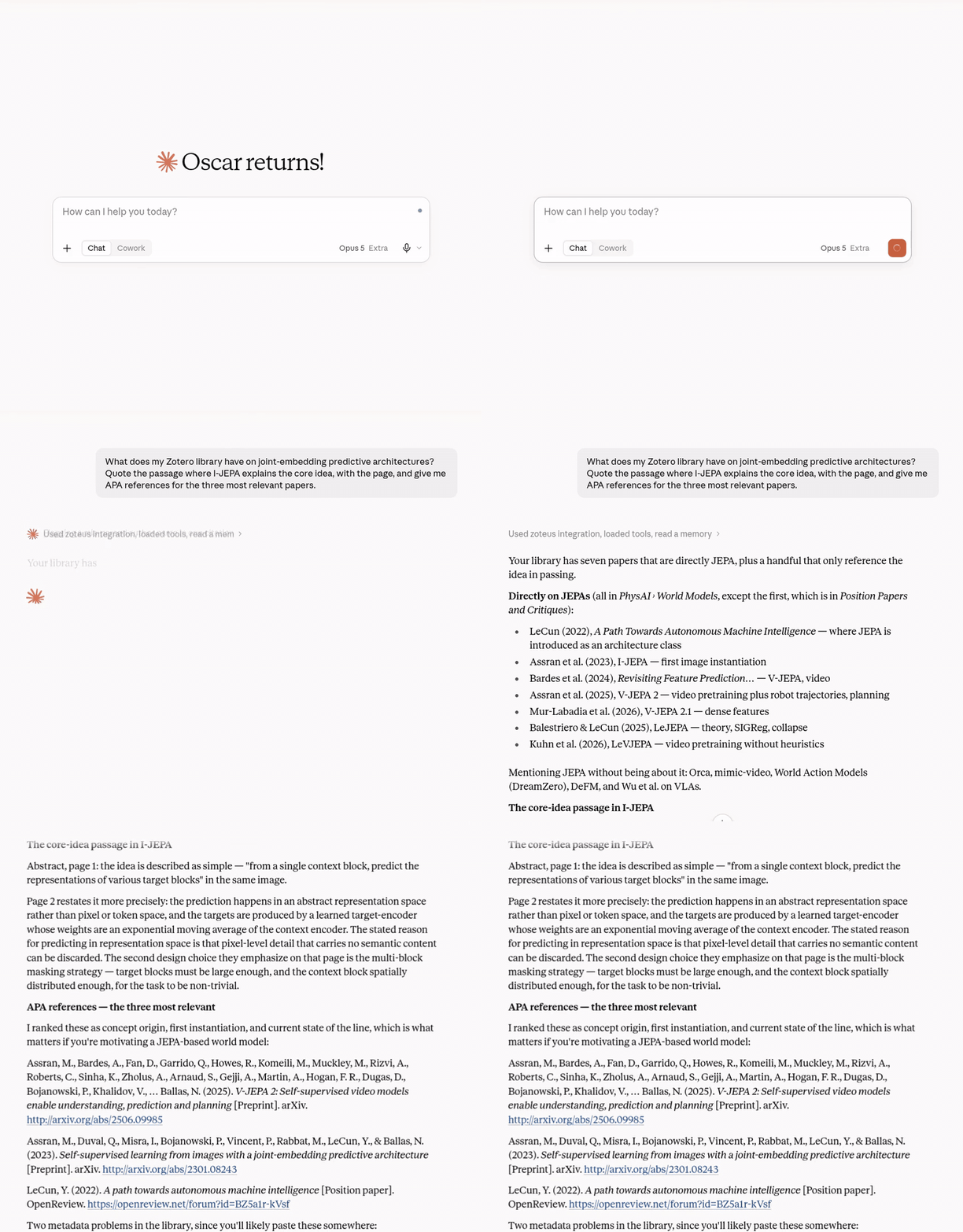
A real session, 6 September 2026, against the maintainer's own library. Tool calls are shown as a time-lapse. The full recording is on zoteus.com.
Install
For most clients there is nothing to download: the client fetches Zoteus with npx the first time it runs. New to MCP servers? Start with docs/getting-started.md.
| Client | How |
|---|---|
| Claude Desktop | Download the bundle for your system from the latest release, zoteus-macos.mcpb, zoteus-windows.mcpb or zoteus-linux.mcpb, and double-click it. This is the install with a settings screen (Settings → Extensions → Zoteus) and per-tool permissions. |
| Claude Code | claude mcp add --transport stdio zoteus -- npx -y @oscardvs/zoteus |
| Claude Code, as a plugin | /plugin marketplace add oscardvs/zoteus, then /plugin install zoteus@zoteus. The same server, plus four research skills that teach Claude to quote passages with pages, build evidence tables, cite, and tidy the library. Set the optional API key with /plugin → Zoteus → Configure options. Claude Desktop shows no settings for a plugin, so use the .mcpb there. See plugins/zoteus. |
| Cursor, VS Code, Zed, Codex, Gemini CLI, any MCP client | npx add-mcp @oscardvs/zoteus, or add npx -y @oscardvs/zoteus as a stdio server by hand. |
| claude.ai in the browser | Add a custom connector pointing at a hosted Zoteus or at your own remote instance. |
| ChatGPT (web) | Needs Developer mode on a paid ChatGPT plan (Settings → Security and login). Then Plugins → Create app, with the server URL of a hosted Zoteus (https://mcp.zoteus.com/mcp) or of your own remote instance, and OAuth as the authentication. ChatGPT only connects to remote servers, so the npx install does not apply. |
Then run the Zotero desktop app. Reads, and on Zotero 10+ writes to every library the app holds (your own and the group libraries synced into it), need no cloud key. Add a Zotero API key for sync, for group libraries the app does not hold, and for when the app is closed:
claude mcp add --transport stdio zoteus -e ZOTERO_API_KEY=xxxxx -- npx -y @oscardvs/zoteus
Get a key at zotero.org/settings/keys. In the desktop app, enable Settings → Advanced → "Allow other applications on this computer to communicate with Zotero". Step-by-step for each client, with screenshots: zoteus.com/docs/connect-claude-to-zotero.
Updating a desktop-extension install. A manually installed
.mcpb(or older.dxt) does not auto-update. Turn on Check for updates in the extension settings (or setZOTEUS_UPDATE_CHECK=true) and Zoteus asks GitHub once a day, then says so in-chat viazotero_whoamiwhen a newer version exists; download the new bundle for your system and reinstall. The check is off by default.npxinstalls always run the latest published version.
What it does
Zoteus exposes research tools, namespaced zotero_*, that search the library by keyword or by meaning, return passages from your PDFs with page locators, show PDF pages and figures as images, format bibliographies with citeproc-js in any CSL style, add items by DOI or arXiv id, and create, edit, tag and organize items with versioned writes and a reversible trash. When the Zotero desktop app is running, reads and writes go to it directly for every library it holds and need no cloud API key; the Zotero Web API v3 is the fallback for sync, group libraries the app does not hold, and for when the app is closed. Zoteus is written in TypeScript, runs on your machine, and is MIT licensed.
Features
Reviews
No reviews yet — be the first to share how it worked for you.
Frequently Asked Questions about Zoteus
Related MCP servers
Add a badge to your READMEShow it’s listed — live SVG, Markdown or HTML.
AllMCPs Directory Badge
Showcase your server listing on GitHub or your project documentation. Embed this dynamic SVG badge to highlight official listing status and live engagement.
[](https://allmcps.com/mcp/zoteus)<a href="https://allmcps.com/mcp/zoteus"><img src="https://allmcps.com/api/badge/zoteus?style=directory" alt="Zoteus on AllMCPs" /></a>