MCP server for Zooza — class scheduling, attendance, and booking for activity businesses.
Quick Install
Automated & IDE SetupCopy the AI prompt to install this server into Claude Code, Cursor, or another agent — or use 1-click editor setup below.
Manual Client & Custom JSON ConfigExpand JSON ▾
Client Config & Setup
Remote HTTPChoose your client or environment
Target File:
💡 Paste the JSON block into your client's configuration file under mcpServers, then restart the application.
Capabilities & Tool Schemas (34)
Inspect callable tools, capabilities, and parameters exposed to AI agents by Zooza MCP Server.
classes_add_courseCreate a new programme — the container that holds pricing, payment settings, and booking-form config. Only for a genuinely new offering; a new term or time slot is a class inside an existing programme
classes_preview_schedulePreview a recurring class schedule before committing
classes_preview_eventsPreview individual sessions across a date range
classes_commit_classCreate a class with a full recurring session schedule
classes_updateEdit a class — name, price, capacity, billing period, instructor, venue, or duration. Call once to preview, again with the token to apply
sessions_updateEdit specific sessions — reschedule a date/time, or change instructor, venue, or duration. Call once to preview, again with the token to apply. Can notify affected clients
Documentation Overview

Zooza MCP Server — AI-Powered Class Management for Activity Businesses
An open-source Model Context Protocol (MCP) server that connects Claude, ChatGPT, and other AI assistants directly to your Zooza account.
Natural language scheduling, attendance tracking, lead follow-up, and class management — no dashboard required.



Website · Documentation · Quickstart · Tools · Get a Zooza account
See it in action
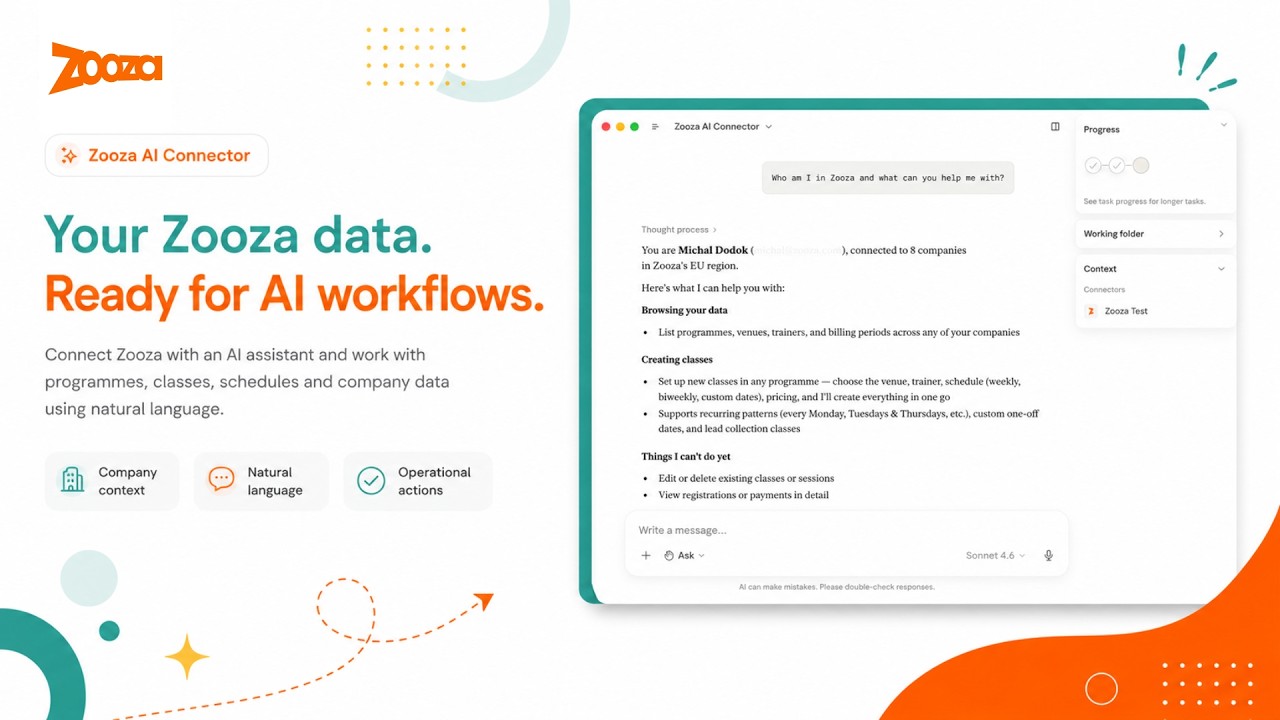
What this is
Zooza MCP Server is a free, open-source Model Context Protocol (MCP) integration for Zooza — the class management and scheduling software for dance schools, language academies, swim schools, music schools, STEAM programmes, sports clubs, and other activity businesses.
It lets activity managers, school administrators, and franchise operators manage schedules, track attendance, create classes, handle bookings and enquiries, set up instalment billing, and query their data through natural language conversation — using Claude, ChatGPT, or any MCP-compatible AI client — without opening the Zooza dashboard.
Zooza powers 500,000+ learners across Slovakia, the Czech Republic, Germany, the UK, and beyond — from single-location dance schools to international franchise networks. This MCP server brings the same platform to any AI client that speaks the Model Context Protocol.
New to Zooza? Create a free account at signup.zooza.online — it takes under 2 minutes.
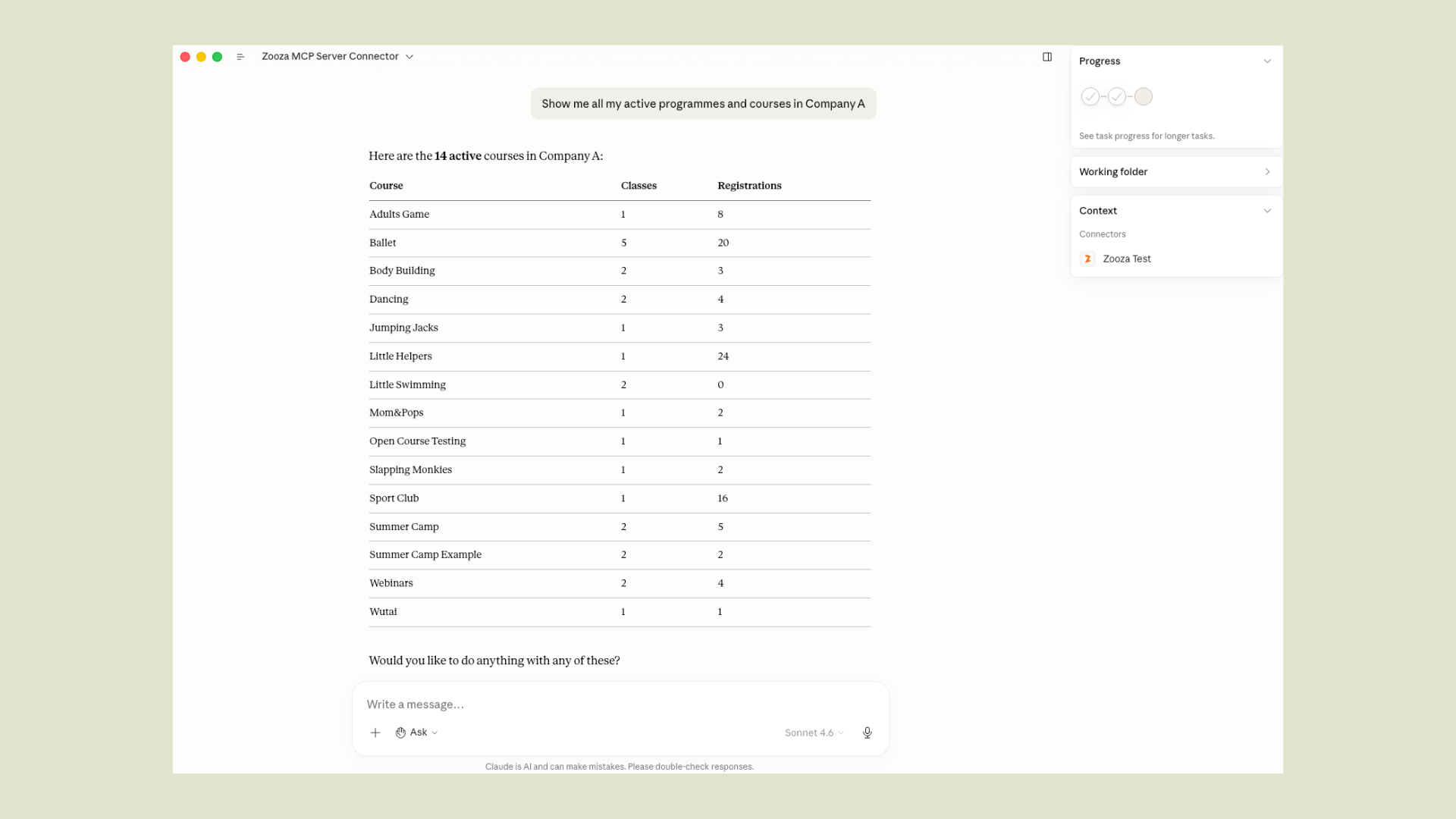
What you can do
Take attendance
Build a term from scratch
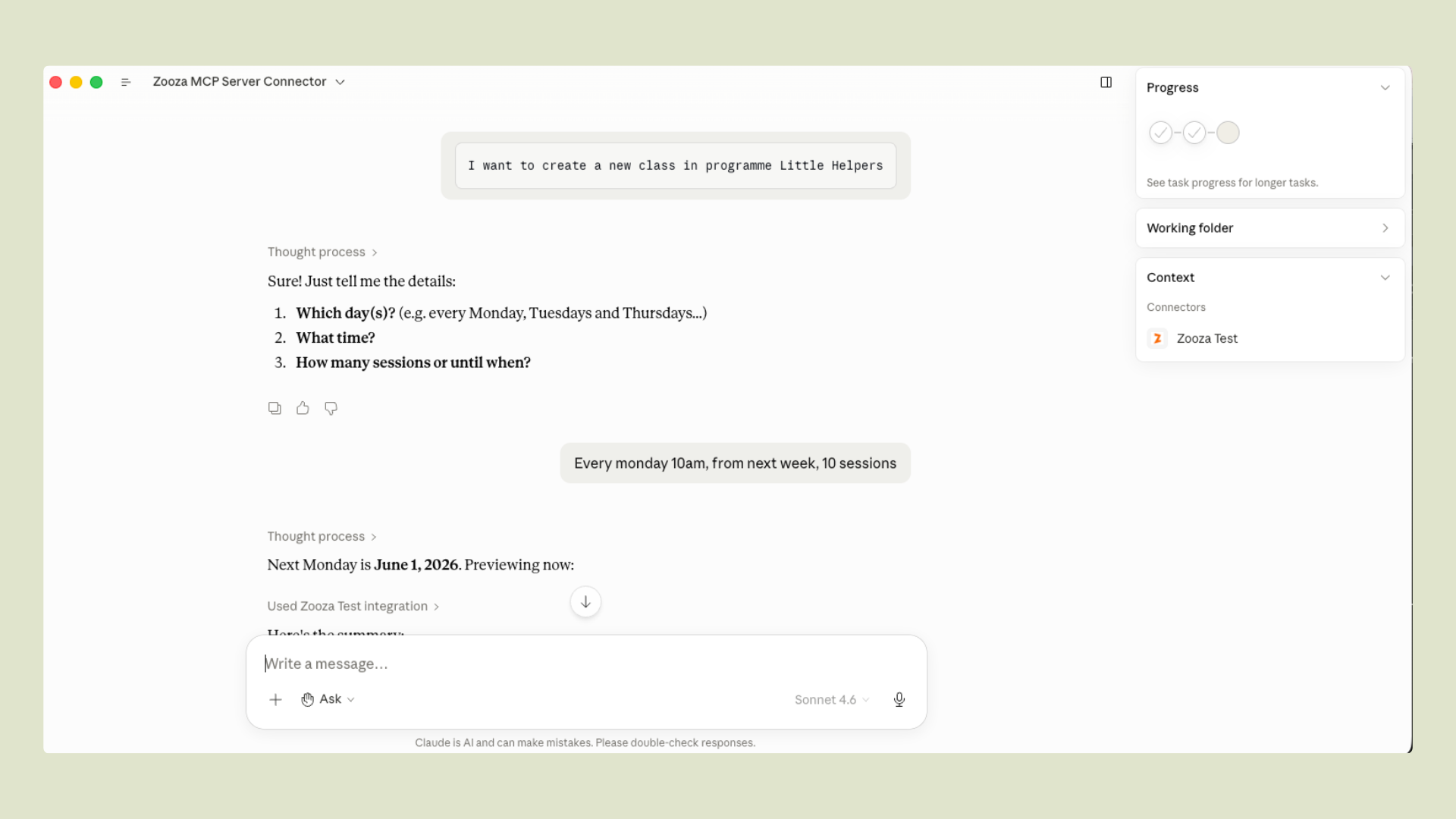
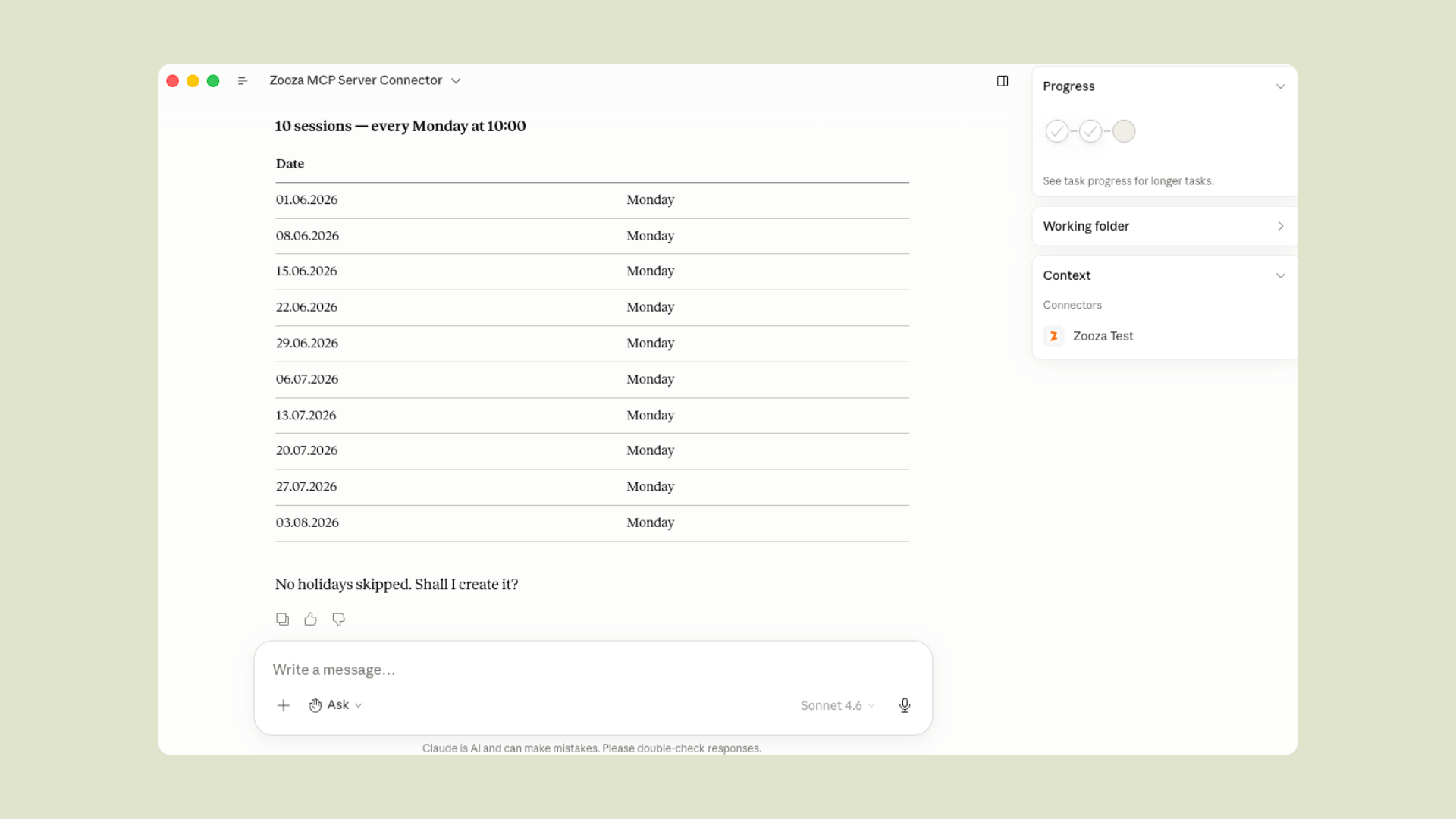
Turn a photo into a full term — no blank page
Building a season by hand means two days of typing into empty forms. Instead, hand the assistant whatever you already have — a whiteboard photo, a hand-drawn sketch, a spreadsheet screenshot — and it drafts the whole term for you to review before anything goes live.
You always see a preview table and calendar first, and nothing is created until you confirm — you bring the intent, you keep the final say. Read how one brand turned a single photo into 68 live classes across venues: From a photo to a full term of live classes.
Get instant answers
Manage bookings
Work an enquiry from first email to enrolled
An enquiry arrives, gets a reply, and then lives in someone's inbox until it goes cold. The assistant keeps the whole thread as records in Zooza instead — the enquiry becomes a trackable lead, the reply comes back where you can see it, and anything needing a human becomes a to-do with a name on it.
Nothing here emails the customer behind your back — capturing a lead sends nothing, and every outbound message still goes through the plan-then-confirm flow.
Set up instalment billing
Ask for any report — in plain language
No report modules, no spreadsheet formulas. Ask a business question the way you actually think about it, and the assistant pulls the real numbers and lays them out — shaped around your question, not a fixed dashboard.
Reporting only ever reads — it never touches bookings, classes, or payments, so you can explore freely. More on how brands use this: Custom reports, just by asking.
No clicking through menus. No switching tabs. No automation scripts. Just ask — Claude handles the lookups, rosters, previews, and confirmations.
Supported clients
| Client | How to connect |
|---|---|
| Claude Desktop | Native MCP over HTTPS |
| Claude Code | Plugin zip or manual .mcp.json |
| ChatGPT | OpenAI Actions — domain verified at mcp.zooza.app |
| Any MCP-compatible client | Streamable HTTP — https://mcp.zooza.app/mcp |
Connect in 2 minutes
Don't have a Zooza account yet? Sign up free at signup.zooza.online
Claude Desktop
Add this to your claude_desktop_config.json:
File location:
- macOS:
~/Library/Application Support/Claude/claude_desktop_config.json - Windows:
%APPDATA%\Claude\claude_desktop_config.json
Restart Claude Desktop. On first use, you'll be prompted to sign in to your Zooza account — no API keys, no extra setup, just your existing login.
Claude Code
Download the latest plugin from Releases (file named zooza-plugin-v*.zip) and run:
The plugin includes the MCP connection config, guided workflow skills, and automatic session context.
Note: Five of the 35 tools (
get_terminology,explain_data_model,comms_list_merge_vars,classes_list_schedule_patterns,negotiate_terminology) work without any Zooza account — useful for exploring how the data model works before connecting live data.
How it works
The MCP server is stateless and hosted by Zooza at mcp.zooza.app. You don't run anything locally. Every request is authenticated against your Zooza account — Claude can only see and change what you're already allowed to access in the dashboard.
Every write operation requires explicit confirmation before anything is committed — Claude shows you what it's about to create or change, and only proceeds when you confirm.
Regions: EU (SK/CZ/DE/RO/HU/IT/PL), UK, US, and Asia regions are all supported. Your account is automatically routed to the correct regional infrastructure.
Multi-location and franchise accounts: Claude will ask which location to operate on at the start of each session. You can switch mid-conversation — useful for comparing across sites or managing a network.
Languages & regions
Zooza MCP is designed for multilingual, multi-market operation. It understands regional terminology differences out of the box:
Related MCP Servers
Adoption & maintenance
Factual signals from GitHub, npm, and our automated checks — not a rating.
GitHub stars
6
Stargazers on the source repository.
Last commit
3d ago
Most recent push to the default branch.
Tools exposed
34
Callable tools this server registers over MCP.
Reviews
No reviews yet — be the first to share how this listing worked for you.
Frequently Asked Questions about Zooza MCP Server
AllMCPs Directory Badge
Showcase your server listing on GitHub or your project documentation. Embed this dynamic SVG badge to highlight official listing status and live engagement.
Badge Style:
Live Dynamic SVG Preview
Markdown (GitHub README)
[](https://allmcps.com/mcp/zooza-mcp-server)HTML Embed
<a href="https://allmcps.com/mcp/zooza-mcp-server"><img src="https://allmcps.com/api/badge/zooza-mcp-server?style=directory" alt="Zooza MCP Server on AllMCPs" /></a>Technical Specs & Signals
CategoryCommunication
13/13 checks healthy over the last 45d
53Quality signal: Good · 53/100How this signal is calculated ▾
Server availabilityNot measured
Not scored for repo-hosted servers — we can't reach the running server, only its GitHub page. Hosted MCP endpoints are health-checked live.
Verified ownership10/20
Documentation & tools25/30
Adoption & activity5/15
Community engagement0/10
A guidance signal from public completeness & health data — not a user rating. New listings start lower and rise as they add docs, get verified, and grow adoption. Signals we can't observe for a listing are skipped, not counted against it.
Own this project?
This directory is pre-filled from public sources. Claim via GitHub README, site badge, or DNS TXT to unlock edit access and the Official badge — proof is checked automatically, then reviewed by our team.
Free dofollow backlink: add your website and place the AllMCPs badge on it — no claim needed. We detect it automatically and keep it verified as long as the badge stays live.
Claim & get free dofollowShare & Embed
Add our SVG badge (dark/light directory styles) or embeddable widget to your site.