AllMCPs
BrowseBestCategoriesStackCompareToolsGuidesBlog
Log in Submit MCP

Stay in the loop

Get new MCP servers and top picks in your inbox.

AllMCPs

The open directory for discovering and installing Model Context Protocol servers.

AllMCPs on GitHub (opens in a new tab)
Launched onTiny Startupstinystartups.com
Explore
  • Browse servers
  • Best MCP servers
  • Categories
  • MCP clients
  • Agent prompts
  • Stack Builder
  • Compare servers
  • Random discovery New
  • Submit a server
  • Pricing & Boost Boost
Learn
  • Guides hub
  • What is MCP?
  • Install guide
  • Build an MCP server
  • Deploy an MCP server
  • Security guide
  • Troubleshooting
  • MCP for SEO & AEO
  • Protocol versioning
  • Blog & updates
Tools
  • All developer tools
  • Config generator
  • Config validator
  • Config auditor
  • MCP playground
  • Token calculator
  • OpenAPI โ†’ MCP
  • Badge generator
For agents
  • REST API docs
  • Trust & traffic Live
  • Remote MCP server SSE โ†— (opens in a new tab)
  • llms.txt โ†— (opens in a new tab)
  • Catalog JSON โ†— (opens in a new tab)
Company
  • About
  • Advertise Sponsor
  • Contact
  • GitHub โ†— (opens in a new tab)
  • Terms
  • Privacy
AllMCPs VerifiedAllMCPs VerifiedFeatured on Nick LaunchesFeatured on Nick LaunchesLaunch Llama NewsletterLaunch Llama NewsletterVerified DR - allmcps.comVerified DR - allmcps.comFeatured on SaaSGrowFeatured on SaaSGrowFeatured on Twelve ToolsFeatured on Twelve ToolsFeatured on Saaspa.geFeatured on Saaspa.geFeatured on Findly.toolsFeatured on Findly.toolsFeatured on Startup FameFeatured on Startup FameFeatured on LaunchKiwiFeatured on LaunchKiwiFeatured on ScrollLaunchFeatured on ScrollLaunchFeatured on DailyPingsFeatured on DailyPingsFazier badgeFazier badgeFeatured on NewTool.siteFeatured on NewTool.siteFeatured on saasfame.comFeatured on saasfame.comDR Checker - Domain RatingDR Checker - Domain RatingListed on Turbo0Listed on Turbo0Launched on LaunchBoard - Product Launch PlatformLaunched on LaunchBoard - Product Launch PlatformList on SimilarlabsList on Similarlabshttps://codetrendy.comhttps://codetrendy.comListed on DevTool.ioFeatured on BuildlistFeatured on BuildlistLaunched on Tiny StartupsFeatured on ShowMeBestAIFeatured on ShowMeBestAIFind us on LaunchZoneFind us on LaunchZoneAllMCPs VerifiedAllMCPs VerifiedFeatured on Nick LaunchesFeatured on Nick LaunchesLaunch Llama NewsletterLaunch Llama NewsletterVerified DR - allmcps.comVerified DR - allmcps.comFeatured on SaaSGrowFeatured on SaaSGrowFeatured on Twelve ToolsFeatured on Twelve ToolsFeatured on Saaspa.geFeatured on Saaspa.geFeatured on Findly.toolsFeatured on Findly.toolsFeatured on Startup FameFeatured on Startup FameFeatured on LaunchKiwiFeatured on LaunchKiwiFeatured on ScrollLaunchFeatured on ScrollLaunchFeatured on DailyPingsFeatured on DailyPingsFazier badgeFazier badgeFeatured on NewTool.siteFeatured on NewTool.siteFeatured on saasfame.comFeatured on saasfame.comDR Checker - Domain RatingDR Checker - Domain RatingListed on Turbo0Listed on Turbo0Launched on LaunchBoard - Product Launch PlatformLaunched on LaunchBoard - Product Launch PlatformList on SimilarlabsList on Similarlabshttps://codetrendy.comhttps://codetrendy.comListed on DevTool.ioFeatured on BuildlistFeatured on BuildlistLaunched on Tiny StartupsFeatured on ShowMeBestAIFeatured on ShowMeBestAIFind us on LaunchZoneFind us on LaunchZone
ยฉ 2026 Jackalope Digital LLC. All rights reserved.
  1. Home
  2. ๐Ÿ”Ž Search & Data Extraction
  3. MCP Zoomeye
MCP Zoomeye logo
Health: ActiveRecent health check succeeded.Last checked 9/9/2026, 11:31:42 AM

MCP Zoomeye

User RatingsBe the first to rate and review this MCP server!
View Repository82 GitHub StarsTotal stargazers on GitHub for the source repository (82 stars).Visit Website
zoomeyenetwork-searchcybersecurityasset-discovery

Search ZoomEye for network asset information using dorks and configurable query parameters.

Quick Install

Automated & IDE Setup

Copy the AI prompt to install this server into Claude Code, Cursor, or another agent โ€” or use 1-click editor setup below.

Add to CursorAdd to VS Code
Not yet automatically verified

We haven't yet run this listing's install command through our automated sandbox check. This isn't a red flag โ€” we're steadily working through the catalog.

Manual Client & Custom JSON ConfigExpand JSON โ–พ

Client Config & Setup

Choose your client or environment
Target File:~/Library/Application Support/Claude/claude_desktop_config.json
claude_desktop_config.json
{
  "mcpServers": {
    "zoomeye-ai-mcp-zoomeye": {
      "command": "uvx",
      "args": [
        "to"
      ]
    }
  }
}

๐Ÿ’ก Paste the JSON block into your client's configuration file under mcpServers, then restart the application.

Install Tool Schemas (1) Directory Badge Claim listing Alternatives๐Ÿ”Ž More in Search & Data Extraction

Overview

This MCP server connects AI assistants to ZoomEye's network asset search API. Use it to query IPv4, IPv6, and website data with Base64-encoded search queries, pagination, field selection, facets, and cache controls. A ZoomEye API key is required.

Use cases

โ€ขSearch internet-facing assets with ZoomEye dorks
โ€ขInspect IPv4, IPv6, or website search results
โ€ขPaginate through asset records
โ€ขSelect returned fields and statistical facets

Key features

โ€ขZoomEye asset searches through the zoomeye_search tool
โ€ขBase64-encoded query support
โ€ขIPv4, IPv6, and web data types
โ€ขPagination with up to 1000 records per page
โ€ขResponse caching
โ€ขAutomatic retries and error logging

Capabilities & Tool Schemas (1) ~18 tokensApproximate context cost of this serverโ€™s tool schemas (~4 chars/token), before any tool is called. Actual usage depends on your client and model.Self-reported Self-reportedParsed from the repository README, not verified against a live server โ€” may be incomplete or out of date.

Inspect callable tools, capabilities, and parameters exposed to AI agents by MCP Zoomeye.

zoomeye_search

Get network asset information based on query conditions.

Documentation Overview

๐Ÿš€ ZoomEye MCP Server

A Model Context Protocol (MCP) server that provides network asset information based on query conditions. This server allows Large Language Models (LLMs) to obtain network asset information by querying ZoomEye using dorks and other search parameters.

๐Ÿ”” Announcement

๐ŸŽ‰ We are excited to announce the official open-source release of ZoomEye MCP Server โ€” a powerful Model Context Protocol (MCP) server that brings real-time cyber asset intelligence to AI assistants and development environments.

๐Ÿš€ Free Trial: 7-Day FREE Access to ZoomEye MCP! Experience ZoomEye MCP โ€” the AI-powered cyberspace asset search engine โ€” absolutely free for 7 days!

๐Ÿ” Search global internet assets, track real-time changes, and unlock AI-driven insights โ€” all in one place.

๐Ÿ‘‰ How to claim:

  1. Follow us on Twitter: @zoomeye_team
  2. DM us "MCP" and your MCP setup screenshot
  3. Get instant access to your 7-day membership

๐ŸŽ Limited-time free trial โ€” explore the power of AI asset search today!

๐Ÿ’ก Provide insightful feedback that gets officially adopted, and you'll unlock even more rewards!

๐Ÿ”ง Fully compatible with leading MCP environments:

  • Claude Desktop
  • Cursor
  • Windsurf
  • Cline
  • Continue
  • Zed
  • Cherry Studio
  • Chatbox

๐Ÿ”— Explore ZoomEye MCP Server on:

  • GitHub: zoomeye-ai/mcp_zoomeye
  • MCP.so: mcp.so/server/mcp_zoomeye
  • Cursor Directory: cursor.directory/mcp/zoomeye
  • Pulse MCP: pulsemcp.com/servers/zoomeye
  • Glama MCP: glama.ai/mcp/servers

We welcome everyone to use, explore, and contribute!

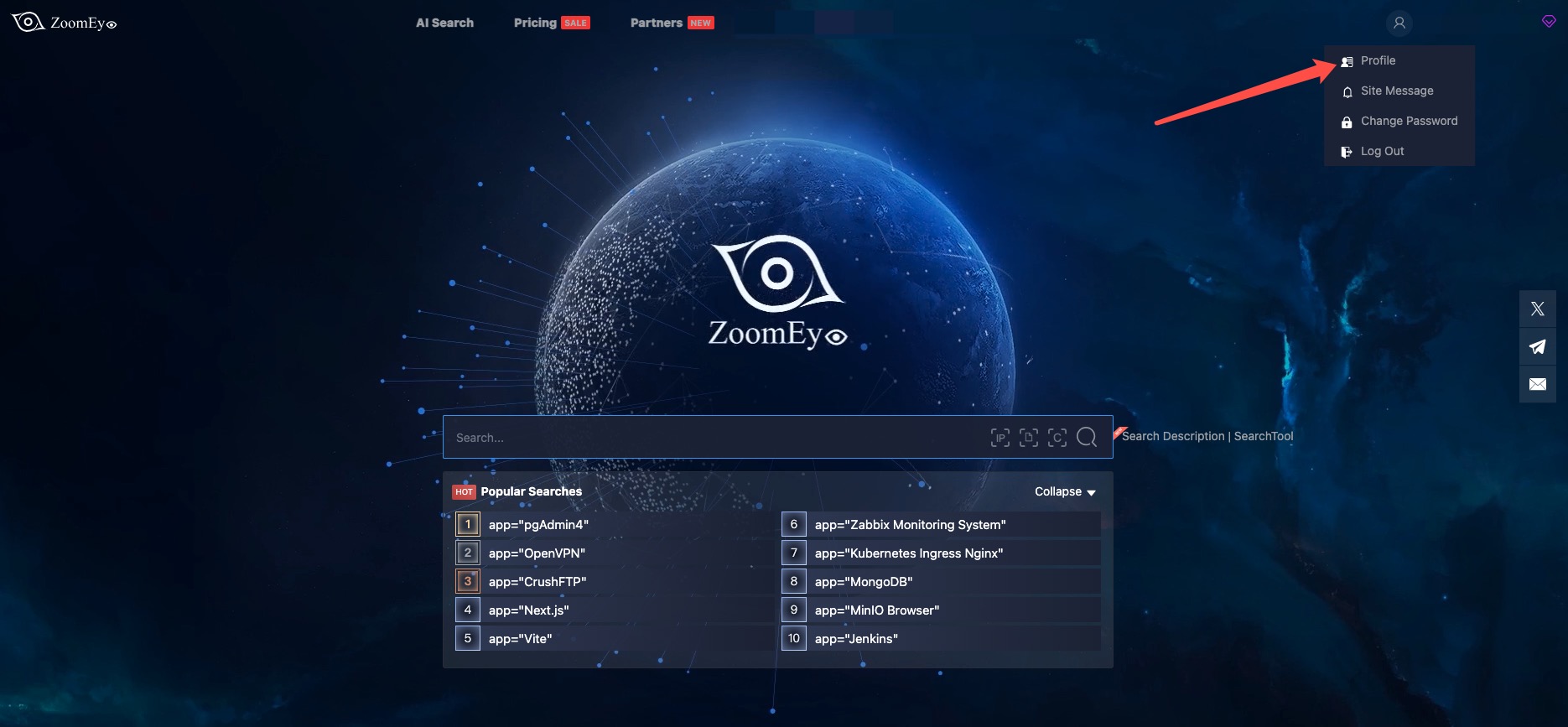
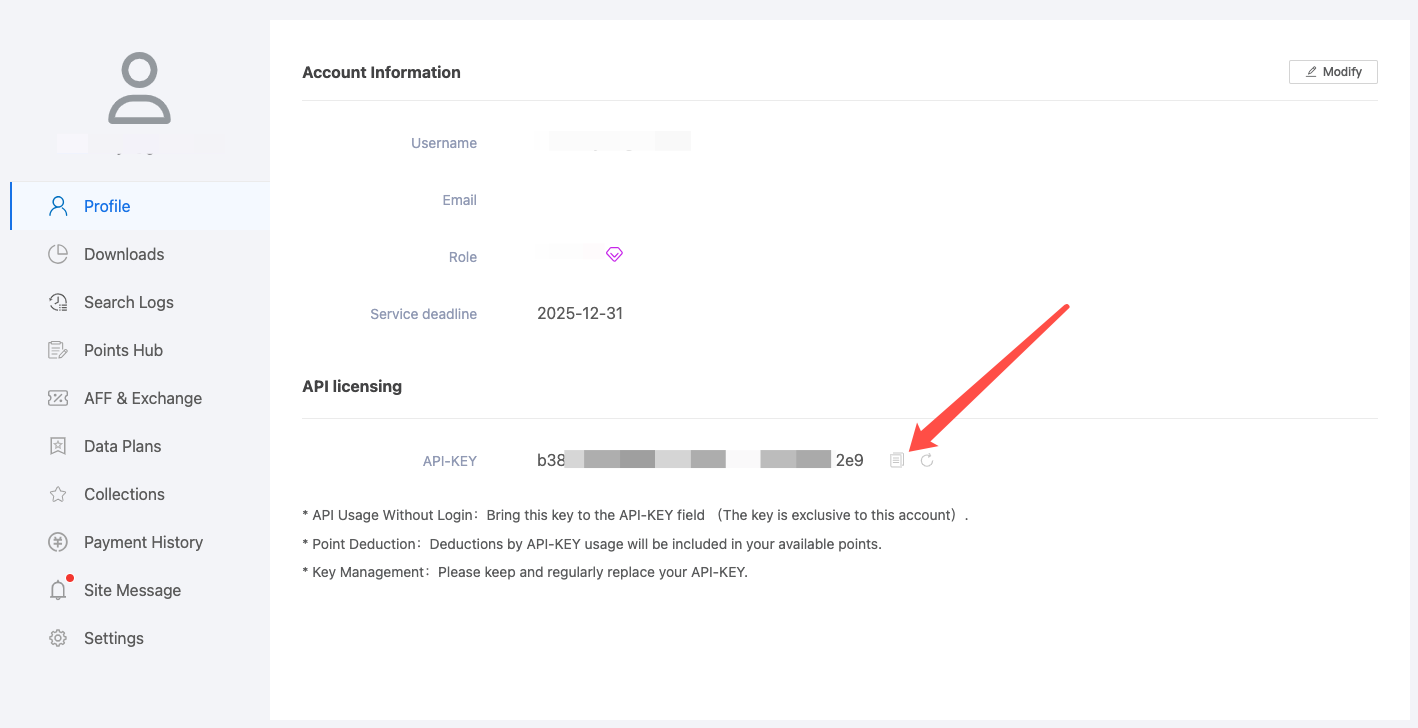
๐Ÿ”‘ How can I get a ZoomEye API key?

To use this MCP server, youโ€™ll need a ZoomEye API key.

  1. Go to https://www.zoomeye.ai

  2. Register or log in

  3. Click your avatar โ†’ Profile

  4. Copy your API-KEY

  5. Set the environment variable:

    export ZOOMEYE_API_KEY="your_api_key_here"
zoomeye1

zoomeye2

Features

  • Query ZoomEye for network asset information using dorks
  • Caching mechanism to improve performance and reduce API calls
  • Automatic retry mechanism for failed API requests
  • Comprehensive error handling and logging

Available Tools

  • zoomeye_search - Get network asset information based on query conditions.
    • Required parameters:
      • qbase64 (string): Base64 encoded query string for ZoomEye search
    • Optional parameters:
      • page (integer): View asset page number, default is 1
      • pagesize (integer): Number of records per page, default is 10, maximum is 1000
      • fields (string): The fields to return, separated by commas
      • sub_type (string): Data type, supports v4, v6, and web. Default is v4
      • facets (string): Statistical items, separated by commas if there are multiple
      • ignore_cache (boolean): Whether to ignore the cache

Usage Guide

Basic Usage

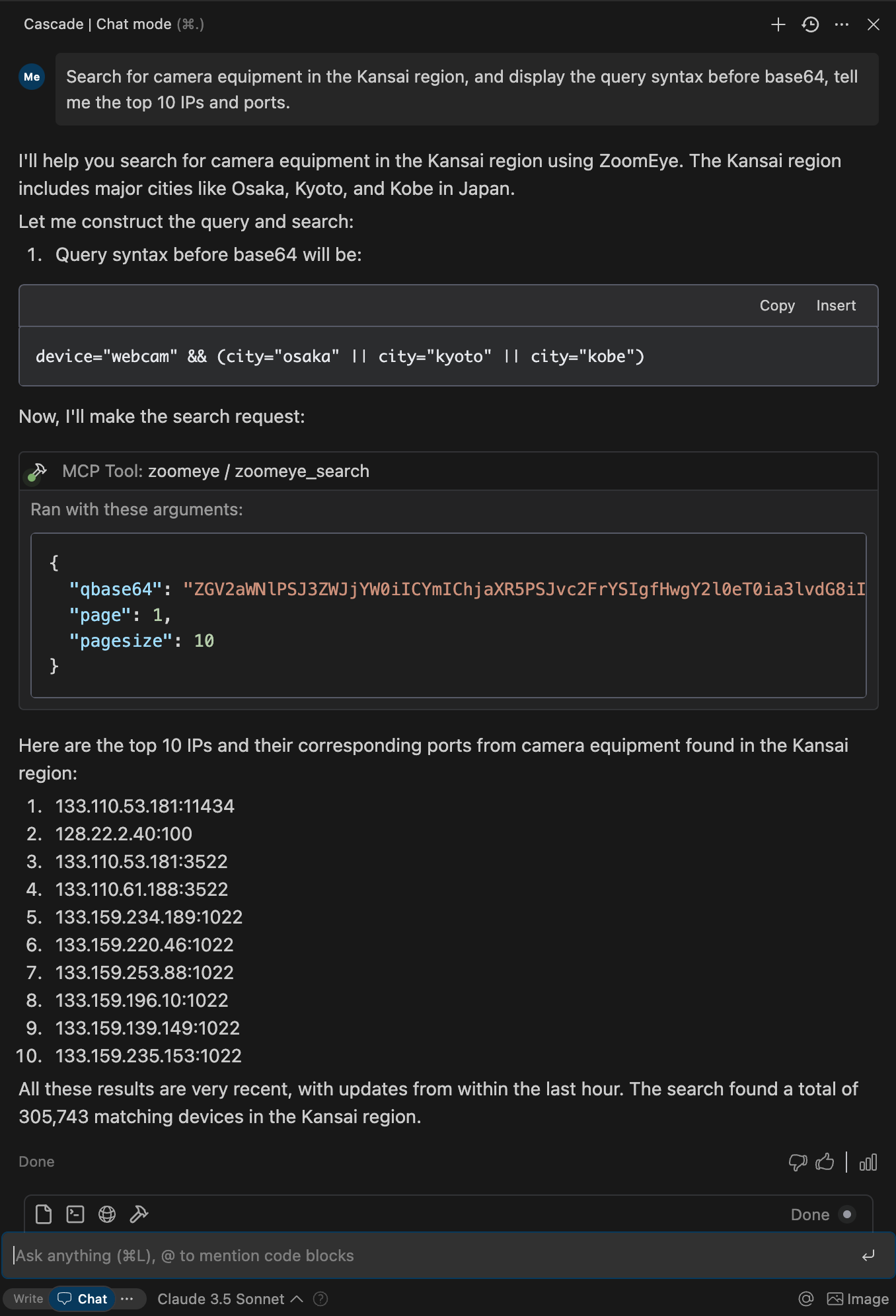
Once the server is running, you can interact with it through your AI assistant or development environment. Here's how to use it:

  1. Start the server using one of the installation methods above
  2. Configure your AI assistant (Claude Desktop, Cursor, Windsurf, Cline, Continue, Zed, etc.) to use the server
  3. Query network information using natural language

searchexample

Search Syntax Guide

  • Search Scope covers devices (IPv4, IPv6) and websites (domains).
  • When entering a search string, the system will match keywords in "global" mode, including content from various protocols such as HTTP, SSH, FTP, etc. (e.g., HTTP/HTTPS protocol headers, body, SSL, title, and other protocol banners).
  • Search strings are case-insensitive and will be segmented for matching (the search results page provides a " segmentation" test feature). When using == for search, it enforces exact case-sensitive matching with strict syntax.
  • Please use quotes for search strings (e.g., "Cisco System" or 'Cisco System'). If the search string contains quotes, use the escape character, e.g.,"a"b". If the search string contains parentheses, use the escape character, e.g., portinfo().

You can see more detailed search syntax rules in prompts.py.

For more information on the ZoomEye Search API, refer to the ZoomEye API v2 documentation.

Getting Started

Prerequisites

  1. ZoomEye API Key

    • Register for an account at ZoomEye
    • Obtain your API key from your account settings
    • The API key will be used to authenticate your requests to the ZoomEye API
  2. Python Environment

    • Python 3.10 or higher is required
    • Alternatively, you can use Docker to run the server without installing Python

Installation

Using PIP

Alternatively, you can install mcp-server-zoomeye via pip:

Terminal
pip install mcp-server-zoomeye

After installation, you can run it as a script using the following command:

bash
python -m mcp_server_zoomeye

Using Docker

You can also run the ZoomEye MCP server using Docker:

Pull from Docker Hub

bash
# Pull the latest image
docker pull zoomeyeteam/mcp-server-zoomeye:latest

# Run the container with your API key
docker run -i --rm -e ZOOMEYE_API_KEY=your_api_key_here zoomeyeteam/mcp-server-zoomeye:latest

Note: We provide multi-architecture Docker images that support linux/amd64 and linux/arm64 platforms and can run on Intel/AMD and ARM (such as Apple Silicon) processors.

Build from Source

Alternatively, you can build the Docker image from source:

bash
# Clone the repository
git clone https://github.com/zoomeye-ai/mcp_zoomeye.git
cd mcp_zoomeye

# Build the Docker image
docker build -t zoomeyeteam/mcp-server-zoomeye:local .

# Run the container
docker run -i --rm -e ZOOMEYE_API_KEY=your_api_key_here zoomeyeteam/mcp-server-zoomeye:local

Using uv

uv is a fast Python package installer and resolver written in Rust. It's a modern alternative to pip that offers significant performance improvements.

Installation of uv

bash
# Install uv using curl (macOS/Linux)
curl -LsSf https://astral.sh/uv/install.sh | sh

# Or using PowerShell (Windows)
irm https://astral.sh/uv/install.ps1 | iex

# Or using Homebrew (macOS)
brew install uv

Using uvx to run mcp-server-zoomeye

No specific installation is required when using uvx, which allows you to run Python packages directly:

Installing with uv

Alternatively, you can install the package using uv:

bash
# Install in the current environment
uv pip install mcp-server-zoomeye

# Or create and install in a new virtual environment
uv venv
uv pip install mcp-server-zoomeye

Configuration

Environment Variables

The ZoomEye MCP server requires the following environment variable:

  • ZOOMEYE_API_KEY: Your ZoomEye API key for authentication

You can set this environment variable in several ways:

  1. Export in your shell session:

    server.ts
    export ZOOMEYE_API_KEY="your_api_key_here"
    
  2. Pass directly when running the container (for Docker):

    Terminal
    docker run -i --rm -e ZOOMEYE_API_KEY=your_api_key_here zoomeyeteam/mcp-server-zoomeye:latest
    

Configure Claude.app

Add the following in Claude settings:

Using uvx
json
"mcpServers": {
  "zoomeye": {
    "command": "uvx",
    "args": ["mcp-server-zoomeye"],
    "env": {
        "ZOOMEYE_API_KEY": "your_api_key_here"
    }
  }
}
Using docker
json
"mcpServers": {
  "zoomeye": {
    "command": "docker",
    "args": ["run", "-i", "--rm", "-e", "ZOOMEYE_API_KEY=your_api_key_here", "zoomeyeteam/mcp-server-zoomeye:latest"],
    "env": {
      "ZOOMEYE_API_KEY": "your_api_key_here"
    }
  }
}
Installed via pip
json
"mcpServers": {
  "zoomeye": {
    "command": "python",
    "args": ["-m", "mcp_server_zoomeye"],
    "env": {
        "ZOOMEYE_API_KEY": "your_api_key_here"
    }
  }
}

Configure Zed

Add the following in Zed's settings.json:

Using uvx
json
"context_servers": [
  "mcp-server-zoomeye": {
    "command": "uvx",
    "args": ["mcp-server-zoomeye"],
    "env": {
        "ZOOMEYE_API_KEY": "your_api_key_here"
    }
  }
],
Installed via pip
json
"context_servers": {
  "mcp-server-zoomeye": {
    "command": "python",
    "args": ["-m", "mcp_server_zoomeye"],
    "env": {
        "ZOOMEYE_API_KEY": "your_api_key_here"
    }
  }
},

Example Interactions

Example 1: Retrieve global Apache Tomcat assets

config.json
{
  "name": "zoomeye_search",
  "arguments": {
    "qbase64": "app=\"Apache Tomcat\""
  }
}

Response:

Read the full README โ†’View source on GitHub โ†’

Related MCP Servers

View all in Search & Data Extraction View all alternatives
  • Firecrawl MCP Server logoFirecrawl MCP Server
    Verified

    Official Firecrawl server to search the web and scrape, crawl, map, and extract structured data from any site for LLMs. Handles JS-rendered pages, PDFs, and batch jobs; hosted remote MCP with OAuth or self-host.

    ๐Ÿ”Ž Search & Data Extraction5 views
    Compare vs Firecrawl MCP Server โ†’
  • Open WebSearch logoOpen WebSearch

    Web search using free multi-engine search (NO API KEYS REQUIRED) โ€” Supports Bing, Baidu, DuckDuckGo, Brave, Exa, and CSDN.

    ๐Ÿ”Ž Search & Data Extraction3 views
    Compare vs Open WebSearch โ†’
  • Serpapi MCP logoSerpapi MCP

    SerpApi MCP Server for Google and other search engine results. Provides multi-engine search across Google, Bing, Yahoo, DuckDuckGo, YouTube, eBay, and more with real-time weather data, stock market information, and flexible JSON response modes.

    ๐Ÿ”Ž Search & Data Extraction2 views
    Compare vs Serpapi MCP โ†’
  • Brave Search MCP Server logoBrave Search MCP Server

    Web search capabilities using Brave's Search API

    ๐Ÿ”Ž Search & Data Extraction7 views
    Compare vs Brave Search MCP Server โ†’

Adoption & maintenance

Factual signals from GitHub, npm, and our automated checks โ€” not a rating.

GitHub stars
82
Stargazers on the source repository.
npm downloads
29k
Package downloads in the last 30 days.
Last commit
3d ago
Most recent push to the default branch.
Tools exposed
1
Callable tools this server registers over MCP.
Directory activity
1 views
Config copies, upvotes, and views on AllMCPs.

Reviews

No reviews yet โ€” be the first to share how this listing worked for you.

Frequently Asked Questions about MCP Zoomeye

A ZoomEye API key is required and must be set in the ZOOMEYE_API_KEY environment variable.

AllMCPs Directory Badge

Full Badge Customizer

Showcase your server listing on GitHub or your project documentation. Embed this dynamic SVG badge to highlight official listing status and live engagement.

Badge Style:
Live Dynamic SVG PreviewMCP Zoomeye AllMCPs Directory Badge

Markdown (GitHub README)
[![AllMCPs](https://allmcps.com/api/badge/zoomeye-ai-mcp-zoomeye?style=directory)](https://allmcps.com/mcp/zoomeye-ai-mcp-zoomeye)
HTML Embed
<a href="https://allmcps.com/mcp/zoomeye-ai-mcp-zoomeye"><img src="https://allmcps.com/api/badge/zoomeye-ai-mcp-zoomeye?style=directory" alt="MCP Zoomeye on AllMCPs" /></a>

Technical Specs & Signals

Category๐Ÿ”ŽSearch & Data Extraction
PricingBring your own API key (usage-based cost)
More technical detailsExpand โ–พ
TransportSTDIO
RuntimePython
AuthAPI key
ClientsClaude Desktop, Cursor, Windsurf, Cline / VS Code
Last updatedSep 9, 2026
10/10 checks healthy over the last 33d
Views1
Unique ViewsTotal visits recorded for this listing page on AllMCPs.
Installs0
Installs & Copy ActionsTotal times users copied install commands or configuration snippets for this server.
GitHub stars82
GitHub Star CountTotal stargazers on GitHub representing community popularity (82 stars).
Last commit3d ago
Last Repository CommitThe most recent commit or push recorded for this server's GitHub repository.Last commit on Sep 9, 2026
npm downloads29,677/mo
Monthly npm DownloadsAverage monthly package installs recorded from npm registry statistics.
60Quality signal: Good ยท 60/100How this signal is calculated โ–พ
Server availabilityNot measured

Not scored for repo-hosted servers โ€” we can't reach the running server, only its GitHub page. Hosted MCP endpoints are health-checked live.

Verified ownership10/20
Documentation & tools24/30
Adoption & activity11/15
Community engagement0/10

A guidance signal from public completeness & health data โ€” not a user rating. New listings start lower and rise as they add docs, get verified, and grow adoption. Signals we can't observe for a listing are skipped, not counted against it.

Supply-chain signal

No high-severity advisories surfaced by our automated scan.

Critical 0High 0Medium 0Low 0

Scanned 27d ago via OSV.dev ยท to (PyPI)

โ˜… Spotlight Slot

Feature Your MCP Server

Get maximum visibility for your server across our directory, search results, and detail pages.

Spotlight Your Server

Own this project?

This directory is pre-filled from public sources. Claim via GitHub README, site badge, or DNS TXT to unlock edit access and the Official badge โ€” proof is checked automatically, then reviewed by our team.

Free dofollow backlink: add your website and place the AllMCPs badge on it โ€” no claim needed. We detect it automatically and keep it verified as long as the badge stays live.

Claim & get free dofollow

Share & Embed

Add our SVG badge (dark/light directory styles) or embeddable widget to your site.

Explore more

More in ๐Ÿ”Ž Search & Data Extraction โ†’Best MCP servers for Web Search & Scraping โ†’Alternatives to MCP Zoomeye โ†’Install in Claude DesktopInstall in CursorInstall in VS Code