AllMCPs
BrowseBestCategoriesStackCompareToolsGuidesBlog
Log in Submit MCP

Stay in the loop

Get new MCP servers and top picks in your inbox.

AllMCPs

The open directory for discovering and installing Model Context Protocol servers.

AllMCPs on GitHub (opens in a new tab)
Launched onTiny Startupstinystartups.com
Explore
  • Browse servers
  • Best MCP servers
  • Categories
  • MCP clients
  • Agent prompts
  • Stack Builder
  • Compare servers
  • Random discovery New
  • Submit a server
  • Pricing & Boost Boost
Learn
  • Guides hub
  • What is MCP?
  • Install guide
  • Build an MCP server
  • Deploy an MCP server
  • Security guide
  • Troubleshooting
  • MCP for SEO & AEO
  • Protocol versioning
  • Transports: stdio vs HTTP
  • State of MCP (stats)
  • Blog & updates
Tools
  • All developer tools
  • Config generator
  • Config validator
  • Config auditor
  • MCP playground
  • Token calculator
  • OpenAPI → MCP
  • Badge generator
For agents
  • REST API docs
  • Trust & traffic Live
  • Remote MCP server SSE ↗ (opens in a new tab)
  • llms.txt ↗ (opens in a new tab)
  • Catalog JSON ↗ (opens in a new tab)
Company
  • About
  • Advertise Sponsor
  • Contact
  • GitHub ↗ (opens in a new tab)
  • Terms
  • Privacy
AllMCPs VerifiedAllMCPs VerifiedFeatured on Nick LaunchesFeatured on Nick LaunchesLaunch Llama NewsletterLaunch Llama NewsletterVerified DR - allmcps.comVerified DR - allmcps.comFeatured on SaaSGrowFeatured on SaaSGrowFeatured on Twelve ToolsFeatured on Twelve ToolsFeatured on Saaspa.geFeatured on Saaspa.geFeatured on Findly.toolsFeatured on Findly.toolsFeatured on Startup FameFeatured on Startup FameFeatured on LaunchKiwiFeatured on LaunchKiwiFeatured on ScrollLaunchFeatured on ScrollLaunchFeatured on DailyPingsFeatured on DailyPingsFazier badgeFazier badgeFeatured on NewTool.siteFeatured on NewTool.siteFeatured on saasfame.comFeatured on saasfame.comDR Checker - Domain RatingDR Checker - Domain RatingListed on Turbo0Listed on Turbo0Launched on LaunchBoard - Product Launch PlatformLaunched on LaunchBoard - Product Launch PlatformList on SimilarlabsList on Similarlabshttps://codetrendy.comhttps://codetrendy.comListed on DevTool.ioFeatured on BuildlistFeatured on BuildlistLaunched on Tiny StartupsFeatured on ShowMeBestAIFeatured on ShowMeBestAIFind us on LaunchZoneFind us on LaunchZoneAllMCPs VerifiedAllMCPs VerifiedFeatured on Nick LaunchesFeatured on Nick LaunchesLaunch Llama NewsletterLaunch Llama NewsletterVerified DR - allmcps.comVerified DR - allmcps.comFeatured on SaaSGrowFeatured on SaaSGrowFeatured on Twelve ToolsFeatured on Twelve ToolsFeatured on Saaspa.geFeatured on Saaspa.geFeatured on Findly.toolsFeatured on Findly.toolsFeatured on Startup FameFeatured on Startup FameFeatured on LaunchKiwiFeatured on LaunchKiwiFeatured on ScrollLaunchFeatured on ScrollLaunchFeatured on DailyPingsFeatured on DailyPingsFazier badgeFazier badgeFeatured on NewTool.siteFeatured on NewTool.siteFeatured on saasfame.comFeatured on saasfame.comDR Checker - Domain RatingDR Checker - Domain RatingListed on Turbo0Listed on Turbo0Launched on LaunchBoard - Product Launch PlatformLaunched on LaunchBoard - Product Launch PlatformList on SimilarlabsList on Similarlabshttps://codetrendy.comhttps://codetrendy.comListed on DevTool.ioFeatured on BuildlistFeatured on BuildlistLaunched on Tiny StartupsFeatured on ShowMeBestAIFeatured on ShowMeBestAIFind us on LaunchZoneFind us on LaunchZone
© 2026 Jackalope Digital LLC. All rights reserved.
  1. Home
  2. 💻 Developer Tools
  3. Yukkurigen MCP
Y
Health: Not checked yetWe have not completed a health check for this listing yet.No health check has run yet.

Yukkurigen MCP

User RatingsBe the first to rate and review this MCP server! Enrichment pendingWe haven’t run our AI enrichment pass on this listing yet, so the overview, use cases, and FAQ below may be sparse or missing. We work through the catalog over time — check back soon.
View RepositoryVisit Website

台本を渡すとゆっくり解説・ずんだもん解説の動画(MP4)が返る。音声合成・字幕・図解・BGM・効果音まで自動。ChatGPT / Claude からは OAuth でつなぐだけ。

Quick Install

Automated & IDE Setup

Copy the AI prompt to install this server into Claude Code, Cursor, or another agent — or use 1-click editor setup below.

One-click editor setup isn’t available for this listing yet — we don’t have a confirmed install command, and we’d rather show nothing than point your editor at the wrong package or host. Follow the project’s own setup instructions, linked above.

Manual Client & Custom JSON ConfigExpand JSON ▾
No confirmed setup config for this listing yet. We only publish a config block when the install details come from the project itself — its README, its docs, or a verified owner. We haven’t found those for yukkurigen-mcp, and we’d rather show nothing than a guess you’d paste into your client. Follow the project’s own setup instructions for the current steps.
Install Directory Badge Claim listing Alternatives💻 More in Developer Tools

Documentation Overview

YukkuriGen — AI から使う「ゆっくり解説」動画生成

台本(話者+セリフの配列)を渡すと、MP4 が返る。こちらで音声を合成してから 本番レンダーを開始する(動画1分につき1クレジット・有料プラン)。output:"preview" なら 1クレジット・低解像度・20秒で、無料プランでも動くものが見られる。 人が編集画面で作ることは想定していない——あなたが自分の AI に頼み、その AI が ここを呼ぶ。

Code
あなた「ゆっくり解説で、日本の年金制度の動画を作って」
  → AI が create_yukkuri_video を呼ぶ(数秒で jobId が返る)
  → AI が get_job で音声合成とレンダー開始を待ち、get_render で MP4 の完成を待つ
  → MP4 の URL が返る
あなた「3行目をもっと驚いた感じに」
  → AI が update_lines でその行だけ直す(喋る速さは render_mp4 の voicePlaybackRate で焼き直す)

直すのもこのサイトではなく、AI との会話で行う。

作例

台本は AI(Claude)が書いて MCP で渡し、返ってきた MP4 をそのまま載せている(人の手直し無し。2026-09-26 に撮り直し)。 台本は 21 行と 22 行。図解カード・写真・章の見出し・強調テロップ、行ごとの表情とポーズも、台本を書いた AI が指定している (card / photo / chapter / emphasis / emotion / pose)。YukkuriGen はそれを画像にして焼くだけで、サーバで AI は呼ばない。 音声・字幕・立ち絵・BGM・効果音は YukkuriGen が入れる。

立ち絵は目・眉・口・顔色・汗や涙・腕が別々の部品なので、セリフごとに組み替える。 表情は16種(ドヤ顔・ジト目・ガーン・照れ・大喜び など。全キャラ共通)、ポーズ(指さし・腕組み・マイク など)は ずんだもん・四国めたん・春日部つむぎ・あんこもんで使える。 聞き手も、直前に話したときの表情を穏やかにして残す。写真や図解が出ている間は、キャラが少し外へ寄って顔を空ける。

ずんだもん・四国めたん「コンビニコーヒーが安い本当の理由」

ずんだもんとめたんの解説動画。行ごとに表情と腕のポーズが変わり、図解カードが出る

→ MP4 をダウンロード(720p・約96秒・音あり・6.7MB)

霊夢・魔理沙「寝る前のスマホが睡眠を壊す理由」
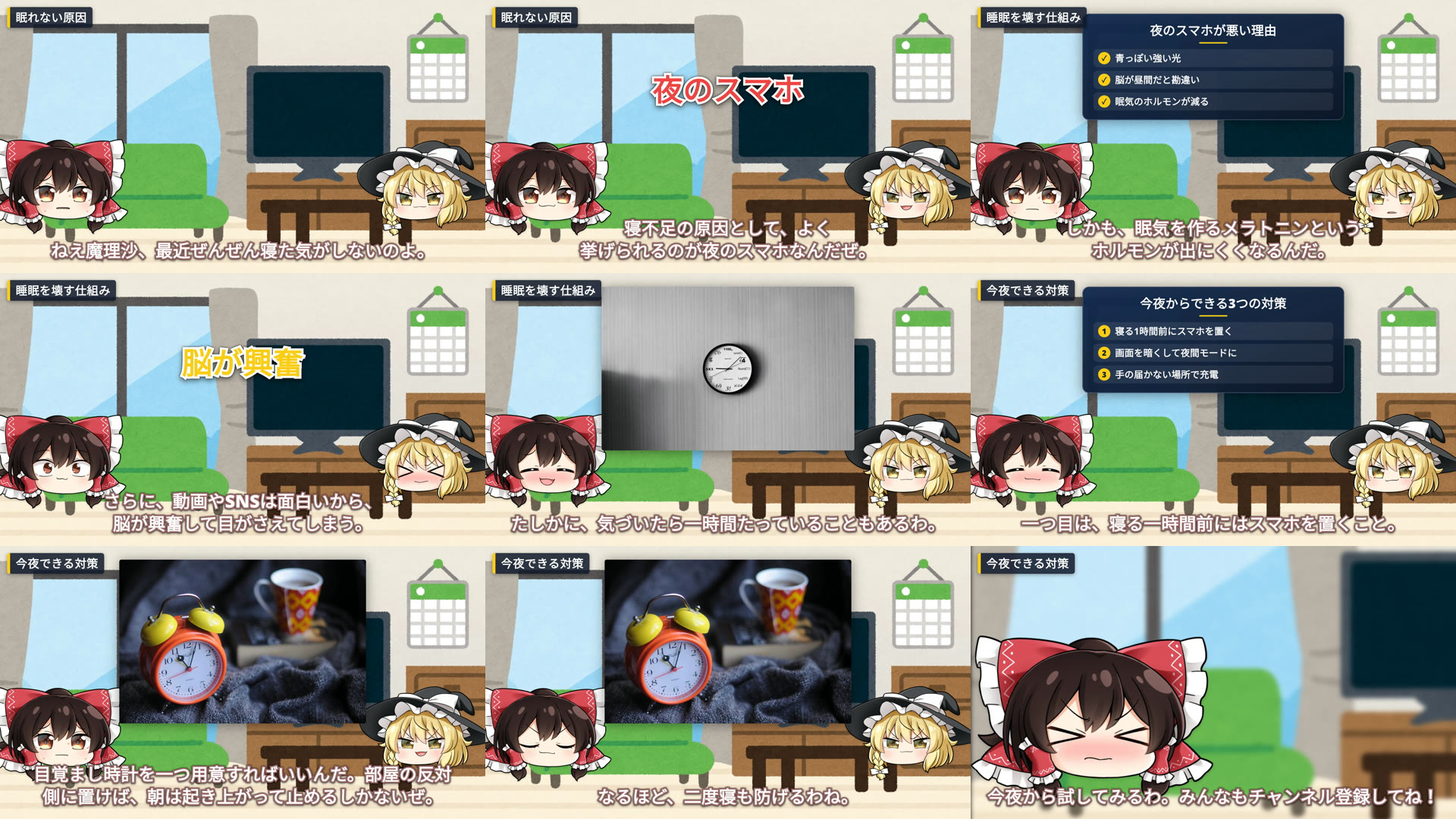
霊夢と魔理沙の解説動画の9場面。表情が行ごとに変わる(困り・ドヤ顔・大喜び・照れ・ほっこり)。写真・図解カード・強調テロップ

→ MP4 をダウンロード(720p・約82秒・音あり・5.2MB)

頼み方の例:

ずんだもんとめたんで、コンビニコーヒーが安い理由を1分半くらいで解説して。最後にチャンネル登録を呼びかけて。

AI は台本の行に、たとえば次のように演出も書いて create_yukkuri_video を呼ぶ:

config.json
{"speaker":"zundamon","text":"安くできる理由は三つあるのだ。",
 "card":{"title":"安くできる3つの理由","style":"steps","items":["豆をまとめて大量仕入れ","ボタンひとつで自動抽出","お客さんのセルフ式"],"span":4},
 "emotion":"smug","pose":"hip"}
{"speaker":"metan","text":"味は大丈夫なのかしら?","photo":["coffee beans","coffee"],"emotion":"troubled","pose":"hold"}
{"speaker":"metan","text":"えっ、儲からなくてもいいってこと!?","emotion":"shocked","pose":"mouth_cover","cameraMode":"dynamic"}

get_render で完成した MP4 の URL と、 YouTube の概要欄に貼るクレジット(credits)が返る。作例のクレジット:

Code
【使用素材】
音声: VOICEVOX:ずんだもん、VOICEVOX:四国めたん
立ち絵: 坂本アヒル 様
背景: いらすとや 様(https://www.irasutoya.com/)
BGM: DOVA-SYNDROME(https://dova-s.jp/)、こおろぎ 様
効果音: 効果音ラボ(https://soundeffect-lab.info/)
写真: Openverse(CC0・パブリックドメイン)
制作: YukkuriGen(https://yukkurigen.com/)

VOICEVOX の音声は「VOICEVOX:キャラ名」の表記が利用条件。動画を投稿するときは、この クレジットを概要欄に入れること(YukkuriGen から YouTube へ投稿した場合は自動で入る)。 写真は Openverse で CC0・パブリックドメインのものだけを使っている。

機能ごとの作例とスキル

skills/ に、機能ごとのスキル(AI 向けの手順書)が10本ある。Claude Code ならプラグインとしてまとめて入る(下の「つなぐ」)。 作例は、どれも AI(Claude)が MCP で作って焼いたものをそのまま載せている(2026-09-26)。

スキルできること作例
yukkuri-video-basics台本から1本作る(霊夢・魔理沙)MP4
dialogue-25dずんだもん×あんこもんの掛け合い。立ち絵が 2.5D で呼吸し、体・しっぽ・頭の飾りが揺れる MP4
explainer-visuals図解カード・写真・章の見出し・強調テロップ MP4
expressions-poses表情16種・腕のポーズを行ごとに一覧(画像)
vertical-shorts縦型ショート(9:16)。上にタイトル・素材、下にキャラ2人・字幕 MP4
your-images自分の画像を行ごとに好きな位置・大きさで出す/背景を差し替える MP4
batch-production最大20本を1回でまとめて作る3本の例(画像)
review-and-fix焼く前に共有リンクで見せ、指定の行だけ直す(消費なし)共有リンクの画面
own-character自分のキャラ(PSD・PNG)を話者にする。画像生成 AI で作ったキャラも PSD にすれば喋る MP4 PSD の見本
youtube-upload焼いた動画を自分の YouTube へ投稿(既定は非公開)—

アカウントの無いまま呼ぶと、会員登録(無料・月10クレジット)の URL 付きで signup_required が返る。 ChatGPT・claude.ai のコネクタなら、つなぐ時に登録と許可の画面が開く。

つなぐ

ChatGPT・claude.ai(コネクタ)

コネクタの追加で、この URL を入れるだけ。鍵は要らない:

Code
https://app.yukkurigen.com/api/mcp

YukkuriGen の許可画面が開くので「許可する」を押す(OAuth 2.1・PKCE・動的クライアント登録)。 つないだアプリは https://app.yukkurigen.com/settings/api-keys に「<アプリ名>(OAuth)」として出て、 そこから取り消せる。

鍵をヘッダーで渡すクライアント

まず鍵を取る(無料・月10クレジット): https://app.yukkurigen.com/settings/api-keys

Claude Code

プラグインとして入れると、MCP サーバの接続と機能ごとのスキル10本がまとめて入る(接続はブラウザでの許可):

Code
/plugin marketplace add yukkurigen/yukkurigen-mcp
/plugin install yukkurigen@yukkurigen

API キーで繋ぐなら:

Terminal
claude mcp add --transport http yukkurigen https://app.yukkurigen.com/api/mcp \
  -H "Authorization: Bearer $YUKKURIGEN_API_KEY"

チームで共有するなら、このリポジトリの .mcp.json をプロジェクトに置く。 鍵は環境変数 YUKKURIGEN_API_KEY から読む(ファイルに鍵を書かない)。

Codex

~/.codex/config.toml に足す:

toml
[mcp_servers.yukkurigen]
url = "https://app.yukkurigen.com/api/mcp"
bearer_token_env_var = "YUKKURIGEN_API_KEY"
server.ts
export YUKKURIGEN_API_KEY=yg_live_...

鍵は環境変数から読むので、設定ファイルに書かない。

Gemini CLI

server.ts
export YUKKURIGEN_API_KEY=yg_live_...
gemini extensions install https://github.com/yukkurigen/yukkurigen-mcp

このリポジトリの gemini-extension.json が読まれる。鍵は環境変数から読むので、 ファイルに書かない。

その他の MCP クライアント

エンドポイントは1つだけ:

Code
POST https://app.yukkurigen.com/api/mcp
Authorization: Bearer <API key>

JSON-RPC 2.0 over HTTP。tools/list でツール一覧が取れる。 server.json は MCP レジストリ用のマニフェスト。

REST で直接叩く

Terminal
curl -X POST https://app.yukkurigen.com/api/v1/agent/generate \
  -H "Authorization: Bearer $YUKKURIGEN_API_KEY" \
  -H "Content-Type: application/json" \
  -H "Idempotency-Key: my-first-video-sync" \
  -d '{"title":"テスト","script":[{"speaker":"reimu","text":"こんにちは"},{"speaker":"marisa","text":"よろしくだぜ"}]}'

これは同期の呼び出しで、音声合成とレンダー開始を待ってから返る(台本が長いと数十秒。 サーバの設定によっては、一定時間だけ待って終わらなければ 202 が返る)。 待っている途中で接続が切れても、サーバ側では生成と課金が進む。投げ直すときは同じ Idempotency-Key を付ける (同じ鍵なら、処理中は 409、終わっていれば最初の結果が返り、2本目は作られない)。 待たずに済ませるなら Prefer: respond-async を付ける。数秒で 202 と jobId / projectId が返る (サーバの設定によってはジョブにならず、同期で待ってから 200 が返る):

Terminal
curl -X POST https://app.yukkurigen.com/api/v1/agent/generate \
  -H "Authorization: Bearer $YUKKURIGEN_API_KEY" \
  -H "Content-Type: application/json" \
  -H "Prefer: respond-async" \
  -H "Idempotency-Key: my-first-video" \
  -d '{"title":"テスト","script":[{"speaker":"reimu","text":"こんにちは"},{"speaker":"marisa","text":"よろしくだぜ"}]}'

GET /api/v1/jobs/{jobId} が succeeded になったら、result.renderId を GET /api/v1/projects/{projectId}/render/{renderId}/progress に渡して完成を待つ。 failed なら error.code に理由が入り、クレジットは返金される。 例外は、レンダーを起動したあとにジョブだけが失敗した場合(まれ)で、レンダーは課金されたまま 動いていて返金されず、Idempotency-Key も空かない(同じ鍵で投げ直すと、起動済みのレンダーが 200 で 返り、2本目は作られない)。renderId に agent-{jobId} を渡して進捗を見れば結果が分かる (not_found なら起動しておらず、返金される)。

複数本は POST /api/v1/agent/generate/batch(MCP は create_yukkuri_videos_batch、最大20件)にまとめて渡せる。 Prefer: respond-async を付けると数秒で 202 と jobId が返り、各件はサーバ側で1件ずつ順に作られる (サーバの設定によってはジョブにならず、同期で処理して 200 が返る。MCP のツールは自分で付ける)。 succeeded の result.results に各件の projectId / renderId / jobId が並ぶので、renderId を 上と同じ進捗の URL に渡す。バッチのジョブが failed になっても返金ではない——作り始めた件は それぞれのジョブで課金されたまま進む。失敗したバッチは GET /api/v1/jobs/{jobId} の partialResults に 作り始めた件と投げ直してよい件(resendIndexes)が分かれて入るので、その件だけを新しい idempotencyKeyPrefix の新しいバッチで送る。同じ prefix で全件を投げ直しても作り始めた件が二重に 作られないのは、その件のジョブが終わってから 24 時間以内だけ(期限は partialResults.fullResendSafeUntil)。

全項目の定義: https://app.yukkurigen.com/openapi.json

AI に読ませるもの

SKILL.md が手順書のすべて。接続、最小例、立ち絵、カメラ、素材の位置、縦型、 テンプレートの位置の直し方、クレジット、402 を受けたときの購入導線、冪等キー、バッチ生成、コールバックまで。 app.yukkurigen.com/skill.md と同一のファイルで、CI で一致を検査している。 機能ごとに短く分けたものが skills/(上の表)。

できること / かかるもの

クレジット無料枠で
台本を作る・読む・直す・音声を作る0○
MP4 プレビュー(低解像度・指定行の周辺だけ)1○(月10回)
MP4 本番レンダー5× 有料プラン

無料枠は月10クレジット。402 を受けたら create_checkout で決済リンクを出せる ——会話を止めずに購入まで進める。

同時に走らせられるレンダーはプランごとに上限がある(無料1 / スタンダード3 / プロ10)。超えると 429 too_many_concurrent_renders(課金なし)。

正直に言っておくこと

  • create_yukkuri_video(ジョブで受け付ける形)から MP4 までは、2026-09-25 に本番で通した (OAuth で接続 → create_yukkuri_video → get_job → get_render の完成まで。上の作例がその出力)。 まとめて作るバッチ(create_yukkuri_videos_batch)は 2026-09-26 に本番でプレビュー出力(1クレジット)の3本を最後まで通した。MP4 出力のバッチは本番未検証(本番で最後まで通した実績はまだ無い)。 初めての形の台本は少数の行で試してほしい。途中で止まる場合は段ごとに切り分けられる (get_project → generate_audio → render_mp4)。不具合として報告してほしい。
  • こちらのサーバは AI(LLM)を呼ばない。 台本・図解・写真の検索語・章・強調を決めるのは、 あなたが使っている AI(ChatGPT・Claude などのあなたのサブスク)。こちらは音声合成・画像化・写真の検索 (Openverse の CC0・パブリックドメインのみ)・レンダーだけを行う。指定の無い行には図解や写真は出ない。
  • .ymmp(YMM4 プロジェクト)の書き出しは 2026-09-07 に撤去した。 音声も 立ち絵も相手の YMM4 が作る形で、こちらの音声合成を一度も通らなかった—— 代替が容易なわりに、保守する面だけが増えていた。MP4 一本にした。
  • OAuth は 2026-09-24 に入れた。 RFC 9728 の authorization_servers と RFC 8414 のメタデータを出している。発行されるアクセストークンは API キーそのもので、 期限は無く refresh_token も出さない(取り消しは鍵の画面で)。本番で登録→許可→ トークン交換→tools/list まで通したが、ChatGPT・claude.ai の実際の画面からの接続は こちらではまだ試していない。つながらなければ報告してほしい。
  • MP4 の完了通知(callbackUrl)は、こちら側が「終わったこと」を確定させた 時点で送る。誰もポーリングしていない場合は掃除の巡回まで待つ。急ぐなら get_render を1〜2回叩けばその場で確定する。

リンク

  • ヘルプセンター
  • 自分の AI につなぐ
  • 料金
  • OpenAPI
  • llms.txt

ライセンス

MIT。このリポジトリの中身(接続情報・マニフェスト・文書)に 対するライセンスであって、YukkuriGen のサービス本体には及ばない。 サービスの利用条件は利用規約による。

Read the full README →View source on GitHub →

Related MCP Servers

View all in Developer Tools View all alternatives
  • Openapi MCP Server logoOpenapi MCP Server

    Connect any HTTP/REST API server using an Open API spec (v3)

    💻 Developer Tools3 views
    Compare vs Openapi MCP Server →
  • Claude Task Master logoClaude Task Master

    AI-powered task management system for AI-driven development. Features PRD parsing, task expansion, multi-provider support (Claude, OpenAI, Gemini, Perplexity, xAI), and selective tool loading for optimized context usage.

    💻 Developer Tools8 views
    Compare vs Claude Task Master →
  • Exogram Authority Runtime logoExogram Authority Runtime

    Model Context Protocol server for the Exogram Authority Runtime.

    💻 Developer Tools2 views
    Compare vs Exogram Authority Runtime →
  • MCP Server Docker logoMCP Server Docker

    Integrate with Docker to manage containers, images, volumes, and networks.

    💻 Developer Tools3 views
    Compare vs MCP Server Docker →

Reviews

No reviews yet — be the first to share how this listing worked for you.

Frequently Asked Questions about Yukkurigen MCP

We don't have a confirmed install command for yukkurigen-mcp yet, so we don't publish a generated one — a guessed package name would point at the wrong package or none at all. Follow the project's own README or setup instructions (https://github.com/yukkurigen/yukkurigen-mcp) for the current steps.

AllMCPs Directory Badge

Full Badge Customizer

Showcase your server listing on GitHub or your project documentation. Embed this dynamic SVG badge to highlight official listing status and live engagement.

Badge Style:
Live Dynamic SVG PreviewYukkurigen MCP AllMCPs Directory Badge

Markdown (GitHub README)
[![AllMCPs](https://allmcps.com/api/badge/yukkurigen-mcp?style=directory)](https://allmcps.com/mcp/yukkurigen-mcp)
HTML Embed
<a href="https://allmcps.com/mcp/yukkurigen-mcp"><img src="https://allmcps.com/api/badge/yukkurigen-mcp?style=directory" alt="Yukkurigen MCP on AllMCPs" /></a>

Technical Specs & Signals

Category💻Developer Tools
More technical detailsExpand ▾
Last updatedSep 28, 2026
Views0
Unique ViewsTotal visits recorded for this listing page on AllMCPs.
Installs0
Installs & Copy ActionsTotal times users copied install commands or configuration snippets for this server.
27Quality signal: Emerging · 27/100How this signal is calculated ▾
Server availabilityNot measured

Not scored for repo-hosted servers — we can't reach the running server, only its GitHub page. Hosted MCP endpoints are health-checked live.

Verified ownership8/20
Documentation & tools11/30
Adoption & activity1/15
Community engagement0/10

A guidance signal from public completeness & health data — not a user rating. New listings start lower and rise as they add docs, get verified, and grow adoption. Signals we can't observe for a listing are skipped, not counted against it.

★ FeaturedMoxie Docs MCP logo

Moxie Docs MCP

MCP & Agent Skills for Automated Documentation, and codebase conventions + context

Explore Server →

Own this project?

This directory is pre-filled from public sources. Claim via GitHub README, site badge, or DNS TXT to unlock edit access and the Official badge — proof is checked automatically, then reviewed by our team.

Free dofollow backlink: add your website and place the AllMCPs badge on it — no claim needed. We detect it automatically and keep it verified as long as the badge stays live.

Claim & get free dofollow

Share & Embed

Add our SVG badge (dark/light directory styles) or embeddable widget to your site.

Explore more

More in 💻 Developer Tools →Best MCP servers for Developers →Alternatives to Yukkurigen MCP →Install in Claude DesktopInstall in CursorInstall in VS CodeSetup guides for all 13 MCP clients