AllMCPs
BrowseBestCategoriesStackCompareToolsGuidesBlog Log in Submit MCP

Stay in the loop

Get new MCP servers and top picks in your inbox.

AllMCPs

The open directory for discovering and installing Model Context Protocol servers.

Explore

  • Browse servers
  • Best MCP servers
  • Categories
  • MCP clients
  • Agent prompts
  • Stack Builder
  • Compare servers
  • Tags index
  • Submit a server
  • Pricing

Learn

  • Guides hub
  • What is MCP?
  • Install guide
  • Troubleshooting
  • Security
  • Blog
  • Blog RSS

Tools

  • All tools
  • Config generator
  • Config validator
  • MCP playground
  • OpenAPI β†’ MCP
  • Badge generator

For agents

  • API docs
  • Trust & traffic
  • llms.txt β†— (opens in a new tab)
  • Catalog JSON β†— (opens in a new tab)
  • Remote MCP β†— (opens in a new tab)

Company

  • About
  • Contact
  • X (@AllMCPs) β†— (opens in a new tab)
  • GitHub β†— (opens in a new tab)
  • Terms
  • Privacy
AllMCPs VerifiedAllMCPs VerifiedFeatured on Nick LaunchesFeatured on Nick LaunchesLaunch Llama NewsletterLaunch Llama NewsletterVerified DR - allmcps.comVerified DR - allmcps.comFeatured on SaaSGrowFeatured on SaaSGrowFeatured on Twelve ToolsFeatured on Twelve ToolsFeatured on Saaspa.geFeatured on Saaspa.geFeatured on Findly.toolsFeatured on Findly.toolsFeatured on Startup FameFeatured on Startup FameFeatured on LaunchKiwiFeatured on LaunchKiwiFeatured on ScrollLaunchFeatured on ScrollLaunchFeatured on DailyPingsFeatured on DailyPingsFazier badgeFazier badgeFeatured on NewTool.siteFeatured on NewTool.siteFeatured on saasfame.comFeatured on saasfame.comDR Checker - Domain RatingDR Checker - Domain RatingListed on Turbo0Listed on Turbo0Launched on LaunchBoard - Product Launch PlatformLaunched on LaunchBoard - Product Launch PlatformList on SimilarlabsList on Similarlabshttps://codetrendy.comhttps://codetrendy.comListed on DevTool.ioFeatured on BuildlistFeatured on BuildlistAllMCPs VerifiedAllMCPs VerifiedFeatured on Nick LaunchesFeatured on Nick LaunchesLaunch Llama NewsletterLaunch Llama NewsletterVerified DR - allmcps.comVerified DR - allmcps.comFeatured on SaaSGrowFeatured on SaaSGrowFeatured on Twelve ToolsFeatured on Twelve ToolsFeatured on Saaspa.geFeatured on Saaspa.geFeatured on Findly.toolsFeatured on Findly.toolsFeatured on Startup FameFeatured on Startup FameFeatured on LaunchKiwiFeatured on LaunchKiwiFeatured on ScrollLaunchFeatured on ScrollLaunchFeatured on DailyPingsFeatured on DailyPingsFazier badgeFazier badgeFeatured on NewTool.siteFeatured on NewTool.siteFeatured on saasfame.comFeatured on saasfame.comDR Checker - Domain RatingDR Checker - Domain RatingListed on Turbo0Listed on Turbo0Launched on LaunchBoard - Product Launch PlatformLaunched on LaunchBoard - Product Launch PlatformList on SimilarlabsList on Similarlabshttps://codetrendy.comhttps://codetrendy.comListed on DevTool.ioFeatured on BuildlistFeatured on Buildlist
Β© 2026 Jackalope Digital LLC. All rights reserved.
  1. Home
  2. 🧠 Knowledge & Memory
  3. Memory Os Cli
Memory Os Cli logo
Health: ActiveRecent health check succeeded.Last checked 8/11/2026, 1:00:06 AM

Memory Os Cli

View Repository12 GitHub StarsTotal stargazers on GitHub for the source repository (12 stars).
memorymcpclideveloper-tools

CLI and hosted MCP endpoint for saving, searching, recalling, and managing user-owned AI memory.

Quick Install

Automated & IDE Setup

Copy the AI prompt to install this server into Claude Code, Cursor, or another agent β€” or use 1-click editor setup below.

Add to CursorAdd to VS Code
Not yet automatically verified

We haven't yet run this listing's install command through our automated sandbox check. This isn't a red flag β€” we're steadily working through the catalog.

Manual Client & Custom JSON ConfigExpand JSON β–Ύ

Install Config Generator

Choose your client
claude_desktop_config.json
{
  "mcpServers": {
    "yonro-memory-os-cli": {
      "command": "npx",
      "args": [
        "-y",
        "--package",
        "@xmemo/client@latest",
        "xmemo-mcp"
      ]
    }
  }
}

πŸ’‘ Paste into ~/Library/Application Support/Claude/claude_desktop_config.json (macOS) or %APPDATA%\Claude\claude_desktop_config.json (Windows)

Install Directory Badge Claim listing Alternatives🧠 More in Knowledge & Memory

Overview

XMemo provides a shared memory layer for AI agents through a hosted Streamable HTTP MCP endpoint and a local stdio mode. Its CLI handles authentication, diagnostics, client configuration, profiles, updates, and smoke checks. Use it when multiple AI clients need access to scoped, durable memory.

Use cases

β€’Save durable memories for AI agents
β€’Search and recall scoped memories
β€’Configure MCP clients for XMemo
β€’Diagnose authentication and connection issues
β€’Manage memory connections across editors and CLIs

Key features

β€’Hosted Streamable HTTP MCP endpoint
β€’Local stdio MCP command
β€’Authentication and credential management
β€’Client setup and configuration generation
β€’Diagnostics and smoke checks
β€’Behavior profiles and native integrations for selected clients

Capabilities & Tool Schemas

Inspect callable tools, capabilities, and parameters exposed to AI agents by Memory Os Cli.

Extracted Tool Capabilities
Hosted Streamable HTTP MCP endpoint
Local stdio MCP command
Authentication and credential management
Client setup and configuration generation
Diagnostics and smoke checks
Behavior profiles and native integrations for selected clients

Documentation Overview

XMemo logo

XMemo CLI

One private memory layer for every AI agent.

Install, authenticate, diagnose, and connect XMemo across editors, CLIs, and autonomous agents from one production-ready command line.


CI npm version npm downloads Node.js version MIT license GitHub stars

MCP compatible XMemo Cloud Privacy first LobeHub Glama quality score

Quick start Β· Integrations Β· Connection modes Β· Commands Β· Security


@xmemo/client is the official control plane for connecting AI tools to XMemo. It makes setup repeatable, keeps credentials out of project files, and gives every supported client a consistent path to durable, user-owned memory.

The package is deliberately small: the CLI runtime, safe client configuration, behavior profiles, XMemo skills, and marketplace metadata. Server code, databases, deployment files, logs, and internal operations remain outside the npm distribution.

Architecture
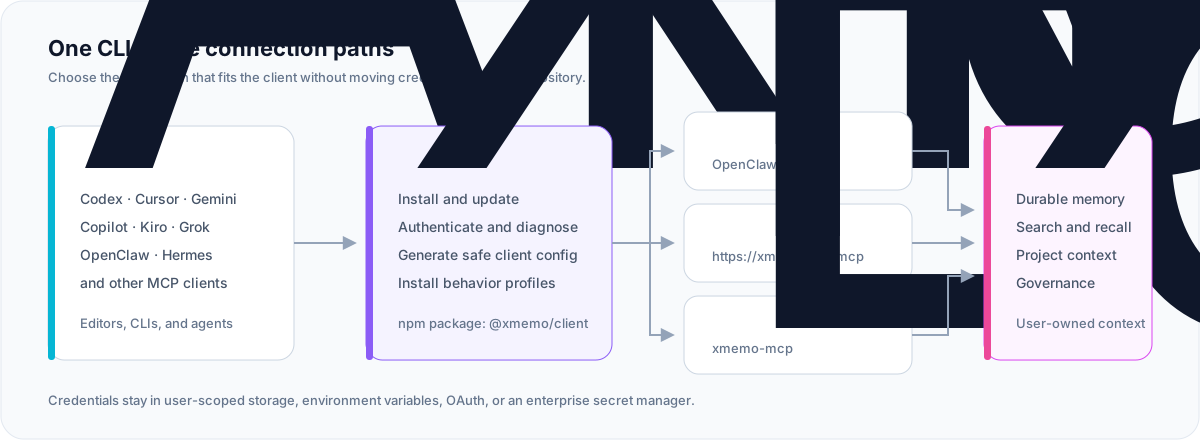
XMemo CLI architecture

Package@xmemo/client
Primary commandxmemo
Local MCP commandxmemo-mcp
Hosted MCPhttps://xmemo.dev/mcp
RuntimeNode.js 20 or later
LicenseMIT

Why XMemo CLI

  • One control plane β€” login, diagnostics, configuration, profiles, updates, and smoke checks share one predictable interface.
  • Private by design β€” generated project configuration references a credential; it never embeds the credential value.
  • Native where it matters β€” OpenClaw and Hermes use dedicated memory integrations instead of duplicating the same capability through MCP.
  • Portable everywhere else β€” hosted Streamable HTTP MCP and local stdio cover modern editors, terminals, and agent runtimes.
  • Safe automation β€” supported setup and removal paths offer preview, dry-run, or explicit confirmation before making changes.
  • Small supply-chain surface β€” the npm package is governed by an explicit file allowlist and release provenance.

Quick start

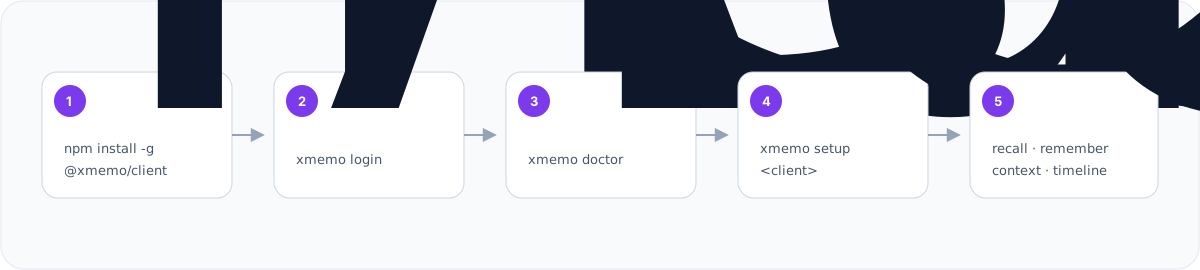
Terminal
npm install -g @xmemo/client
xmemo login
xmemo doctor
xmemo setup codex
xmemo status

Replace codex with your client. Preview a configuration before writing it:
bash
xmemo setup cursor --dry-run

XMemo CLI setup workflow

[!TIP] Start with xmemo login, xmemo doctor, and xmemo setup <client>. Hand-edit MCP configuration only when a client has no verified setup path.

Supported integrations

ClientRecommended commandConnection
Codexxmemo setup codexHosted MCP + behavior profile
Cursorxmemo setup cursorHosted MCP + behavior profile
Copilot CLIxmemo setup copilotLocal authenticated proxy
Gemini CLIxmemo setup geminiHosted MCP + OAuth
Antigravityxmemo setup antigravityHosted MCP + OAuth
OpenClawxmemo setup openclawNative memory plugin + Skill
Hermesxmemo setup hermesNative memory provider
Kiroxmemo setup kiroHosted MCP
Grokxmemo setup grokHosted MCP
Other MCP clientsxmemo mcp config --client genericGenerated template

The client registry also covers Windsurf, Cline, Continue, Claude Desktop, Claude Code, Kimi Code, Zed, JetBrains, OpenCode, Qwen, Trae, and compatible MCP hosts. Run xmemo mcp list for the current machine-readable catalog.

Connection modes

Hosted MCP

The recommended universal path is the XMemo Streamable HTTP endpoint:

text
https://xmemo.dev/mcp

OAuth-capable clients complete authentication in the browser. Other clients reference XMEMO_KEY without copying its value into repository files.

Generic configuration shape:

config.json
{
  "mcpServers": {
    "XMemo": {
      "type": "streamable-http",
      "url": "https://xmemo.dev/mcp",
      "headers": {
        "Authorization": "Bearer ${XMEMO_KEY}"
      }
    }
  }
}

Client configuration keys differ; prefer xmemo setup <client> over copying this generic example directly.

Local stdio MCP

xmemo-mcp is the dedicated stdio entry point for marketplaces and clients that launch a local process. Safe discovery exposes 20 tools, three prompts, and two documentation resources without a token. Tool execution still requires authentication.

After a global installation:

bash
xmemo-mcp

Install-free MCP configuration:

config.json
{
  "mcpServers": {
    "XMemo": {
      "command": "npx",
      "args": [
        "-y",
        "--package",
        "@xmemo/client@latest",
        "xmemo-mcp"
      ]
    }
  }
}

xmemo mcp serve is equivalent when the CLI is already installed.

Native integrations

OpenClaw and Hermes have dedicated memory providers. Their default setup avoids installing a second, duplicate XMemo tool surface.

bash
# Native OpenClaw plugin + XMemo Skill
xmemo setup openclaw

# Native Hermes memory provider
xmemo setup hermes

Add hosted MCP only when an explicit fallback is desired:

bash
xmemo setup openclaw --with-mcp
xmemo setup hermes --with-mcp

Use --mcp-only to skip the native integration and install only the hosted MCP fallback.

Authentication

Browser login

Recommended for personal accounts:

bash
xmemo login
xmemo auth status

The CLI uses the hosted device-login flow, waits for browser approval, and asks once before storing the issued credential unencrypted in the current user's XMemo config directory. The exact path is shown before approval, file permissions are restricted where the operating system supports it, and the credential value is never printed. Prefer XMEMO_KEY or a managed secret store on shared systems.

For non-interactive automation, record the same decision explicitly:

bash
xmemo login --allow-plaintext

Existing token

Pipe an existing token through stdin so it does not appear in command history:

bash
printf '%s\n' 'your-token' | xmemo token add --from-stdin --allow-plaintext
xmemo token status --verify

PowerShell:

powershell
$xmemoToken = Read-Host "XMemo token"
$xmemoToken | xmemo token add --from-stdin --allow-plaintext
Remove-Variable xmemoToken

For CI and managed workstations, expose XMEMO_KEY through the platform's secret manager. Do not commit it to .env, MCP configuration, logs, issue reports, or chat transcripts.

Command reference

Lifecycle and diagnostics
bash
xmemo --version
xmemo update
xmemo update --dry-run
xmemo doctor
xmemo discovery show
xmemo status
xmemo privacy
Authentication
bash
xmemo login
xmemo auth status
xmemo auth-status --verify
xmemo token status --verify
xmemo token add --from-stdin --allow-plaintext
xmemo env example --shell bash
Client setup
bash
xmemo setup <client>
xmemo setup <client> --dry-run
xmemo setup --all
xmemo setup openclaw [--with-mcp|--mcp-only]
xmemo setup hermes [--with-mcp|--mcp-only]
MCP and behavior profiles
bash
xmemo mcp serve
xmemo mcp list
xmemo mcp config --client generic
xmemo mcp add <client> --write
xmemo mcp proxy
xmemo profile install <client>
xmemo profile status <client>
xmemo profile uninstall <client>
xmemo smoke --client codex
Safe removal
bash
xmemo uninstall <client> --dry-run
xmemo uninstall <client> --yes
xmemo uninstall --all --dry-run
xmemo uninstall --all --yes --profiles

Only XMemo-owned entries and marker-scoped behavior profiles are removed. Unrelated MCP servers, credentials, and device identity remain intact.

Run xmemo help or xmemo <command> --help for complete, version-matched options.

Client notes

Codex and Cursor
bash
xmemo setup codex
xmemo smoke --client codex

xmemo setup cursor

Both setup paths write a user-scoped MCP entry and can install a marker-scoped memory behavior profile. Use --no-profile to configure MCP only. Cursor's public marketplace plugin remains OAuth-first and contains no bearer-token configuration.

Gemini CLI and Antigravity
bash
xmemo setup gemini
xmemo setup antigravity

These clients use hosted MCP OAuth. Their generated configuration carries no token value; restart the client and complete the browser login on first use.

OpenClaw
bash
xmemo login
xmemo setup openclaw
openclaw xmemo status

The setup command installs or updates @xmemo/openclaw-memory, installs the XMemo Skill, reuses the shared XMemo credential, and checks plugin status.

Hermes
bash
xmemo login
xmemo setup hermes

The setup command installs or updates hermes-xmemo, configures the native provider, and synchronizes the user-scoped XMemo credential with Hermes.

Copilot CLI
bash
xmemo login
xmemo setup copilot
xmemo mcp proxy

Copilot CLI receives a local proxy entry. The proxy reads the credential from user-scoped storage, adds identity metadata, and forwards requests to hosted MCP without writing secrets into Copilot configuration.

Security by default

ControlDefault behavior
TelemetryNo CLI analytics or usage telemetry
Credential outputToken values are never printed
Project filesGenerated configuration references secrets; it does not embed them
Discoverydoctor, discovery show, and public capability discovery send no token
IdentityOne stable, non-secret agent-instance ID is stored outside git
WritesSetup supports preview/dry-run; broad removal requires confirmation
Local credential storageInteractive login asks first; non-interactive writes require --allow-plaintext; stored tokens are unencrypted
Package contentsAn npm files allowlist excludes tests, operations, logs, and server code

Credential precedence and compatibility aliases are documented by:

bash
xmemo env example --shell bash
xmemo privacy

For private or self-hosted deployments, set XMEMO_URL or pass --url <service-url>. MEMORY_OS_URL remains a compatibility alias.

Package boundary

Published to npm:

text
bin/
docs/assets/
src/
skills/
plugins/kiro/
plugins/xmemo/
README.md
LICENSE

Not published:

text
.github/
docs/analysis/
docs/architecture/
test/
coverage/
server code
database migrations
deployment files
logs and local state

Development

Terminal
npm install
npm run release:check
npm run lint
npm test
npm run pack:dry-run

Before proposing a release, run the complete package gate:

Terminal
npm run prepublishOnly

The local stdio server can be inspected directly:

bash
node bin/mcp-stdio.js

Release model

Normal releases are produced by GitHub Actions from the exact tagged commit, not from a mutable branch checkout or a developer workstation:

text
develop β†’ version sync β†’ test β†’ tag β†’ GitHub Actions β†’ npm publish --provenance

Version-bearing files must stay synchronized:

  • package.json
  • package-lock.json
  • server.json
  • lhm.plugin.json

node scripts/check-release-version.mjs --tag vX.Y.Z verifies the tag and every version-bearing file before publication. The separate npm publish workflow is manual recovery only, so creating a GitHub Release cannot publish twice.

Documentation and support

  • XMemo
  • XMemo MCP guide
  • MCP server reference
  • Issues
  • Releases

License

MIT Β© 2025–2026 Yonro

Related MCP Servers

View all in Knowledge & Memory View all alternatives
  • Moxie Docs MCP logoMoxie Docs MCP
    β˜… Featured

    MCP & Agent Skills for Automated Documentation, and codebase conventions + context

    🧠 Knowledge & Memory17 views
    Compare vs Moxie Docs MCP β†’
  • Mcp Server logoMcp Server

    Project memory for AI coding sessions. Auto-captures checkpoints on git commits, branch switches, and inactivity, then provides re-entry briefings so AI assistants pick up where you left off. Local-first, no account required.

    🧠 Knowledge & Memory3 views
    Compare vs Mcp Server β†’
  • Mcp Obsidian logoMcp Obsidian

    Universal AI bridge for Obsidian vaults using MCP. Provides safe read/write access to notes with 11 comprehensive methods for vault operations including search, batch operations, tag management, and frontmatter handling. Works with Claude, ChatGPT, and any MCP-compatible AI assistant.

    🧠 Knowledge & Memory2 views
    Compare vs Mcp Obsidian β†’
  • Rememb logoRememb

    Persistent memory for AI agents with sectioned entries (project/user/context/etc), semantic search, CLI, and per-project scope. Local JSON, zero config, no server required.

    🧠 Knowledge & Memory1 views
    Compare vs Rememb β†’

Frequently Asked Questions about Memory Os Cli

The hosted Streamable HTTP endpoint is https://xmemo.dev/mcp.

AllMCPs Directory Badge

Full Badge Customizer

Showcase your server listing on GitHub or your project documentation. Embed this dynamic SVG badge to highlight official listing status and live engagement.

Badge Style:
Live Dynamic SVG PreviewMemory Os Cli AllMCPs Directory Badge

Markdown (GitHub README)
[![AllMCPs](https://allmcps.com/api/badge/yonro-memory-os-cli?style=directory)](https://allmcps.com/mcp/yonro-memory-os-cli)
HTML Embed
<a href="https://allmcps.com/mcp/yonro-memory-os-cli"><img src="https://allmcps.com/api/badge/yonro-memory-os-cli?style=directory" alt="Memory Os Cli on AllMCPs" /></a>

Technical Specs & Signals

Category🧠Knowledge & Memory
PricingFree
More technical detailsExpand β–Ύ
TransportSTDIO
RuntimeNode.js
AuthOther
LicenseMIT
ClientsClaude Desktop, Cursor, Windsurf, Cline / VS Code
Views2
Unique ViewsTotal visits recorded for this listing page on AllMCPs.
Installs0
Installs & Copy ActionsTotal times users copied install commands or configuration snippets for this server.
GitHub stars12
GitHub Star CountTotal stargazers on GitHub representing community popularity (12 stars).
Last commitToday
Last Repository CommitThe most recent commit or push recorded for this server's GitHub repository.Last commit on Aug 10, 2026
55Quality signal: Good Β· 55/100How this signal is calculated β–Ύ
Server availabilityNot measured

Not scored for repo-hosted servers β€” we can't reach the running server, only its GitHub page. Hosted MCP endpoints are health-checked live.

Verified ownership10/20
Documentation & tools24/30
Adoption & activity6/15
Community engagement1/10

A guidance signal from public completeness & health data β€” not a user rating. New listings start lower and rise as they add docs, get verified, and grow adoption. Signals we can't observe for a listing are skipped, not counted against it.

β˜… Spotlight Slot

Feature Your MCP Server

Get maximum visibility for your server across our directory, search results, and detail pages.

Spotlight Your Server

Own this project?

This directory is pre-filled from public sources. Claim via GitHub README, site badge, or DNS TXT to get the verified badge and attach your website.

Free dofollow backlink: after claiming, verify your product site and place a dofollow AllMCPs badge β€” we recheck it stays live.

Claim & get free dofollow

Share & Embed

Add our SVG badge (dark/light directory styles) or embeddable widget to your site.

Explore more

More in 🧠 Knowledge & Memory β†’Best MCP servers for Memory & Knowledge β†’Alternatives to Memory Os Cli β†’Install in Claude DesktopInstall in CursorInstall in VS Code