web-platformbrowser-compatibilitybaselinedeveloper-tools
Searches Web Platform APIs and returns Baseline support, browser implementation, and usage data through MCP.
Quick Install
Automated & IDE SetupCopy the AI prompt to install this server into Claude Code, Cursor, or another agent — or use 1-click editor setup below.
One-click editor setup isn’t available for this listing yet — we don’t have a confirmed install command, and we’d rather show nothing than point your editor at the wrong package or host. Follow the project’s own setup instructions, linked above.
Manual Client & Custom JSON ConfigExpand JSON ▾
No confirmed setup config for this listing yet. We only publish a config block when the install details come from the project itself — its README, its docs, or a verified owner. We haven’t found those for yamanoku/baseline-mcp-server, and we’d rather show nothing than a guess you’d paste into your client. Follow the project’s own setup instructions for the current steps.
Overview
Use cases
Check a web feature's Baseline status
Review browser implementation versions and dates
Find web features by query
Exclude Chrome, Edge, Firefox, or Safari from searches
Assess browser support before adopting a web API
Key features
Searches the Web Platform Dashboard API
Reports widely, newly, limited, and no_data Baseline statuses
Provides browser implementation versions and dates
Returns feature usage data
Supports browser exclusion filters
Runs as an MCP server for AI model clients
Capabilities & Tool Schemas
Inspect callable tools, capabilities, and parameters exposed to AI agents by Baseline MCP Server.
Extracted Tool Capabilities
Searches the Web Platform Dashboard API
Reports widely, newly, limited, and no_data Baseline statuses
Provides browser implementation versions and dates
Returns feature usage data
Supports browser exclusion filters
Runs as an MCP server for AI model clients
Documentation Overview
Baseline MCP Server
Web Platform APIのサポート状況を提供するModel Context Protocolサーバーです。
概要
このサーバーは、Web Platform DashboardのAPIを使用して、WebのAPI機能のBaselineステータス(サポート状況)を取得できるMCPサーバーを実装しています。クエリに基づいてWeb機能の情報を取得し、その結果をMCPクライアントに返します。
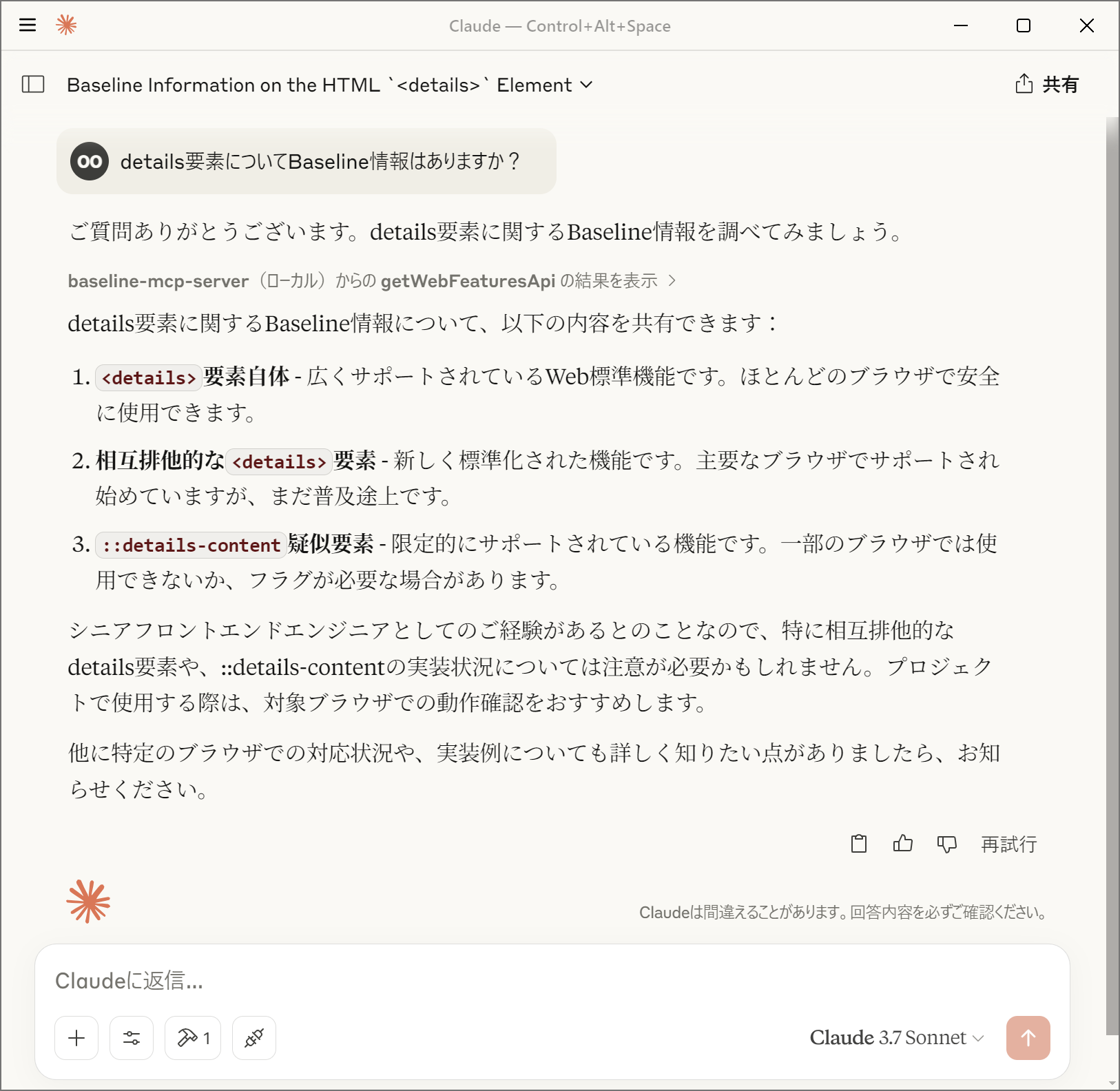
機能
- Web Platform DashboardのAPIを使用した機能検索
- 機能のBaselineステータス(
widely、newly、limited、no_data)の提供 - ブラウザ実装状況(バージョンと実装日)の提供
- 機能の使用状況データの提供
- 特定のブラウザを除外した機能検索(
chrome,edge,firefox,safari) - MCPを介した各種AIモデルとの連携
Baselineステータスについて
Baselineステータスは、Web機能のブラウザサポート状況を示します:
- widely: 広くサポートされているWeb標準機能。ほとんどのブラウザで安全に使用できます。
- newly: 新しく標準化されたWeb機能。主要なブラウザでサポートされ始めていますが、まだ普及途上です。
- limited: 限定的にサポートされているWeb機能。一部のブラウザでは使用できないか、フラグが必要な場合があります。
- no_data: 現時点ではBaselineに含まれていないWeb機能。ブラウザのサポート状況を個別に確認する必要があります。
Baselineについての詳細については「Baseline (互換性) - MDN Web Docs 用語集」を参照してください。
MCPクライアントでの設定
- サーバーを起動するにあたり、Denoの使用を推奨します
- パーミッションとして
api.webstatus.devのみのアクセスを許可してください
- パーミッションとして
@yamanoku/baseline-mcp-serverを指定するか、お手元のローカル環境にbaseline-mcp-server.tsを設置して読み取るように設定してください
Claude Desktop
Claude
DesktopのMCPクライアントで使用するには、以下のようにcline_mcp_settings.jsonに設定を追加します。
Visual Studio Code
Visual Studio
CodeのMCPクライアントで使用するには、以下のようにsettings.jsonに設定を追加します。
Dockerによる起動
最初にDockerイメージをビルドします。
MCPクライアントの設定でDockerコンテナを実行するようにします。
謝辞
このOSSはGPT-4o Image Generationによってロゴを製作、Claude 3.7 Sonnetによって実装、ドキュメントのサンプルを提案いただきました。感謝申し上げます。
ライセンス
Related MCP Servers
Adoption & maintenance
Factual signals from GitHub, npm, and our automated checks — not a rating.
GitHub stars
37
Stargazers on the source repository.
Last commit
12d ago
Most recent push to the default branch.
Directory activity
1 views
Config copies, upvotes, and views on AllMCPs.
Reviews
No reviews yet — be the first to share how this listing worked for you.
Frequently Asked Questions about Baseline MCP Server
AllMCPs Directory Badge
Showcase your server listing on GitHub or your project documentation. Embed this dynamic SVG badge to highlight official listing status and live engagement.
Badge Style:
Live Dynamic SVG Preview
Markdown (GitHub README)
[](https://allmcps.com/mcp/yamanoku-baseline-mcp-server)HTML Embed
<a href="https://allmcps.com/mcp/yamanoku-baseline-mcp-server"><img src="https://allmcps.com/api/badge/yamanoku-baseline-mcp-server?style=directory" alt="Baseline MCP Server on AllMCPs" /></a>