Query your DevExpress XAF app: entities, controllers, actions, rules, Model Editor.
Quick Install
Automated & IDE SetupCopy the AI prompt to install this server into Claude Code, Cursor, or another agent — or use 1-click editor setup below.
Manual Client & Custom JSON ConfigExpand JSON ▾
Client Config & Setup
Choose your client or environment
Target File:
💡 Paste the JSON block into your client's configuration file under mcpServers, then restart the application.
Documentation Overview
XAF Logic Explainer










Teach your AI coding agent what your XAF application actually does.
Point it at an XAF module. It reads your entities, controllers, actions, business rules, navigation and Model Editor customizations straight from source — and hands the result to whatever agent you code with.
Why this exists
DevExpress has done excellent work making AI agents fluent in XAF. Two pieces already exist, and this is the third:

| Teaches the agent… | Tool |
|---|---|
| How XAF works in general | DevExpress agent-skills |
| What the official documentation says | DevExpress Docs MCP Server |
| What YOUR application does | XAF Logic Explainer ← you are here |
An agent that has read every page of the XAF documentation still does not know that your Invoice
total is calculated from its lines, that ApproveController refuses to run when the period is
closed, or that three columns were hidden in the Model Editor and appear in no C# file at all. It
will confidently invent all three.
That gap is not solvable by better prompting. It is solvable by extraction.
These tools compose. Install the DevExpress skills for framework knowledge, use the Docs MCP for the official reference, and use this for your own codebase. None of them replaces the others.
What it extracts

Everything below is read as syntax, using Roslyn. Your project never has to compile, and this tool never links against DevExpress assemblies:
- Entities — properties, types, associations, and the XAF attributes that give them meaning
(
[Association],[Aggregated],[RuleRequiredField],[Appearance],[ModelDefault], …). XPO and EF Core, auto-detected from yourusingstatements. - Controllers and actions —
SimpleAction,PopupWindowShowAction,SingleChoiceAction, their target criteria, and the handler code that runs when they fire. - Business rules — validation attributes and code rules, with the conditions attached.
- Module setup —
ModuleUpdaterseed data and what gets created on first run. - Navigation — the groups and items your users actually see.
- Model Editor (
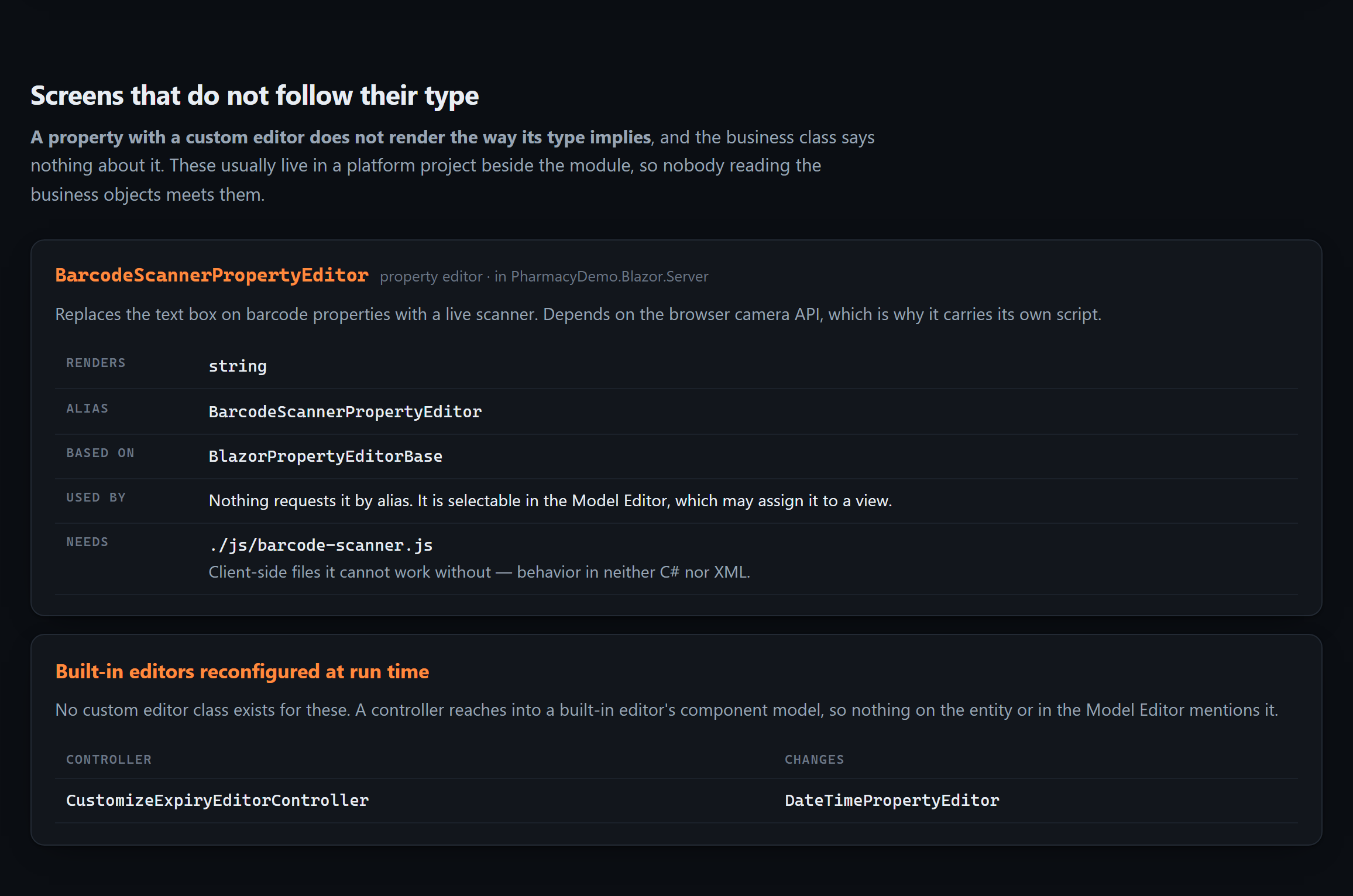
.xafml) — the customizations that exist only in XML and are invisible to anyone reading your C#. Module and platform files are merged the way XAF merges them. - Custom property and list editors — including the JavaScript they cannot work without, and
built-in editors reconfigured at run time through
View.CustomizeViewItemControl<T>(). These live in the platform project beside the module, so nobody reading the business objects meets them. - Version-gated migrations — the
CurrentDBVersion < new Version(…)blocks in your updater. Each runs at most once for any database, and is the only explanation for data the current code cannot account for. - Reports — what each one is over, the filter inside its layout, its calculated fields and bound
expressions, and the parameters dialog it opens with, down to the
GetCriteria()that turns the answers into a filter. Read from designer code, from a.repx, or from the report's own constructor. - Every screen, and what loads onto it — see below.
These are the reason an agent that has read every business class can still be confidently wrong about the application:
What runs when you open this screen
Nothing in an XAF repository answers that, and both halves are missing for different reasons.
The screens themselves are in no file. XAF generates a list, a detail and a lookup view for
every business class, plus a list view for every collection, and the Model Editor stores only the
ones somebody changed. Grepping your source for Patient_Prescriptions_ListView finds nothing —
and that is not evidence it is missing.
Which controllers run there is decided at run time, by four conditions XAF ANDs together: nesting, view type, object type and view id. Each is unrestricted when unset, so a controller that sets none of them loads onto every screen you have.
This reads all four the way ViewController.IsFitToView evaluates them, against a view inventory
built from the framework's own id generators — and records why each one matched, so the answer
can be checked rather than trusted:
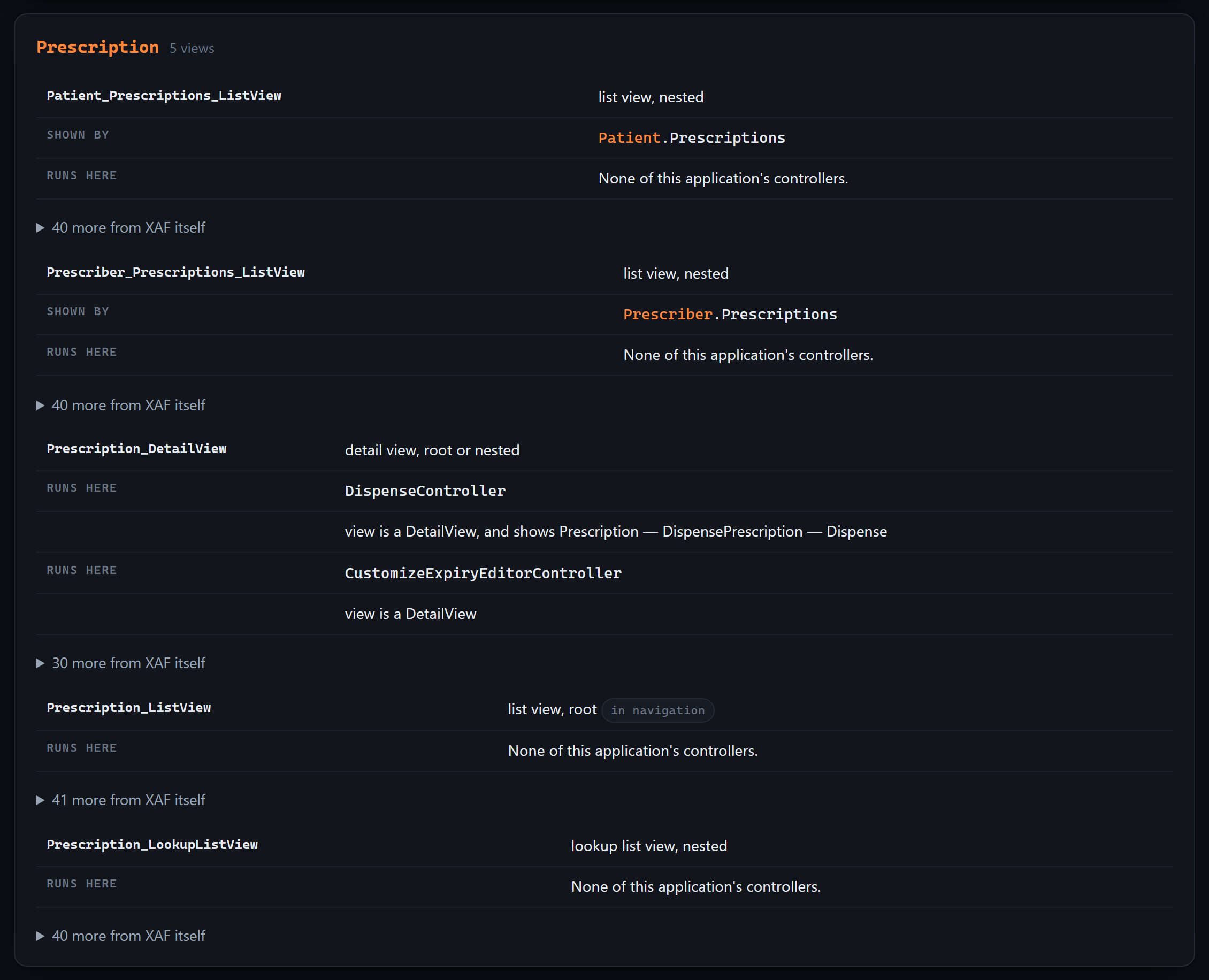
Two layers, kept apart. What your team wrote gets the full treatment; what XAF provides is folded away behind one line, because there is a great deal of it and it is not yours to change. With a ground-truth catalog it is named too — scoped to the modules you actually register, so a WinForms controller never appears on a Blazor screen.
What it will not claim: a controller listed here can still switch itself off through
Active["reason"], which depends on the data and the user. This is what XAF loads onto a
screen, not what will necessarily do something — and anything it could not read from the source is
listed apart, with the reason, instead of being quietly treated as "runs everywhere".
The reports are the test of whether you can trust any of this
Every other section here is a claim that we found something you could not see. This one is the opposite, and it is the more useful half.
Reports V2 lets your users design reports at run time. Those are stored as rows in your database, not as files — so no tool that reads a repository can see them, this one included. An application with forty reports and none in its source is not unusual; it is what a successful reporting setup looks like.
So the answer changes shape depending on what is knowable:
| Your application | What you are told |
|---|---|
No ReportsModuleV2 | "these are all of them" — nothing can appear at run time |
| Module registered, reports in source | "this list is a lower bound" |
| Module registered, none in source | "the true number is not zero but unknown" |
That last row is the common case, and it is where a confident tool does real damage. An agent told
"this application has no reports" will design as though none can exist — for an application whose
users built forty. AGENTS.md says it outright:
The number is unknown, not zero — do not tell anyone this application has no reports.
The same rule governs the framework catalog. If the catalog on your machine describes DevExpress 26.1 and your application declares 23.2, every framework answer says so, with both numbers, rather than being presented as certain.
Related MCP Servers
Reviews
No reviews yet — be the first to share how this listing worked for you.
Frequently Asked Questions about XAF Logic Explainer
AllMCPs Directory Badge
Showcase your server listing on GitHub or your project documentation. Embed this dynamic SVG badge to highlight official listing status and live engagement.
Badge Style:
Live Dynamic SVG Preview
Markdown (GitHub README)
[](https://allmcps.com/mcp/xaf-logic-explainer)HTML Embed
<a href="https://allmcps.com/mcp/xaf-logic-explainer"><img src="https://allmcps.com/api/badge/xaf-logic-explainer?style=directory" alt="XAF Logic Explainer on AllMCPs" /></a>