Wyd README
The full upstream README, mirrored here for reference. Install config, tool schemas, adoption signals, and an original overview live on the Wyd listing page.
wyd
wyd? — what you doing?
See what your coding agents left running.
Coding agents spawn MCP servers, headless browsers, dev servers, workers, and databases.
ps tells you what is running. wyd tells you why — which session started it, in which project, and whether it's leftover.
Local, macOS and Linux. No account, no network, no telemetry.
Each tagged release publishes the crate to crates.io and bumps
Formula/wyd.rb in oxyplay/homebrew-tap
automatically, so wyd upgrade stays current with no manual step. wyd upgrade
still prints a hint if a formula bump is ever lagging.
Binaries: GitHub Releases. From a clone: cargo install --path .
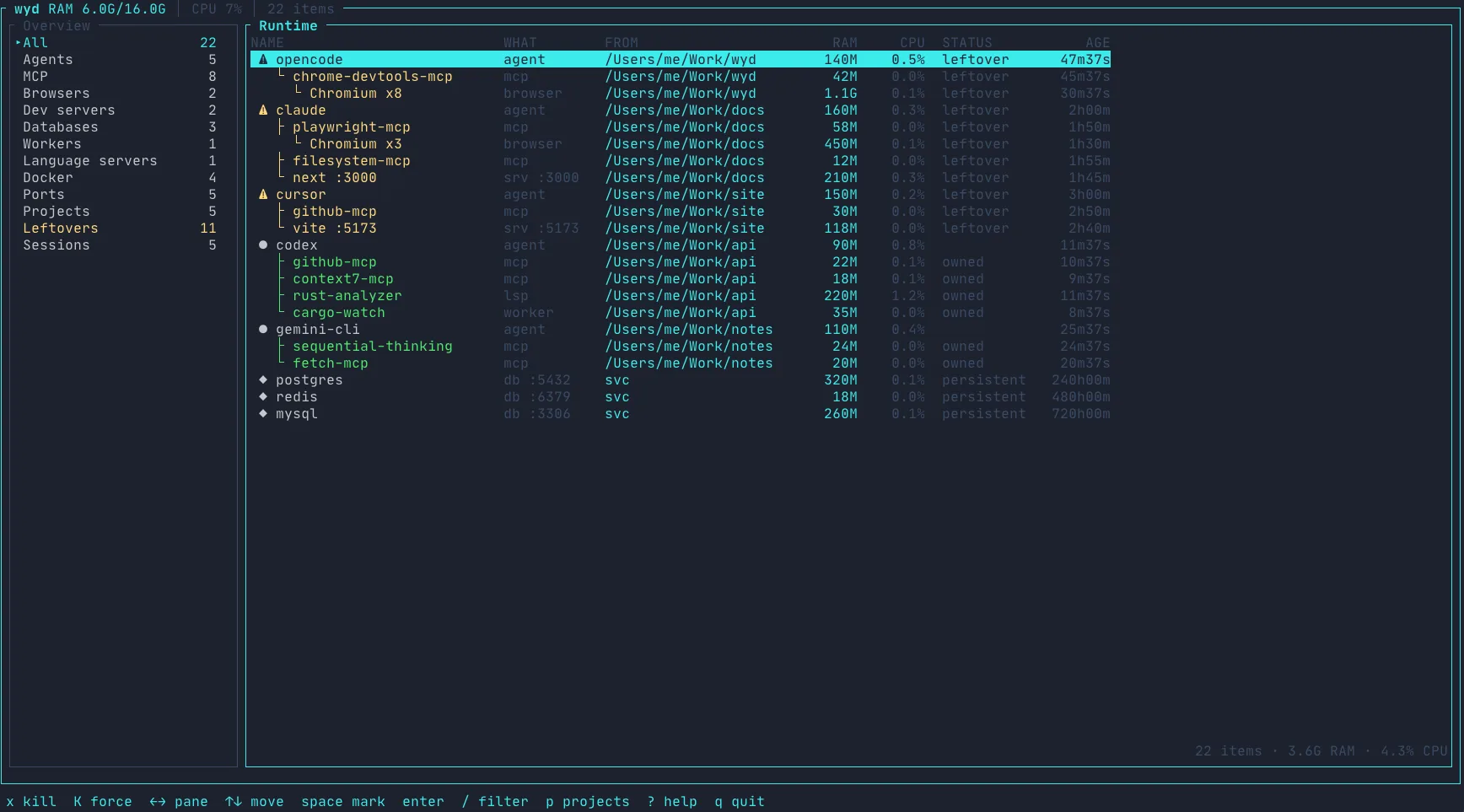
OS daemons stay hidden. Desktop Chrome stays hidden. Agent-spawned Chromium does not.
Why wyd
ps / Activity Monitor | Docker Desktop | wyd | |
|---|---|---|---|
| Every process | yes | containers only | only dev runtime |
| Who started it | no | compose labels | agent → MCP → browser |
| Which project | no | sometimes | cwd / git root |
| Leftover? | no | you guess | scored, with a reason |
| Safe kill | you hope | stop/rm | PID + start time, y to confirm |
| Volumes | — | easy to nuke | unused ≠ garbage; D required |
Built for people who run coding agents all day and then ask what did that session leave behind?
Runtime ownership
Beyond the live view, wyd tracks coding-agent runtime sessions — which
resources a session spawned, keyed by boot_id + pid + start_time, so the
provenance survives process re-parenting and Wyd restarts. A deterministic
resolver attributes resources to a session with an explainable score when
exact ancestry is gone.
- Sessions view in the TUI (top-level): agent · project · state · age · id, with a details panel.
wyd why <pid>— which session owns a process, and the evidence.wyd --json sessions— recorded sessions as JSON.wyd serve— a local daemon over a Unix socket (wyd.sock, mode 0600, single-instance). Keeps provenance fresh and answers read-only queries; vendors can register sessions withsession_start/session_end(their id maps to a Wyd session as an alias).wyd mcp— a Model Context Protocol server over stdio, so a coding agent can ask wyd for its sessions and who owns a PID.
MCP
wyd also speaks the Model Context Protocol over stdio, so a coding agent
can ask the machine what it — or other agents — left running.
Starts the local MCP server (read-only). It exposes two tools:
list_sessions (recorded agent sessions) and explain (which session owns a
process, by pid). No network, no account — the answers come from the local
provenance store.
Registered in the MCP Registry:
- MCP Registry name:
mcp-name: io.github.oxyplay/wyd
WebMCP
Try the hosted demo: https://demo.wyd.sh
wyd exposes six WebMCP tools so a browser agent can investigate leftovers in
the same UI the human sees: list_sessions, get_session, list_leftovers,
explain_process, focus_resource, propose_cleanup. Nothing is killed from
a tool call — the human confirms cleanup.
Quick test
Paste this into a browser agent on the demo (or local wyd web):
WebMCP support was added during the OpenAI WebMCP Challenge on top of the existing wyd CLI/TUI runtime inspector.
See docs/webmcp.md.
Keys
| Key | Action |
|---|---|
← → / h l | overview / list |
↑ ↓ / j k | move (scroll the details popup) |
Tab | focus overview / list |
backspace | go back (clear filter / project / section, never quits) |
enter | details popup; on a project, pin that project |
space | mark several |
x / K | terminate / force kill (y confirms) |
s | stop running Docker container (running ones sort first) |
c | Docker clean (y; volumes need D) |
P | prune unused anonymous volumes (confirm; named data kept) |
o | open the selected listener as HTTP (o try HTTP — an explicit assumption; listeners are shown as sockets, not URLs) |
p | projects |
/ | filter |
r | refresh |
? | help |
esc | close popup, then clear filter / project, then quit |
q | quit |
Kill only signals the item’s own PIDs (re-checked by PID + start time). A named volume is never treated as garbage — only anonymous, unattached ones (P) are offered for pruning, with confirmation. The bottom hint line is context-aware: it shows the actions that apply to the currently selected row.
Scripts
Same snapshot as the TUI — useful after an agent finishes a task:
Filters: leftovers, mcp, agents, docker, project, sessions (JSON only).
Field names stay stable until a major version bump. Empty ports / reasons / children / project are omitted.
Config
~/.config/wyd/config.toml — missing file is fine.
License
Apache-2.0. Copyright 2026 Maksym Nevinchanyy.