Wsl Envidat MCP README
The full upstream README, mirrored here for reference. Install config, tool schemas, adoption signals, and an original overview live on the Wsl Envidat MCP listing page.
🇨🇭 Part of the Swiss Public Data MCP Portfolio
wsl-envidat-mcp 🌲❄️⛰️






MCP server connecting AI models to Swiss environmental research data from WSL via EnviDat — forest, snow, avalanches, natural hazards and biodiversity, no API key required.
Phase
This server is in Phase 1: Read-only Wrapper.
| Property | Status |
|---|---|
| Read tools | ✅ 10 tools, all readOnlyHint: true |
| Write tools | ❌ none (EnviDat is read-only public data) |
| Semantic Layer | ⚠️ partial — three domain tools curate Solr queries |
| OAuth / Auth Gateway | ❌ not required (Public Open Data, no API key) |
| Container hardening | ✅ multi-stage Dockerfile, non-root |
| Test suite | ✅ 38 offline unit tests + 31 live integration tests |
| Audit run | ✅ 2026-05-27 (mcp-audit-skill v1.0.0) |
Phase-2 ideas (caching layer, semantic aggregation tool combining forest +
snow + hazard data into a "Lage-Übersicht"): tracked under docs/.
Overview
The WSL (Eidgenössische Forschungsanstalt für Wald, Schnee und Landschaft / Swiss Federal Research Institute for Forest, Snow and Landscape) is one of Europe's leading environmental research institutes. Its open data platform EnviDat provides access to 1,000+ research datasets, time series of up to 130 years, and data from 6,000+ monitoring stations.
This MCP server exposes the EnviDat CKAN API as 10 tools and 2 resources, enabling AI assistants to search, filter and retrieve WSL research data by keyword, domain, or geographic bounding box — all without an API key.
Anchor demo query: "How was air quality and forest health around Schulhaus Leutschenbach in Zurich — and what does the WSL say about the current forest condition in the canton?"
Demo
Features
- 10 tools covering full-text search, domain-specific queries, spatial search, and curated thematic tools (avalanche, forest, natural hazards)
- 2 MCP resources for organizations and research domains
- 5 research domains: Forest · Biodiversity · Natural Hazards · Snow & Ice · Landscape
- 815+ datasets, time series since 1890, data from the SLF avalanche research institute
- No API key required — all data publicly accessible via open licenses
- Dual transport: stdio (Claude Desktop / local) + Streamable HTTP (cloud deployment)
- Model-agnostic: works with Claude, GPT-4, and any MCP-compatible client
Prerequisites
- Python 3.11+
piporuv/uvx- Internet connection (live API calls to envidat.ch)
Installation
Quickstart
Claude Desktop
Edit ~/Library/Application Support/Claude/claude_desktop_config.json (macOS) or %APPDATA%\Claude\claude_desktop_config.json (Windows):
Restart Claude Desktop, then ask:
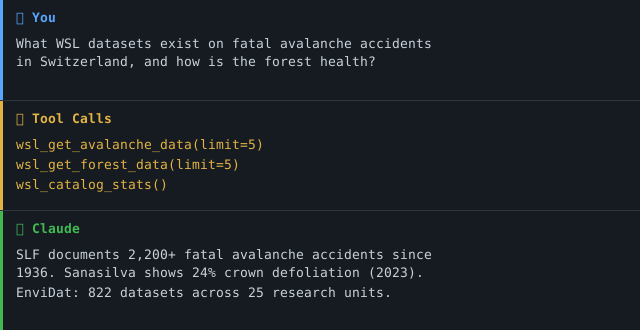
- "What WSL datasets exist on fatal avalanche accidents in Switzerland?"
- "Show me forest inventory data from the LFI for the canton of Zurich."
- "Which natural hazard research data does the SLF publish on EnviDat?"
- "Are there WSL datasets on drought conditions in summer 2022?"
- "What biodiversity data is available for alpine ecosystems?"
Configuration
No API key required. Optional environment variables:
| Variable | Default | Description |
|---|---|---|
MCP_TRANSPORT | stdio | Transport mode: stdio or streamable-http (legacy streamable_http is accepted) |
MCP_HOST | 127.0.0.1 | Bind address for streamable-http. Use 0.0.0.0 only inside a container. |
PORT | 8000 | Port for Streamable HTTP mode |
Cloud Deployment (Streamable HTTP)
For use via claude.ai in the browser (e.g. on managed workstations without local software):
💡 "stdio for the developer laptop, streamable-http for the browser."
⚠️ Multi-Replica Cloud Deployments: Session state lives in the server. Run a single replica or enable sticky sessions (Railway/Render setting, or
sessionAffinity: ClientIPon Kubernetes Services).
⚠️ Multi-Tenant / Unauthenticated Streamable HTTP: This server has no auth layer (
auth_model: none). Streamable HTTP without a reverse-proxy + OAuth/API-Gateway is intended only for single-user deployments (e.g. one user's claude.ai browser session). For multi-tenant use, front the server with an authenticating gateway.
Container image (recommended for cloud)
A hardened multi-stage image is published to GitHub Container Registry on
every main push and semver tag. Runs as non-root (uid=1000), no build
tools in the runtime layer, multi-arch (linux/amd64 + linux/arm64).
The publishing workflow is .github/workflows/container.yml —
not publish.yml, which only uploads the Python package to PyPI on a
release. container.yml is delivery, not a gate: it does not gate a pull
request, and a red run there means the image is missing, not that the code
is broken.
Kubernetes hardening (excerpt):
Available Tools
| Tool | Description |
|---|---|
wsl_search | Unified search — combine query, domain, organization, and bbox filters |
wsl_get_dataset | Full metadata, DOI, download URLs for a specific dataset |
wsl_list_organizations | List all WSL research units on EnviDat |
wsl_get_organization | Details of a specific research unit incl. datasets |
wsl_list_tags | Browse available tags/keywords |
wsl_get_recent_datasets | Most recently updated datasets |
wsl_get_avalanche_data | SLF avalanche & snow data (incl. fatal accidents since 1936) |
wsl_get_forest_data | Forest data incl. National Forest Inventory (LFI) & Sanasilva |
wsl_get_naturgefahren_data | Natural hazard datasets (landslides, rockfall, floods) |
wsl_catalog_stats | Catalog overview and statistics |
Example Use Cases
| Query | Tool |
|---|---|
| "Fatal avalanche accidents in Valais since 2000?" | wsl_get_avalanche_data |
| "Forest health data for canton Zurich?" | wsl_get_forest_data |
| "Landslide risk datasets near Brienz?" | wsl_get_naturgefahren_data |
| "Most recent WSL publications on biodiversity?" | wsl_search(domain="biodiversitaet") |
| "Which datasets cover the area around Lake Constance?" | wsl_search(bbox=[9.0, 47.5, 9.7, 47.8]) |
| "How many datasets does SLF publish?" | wsl_get_organization |
Resources
| URI | Description |
|---|---|
envidat://organization/{name} | Research unit (e.g. slf, wsl) |
envidat://domain/{domain} | Domain overview with top datasets |
Valid domain values: wald, biodiversitaet, naturgefahren, schnee_eis, landschaft
Architecture
Infrastructure Components
| Component | Metaphor | Function |
|---|---|---|
api_client.py | Librarian | Handles all HTTP requests to EnviDat CKAN API |
server.py | Reception desk | Registers all 10 tools and 2 resources with FastMCP |
| Domain filters | Filing cabinet | Pre-configured keyword sets per research domain |
| Bounding box search | Map overlay | Spatial filtering via lat/lon coordinates |
Project Structure
Combination with Other MCP Servers
This server is part of the Swiss Open Data MCP Portfolio and integrates well with:
| Combination | Use Case |
|---|---|
+ zurich-opendata-mcp | Urban climate + forest condition around Zurich |
+ swiss-statistics-mcp | Population data + environmental quality |
+ swiss-transport-mcp | Avalanche risk + public transport connections |
+ fedlex-mcp | Forest protection law + actual LFI forest condition |
+ global-education-mcp | Compare environmental education data internationally |
Known Limitations
- Solr search:
ORis treated as a stopword — use single, specific search terms per query - Domain search: Results depend on WSL's internal keyword tagging — not all datasets are tagged consistently
- Spatial search: Bounding box filtering is approximate; verify coordinates with individual dataset metadata
- Live API: All tools make live calls to envidat.ch — results depend on availability of the public API
- Languages: Dataset metadata is primarily in English and German; some older entries may be in German only
Safety & Limits
- Read-only: All tools perform HTTP GET requests only — no data is written, modified, or deleted on EnviDat.
- No personal data: The API returns research metadata, dataset descriptions, and download URLs. No personally identifiable information (PII) is processed or stored by this server.
- Rate limits: The EnviDat CKAN API is public without documented rate limits. Use
limitandrowsparameters conservatively. The server enforces a 30-second timeout per request. - Data freshness: All tools make live API calls — results reflect the current state of the EnviDat catalog at query time. No caching is performed by this server.
- Terms of service: Data is subject to the EnviDat Terms of Use. Individual datasets are published under various open licenses (Creative Commons, CC0) — see dataset metadata.
- No guarantees: This is a community project, not affiliated with WSL or EnviDat. Availability depends on the upstream EnviDat API.
For the full security posture (egress allow-list, redirect handling, accepted risks) see SECURITY.md.
MCP Protocol Version
This server speaks two protocol eras over the same endpoint. The client's first request on a connection decides which one applies; a later claim from the other era is refused.
| Era | Revision | Who reaches it |
|---|---|---|
initialize handshake | 2024-11-05 … 2025-11-25 | What today's clients speak. The server answers with the revision asked for, or with the 2025-11-25 ceiling when the request asks for something newer. |
| Per-request envelope | 2026-07-28 | A request carrying the 2026-07-28 _meta envelope opens a modern connection. |
Both revisions are pinned in
tests/test_protocol_version.py and asserted
against the installed SDK, so a Dependabot bump of mcp cannot move either one
silently. This server builds no ASGI app to send an initialize through, so
the gate asserts the SDK constants rather than a measured response — the
weaker form, named rather than left unsaid.
SUPPORTED_MCP_PROTOCOL_VERSION in
server.py names the modern era; a
mismatch against the SDK logs a warning at startup. A warning is not a gate —
that is what the test file is for.
Note that the SDK's LATEST_PROTOCOL_VERSION is an alias for the modern
era, not for the handshake era — pinning against it alone would leave the era
that current clients actually negotiate free to drift.
Update policy. When the gate fails, do not edit the constant blindly: read
the spec changelog between the two revisions, verify the server still behaves,
then move the constant, this section, README.de.md and
CHANGELOG.md together.
Testing
CI runs the offline suite on every PR. The live suite runs only on main
pushes and manual workflow_dispatch triggers, so build status is not
coupled to upstream availability.
Changelog
See CHANGELOG.md
Contributing
See CONTRIBUTING.md
Security
See SECURITY.md (Deutsch) for the security posture and how to report a vulnerability.
License
MIT License — see LICENSE
Data on EnviDat is published under various open licenses (Creative Commons, CC0) — see individual dataset metadata.
Author
Hayal Oezkan · malkreide
Credits & Related Projects
- Data: EnviDat – WSL Swiss Federal Research Institute for Forest, Snow and Landscape
- Protocol: Model Context Protocol – Anthropic / Linux Foundation
- Portfolio: Swiss Public Data MCP Portfolio
Installation
Run via uv's uvx — no clone or manual install needed. Add to your MCP client config (mcpServers for Claude Desktop, Cursor and Windsurf; use a top-level servers key for VS Code in .vscode/mcp.json):