workstream-mcp


An MCP server that keeps the state of record for work done by AI agents and humans together: plans, tasks, claims, findings, fix attempts and verdicts, stored in Postgres, mirrored to GitHub Projects and Slack.
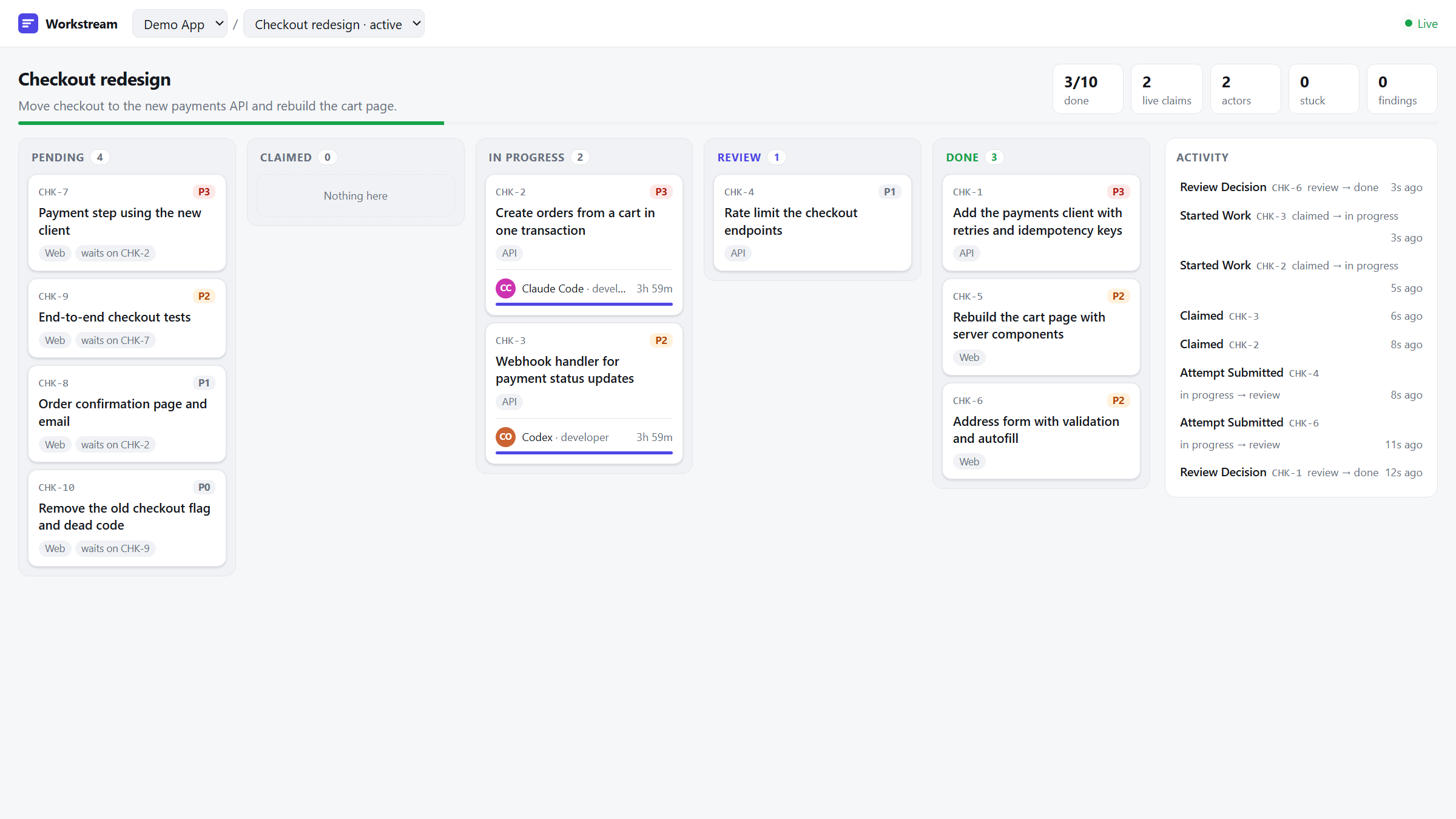
Try it in 30 seconds
One container with Postgres and the server in demo mode, seeded with a project, an active plan and three tasks:
docker run --rm -p 127.0.0.1:8080:8080 ghcr.io/ahmad-codex/workstream-mcp:demo
claude mcp add --transport http workstream-demo http://localhost:8080/demo-insecure-token/mcp
Then ask Claude to "list the workstream projects and claim the next task on the demo plan".
The demo token is public and gives admin rights, so keep the port on 127.0.0.1; the server
refuses that token whenever demo mode is off. Data is gone when the container stops.
Open http://localhost:8080/demo-insecure-token/ui/ to watch the plan on the dashboard.
To see agents race for tasks, start the container with -e WORKSTREAM_ADMIN_TOKEN=local-admin and
run WORKSTREAM_ADMIN_TOKEN=local-admin node scripts/simulate-agents.mjs.
Set it up with Claude Code
Clone the repo, open Claude Code in it, and paste:
Set up workstream-mcp for me on this machine. Follow the README quick start using the
published Docker image, create an admin user for me, and connect this Claude Code session
to it. Then create a project and a development plan with three sample tasks, activate it,
and claim one task to show it works. When that is done, ask me whether I want GitHub
Projects or Slack sync, and walk me through docs/github-setup.md or docs/slack-setup.md
step by step, telling me exactly what to click and which values to paste back.
Prefer to do it by hand? See the quick start.
Why
A common way to coordinate agent work is a markdown plan in the repo: a checklist the agent reads, edits and commits. That works for one agent in one session. It breaks down when several agents and people work the same plan at once:
- Two agents pick the same item, because nothing stops them.
- An agent dies mid-task and the item stays "in progress" forever.
- Edits to the file race each other, and the history of who did what lives in git diffs.
- The plan does not show up where the team already looks: the project board and Slack.
workstream-mcp replaces the file with a small service. Agents call MCP tools to claim work, submit results and record verdicts. Claims are atomic and expire, transitions are checked against a state graph, every change is written to an append-only event log, and GitHub and Slack are updated from an outbox so an outage on their side never blocks the agents.
Features
What the code does today:
- Atomic claims with TTLs.
SELECT ... FOR UPDATE SKIP LOCKEDin one transaction, so concurrent claimers never get the same task and never block each other. A claim that is not refreshed expires and the work returns to the pool. Covered by a 32-claimer concurrency test suite. - Data-driven state machine. Statuses, legal transitions, allowed roles, role TTLs, retry
caps and board column mappings live in
plan_types.state_graph(JSONB). Two plan types ship:audit(find, verify, fix, re-verify) anddevelopment(implement, review). An illegal transition returnsillegal_transitionwithallowed_next, so the calling model can correct itself. - Append-only event log. Every state change writes an
eventsrow. Triggers blockUPDATEandDELETEoneventsandverdicts. - GitHub Projects V2 sync. Tasks become issues (or draft items for repo-less projects) on a Projects V2 board, columns follow task status, and audit plans get a milestone. A signed webhook endpoint verifies inbound board events, but does not apply them yet (see the roadmap). Uses a GitHub App.
- Slack notifications. Block Kit messages per project channel, threaded per task, with role personas for agent posts, and interactive buttons verified with the Slack signing secret.
- Outboxes. GitHub and Slack calls are queued in
board_sync_logandslack_notify_loginside the request transaction and drained by background workers with retries. - Web dashboard. A read-only board per plan at
/<token>/ui/: tasks by status, claim holders with a TTL countdown, dependencies, stuck work and the event timeline of every task. See docs/dashboard.md. - URL-as-credential auth. Each user gets a URL like
https://host/<token>/mcp. Pasting it into an MCP client is the whole setup. Tokens can be rotated; the token is stripped from the path and from logs. - Audit dispatcher (optional).
request_auditqueues an audit run; a sidecar container clones the repo and starts the project's audit orchestrator in a tmux session with Claude Code. - Admin API and CLI.
/admin/*endpoints behind a static bearer token for users and boards, plus a CLI for user management. Projects and plans are set up through the admin-gated MCP tools.
Architecture
flowchart LR
subgraph Clients
CC[Claude Code / Desktop / Cursor]
ORCH[Orchestrator agents]
end
CC -- "POST /<token>/mcp<br/>JSON-RPC 2.0" --> API
ORCH -- "POST /<token>/mcp" --> API
subgraph Server
API[Workstream.Api<br/>token middleware, MCP tools,<br/>state machine, claims]
BSW[BoardSyncWorker]
SNW[SlackNotifyWorker]
DISP[AuditDispatchWorker<br/>dispatcher role]
end
API -- "one transaction:<br/>state + events + outbox rows" --> PGB[(PgBouncer)]
PGB --> PG[(Postgres 16)]
BSW -- drain board_sync_log --> PG
SNW -- drain slack_notify_log --> PG
DISP -- drain audit_dispatch_log --> PG
BSW -- GraphQL / REST --> GH[GitHub Projects V2,<br/>issues, milestones]
SNW -- chat.postMessage --> SL[Slack]
GH -- signed webhook --> API
SL -- signed interactivity --> API
DISP -- tmux + claude --> REPO[checked-out repos]
| Project | Responsibility |
|---|---|
src/Workstream.Api | ASP.NET Core host, token middleware, JSON-RPC endpoint, admin API, webhooks, dispatcher |
src/Workstream.Core | Domain model, state graph parser, StateMachineService, claim rules |
src/Workstream.Data | Npgsql + Dapper repositories, outbox, SQL migration runner |
src/Workstream.Mcp | The MCP tool classes and their registration |
src/Workstream.GitHub | GitHub App auth, Projects V2 client, board sync worker |
src/Workstream.Slack | Slack client, Block Kit builders, notify worker, signature check |
src/Workstream.Telemetry | OpenTelemetry setup and metric definitions |
tools/workstream-admin | Operator CLI |
deploy/ | Dockerfiles, compose files, migrations, plan-type profiles, Caddy, PgBouncer, Grafana and Prometheus config |
More in docs/architecture.md and docs/state-machine.md.
Quick start (about 5 minutes)
Needs Docker. This starts Postgres and the API only; GitHub, Slack and the dispatcher stay off.
git clone https://github.com/ahmad-codex/workstream-mcp.git
cd workstream-mcp
docker compose -f deploy/docker-compose.quickstart.yml up -d --build
curl http://localhost:8080/healthz
# {"ok":true}
To skip the local build, run the published image instead:
WORKSTREAM_IMAGE=ghcr.io/ahmad-codex/workstream-mcp:latest \
  docker compose -f deploy/docker-compose.quickstart.yml up -d --no-build
The API applies the SQL migrations on startup, including the audit and development plan types.
Create a user. The response contains the user's MCP URL once; copy it.
curl -s -X POST http://localhost:8080/admin/users \
  -H "Authorization: Bearer local-admin-token" \
  -H "Content-Type: application/json" \
  -d '{"githubUsername":"alice","displayName":"Alice","actorType":"human","isAdmin":true}'
# { "user": {...}, "url": "http://localhost:8080/<token>",
#   "mcp_endpoint": "http://localhost:8080/<token>/mcp", "warning": "..." }
isAdmin lets this user call the setup tools (create_project, create_plan, ...).
Check the URL:
curl http://localhost:8080/<token>
# {"ok":true,"actor":{"id":"...","github_username":"alice","is_admin":true},...}
Then connect an MCP client (next section) and ask it to create a project, a development plan and a few tasks, activate the plan, and claim one.
Stop with docker compose -f deploy/docker-compose.quickstart.yml down (add -v to drop the data).
Connecting an MCP client
The server speaks MCP over HTTP (JSON-RPC 2.0 POSTs) at <base>/<token>/mcp. There are no
extra headers; the token in the path identifies the user.
Claude Code
claude mcp add --transport http workstream http://localhost:8080/<token>/mcp
Claude Desktop (claude_desktop_config.json). Claude Desktop launches stdio servers from
this file, so use the mcp-remote bridge (needs Node.js):
{
  "mcpServers": {
    "workstream": {
      "command": "npx",
      "args": ["-y", "mcp-remote", "http://localhost:8080/<token>/mcp"]
    }
  }
}
If the server is reachable from the internet over HTTPS, you can instead add the URL as a custom connector in Claude Desktop's settings.
stdio (any client). The same binary speaks MCP over stdin/stdout with --stdio, acting as
the user whose token is in WORKSTREAM_USER_TOKEN against the database in
WORKSTREAM_DB_CONNECTION (an HTTP server must still be running somewhere to drain the GitHub
and Slack outboxes):
{
  "mcpServers": {
    "workstream": {
      "command": "dotnet",
      "args": ["/path/to/Workstream.Api.dll", "--stdio"],
      "env": {
        "WORKSTREAM_DB_CONNECTION": "Host=localhost;Database=workstream;Username=workstream;Password=...",
        "WORKSTREAM_USER_TOKEN": "<token>"
      }
    }
  }
}
Without WORKSTREAM_DB_CONNECTION, --stdio starts in discovery mode: initialize and
tools/list work and every tool call returns a not_configured error. Directory scanners such
as Glama use this mode.
Cursor (~/.cursor/mcp.json, or .cursor/mcp.json in a project):
{
  "mcpServers": {
    "workstream": {
      "url": "http://localhost:8080/<token>/mcp"
    }
  }
}
The URL is a credential. Do not commit it; keep it in user-level config. See docs/onboarding.md for the full onboarding flow.
MCP tools
36 tools. Every response is { ok, data, error }; errors carry a stable code
(stale_claim, illegal_transition, retry_cap_exceeded, ...). Full details in
docs/mcp-tools.md. Any call may pass as_agent to set the role
persona used for Slack posts.
| Group | Tool | What it does |
|---|---|---|
| Discovery | list_projects | Projects with active plan counts and the caller's open claims |
list_plans | Plans of a project, filterable by status, with task counts per status | |
get_plan_dashboard | Status counts, next claimable work, my claims, stuck work, recent events | |
get_my_active_work | Every claim the caller holds | |
| Claims | claim_next_task | Claim the highest-priority pending task for a role |
claim_specific_task | Claim one task by id | |
claim_next_finding_for_verification | Audit: claim a finding to verify | |
claim_next_finding_for_fix | Audit: claim a confirmed finding to fix | |
claim_next_attempt_for_review | Reserved; v1 stub | |
refresh_claim | Extend a claim's TTL during long work | |
release_claim | Give work back without submitting | |
| Submission | start_work | claimed to in_progress |
submit_findings | Audit: submit findings for a task | |
submit_verification_verdict | Audit: confirmed, rejected or ambiguous | |
submit_attempt | Submit a code change; enforces the retry cap | |
submit_attempt_verdict | Audit: fix_confirmed, fix_failed or partial | |
submit_review_decision | Development: approved or changes_requested | |
| Lifecycle | mark_task_status | deferred, blocked, skipped, out_of_scope, needs_human_review |
record_commit | Attach a commit hash | |
create_task / |
Configuration
Environment variables read by the API. Each _FILE variant reads the value from a file
(Docker secrets).
| Variable | Required | Purpose |
|---|---|---|
WORKSTREAM_DB_CONNECTION | yes | Npgsql connection string. Password=__from_secret__ is replaced with the contents of WORKSTREAM_DB_PASSWORD_FILE |
WORKSTREAM_DB_PASSWORD_FILE | no | File holding the database password |
WORKSTREAM_ADMIN_TOKEN / _FILE | for admin API | Bearer token for /admin/*. If unset, admin requests are rejected |
WORKSTREAM_PUBLIC_BASE_URL | no | Base used when returning user URLs. Defaults to the request host |
WORKSTREAM_GH_APP_ID | for GitHub | GitHub App id |
WORKSTREAM_GH_INSTALLATION_ID | for GitHub | App installation id |
WORKSTREAM_GH_APP_KEY_PATH | for GitHub | Path to the App private key (PEM) |
WORKSTREAM_GH_WEBHOOK_SECRET / _FILE | for GitHub | Webhook HMAC secret |
WORKSTREAM_SLACK_SIGNING_SECRET / _FILE | for Slack buttons | Slack signing secret |
WORKSTREAM_ROLE | no | api (default) or dispatcher |
WORKSTREAM_TRANSPORT | no | stdio to serve MCP over stdin/stdout (same as --stdio) |
WORKSTREAM_USER_TOKEN | stdio | The user the stdio server acts as |
WORKSTREAM_DEMO | no | true seeds demo data and accepts the public demo token. Local trials only |
WORKSTREAM_AUDIT_DISPATCH_ENABLED | dispatcher | true to run the audit dispatcher |
WORKSTREAM_AUDIT_DISPATCH_SCRIPT | dispatcher | Path to audit-dispatch.sh |
WORKSTREAM_AUDIT_DISPATCH_TIMEOUT | no |
Per-project Slack bot tokens are files under the secrets directory, referenced by
set_project_slack. See docs/slack-setup.md and
docs/github-setup.md.
Building from source
dotnet build
dotnet test tests/Workstream.UnitTests           # no Docker
dotnet test tests/Workstream.IntegrationTests    # Docker (Testcontainers, Postgres 16)
dotnet test tests/Workstream.ConcurrencyTests    # Docker
Run the API against your own Postgres:
export WORKSTREAM_DB_CONNECTION="Host=localhost;Database=workstream;Username=workstream;Password=devpass"
export WORKSTREAM_ADMIN_TOKEN="dev-admin-token"
dotnet run --project src/Workstream.Api
Documentation
- Architecture: modules, request lifecycle, concurrency model
- State machine: the state graph format and the two seed plan types
- MCP tools: every tool, error codes,
as_agent - Onboarding: giving a developer access
- GitHub setup: GitHub App, Projects V2 board, webhooks
- Slack setup: bot token, channel, interactivity
- Audit dispatch: the dispatcher sidecar
- Deployment: production compose, PgBouncer, Caddy, backups
- Example audit orchestrator: a prompt that drives an audit plan end to end
- Dashboard: the read-only web view and its API
- Roadmap: Now, Next and Later
Status
Early, version 0.2.1. Known gaps:
claim_next_attempt_for_reviewis a stub.workstream-admin apply(declarative bootstrap) only prints the file.- The stuck-work report is stored but not yet posted to Slack.
- Only the latest
masteris supported; there are no release branches.
See CHANGELOG.md and the roadmap.
Community
- Questions and ideas: GitHub Discussions
- Bugs and feature requests: issues
- Getting help: SUPPORT.md. How decisions are made: GOVERNANCE.md
- Security issues: SECURITY.md
Contributing
Start with CONTRIBUTING.md and the good first issues. Planned work is in ROADMAP.md. The repository opens in a dev container or GitHub Codespaces with the .NET 10 SDK and Postgres ready.

Contributors
License
MIT. Copyright 2026 Ahmad Shawar.